Everything Your Pod Can Do, and Nothing Else
Every pod carries an API token whether you asked for one or not. Here is what it can do (nothing), how to give it exactly enough, and why RBAC has no deny rule.
A colleague adds a sidecar that needs to list the pods in its own namespace. It gets a 403. They search, and the fourth result says to bind cluster-admin to the ServiceAccount. It is four lines of YAML, it works immediately, and the ticket closes. Nobody notices that the sidecar can now delete every object in every namespace in the cluster, read every Secret in every namespace, and create a pod that mounts the host filesystem. The 403 was Kubernetes doing its job. The fix undid the cluster’s entire security model to make one GET /pods succeed.
This chapter is about the thing that returned that 403, why the default is deliberately useless, and how to grant exactly the six characters of permission the sidecar actually needed. It is also, quietly, the chapter where the bookshop’s pods acquire an identity — which is the thing every access-control question in a cluster eventually turns on.
Every pod has a ServiceAccount, whether you asked or not
Look at any pod you have created in this book. You never wrote a ServiceAccount, and yet:
.spec.serviceAccountName: defaultEvery namespace comes with a ServiceAccount called default, and every pod that does not name one is given it. This is not optional and it cannot be switched off — a pod always runs as somebody. The only question is who.
That identity is not an abstraction floating in the API server’s head. It is mounted into your container’s filesystem, at a path worth memorizing:
/var/run/secrets/kubernetes.io/serviceaccount/
├── token       # a signed JWT proving you are this ServiceAccount
├── ca.crt      # the CA that signed the API server's certificate
└── namespace   # the string "bookshop"
Three files. A token, the certificate authority you need to trust the API server, and the name of the namespace you are in. That is a complete, self-contained kit for talking to the Kubernetes API from inside a pod, and it is sitting in every container you have started, including the ones that have no business talking to Kubernetes at all — the bookshop’s web, catalog, and orders among them.
One detail here changed, and stale documentation still gets it wrong. That token used to be a Secret: creating a ServiceAccount auto-created a Secret holding a token that never expired, and the pod mounted that Secret. In modern Kubernetes it is a projected token — the kubelet requests it from the API server on the pod’s behalf, it is bound to that specific pod, it has an expiry, and the kubelet rotates it in place. There is no Secret object holding it. So if you go looking for kubectl get secrets to find your ServiceAccount’s token and find nothing, the cluster is not broken; you are reading a 2021 blog post. The practical upshot is good news: a token stolen from a pod’s filesystem stops working — eventually — instead of being a permanent credential someone can copy into a laptop.
Two smaller facts about ServiceAccounts, so they do not ambush you later. You can mint a token for one on demand — kubectl create token reader prints a short-lived JWT, which is how you test a ServiceAccount’s permissions from your laptop without deploying anything (I did not run it in the lab; the mechanism is the same TokenRequest API the kubelet uses). And a ServiceAccount can carry an imagePullSecrets list, which is quietly the reason many teams meet the object at all: it is where you attach the registry credential that every pod using that ServiceAccount will pull with. An identity object that is also a place to hang a pull secret is an odd shape, but it is the shape you get.
What the default ServiceAccount can do: nothing
Enough theory. Get into a pod, pick up the token, and ask the API server for something. The API server is reachable from inside every pod at https://kubernetes.default.svc — a Service in the default namespace, which is exactly the cluster DNS from the Services chapter doing its job:
SA=/var/run/secrets/kubernetes.io/serviceaccount
curl -s --cacert $SA/ca.crt \
  -H "Authorization: Bearer $(cat $SA/token)" \
  https://kubernetes.default.svc/api/v1/namespaces/bookshop/pods
An ordinary HTTPS request. A bearer token in a header. Kubernetes’ API is a REST API and kubectl is a client for it — nothing more privileged is happening when you type kubectl get pods than what we just typed by hand.
The answer is HTTP 403, and the message is the best error message in Kubernetes:
pods is forbidden: User "system:serviceaccount:bookshop:default" cannot list
resource "pods" in API group "" in the namespace "bookshop"
Read it slowly, because it names every moving part of the system you are about to learn.
system:serviceaccount:bookshop:default — the subject. A ServiceAccount’s username is that whole colon-delimited string; the system:serviceaccount: prefix and the namespace are part of the name. Two ServiceAccounts called default in two namespaces are two different users, and you will see this string again in every RBAC object you write.
cannot list — the verb. Not “cannot read”: list and get and watch are three different permissions. Being allowed to get a pod by name does not let you enumerate the pods.
resource "pods" in API group "" — the resource, and the API group it lives in. The empty string is not a formatting bug. It is the core group — pods, services, secrets, configmaps, nodes — the original objects, which have no group prefix. Deployments live in apps, Gateways in gateway.networking.k8s.io. You will type apiGroups: [""] in every Role you write about pods and it will look like a mistake every time.
in the namespace "bookshop" — the scope.
Subject, verb, resource, scope. That is the whole of RBAC, and the error message hands you all four.
The default ServiceAccount can do nothing at all. Not read pods, not read its own pod, not list namespaces. It is authenticated — the API server knows exactly who it is, which is why the error says “forbidden” and not “unauthorized” — and it is authorized for precisely zero things. That is not an oversight or a rough edge. It is the correct default, and it is the reason the colleague in the opening paragraph hit a wall. The wall was working.
Granting exactly enough
Four objects, and you already know two of the words in each.
A Role is a list of permissions. It grants, and it is namespaced — a Role exists in a namespace and can only ever talk about resources in that namespace:
apiVersion: rbac.authorization.k8s.io/v1
kind: Role
metadata:
  name: pod-reader
  namespace: bookshop
rules:
  - apiGroups: [""]
    resources: ["pods"]
    verbs: ["get", "list"]
Two verbs on one resource in one API group. It is not attached to anybody. A Role on its own grants nothing to nobody — it is a definition sitting on a shelf.
A RoleBinding takes that definition off the shelf and hands it to a subject:
apiVersion: rbac.authorization.k8s.io/v1
kind: RoleBinding
metadata:
  name: reader-can-read-pods
  namespace: bookshop
subjects:
  - kind: ServiceAccount
    name: reader
    namespace: bookshop
roleRef:
  kind: Role
  name: pod-reader
  apiGroup: rbac.authorization.k8s.io
And a ServiceAccount named reader, which is the most boring object in Kubernetes — a name, a namespace, and nothing else. It has no password, no key, no fields worth showing. It exists so that things can point at it.
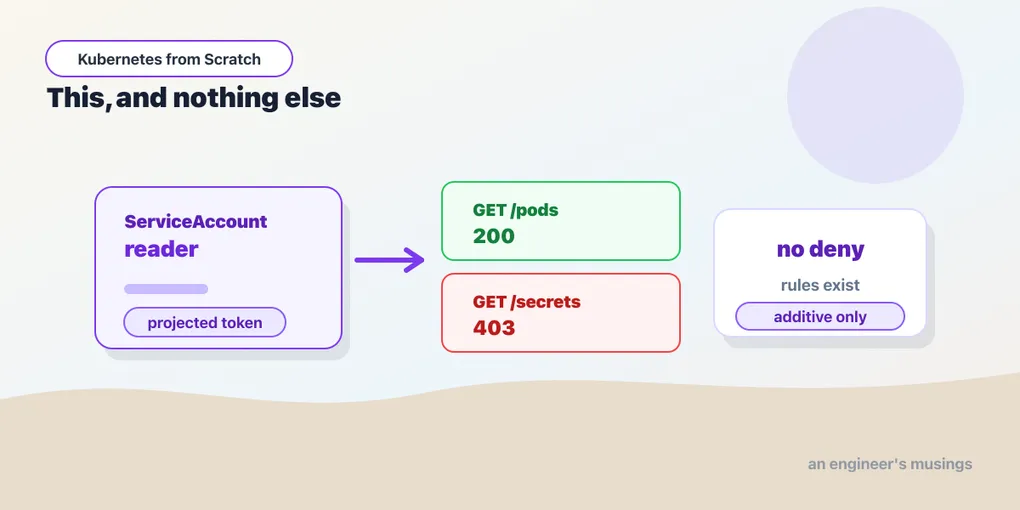
Run a pod with serviceAccountName: reader, and issue exactly the same curl as before:
GET /api/v1/namespaces/bookshop/pods    -> HTTP 200
GET /api/v1/namespaces/bookshop/secrets -> HTTP 403
Pods: 200, and a JSON list of them comes back. Secrets: 403. The Role granted pods. It never mentioned secrets, so secrets is denied — not by any rule that says so, but by the absence of a rule that permits it. Hold that thought; it is the punchline of this chapter.
The two axes, and the hybrid everybody misses
There are four RBAC objects and they are two ideas crossed with each other.
| grants (a noun) | assigns (a verb) | |
|---|---|---|
| namespaced | Role | RoleBinding |
| cluster-wide | ClusterRole | ClusterRoleBinding |
A ClusterRole is a Role that is not confined to a namespace. It is what you need for two things a Role structurally cannot do: cluster-scoped resources (nodes, namespaces, PersistentVolumes, CustomResourceDefinitions — objects that do not live in a namespace), and permissions that must span all namespaces at once. A ClusterRoleBinding grants a ClusterRole everywhere in the cluster, which is the one that hands out the nuclear weapons.
Now the combination people miss, and it is the most useful one in daily practice: a ClusterRole bound by a RoleBinding. A RoleBinding’s roleRef may point at a ClusterRole, and when it does, the permissions apply only inside the RoleBinding’s namespace.
kind: RoleBinding
metadata:
  namespace: bookshop        # <- the scope comes from HERE
roleRef:
  kind: ClusterRole          # <- the definition comes from HERE
  name: view
Define the role once, cluster-wide; grant it namespace by namespace. This is how you avoid copy-pasting the same twelve-rule Role into forty namespaces and forgetting one of them when the rules change. It is also how the built-in roles are meant to be used: Kubernetes ships ClusterRoles called view, edit, admin, and cluster-admin, and the first three are designed to be bound with a RoleBinding into one namespace. view on a namespace, edit on a namespace, admin on a namespace. (I did not exercise those four in the lab — they are the names to look up, not results I ran.) cluster-admin bound with a ClusterRoleBinding is the one that means “everything, everywhere”, and the fact that it is one word away from the safe pattern is exactly how the opening paragraph happens.
While we are naming the subjects: a binding’s subjects list can hold a ServiceAccount, a User, or a Group. But there is no User object in the API — you cannot kubectl create user. Kubernetes does not manage human identities at all; it trusts a certificate, an OIDC provider, or your cloud’s IAM to authenticate someone and hand it a username, and RBAC only authorizes the name it was given. Everything I ran in this chapter used ServiceAccounts, because ServiceAccounts are the identities Kubernetes actually issues.
kubectl auth can-i is the fastest debugger you have
You do not have to deploy a pod, exec into it, and curl to find out what a ServiceAccount can do. Ask the API server to answer the question as somebody:
$ kubectl auth can-i get pods    --as=system:serviceaccount:bookshop:reader -n bookshop
yes
$ kubectl auth can-i list pods   --as=system:serviceaccount:bookshop:reader -n bookshop
yes
$ kubectl auth can-i delete pods --as=system:serviceaccount:bookshop:reader -n bookshop
no
$ kubectl auth can-i get secrets --as=system:serviceaccount:bookshop:reader -n bookshop
no
Four questions, four answers, no pod. --as is impersonation: your own credentials are used to authenticate, and then you ask the API server to evaluate the request as though it came from that user. (Impersonation is itself a permission — the impersonate verb — which you have as a cluster admin and a normal user does not. It is not a backdoor.)
This is the fastest RBAC debugging loop that exists, and it answers the two questions you always have. Did my binding take effect? Run can-i and find out in a second, instead of restarting a pod and reading its logs. Is this ServiceAccount over-privileged? Ask it can-i delete pods, can-i get secrets, can-i '*' '*' and see how much comes back yes.
The variant worth putting in your fingers is kubectl auth can-i --list --as=…, which dumps every permission a subject has rather than answering one question. It is how you audit a ServiceAccount somebody else configured, and how you discover that the sidecar from the opening paragraph can, in fact, delete namespaces. And note that get pods says yes while delete pods says no, out of the same Role — the verbs are individually granted, and “read access” is not a thing RBAC believes in. It believes in get, list, watch, create, update, patch, delete, and deletecollection.
There is no deny rule
Now the thing that surprises every single person arriving from AWS IAM, Azure, or any policy engine with an explicit Deny.
You cannot write one. RBAC has no deny. Watch what happens when you try:
$ kubectl create role denier --verb=deny --resource=pods
Warning: 'deny' is not a standard resource verb
Read that twice. It warned — and it created the role anyway. Kubernetes accepted deny as a verb string, because the verb field is just a string and RBAC allows custom verbs for custom resources. But deny is not a verb the authorizer understands, so the rule this Role now contains grants the ability to perform the deny operation on pods, an operation that does not exist. It is a permission to do nothing, spelled in a way that looks reassuring in a code review. It denies nothing. It never will.
RBAC is purely additive. What a subject can do is the union of every rule in every Role and ClusterRole bound to it, and to any group it belongs to. There is no subtraction. If a ServiceAccount has too much access, you do not add a rule to take some away — you find the binding that granted it and you delete or narrow that binding. There is no other move.
This is a real design decision and not a missing feature, and once you have debugged a large IAM policy you may even come to like it. In a system with denies, “what can Alice do?” is a question you cannot answer by reading her grants — you have to find every policy in the system that might deny her, evaluate precedence rules, and hope nobody attaches a new one tomorrow. In RBAC the answer to “what can this subject do?” is: list its bindings, union the rules. That is it. Which is exactly why kubectl auth can-i --list can give you a complete, honest answer, and why an over-privileged ServiceAccount is always traceable to a specific binding somebody applied.
The corollary is a real operational constraint you should plan for: you cannot fix an over-grant with a patch, only with a removal. If you need “everything except this one namespace”, RBAC will not express it, and the honest answers are to restructure (bind narrower ClusterRoles per namespace) or to reach for a policy engine — a validating admission webhook, Kyverno, OPA Gatekeeper — which is a genuinely different layer that runs after RBAC has already said yes. When someone tells you they will “just add a deny,” they are telling you they have not read this page.
Where RBAC sits in the request’s journey
It helps to know exactly where in the pipeline that 403 was generated, because the three stages get conflated constantly and they fail differently.
Every request to the API server — yours, a pod’s, a controller’s — passes through three gates in order. Authentication answers who are you?: it validates the bearer token’s signature, or your client certificate, or the OIDC assertion, and produces a username and a set of groups. If it fails you get a 401, and RBAC never runs. Authorization answers may you do this?: RBAC unions the rules bound to that username and its groups and decides. If it fails you get a 403 — the message we read above, which can only be that specific because authentication already succeeded and the API server knows precisely who is being refused. Admission answers is this object acceptable?: mutating and validating webhooks, the ResourceQuota check from the namespaces chapter, PodSecurity — all of which run after RBAC has already said yes, and all of which can still reject the request.
So the three gates answer three different questions, and the one that RBAC cannot answer — “you may create pods, but not privileged ones” — is not an RBAC failure. It is admission’s job, and that is exactly the boundary the missing deny rule pushes you across.
Turn the token off
Back to the three files mounted in every container. The bookshop’s web, catalog, and orders never call the Kubernetes API. They serve HTTP and talk to Postgres. And yet every one of their pods is carrying a signed API token in its filesystem, which means anything that can read that filesystem — a path-traversal bug in the app, a compromised dependency, an attacker with a shell — starts with a valid cluster credential in hand rather than having to find one.
So take it away:
spec:
  automountServiceAccountToken: false
  containers:
    - name: web
      ...
One line, and /var/run/secrets/kubernetes.io/serviceaccount/ is not mounted. The pod still has a ServiceAccount — it still runs as somebody — it simply is not handed the credential. You can set the same field on the ServiceAccount object itself, in which case it applies to every pod that uses that ServiceAccount, and the pod-level setting wins where both are set.
Most of your workloads want this. The set of pods that legitimately need to talk to the Kubernetes API is small and it is knowable: controllers and operators, monitoring agents, ingress and gateway controllers, CI runners. Web applications are not on that list. Neither are databases. If you are looking for one change to make to a cluster you inherited that costs nothing and closes a real path, this is it.
Why reading Secrets is the game
One permission deserves its own warning, and it connects straight back to the ConfigMaps and Secrets chapter, where we established that a Secret is base64 — that is, not encrypted, merely encoded, and base64 -d is not a cryptanalysis technique.
Follow the consequence. A subject with get on secrets in a namespace can read every credential stored in that namespace: the bookshop’s PGPASSWORD, its API key, the TLS private key behind the gateway’s certificate, the token of every ServiceAccount that has a Secret-based token. In practice, the ability to read Secrets in a namespace is the ability to become anything whose credentials live in that namespace. Not “a step toward” it — it is it. Whatever those secrets unlock, the reader now unlocks too, inside the cluster and outside it, because the database that PGPASSWORD opens does not know or care that the connection came from an unexpected pod.
Which makes resources: ["secrets"], verbs: ["get"] the single most consequential line you can put in a Role, and makes “give the CI ServiceAccount admin on the namespace so the deploy works” a decision with a much longer blast radius than it appears to have. When you review a Role, read the secrets rule first, and make somebody justify it.
And one last connection, planted here for later. That ServiceAccount name — system:serviceaccount:bookshop:reader — is not only a string the API server checks in a bearer token. It is the identity a service mesh mints an X.509 certificate for, so that one pod can prove to another pod, cryptographically, which workload it is. The SPIFFE identity in an Istio mesh is derived directly from the ServiceAccount you assign here. The identity you set up for authorization against the API server becomes the identity used for authentication between your services. Give your workloads distinct ServiceAccounts, even when they need no permissions at all, and you will find the mesh chapter already half-done.
Final thoughts
The 403 in the opening paragraph is the system working exactly as designed, and the reflex to make it go away with cluster-admin is the most common way clusters are quietly ruined. Not dramatically — nothing breaks, the ticket closes, everyone moves on. The damage is that the cluster’s answer to “what can this pod do?” changed from nothing to everything, and nobody will notice until the day something inside that pod is not what you thought it was.
The habit worth building is smaller than a security program. When something gets a 403, read the message — it names the subject, the verb, the resource, the group, and the namespace, which is the entire Role you need to write. Write that Role, bind it to a ServiceAccount that exists for that one workload, and confirm it with kubectl auth can-i --as= before you redeploy anything. It takes about ninety seconds. And keep the additive model in your head as the thing that makes this tractable: you can always answer what a subject can do, because there is no hidden deny lurking anywhere in the system to change the answer — only bindings, and you can list them.
Next: The Pod Is Lying to You
Comments