Your Mesh Has Six Months to Live
Istio supports two minor releases at a time, so the version you pin today goes end-of-life before your next planning cycle finishes — and the only sane way through is a second control plane, a tag, and one namespace at a time.
Nobody upgrades Istio because they want a feature.
That is the sentence to start from, and it is not a joke. Most infrastructure you run, you upgrade when there is a reason — a bug fix you need, a capability you want, a dependency that finally forced your hand. You can defer it. You can decide the current version is fine and revisit next quarter — and next quarter you can decide the same thing again, and often that is the correct engineering call.
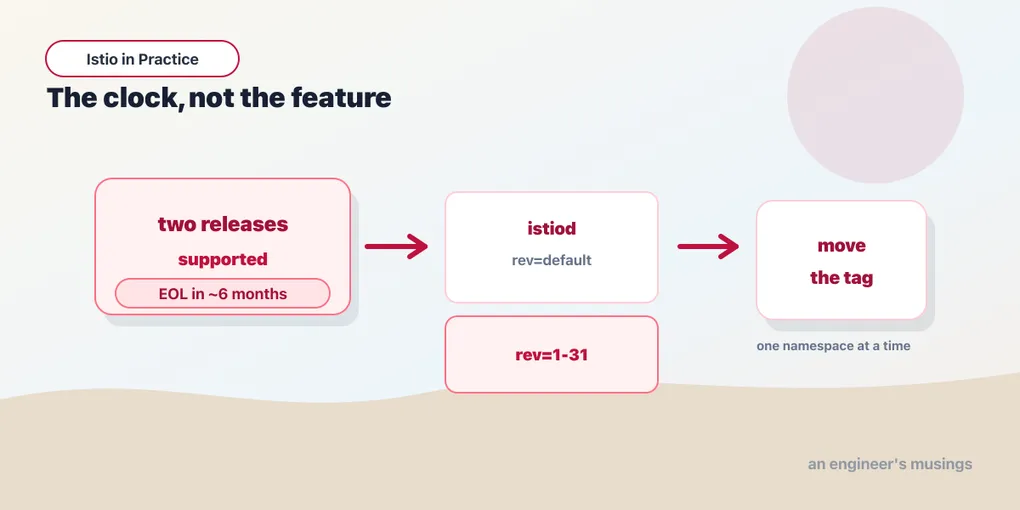
Istio does not offer you that. Istio supports exactly two minor releases at a time — the current one and the one before it — and a release goes end-of-life roughly six weeks after the release two ahead of it ships. Istio cuts a minor about once a quarter. Do the arithmetic and it comes out where chapter three of the foundations book said it comes out: what you pin today is unsupported in about six months.
So you will upgrade. Not because you want anything. Because the clock ran out — and it will run out again six months after that, and six months after that, for as long as the mesh is in your cluster.
I want to be precise about the stakes, because “unsupported” is one of those words that sounds like a licensing problem and is actually a security one. An unpatched Istio is not an unpatched logging library. istiod is your certificate authority. It holds the signing key for every workload identity in the mesh, it is the thing that decides what a service is, and it is in the path of every request you serve. A CVE in an unsupported mesh is not a ticket you triage next sprint. It is a privileged, cluster-wide, network-position vulnerability in the one component that is architecturally trusted by everything else — and there is no patch coming, because your version is dead.
A team that cannot upgrade smoothly will, eventually and inevitably, end up running an unpatched mesh. Not through negligence — through friction. The upgrade is frightening, so it slips; it slips twice, and now you are two minors behind and it is more frightening still. The whole point of this chapter is to make it boring — because boring is the only property that reliably gets a thing done twice a year, forever, by whoever happens to be holding the pager.
Namespaces do not point at a version. They point at a tag.
Here is the mechanism, and it is the piece people are missing when they think an Istio upgrade means changing the mesh all at once.
istiod carries a revision — a label identifying which control plane it is. On a default install, that revision is, unimaginatively, default:
istiod-644c69ddc-8zxdd rev=defaultBut your namespaces are not labelled with a revision. They are labelled with a tag, and a tag is an indirection: a named pointer that resolves to a revision. Istio implements it as a MutatingWebhookConfiguration, and here is the one this cluster is running:
istio-revision-tag-default rev=default tag=defaultRead that carefully, because the two words in it look identical and are doing completely different jobs. tag=default is the name workloads point at — rev=default is the control plane it currently resolves to. They happen to hold the same value on a fresh install, which is exactly why nobody notices the indirection exists, and exactly why it is the most important object in this chapter.
The tag is the level of indirection that makes a safe upgrade possible. A namespace says “I use the default tag.” The tag says “default currently means the control plane at revision X.” Change what the tag resolves to, and the namespace moves — without the namespace’s YAML changing at all, and without the workloads having any idea it happened.
Now look at what the bookshop’s namespaces are actually pinned to today:
NAMESPACE   dataplane-mode   istio-injection   istio.io/rev
bookshop    ambient          <none>            <none>
legacy      <none>           enabled           <none>
bookshop runs ambient. legacy runs sidecars, from chapter one. And neither of them carries an explicit revision label at all. They are both riding the default tag implicitly, because that is what a default install gives you and nobody ever had to think about it.
That is the state most clusters are in, and it is entirely fine — right up until the day you want a second control plane, at which point the very first thing the upgrade makes you do is stop being implicit. You cannot move one namespace and not the other if neither of them has ever said which control plane it is on.
The canary control-plane upgrade
Here is the shape of it. Four steps, and the entire safety of the thing lives in the fact that steps one and four are far apart.
1. Install a second istiod, at a new revision, beside the old one. Both control planes are now running. Both are watching the same API server. Neither has taken anything from the other.
$ istioctl install --set profile=ambient --set revision=1-31-02. Move one namespace to the new revision, and restart its workloads. Not the mesh — one namespace, ideally one you have chosen precisely because you can afford for it to be wrong.
3. Watch it. Real traffic, real dashboards, real error rates, for as long as your nerve requires. If it is bad, move that namespace back. The old control plane is still running, still healthy, still holding the config it always held — so the rollback is a label, and it takes as long as a label takes.
4. When every namespace has crossed, delete the old istiod. Only then — the old control plane is your rollback, and you do not delete your rollback while you might still want it.
And the tag is what makes step two a one-liner rather than a migration. istioctl tag set repoints a tag at a different revision:
$ istioctl tag set default --revision 1-31-0 --overwriteTwo ways to use that, and they are emphatically not the same operation. You can move the shared default tag to the new revision — which moves everything riding that tag in one go, fast, and gives you precisely the blast radius you were trying to avoid. Or you can create a second tag — canary, say — point it at the new revision, and label individual namespaces onto it one at a time. Only the second one earns the word.
What I ran and what I did not, plainly. I verified the mechanism: istiod carries rev=default, the istio-revision-tag-default webhook exists, it maps tag=default to rev=default, and the namespaces carry no explicit revision. That is all real, and it is the output above. I did not install a second control plane and I did not perform a canary upgrade. The four-gigabyte lab could not carry two istiods plus everything else — it is the same wall the multicluster chapter went into face-first, and the scheduler was no more sympathetic the second time. So take the four steps as the documented, well-established procedure they are, and take the objects above as verified, and do not take my word for the outcome of a run I did not do.
Why this is safe, and what it is safe from
The property that makes a canary control-plane upgrade worth the extra effort is not that it is careful. It is that the two control planes coexist, and everything follows from that.
An upgrade that goes wrong goes wrong in a way you cannot easily predict from reading the release notes. A default changed. A CRD gained a field, and your admission webhook now rejects something. An Envoy config that Istio used to generate one way it now generates another — and one of your VirtualService objects quietly means something different than it did last week. These are not hypothetical failure modes. They are the ordinary texture of upgrading a system with this much surface area, and no amount of pre-reading eliminates them — which is why the answer has to be structural rather than diligent.
What you want is not an upgrade that cannot fail. What you want is an upgrade whose failure is small and reversible, and the canary gives you both:
- The blast radius is one namespace. If the new control plane programs the data plane wrongly, it does so for the workloads you moved, and only those. The rest of the mesh is still being programmed by a control plane you have been running successfully for six months.
- The rollback is a label. Not a reinstall. Not a restore. Not “roll back the Helm release and pray about the CRDs.” The old istiod is still sitting there, still holding its config, and moving the namespace back to the old tag puts it back under management you know works.
Contrast that with the in-place upgrade — the one where you run the installer against the existing revision and it replaces istiod underneath you. It is one command, it is fast, and it has a fatal structural property: it changes everything at once, and it leaves you nothing to go back to. The old control plane is gone. If the new one is wrong, you discover that across the entire mesh simultaneously — while the thing you would have used to fix it no longer exists — and your only route back is to reinstall the previous version and hope the state it finds is state it understands.
There is a version of that command that is defensible: a patch upgrade, 1.30.2 to 1.30.3, within a minor, where the surface area of change is small and the risk is genuinely low. Even then I would rather do it revision-by-revision on anything I care about. For a minor — 1.30 to 1.31, the one the clock is actually forcing on you — in-place is a bet you have no reason to take, because the canary path costs you one extra control plane for a couple of days and buys you the ability to be wrong.
The upgrade you will forget: the data plane
Here is the mistake that produces the most confused Slack threads, and it comes from a genuinely reasonable assumption.
You upgraded the control plane. istiod is on the new version, the pods are healthy, istioctl version says what you want it to say — and your proxies are all still running the old build.
Upgrading the control plane does not upgrade the data plane. They are two separate steps, and the second one is yours.
In a sidecar mesh the reason is obvious once you see it. The proxy is a container inside your pod, with an image tag baked into the pod spec at admission time by the injector — and that pod is already running. Nothing about installing a new istiod reaches inside a running pod and swaps a container image; Kubernetes does not work that way, and you would be alarmed if it did. The new injector will inject the new proxy into the next pod that is created, and not one moment sooner. Every pod that already exists keeps the proxy it was born with, indefinitely, however new the control plane above it happens to be.
We already ran the proof of this, in a different guise. In chapter one, labelling a namespace istio-injection=enabled did nothing at all to the pods already running — they stayed 1/1, one container, no proxy, exactly as before. Only kubectl rollout restart produced 2/2. That is the same mechanism, in the same direction, for the same reason: injection happens at pod creation, and nothing else is a pod creation.
So the data-plane step is a rolling restart of your workloads, and it deserves the same care as any other rolling restart of your workloads — which, per the deployments chapter of the Kubernetes book, is more care than people give it. Do it namespace by namespace. Do it after you have watched the new control plane behave. Do not do it to the whole mesh on a Friday.
And check afterwards, because “I upgraded” and “the proxies upgraded” are different claims, and only one of them is verifiable by looking. istioctl proxy-status will tell you which control plane each proxy is talking to, and a proxy still attached to the old istiod is a workload that has not been restarted. (Documented, and the natural tool for the job — but I did not run it across a two-revision mesh, since I never had two revisions. Confirm it against your own.)
The ambient wrinkle, and what the architecture buys you
Now the part that is specific to ambient, and it is genuinely different — in one place better and in one place coarser.
The better half: there is no per-pod proxy to restart for L4. Look at what an ambient pod’s data plane actually consists of. Nothing in the pod. No sidecar, no injected container, no image tag frozen at admission time. The traffic is handled by ztunnel, which lives on the node. So the entire “restart every workload in the mesh to pick up the new proxy” phase of a sidecar upgrade — the slow, risky, application-disturbing phase — does not exist for L4 in ambient. You upgrade the node components and the pods, which were never carrying a proxy, carry on not carrying one.
That is not a small thing. In a large sidecar mesh, the data-plane rollout is the part of the upgrade that takes days, touches every team’s workloads, and produces every incident. Ambient deletes it for the L4 case. Add it to the honest ledger from the last chapter, alongside the memory arithmetic.
The coarser half: ztunnel and istio-cni-node are DaemonSets, and a DaemonSet is a node-level thing.
This is the wrinkle worth carrying in your head, and it follows directly from the architecture rather than from any command I ran. One ztunnel serves every pod on its node — every namespace, every team, every workload, regardless of what tag anyone is on. So when you upgrade ztunnel on a node, you are changing the data plane for everything on that node at once. There is no per-namespace canary at the node layer, because the node layer is not per-namespace. The unit of exposure at L4 is the node, and it always was — that was the whole point of moving the proxy there.
The practical consequence: treat a ztunnel or CNI upgrade like a node-level maintenance event, not a per-pod one. Roll it node by node, watch the workloads on the node you just rolled, and give it the same operational respect you would give draining a node — because the surface it touches is the same surface. And when you are choosing which namespace to canary an Istio upgrade with, remember that the namespace boundary you are canarying within does not exist at the ztunnel layer, so a node component that misbehaves does not respect it.
I want to be exact about what I am claiming there, because it matters. I did not run an ambient revision upgrade. What I am telling you is what a DaemonSet is — one pod per node, serving that node — and what ztunnel does, which the foundations book established by running it. The inference from those two facts is solid. The specific behaviour of Istio’s revision machinery as applied to the node components is something I have not exercised, and you should check it against the release notes of the version you are actually going to.
There is one more piece of the same shape. The tag object I found is a MutatingWebhookConfiguration — an injection webhook. Its literal job is to mutate pods at creation to insert a sidecar. Which means the mechanism I verified is, at its heart, the sidecar injection mechanism, and an ambient namespace has nothing to inject. Ambient namespaces do bind to a control plane revision, and Istio does support revisioned ambient installs — but the object doing the work is not the one printed above, and I did not go and find it. That is a loose end, I am leaving it visible rather than papering over it, and it is exactly the kind of thing to resolve in a staging cluster rather than during your first upgrade.
Making it a habit instead of an event
The failure mode is never the mechanism. It is the calendar. So:
Name an owner and put it on the calendar. Two or three upgrades a year, scheduled, with a person’s name against each. An upgrade that happens on a date is an upgrade that happens — an upgrade that happens “when we get a chance” is an unpatched mesh with a six-month head start.
Keep a permanent canary namespace. Something real enough to exercise the mesh — mTLS, a policy, a waypoint, a route — and unimportant enough that being wrong about it costs you nothing. Every upgrade goes there first, every time, and by the fourth time nobody’s pulse changes.
Run istioctl analyze in CI, and run it again after the upgrade. It is the one habit from the authorization chapter that pays for itself repeatedly, because the class of bug it catches — the well-formed object that lands on nothing — is exactly the class an upgrade creates when a binding changes shape underneath you. It exits non-zero on warnings and it needs nothing but read access. There is no excuse.
Read the release notes for the version you are skipping, too. The two-release window means you sometimes find yourself going 1.29 to 1.31 because a quarter got away from you. Istio’s supported upgrade path is one minor at a time. If you must cross two, cross them one at a time, with the mesh healthy in between — and if that sounds tedious, notice that the alternative is the unsupported path, on the component holding your certificate authority.
And budget the data-plane rollout separately from the control-plane upgrade, in both time and risk, because it is a separate thing and forgetting that is how you end up telling your manager the upgrade is done while half the fleet is still running last quarter’s proxy.
Final thoughts
The two-release window is the most consequential thing about Istio and the least discussed, and I think that is because it is not a technical fact. It is a commitment, and commitments are boring, and nobody gives a conference talk about them.
But consider what the window actually does to you. It converts a service mesh from a thing you install into a thing you operate, permanently, on somebody else’s schedule. It means that the day you label that first namespace, you have signed up not to a migration but to a subscription — one that renews twice a year, that you cannot cancel while the mesh is in your cluster, and whose non-payment is not a bill but a vulnerability. The foundations book put it as plainly as I know how: own the upgrade, or do not install the mesh. Everything else in that book, and this one, assumed you had made that choice honestly.
The good news is that the mechanism is genuinely, unusually good. The revision-and-tag design is the right answer to a hard problem — two control planes coexisting, one indirection between your namespaces and the version they are on, a rollback that is a label rather than a restore. Very little infrastructure of this criticality gives you that. It exists precisely because the support window is brutal, and the project knew perfectly well what it was asking of you.
So use it. Not once, when you are finally cornered by an EOL date and doing this for the first time under pressure at the worst possible moment. Use it on the schedule, from the beginning, on a canary namespace nobody cares about, until the whole thing is so routine it fits in an afternoon and a junior engineer can run it.
Because the alternative is not “we will upgrade later.” The alternative is a certificate authority with a known CVE, in the path of every request you serve, that nobody has the confidence to touch. And I have seen that cluster. Everybody has.
Comments