Seven Additions and a One-Way Door
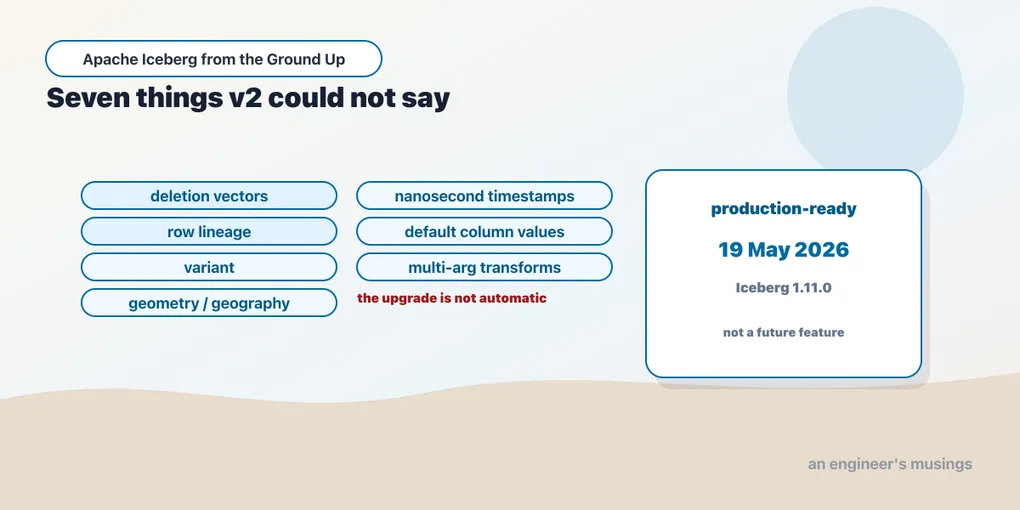
Format v3 went GA in 2026 and your tables did not notice. This chapter runs all seven of its additions against a real installation, shows which ones you can actually reach, and explains why turning the version up changes almost nothing by itself.
There is a number stamped on every Iceberg table, and almost nobody looks at it.
SHOW TBLPROPERTIES ice.ch19.plain;+-------------------------------+---------------+
|key |value |
+-------------------------------+---------------+
|current-snapshot-id |none |
|format |iceberg/parquet|
|format-version |2 |
|write.parquet.compression-codec|zstd |
+-------------------------------+---------------+That table was created moments ago, on Iceberg 1.11.0 — released in May 2026. Format version 3 is final and shipping: Snowflake in May 2026, Databricks in Runtime 18.0, AWS back in November 2025. (Those three are reported release dates, not something this lab measured.) And the brand-new table says 2.
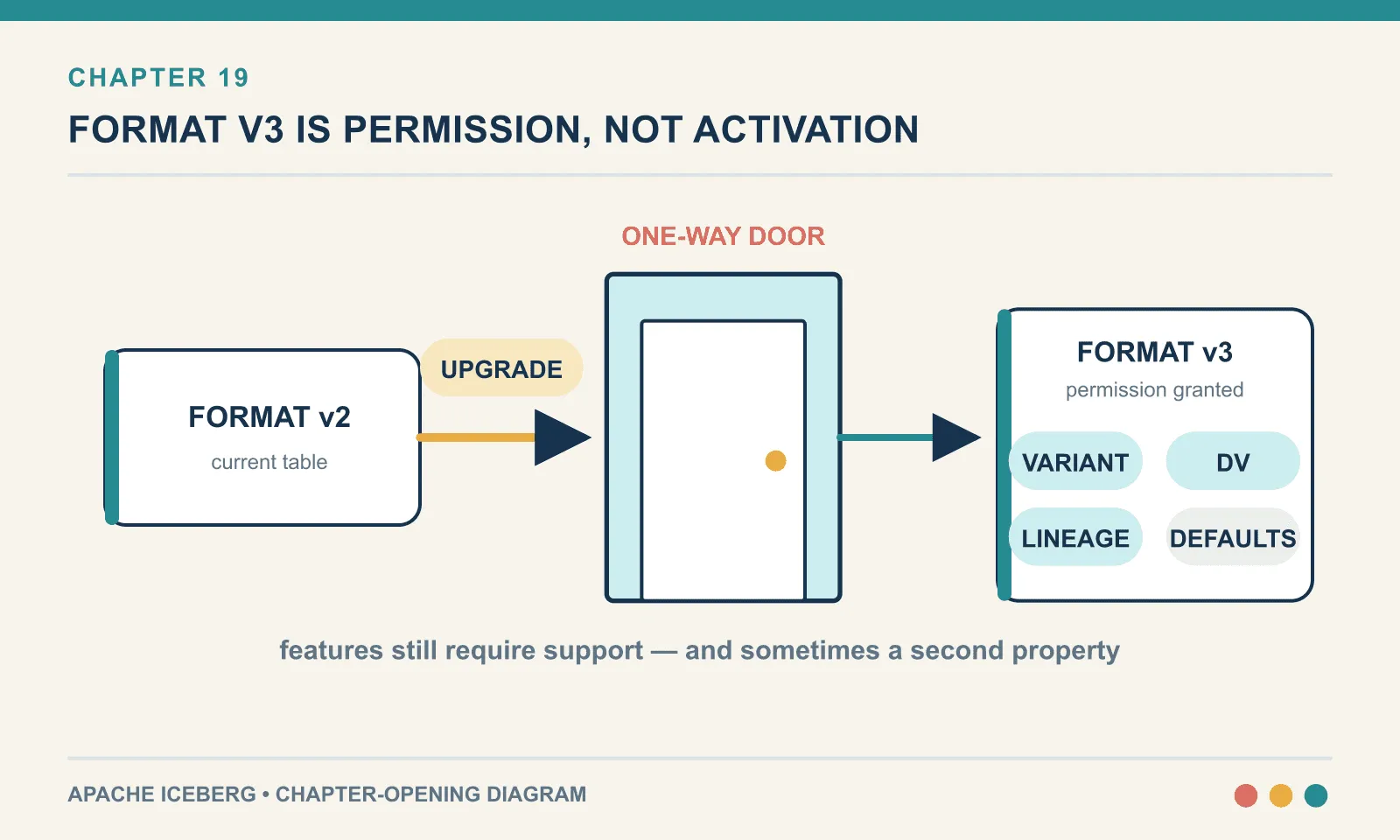
This is the single most important thing to understand about v3, and it is about software distribution rather than about the format. The version belongs to the table, not to the library. Upgrading Iceberg does not upgrade your tables. Creating a new table on a v3-capable engine does not give you a v3 table. Somebody has to ask — per table, in writing.
Asking for v3 opens access to new types and mutation features, but availability still depends on the client, and the upgrade cannot be undone in place. Deletion vectors and row lineage get a separate treatment in chapter 20; first we need to establish what this stack can reach.
Everything here was run against Apache Iceberg 1.11.0 (iceberg-spark-runtime-4.1_2.13:1.11.0, commit 6976e020) on Spark 4.1.3, Java 21, through the 1.10.1 REST catalog fixture. PyIceberg 0.11.1 and DuckDB 1.5.5 supply the second and third opinions. Where a feature could not be reached from this stack, the sentence that makes the claim says so. The tables live in per-chapter namespaces in the catalog, ch19 and ch20, which is why those names show up in the pasted file paths.
What a format version actually is
An Iceberg table’s format version is a compatibility contract in one integer. It says: a reader must understand at least this much of the specification to be allowed to interpret my metadata. It sits at the top of metadata.json, above the schema and the snapshots:
{
  "format-version": 2,
  "table-uuid": "...",
  "location": "...",
  ...
}
Three versions exist. Each one bought something the previous one could not express.
v1 was the original: a list of files, a schema with field IDs, snapshots, partition specs. Everything in chapters 1 through 9 of this book works on v1. It is a read-mostly format. To change a row you rewrote the file that held it.
v2 added row-level deletes — and that is essentially the whole of v2. Two new kinds of file, described in chapter 10. A position delete file says “row 47 of that data file is gone”. An equality delete file says “any row where order_id = 5 is gone”. To make that safe it also added sequence numbers, so a reader can tell whether a delete file was written before or after a given data file. And it made the manifest list mandatory.
v3 adds seven things. Two of them change how a table behaves under mutation, and chapter 20 is about those. The other five are additions to the type system and the schema. They are the quieter half of the release, even though they are the half most people will actually use.
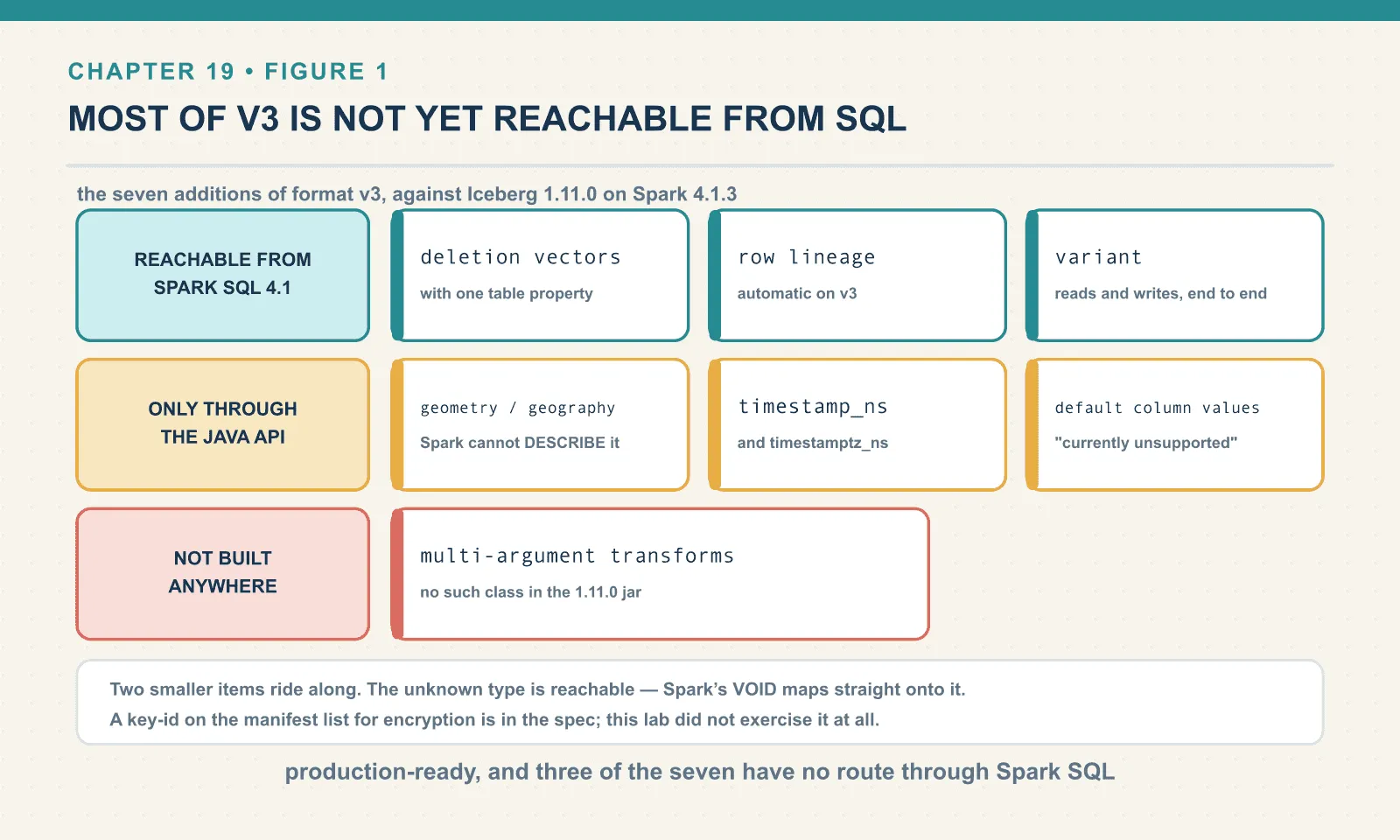
Here is the whole list, with what this stack could do with each:
| Addition | Reachable from Spark SQL 4.1 + Iceberg 1.11.0? |
|---|---|
| Deletion vectors | Yes, with one table property (chapter 20) |
| Row lineage | Yes, automatic on v3 (chapter 20) |
variant | Yes, fully, including reads and writes |
geometry / geography | Only through the Java API; Spark SQL cannot spell the type |
timestamp_ns / timestamptz_ns | Only through the Java API; same reason |
| Default column values | Only through the Java API; Spark refuses by name |
| Multi-argument transforms | No, and not through the Java API either |
Two smaller items ride along: an unknown type, and a key-id on the manifest list for encryption. The unknown type is reachable and is covered below. Encryption is not something this lab exercised at all, and I am flagging it here rather than describing it.
That table is the honest state of v3 in the reference engine as of August 2026. v3 is production-ready. Most of v3 is not yet reachable from SQL. Those are both true, and treating either one as the whole picture will lead you somewhere wrong.
The default is still 2, and it is a constant
The empty SHOW TBLPROPERTIES above is not a quirk of the REST fixture. It is a compiled-in constant in the library itself:
static final int DEFAULT_TABLE_FORMAT_VERSION = 2;
static final int SUPPORTED_TABLE_FORMAT_VERSION = 4;
static final int MIN_FORMAT_VERSION_ROW_LINEAGE = 3;
That is org.apache.iceberg.TableMetadata in the 1.11.0 runtime jar, read with javap. New tables get 2. The library will accept up to 4. And row lineage will not switch on below 3.
Asking for v3 is one property at creation:
CREATE TABLE ice.ch19.v3plain (id BIGINT, t STRING) USING iceberg
TBLPROPERTIES ('format-version'='3');
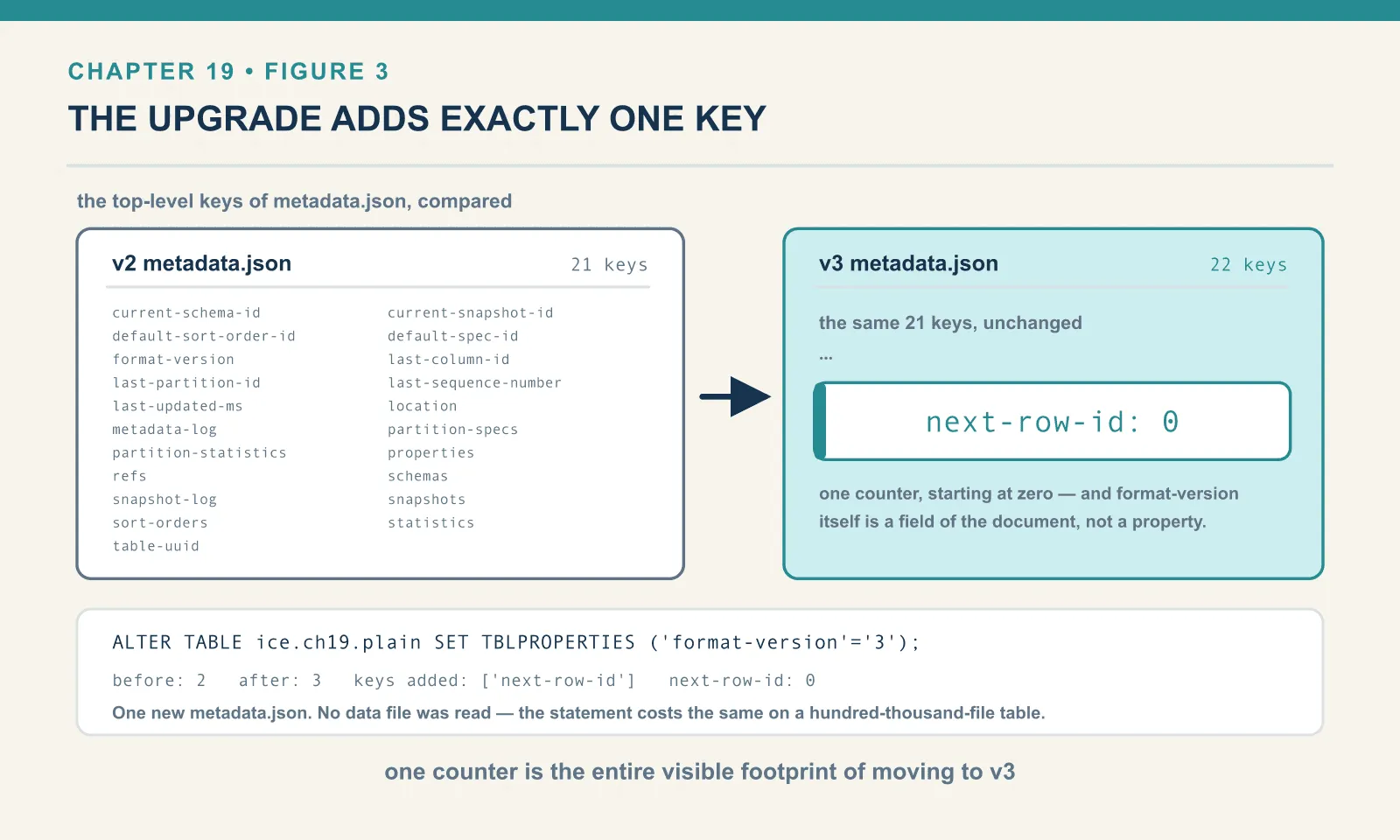
The interesting part is what shows up in metadata.json afterwards. Comparing the top-level keys of a v2 table against a v3 table, exactly one key is new:
v2 keys: [current-schema-id, current-snapshot-id, default-sort-order-id, default-spec-id,
          format-version, last-column-id, last-partition-id, last-sequence-number,
          last-updated-ms, location, metadata-log, partition-specs, partition-statistics,
          properties, refs, schemas, snapshot-log, snapshots, sort-orders, statistics,
          table-uuid]

v3 keys: ... same list, plus  next-row-id
next-row-id: 0That is the entire visible footprint of the upgrade at rest. One counter, starting at zero. Everything else v3 adds is either a type you have not used yet or a behaviour that only appears when you mutate the table.
Note also what is not in properties. You set format-version through TBLPROPERTIES, but it is not stored as a property. It is promoted to a first-class field of the metadata document — which is correct, because it governs how the rest of the document may be parsed.
Variant: the one you can use today
variant is a type for semi-structured data. It stores a JSON-shaped value in a binary encoding, with the keys extracted into a dictionary. Reading one field therefore does not mean parsing the whole document. It is the same idea as Postgres’s jsonb or DuckDB’s VARIANT, standardised into the table format so that every engine agrees on the bytes.
It is also, of the five type-level additions, the only one this stack could exercise end to end. Spark 4.1 has a native VARIANT type, and Iceberg 1.11.0 maps to it.
CREATE TABLE ice.ch19.tvariant (order_id BIGINT, payload VARIANT) USING iceberg
TBLPROPERTIES ('format-version'='3');

INSERT INTO ice.ch19.tvariant
     SELECT 1, parse_json('{"channel":"web","promo":{"code":"SUMMER","pct":10}}')
   UNION ALL
     SELECT 2, parse_json('{"channel":"kiosk","items":[7,9]}');
Two bookshop orders whose payloads have nothing in common — one has a nested promo object, the other an array of item ids. No schema reconciled them, and none was asked to.
SELECT order_id,
       variant_get(payload,'$.channel','string') AS channel,
       variant_get(payload,'$.promo.pct','int')  AS promo_pct,
       to_json(payload) AS raw
FROM ice.ch19.tvariant ORDER BY order_id;
+--------+-------+---------+----------------------------------------------------+
|order_id|channel|promo_pct|raw |
+--------+-------+---------+----------------------------------------------------+
|1 |web |10 |{"channel":"web","promo":{"code":"SUMMER","pct":10}}|
|2 |kiosk |NULL |{"channel":"kiosk","items":[7,9]} |
+--------+-------+---------+----------------------------------------------------+The missing promo on the kiosk order reads as NULL rather than raising. to_json round-trips the original document. And in the metadata the column is recorded as a first-class Iceberg type, not as a string with a convention attached:
{"id": 2, "name": "payload", "required": false, "type": "variant"}Try the same CREATE TABLE at v2 and the catalog refuses, by column name:
IllegalStateException: Invalid schema for v2:
  - Invalid type for payload: variant is not supported until v3
That error is the format version doing its job. A v2 reader has no definition of variant, so a v2 table is not permitted to contain one — and the check happens at commit rather than at read.
The reason variant matters more than its position in a feature list suggests: it is the thing people were faking. The common workaround is a STRING column holding JSON, parsed on every read, with no statistics and no pruning. variant replaces a convention with a type, so every engine that implements it agrees on what is inside. DuckDB 1.5.5 already does:
duckdb variant payload: [(1, {'channel': 'web', 'promo': {'code': 'SUMMER', 'pct': 10}}),
                         (2, {'channel': 'kiosk', 'items': [7, 9]})]
That is DuckDB, attached to the REST catalog, returning the variant as a nested value. PyIceberg 0.11.1 does not get that far. It cannot even load the table:
ValidationError: 1 validation error for TableResponse
metadata.3.schemas.0.fields.1.type
  Value error, Unsupported field type: 'variant'
The same variant column is readable in DuckDB and prevents PyIceberg from loading the table. That is why a v3 compatibility check needs the actual column types as well as the format version.
The four you probably cannot reach yet
Geometry, geography, nanosecond timestamps and default values are all in the specification and all implemented in the Iceberg Java library. All four are unreachable from Spark SQL in this configuration. Be precise about where each one stops: “not supported” can mean three different things, and this section covers two of them.
Spark’s parser does not know the type name. For geometry, geography and nanosecond timestamps the failure happens before Iceberg is consulted at all:
CREATE TABLE ice.ch19.tgeo (id BIGINT, g GEOMETRY) USING iceberg
TBLPROPERTIES ('format-version'='3');
ParseException: [UNSUPPORTED_DATATYPE] Unsupported data type "GEOMETRY". SQLSTATE: 0A000
== SQL (line 1, position 42) ==
...BLE ice.ch19.tgeo (id BIGINT, g GEOMETRY) USING iceberg TBLPROPERTIES ('...
^^^^^^^^Same for GEOGRAPHY and for TIMESTAMP_NS. Spark’s TIMESTAMP_NTZ does work, but it maps to Iceberg’s microsecond timestamp, not to the new nanosecond type. You can confirm that in the metadata:
{"id": 2, "name": "ts", "required": false, "type": "timestamp"}The types themselves are genuinely present in the library. Every one of them is a real class in the 1.11.0 runtime jar: Types$GeometryType, Types$GeographyType, Types$TimestampNanoType, Types$VariantType, Types$UnknownType. They can be used if you drop below SQL. Building a schema through the Java API over py4j and creating the table through the REST catalog directly works on the first attempt:
T = jvm.org.apache.iceberg.types.Types
fields.add(T.NestedField.optional(2, "shop_point",    T.GeometryType.crs84()))
fields.add(T.NestedField.optional(3, "delivery_zone", T.GeographyType.crs84()))
fields.add(T.NestedField.optional(4, "event_ts",      T.TimestampNanoType.withZone()))
fields.add(T.NestedField.optional(5, "event_ts_ntz",  T.TimestampNanoType.withoutZone()))
table {
1: id: optional long
2: shop_point: optional geometry
3: delivery_zone: optional geography
4: event_ts: optional timestamptz_ns
5: event_ts_ntz: optional timestamp_ns
6: payload: optional variant
7: reserved: optional unknown
}
CREATE v3 geo/geography/ts_ns/variant/unknown table -> OK
format-version: 3Two details from that run are worth keeping. The default coordinate reference system is not implicit — it is named OGC:CRS84, for both geometry and geography. Geography also carries an edge-interpolation algorithm, defaulting to spherical. And the spelling in the metadata distinguishes zoned from unzoned nanosecond timestamps as timestamptz_ns and timestamp_ns, mirroring the existing microsecond pair.
The same schema at v2 is rejected, and the error enumerates every offender:
IllegalStateException: Invalid schema for v2:
  - Invalid type for shop_point: geometry is not supported until v3
  - Invalid type for delivery_zone: geography is not supported until v3
  - Invalid type for event_ts: timestamptz_ns is n...
Now ask Spark to read the table it just helped create:
FAIL DESCRIBE TABLE ice.ch19.geo
     UnsupportedOperationException: Cannot convert unsupported type to Spark: geometry
FAIL SELECT * FROM ice.ch19.geo
     UnsupportedOperationException: Cannot convert unsupported type to Spark: geometry
You cannot even DESCRIBE it. DuckDB is no better — though it fails more politely:
duckdb ch19.geo -> NotImplementedException: Not implemented Error: Geography supportSo the position on the three spatial and nanosecond types is: the format has them, the Java library has them, and neither Spark nor DuckDB in this lab can query a table containing them. I did not attempt them from Trino or Flink, and I have not measured them anywhere. So if you need geospatial types today, test your specific engine before you design around them.
Default column values stop somewhere different, and it is more interesting. Here the failure is Iceberg’s Spark integration explicitly declining — not the parser:
ALTER TABLE ice.ch19.tdef ADD COLUMN channel STRING DEFAULT 'web';UnsupportedOperationException: Cannot add column channel since setting default values
in Spark is currently unsupportedThe word currently is doing real work in that message. Go around it through the Java API and the feature works completely. This is the one v3 addition where the gap is purely in the SQL layer.
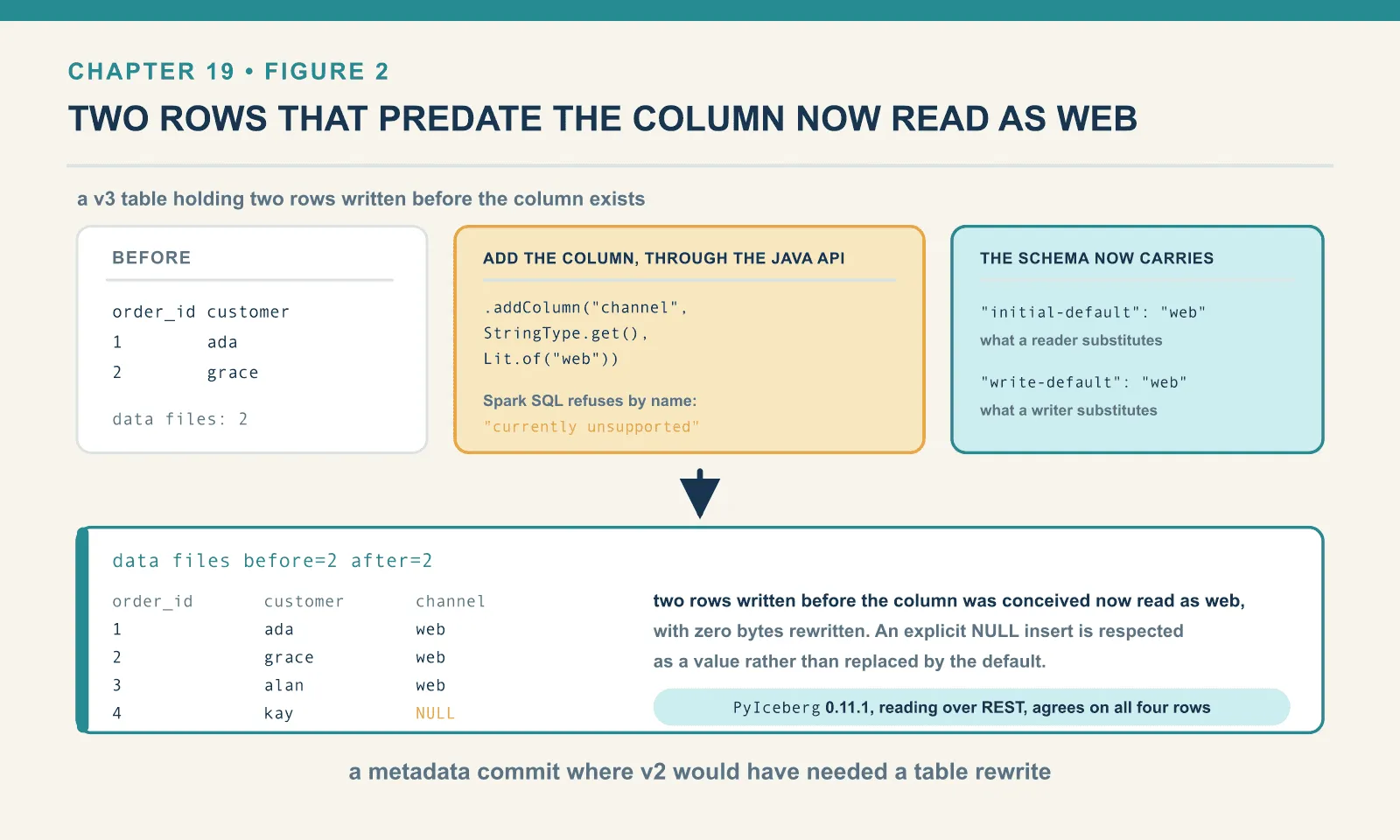
Start with a v3 bookshop table holding two rows written before the column exists:
+--------+--------+
|order_id|customer|
+--------+--------+
|1       |ada     |
|2       |grace   |
+--------+--------+
Then add the column with a default through the library:
t.updateSchema().addColumn("channel", T.StringType.get(), Lit.of("web")).commit()The schema now carries two distinct defaults, and the distinction is the whole feature:
{"id": 1, "name": "order_id", "required": false, "type": "long"}
{"id": 2, "name": "customer", "required": false, "type": "string"}
{"id": 3, "name": "channel",  "required": false, "type": "string",
 "initial-default": "web", "write-default": "web"}
initial-default is what a reader substitutes for rows in files written before the column existed. write-default is what a writer substitutes when an insert omits the column. They are separate because they answer different questions — and a schema evolution can change one without the other.
Read the old rows back, and no data file was touched:
data files before=2 after=2

+--------+--------+-------+
|order_id|customer|channel|
+--------+--------+-------+
|1       |ada     |web    |
|2       |grace   |web    |
+--------+--------+-------+
Two rows written before the column was conceived now read as web — with zero bytes rewritten. In v2 the same operation gives you NULL for those rows, forever, unless you rewrite the table. Insert a row that omits the column and the write default applies. Insert an explicit NULL and it is respected as a value rather than replaced:
+--------+--------+-------+
|order_id|customer|channel|
+--------+--------+-------+
|1       |ada     |web    |
|2       |grace   |web    |
|3       |alan    |web    |
|4       |kay     |NULL   |
+--------+--------+-------+
PyIceberg 0.11.1, reading the same table over REST, agrees on all four rows:
{'order_id': [4, 3, 1, 2], 'customer': ['kay', 'alan', 'ada', 'grace'],
 'channel': [None, 'web', 'web', 'web']}
That agreement matters more than it looks. A default that only one engine honours is worse than no default at all — because the same query returns different answers depending on who runs it. Here two independent implementations produced the same four values.
And at v2 the commit is rejected, again by name:
IllegalStateException: Invalid schema for v2:
  - Invalid initial default for channel: non-null default (web) is not supported until v3
Multi-argument transforms: not yet, anywhere
The seventh addition is partition and sort transforms over more than one column. This one does not exist in the reference implementation at all. Not in SQL:
CREATE TABLE ice.ch19.tmulti (a BIGINT, b STRING, c DOUBLE) USING iceberg
PARTITIONED BY (bucket(4, a, b)) TBLPROPERTIES ('format-version'='3');
IllegalArgumentException: Cannot convert transform with more than one column reference:
bucket(4, a, b)And not in the library either. PartitionSpec.Builder in the 1.11.0 jar exposes exactly these methods that take a source column, every one of them single-column:
['alwaysNull', 'bucket', 'day', 'hour', 'identity', 'month', 'truncate', 'year']The Transforms factory is the same story, and there is no multi-column transform class anywhere under org/apache/iceberg/transforms/. So this is not a Spark gap you can route around; there is nothing behind the SQL to route to.
I have not checked Trino, Flink or the commercial engines for this. I would be surprised if they were ahead of the Java library, but that is an expectation rather than a measurement.
The unknown type, and a small surprise
The unknown type represents a column whose type is genuinely not known. Typically that is because it arrived from a source that only ever produced nulls for it. Spark’s parser rejects UNKNOWN outright, but there is a route in that I did not expect to work:
CREATE TABLE ice.ch19.tvoid (id BIGINT, u VOID) USING iceberg
TBLPROPERTIES ('format-version'='3');{"id": 2, "name": "u", "required": false, "type": "unknown"}Spark’s VOID maps straight onto Iceberg’s unknown. It is a small thing. I mention it as a reminder that a type unreachable by its own name is not necessarily unreachable.
Upgrading a table you already have
An existing table moves versions with one statement, and it is metadata-only:
ALTER TABLE ice.ch19.plain SET TBLPROPERTIES ('format-version'='3');before: 2
after : 3 | file: 00001-0aaf3008-9ce3-4f20-ae94-a638adf470f1.metadata.json
keys added: ['next-row-id']
next-row-id: 0One new metadata.json, one new key in it. No data file was read, let alone rewritten. On a table with a hundred thousand Parquet files this statement costs the same as it does on an empty one, which is the good news.
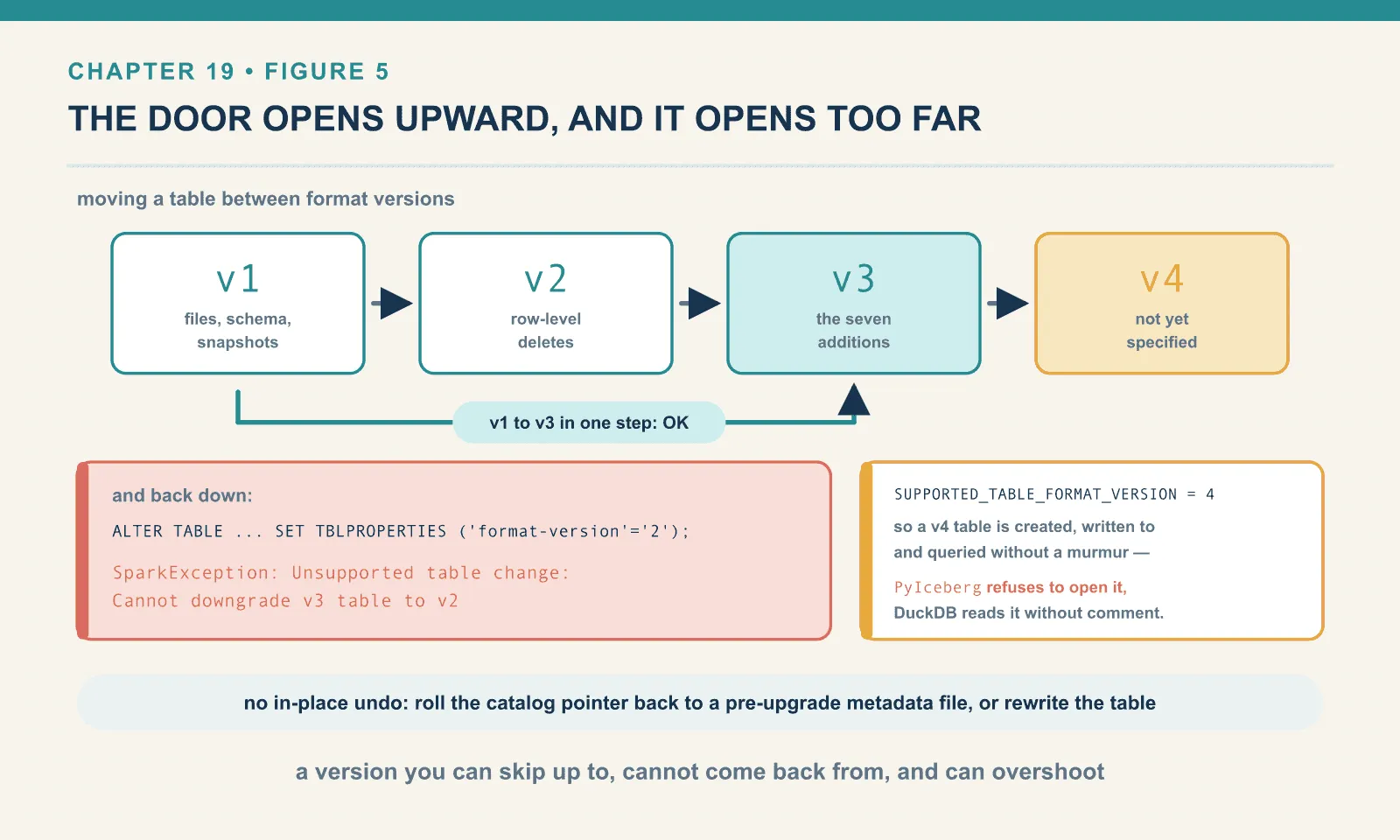
You can also skip a version. A v1 table goes straight to v3 without passing through v2:
v1 format-version: 1
OK   ALTER v1 -> v3
now: 3
What you cannot do is go back:
ALTER TABLE ice.ch19.plain SET TBLPROPERTIES ('format-version'='2');SparkException: Unsupported table change: Cannot downgrade v3 table to v2That refusal is correct and it is the reason to think before running the upgrade. A v3 table may contain metadata a v2 reader has no definition for. Allowing a downgrade would mean either silently dropping it or producing a table that lies about what it is. There is no in-place undo. After an unwanted upgrade you have two options: roll the catalog pointer back to a pre-upgrade metadata file, if your catalog supports it, or rewrite the table.
Why the upgrade is not automatic
A cheap metadata upgrade still needs a deliberate decision: the default stays at v2, mutation settings remain separate, and readers may lose access.
One: nothing upgrades your tables for you. The default is compiled in as 2, per the constant above, so every table you create next week will be v2 unless the property is set. If you want v3 across a warehouse, that is a migration you plan and execute, table by table. It is not a side effect of a library bump. The one mercy is that the migration itself is cheap.
Two: upgrading changes nothing you would notice. This is the part that surprises people, so it is worth demonstrating rather than asserting. Here is a table created at v3, with no other properties set, and a delete against it. It lives in the next chapter’s namespace because that is where it came from:
CREATE TABLE ice.ch20.cow (order_id BIGINT, customer STRING) USING iceberg
TBLPROPERTIES ('format-version'='3');
INSERT INTO ice.ch20.cow VALUES (1,'ada'),(2,'grace'),(3,'alan');
DELETE FROM ice.ch20.cow WHERE order_id = 2;
delete files after DELETE on a default-configured v3 table:
+-------+------------+---------+
|content|record_count|file_path|
+-------+------------+---------+
+-------+------------+---------+
puffin files on disk: []Zero delete files. No deletion vector. The data file was rewritten instead, and the snapshot is recorded as an overwrite. The reason is another compiled-in default, which v3 does not change:
write.delete.mode default : copy-on-write
write.update.mode default : copy-on-write
write.merge.mode default  : copy-on-write
Deletion vectors are the headline feature of v3, and a v3 table produces none of them until you also set write.delete.mode to merge-on-read. The format version is a permission — not a behaviour.
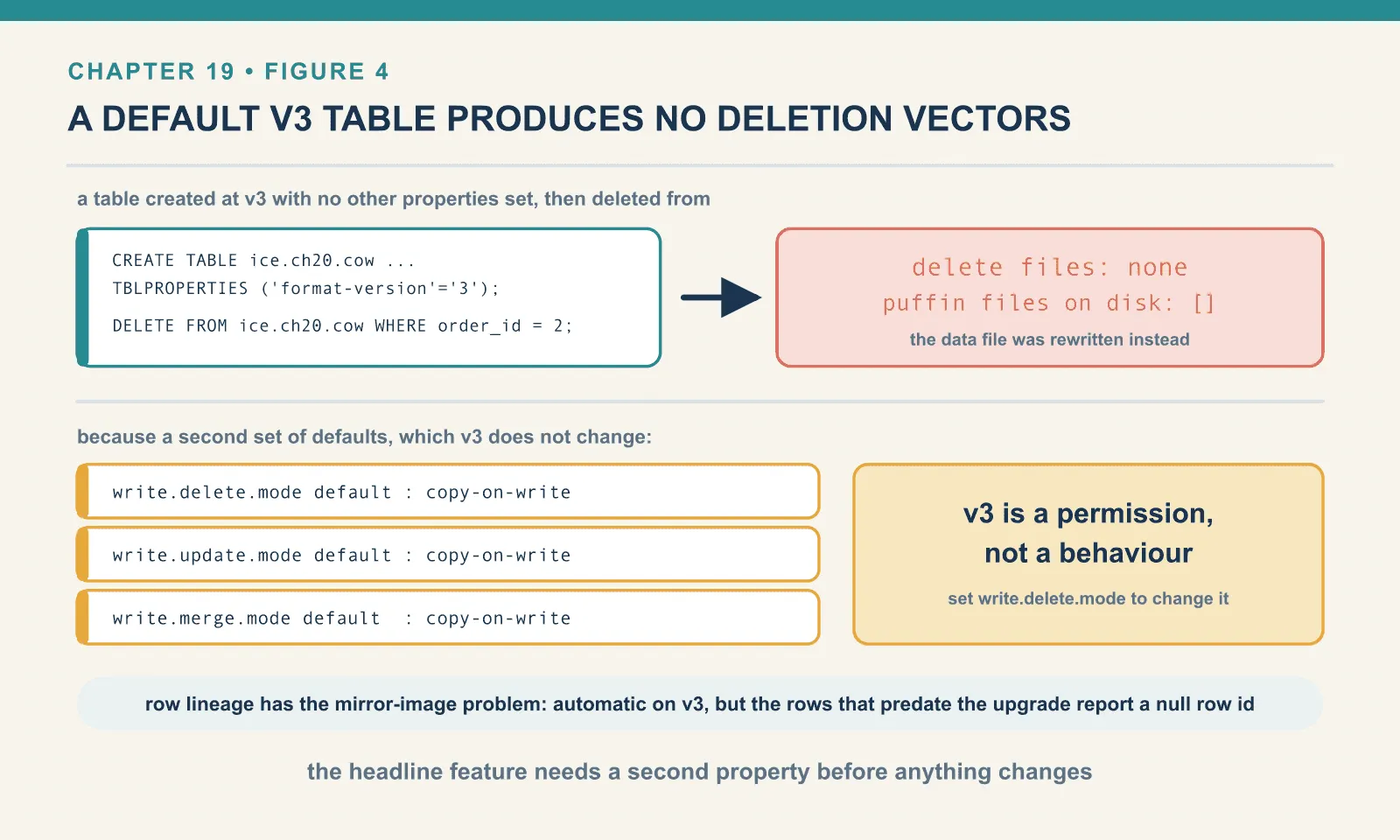
Row lineage has the mirror-image version of the same problem. It is automatic on v3, but only forward. Take a v2 table with three rows, upgrade it, and ask for the lineage of the rows that were already there:
+--------+-------+-----------------------------+
|order_id|_row_id|_last_updated_sequence_number|
+--------+-------+-----------------------------+
|1       |NULL   |NULL                         |
|3       |NULL   |NULL                         |
+--------+-------+-----------------------------+
Nulls. The rows predate the counter, so they have no identity to report. Chapter 20 follows what happens to those nulls on the next commit, and the answer is stranger than it looks.
Three: your readers may not follow. This is the real risk, and it is why the one-way door matters. Support for v3 is not uniform, and no single version number captures how it varies. Against one v3 bookshop table with deletion vectors and a variant column, three clients in this lab:
| Reads a v3 table | Applies a deletion vector | _row_id visible | Variant column | Writes to v3 | |
|---|---|---|---|---|---|
| Spark 4.1.3 + Iceberg 1.11.0 | yes | yes | yes | yes | yes |
| DuckDB 1.5.5 | yes | yes | yes | yes | not tested here |
| PyIceberg 0.11.1 | yes | yes | no | no, and cannot load the table at all | no |
PyIceberg reads a v3 table correctly, applies the deletion vector, and reports next-row-id: 6 from the metadata, but it has no _row_id column to select:
_row_id via PyIceberg FAILED: ValueError: Could not find column: '_row_id'and it cannot write to a v3 table at all, which chapter 18 opens on. Meanwhile DuckDB — the client you would expect to be furthest behind — returns row ids that match Spark’s exactly. Do not reason about v3 support by ranking engines by maturity. Test the specific operations you need, on the specific versions you run.
The version-4 trap
The accepted version range extends beyond v3. This creation call succeeded on the same runtime:
CREATE TABLE ice.ch19.v4 (id BIGINT) USING iceberg TBLPROPERTIES ('format-version'='4');CREATE -> OK
metadata format-version: 4
OK INSERT INTO ice.ch19.v4 VALUES (1)
OK SELECT * FROM ice.ch19.v4A format version 4 table, created, written to and queried without a murmur. This is not a missing bounds check. The library says so itself:
static final int SUPPORTED_TABLE_FORMAT_VERSION = 4;Iceberg 1.11.0 deliberately accepts version 4, ahead of the specification work that will define what version 4 means. What that version will eventually contain is beyond what this book can verify, and I am not going to guess. What I can show is the consequence today, because PyIceberg refuses the table outright:
ValidationError: 1 validation error for TableResponse
metadata
  Input tag '4' found using 'format_version' | 'format-version' does not match any of
  the expected tags: 1, 2, 3
while DuckDB reads it without comment:
duckdb ch19.v4: [(1,)]A typo in the property, or a copied configuration asking for version 4, can therefore leave clients disagreeing about whether they can open the table. The version cannot be lowered again. If you are automating table creation, validate the version you are passing; the format will not do it for you. (A genuinely malformed value is caught, for what little that is worth: format-version='banana' comes back as a server-side NumberFormatException.)
When to turn it on
The upgrade earns its compatibility cost when a table needs one of the features you can actually use:
You mutate the table and you are on merge-on-read. Deletion vectors are a straight improvement over v2 position delete files — measured in the next chapter. If your table takes MERGE INTO traffic, this is the reason.
You want change data capture without a separate pipeline. Row lineage gives every row a stable identity and a last-modified marker, in the table, maintained by whichever engine writes. That is chapter 20’s second half. It is the addition with the largest architectural consequences.
You are storing JSON in a string column. variant is available now, works in Spark and DuckDB, and removes a convention that every consumer has to independently agree to.
You want a new column to have a value for existing rows. Default values, if you can reach them from your write path, turn a table rewrite into a metadata commit.
The case against is equally concrete. If none of the above applies, v3 buys you nothing and costs you a compatibility ceiling. A v2 table can be read by strictly more software than a v3 table can. The gap will close, but it has not closed yet, and the change is one-way. There is no urgency premium here. The format is not going anywhere. A table you upgrade in six months will be upgraded into a better-supported ecosystem than one you upgrade today.
The one thing I would do now, on every table, is find out what version it is. In a warehouse where nobody knows, the answer is 2 everywhere and somebody is about to be surprised by it.
Final thoughts
The thing to carry out of this chapter is that a format version is a permission slip, not a feature flag. Setting it to 3 tells Iceberg that a reader of this table is expected to understand deletion vectors, row lineage, variants and defaults. It does not tell Iceberg to start using any of them. For the two additions that would change how your table behaves, a second property is required before anything is different at all.
The gap between what v3 specifies and what you can reach from SQL is real and, in August 2026, wide. Variant is fully usable. Deletion vectors and row lineage are fully usable with one property. The spatial and nanosecond types exist only below the SQL layer and cannot be read back by any engine in this lab. Default values work perfectly through the library and are refused by Spark’s integration with a message containing the word currently. Multi-argument transforms have not been built.
Those boundaries belong to the versions tested here and may change within a year. Repeating the specific creation, write and read operations on your installed clients gives you a firmer upgrade decision than a general claim of v3 support.
The next chapter takes the two additions I have kept deferring and shows what they do to a table, starting with a 480-byte file that replaces a Parquet one.
Comments