Same Spec, Different Year
PyIceberg will create a format v3 table you cannot write a single row into. That is one of four version numbers that have to agree — spec, library, engine and catalog — and this chapter shows what each disagreement looks like when it fails.
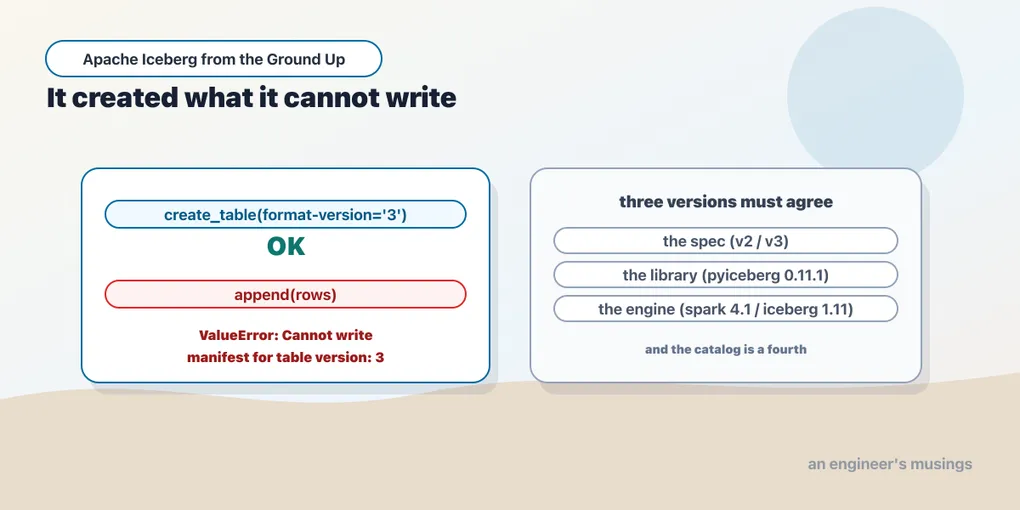
Here is the shortest way I know to lose an afternoon.
cat.create_table("ch18.pyice_v3", schema=sch, properties={"format-version": "3"})create_table(format-version=3) -> OK, metadata says v3It worked. The catalog accepted it, the metadata says format version 3, and load_table returns a perfectly ordinary table object. Nothing anywhere suggests a problem. Write a row into it:
nt.append(pa.Table.from_pylist([{"order_id": 1, "customer": "ada"}], schema=sch.as_arrow()))first append -> ValueError | Cannot write manifest for table version: 3PyIceberg 0.11.1 will hand you a format v3 table that it cannot write a single row into. No warning at creation, no hint in the return value, and an error at the first append that names a manifest rather than the decision that caused the problem. And if that table is created by a setup script and appended to by a job, the two are far enough apart in space and time that the failure looks like a bug in the job. It is not.
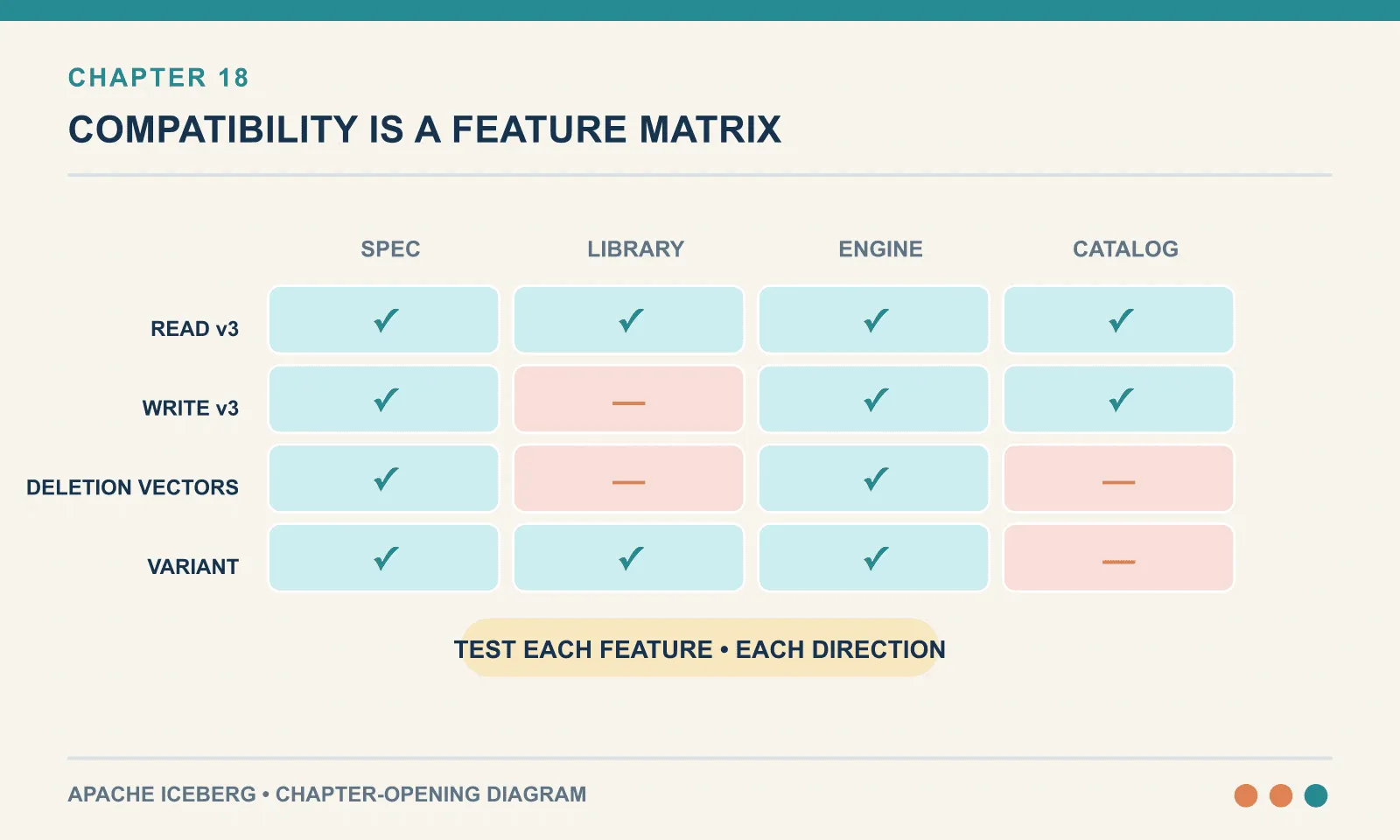
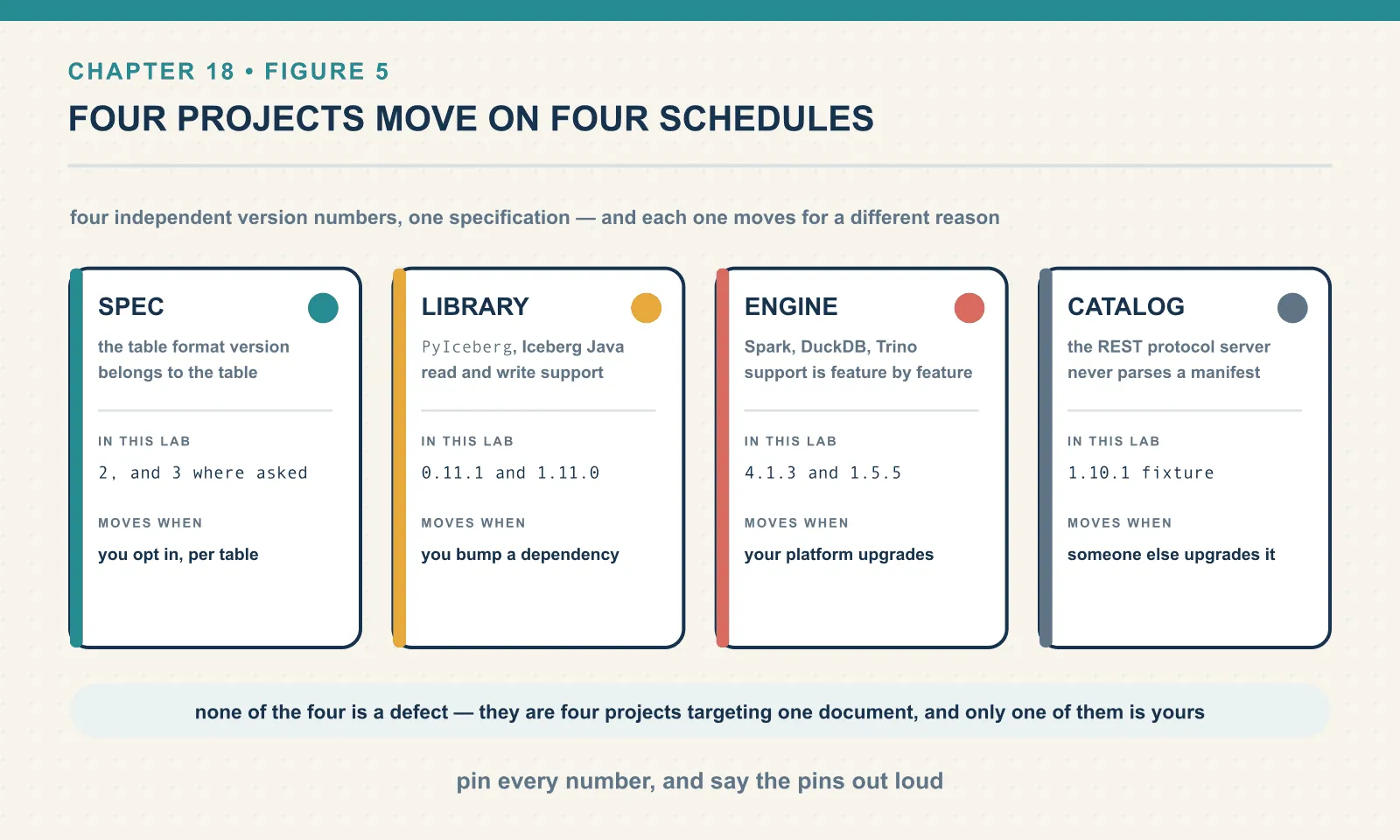
The delayed write failure comes from a mismatch that one “Iceberg version” cannot describe. A deployment has four independent version numbers, and each can move without the others:
| In this book’s lab | Moves when | |
|---|---|---|
| The spec (table format version) | 2, and 3 where we ask for it | you opt in, per table |
| The library (PyIceberg, Iceberg Java) | 0.11.1 and 1.11.0 | you upgrade a dependency |
| The engine (Spark, DuckDB, Trino, Flink) | 4.1.3 and 1.5.5 | your platform upgrades |
| The catalog (the REST server) | the 1.10.1 reference fixture | someone else upgrades it |
The interesting failures are not “version too old.” They are the ones where three of the four agree and the fourth does something surprising. And, as the opening example shows, the surprise tends to arrive some distance from its cause.
Everything below was executed against PyIceberg 0.11.1, Iceberg 1.11.0, Spark 4.1.3, DuckDB 1.5.5, Polars 1.44.1, Python 3.13, Java 21, and apache/iceberg-rest-fixture:1.10.1.
The v3 trap, in full
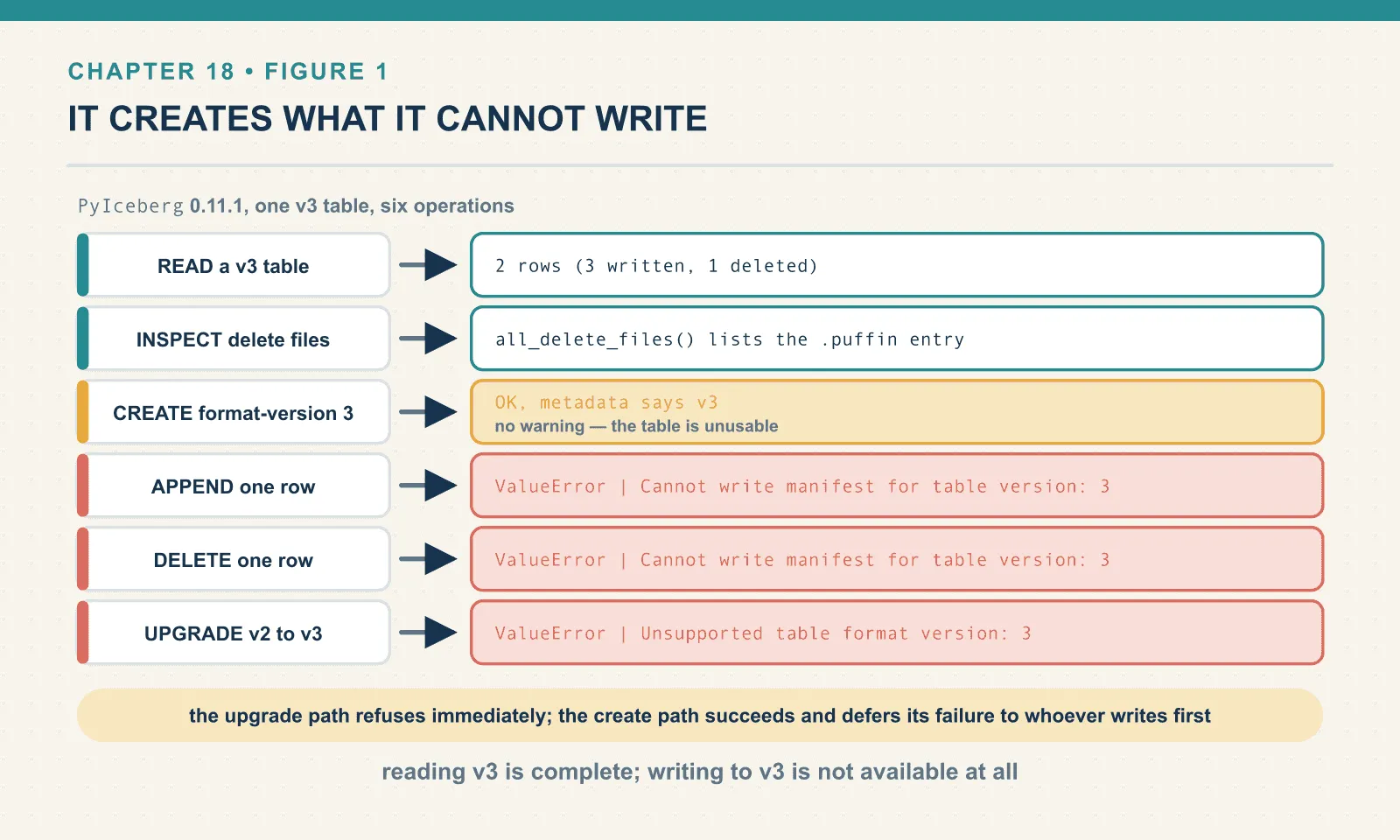
I expected a single switch: either a library supports format v3 or it does not. The actual boundary in PyIceberg 0.11.1 runs straight through the middle of the feature.
It reads v3, completely. Here is a v3 table Spark created, with a row deleted through a merge-on-read delete:
format_version : 3
READ           : 2 rows (3 written, 1 deleted)
delete files   : [(1, '00000-3-60bc6e52-...-00001-deletes.puffin')]
Two of three rows — which means PyIceberg found the Puffin file, decoded the deletion vector and applied it. That is not partial support. That is the headline v3 feature working correctly.
It inspects v3. t.inspect.all_delete_files() shows the .puffin entry with its content type, so the diagnostic path is intact too.
It creates v3. Shown above.
It cannot write to v3. Both mutating operations fail identically:
APPEND         : ValueError | Cannot write manifest for table version: 3
DELETE         : ValueError | Cannot write manifest for table version: 3
And it cannot upgrade a v2 table to v3:
current version: 2
upgrade_table_version(3) -> ValueError | Unsupported table format version: 3
upgrade_table_version(2) -> OK (no-op)
Two different error messages for what a user would call one capability. Note which one is friendlier. The upgrade path fails immediately with an explicit “Unsupported table format version”. The create path succeeds and defers its failure to whoever writes first.
Why the source says one thing and the runtime does another
I first inferred the v3 boundary from a constant in the installed package:
pyiceberg/table/metadata.py:69:SUPPORTED_TABLE_FORMAT_VERSION = 2A named constant, set to 2, in the metadata module. Reading that, the obvious conclusion is that PyIceberg refuses v3 outright. I wrote exactly that down, confidently, before running anything. It is wrong in both directions: PyIceberg reads v3 fine, and it does not refuse to create one.
The constant is used in exactly one place in the entire package:
pyiceberg/table/update/__init__.py:315: if update.format_version > SUPPORTED_TABLE_FORMAT_VERSION:That is the upgrade path, and only the upgrade path. Creation does not consult it. Neither does the write path — which fails much later and somewhere else entirely:
pyiceberg/manifest.py:1253: raise ValueError(f"Cannot write manifest for table version: {format_version}")So the real shape is a guard on one route, no guard on the second, and a low-level failure at the bottom of the third. None of that is visible from the constant. Reading it produced a claim that was both plausible and false, which is the worst combination available.
This is the entire argument for the standard this book runs on. Source reading tells you what an author intended to enforce. Execution tells you what the installed thing does. When they disagree, the installed thing is the one your users will meet. And they disagree more often than anyone expects. One create_table call, under a second of work, corrected a paragraph I would otherwise have shipped.
The practical rule for v3 today
If you are running PyIceberg 0.11.1, the honest summary is:
- Reading v3 is fine. Deletion vectors and all.
- Writing v3 is not available. Any write path must go through an engine, and in this lab that means Spark.
- Do not set
format-version: 3in a PyIcebergcreate_tablecall, because the call will succeed and hand you an unusable table.
That third one is worth a guard rail. If Python code in your stack creates tables, pin the format version explicitly rather than letting it be configured, and assert on it after creation. A one-line check that t.metadata.format_version == 2 is cheaper than debugging a manifest error in a job that did not create the table.
And expect all of this to change. PyIceberg is visibly mid-migration: the v3 concepts are already present in its type system and metadata model even though the write path is not finished. When the next version lands, re-run the four checks above rather than reading the release notes and assuming.
Three version numbers in one string
The Spark runtime coordinate looks like a single dependency, but a mismatch inside it can prevent catalog access before table-format support even matters:
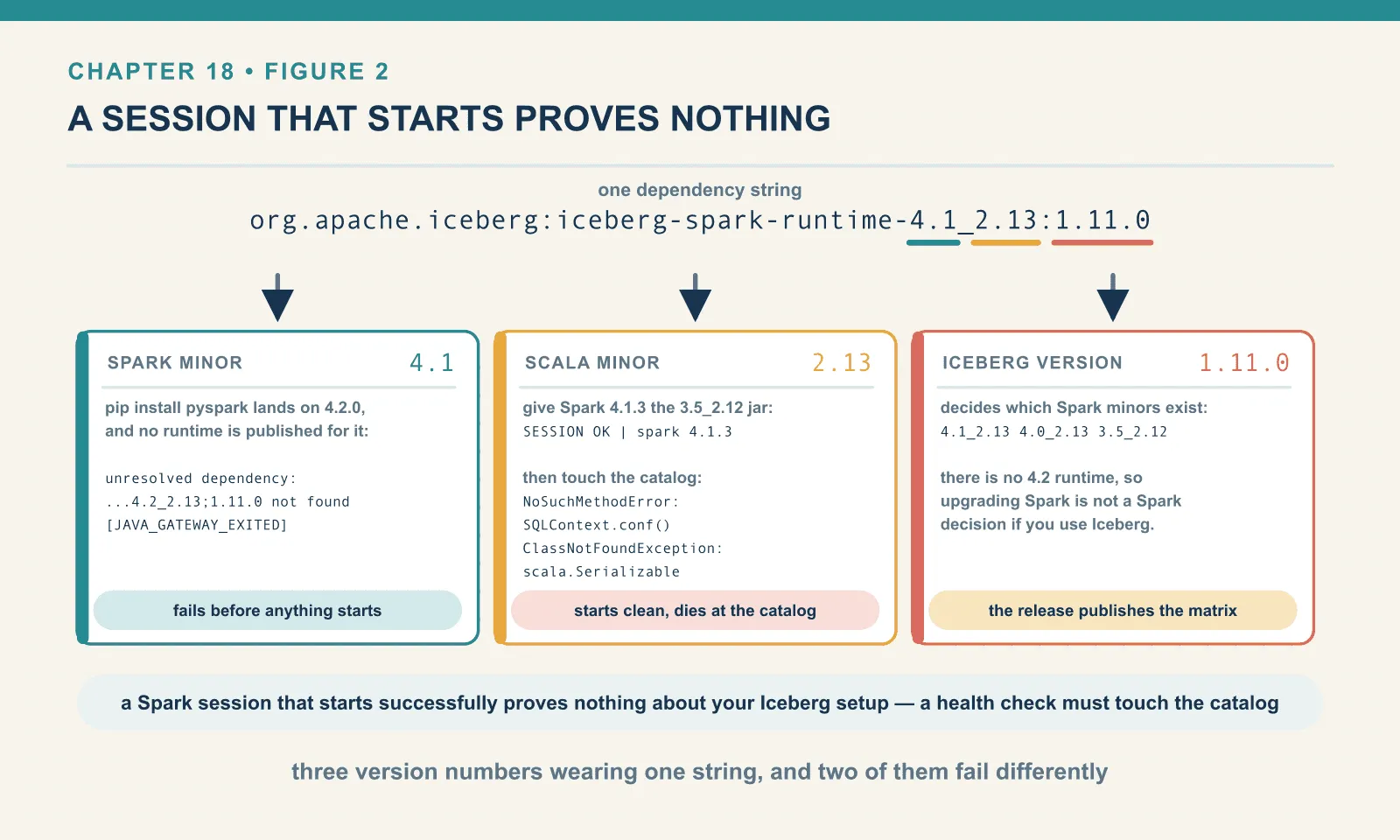
org.apache.iceberg:iceberg-spark-runtime-4.1_2.13:1.11.0It is three version numbers wearing one string: Spark minor 4.1, Scala minor 2.13, Iceberg version 1.11.0. All three must line up with reality, and each one fails differently.
When the Spark minor has no runtime
The naive install is broken out of the box, and this is not a hypothetical. pip install pyspark today lands on 4.2.0. The Iceberg runtimes published for 1.11.0 are 4.1_2.13, 4.0_2.13 and 3.5_2.12. There is no iceberg-spark-runtime-4.2. So the default install of the most popular engine gives you a Spark minor with no Iceberg runtime at all.
Ask for one anyway:
:: org.apache.iceberg#iceberg-spark-runtime-4.2_2.13;1.11.0: not found

Exception in thread "main" java.lang.RuntimeException:
  [unresolved dependency: org.apache.iceberg#iceberg-spark-runtime-4.2_2.13;1.11.0: not found]
...
PySparkRuntimeError | [JAVA_GATEWAY_EXITED] Java gateway process exited before
sending its port number.
As failures go this one is kind. It happens before anything starts, and the resolver names the exact artifact it could not find. The fix is to pin Spark to a minor that has a runtime. This book pins pyspark==4.1.3 for precisely this reason, and it is the first thing to check when a tutorial’s Spark setup does not work.
The general rule: the Iceberg release decides which Spark minors exist, not the other way around. Upgrading Spark is not a Spark decision if you use Iceberg. Check the runtime list first.
When the Scala minor is wrong
A wrong runtime can also resolve and let the session start. Here Spark 4.1.3 receives the Scala 2.12 runtime built for Spark 3.5:
SESSION OK with org.apache.iceberg:iceberg-spark-runtime-3.5_2.12:1.11.0 | spark 4.1.3The jar resolved. The session built. Spark reports its version cheerfully — and every smoke test that checks “does Spark start” passes.
Then touch the catalog:
Py4JJavaError | java.lang.NoSuchMethodError:
  'org.apache.spark.sql.internal.SQLConf org.apache.spark.sql.SQLContext.conf()'
    at org.apache.iceberg.spark.SparkUtil.hadoopConfCatalogOverrides(SparkUtil.java:159)
    at org.apache.iceberg.spark.SparkCatalog.buildIcebergCatalog(SparkCatalog.java:149)
...
Caused by: java.lang.ClassNotFoundException: scala.Serializable
A NoSuchMethodError on an internal Spark class, and underneath it a missing scala.Serializable — a class that exists in Scala 2.12 and not in 2.13. Neither message says “wrong Scala version” and neither says “wrong jar”. So a reader who does not already know this failure mode will start debugging their catalog configuration, because that is where the stack trace points.
Two things to take from it. First, NoSuchMethodError or ClassNotFoundException on a Spark or Scala internal class almost always means a jar built against different versions than the ones running. It is a linkage error, not a logic error. Second, a Spark session that starts successfully proves nothing about your Iceberg setup. Any health check worth having must touch the catalog. SELECT count(*) against a real table is the shortest one that would have caught this.
The catalog is a fourth version, and somebody else owns it
The catalog is the version people forget, because it is usually not in their dependency file. It is a server — upgraded on its own schedule, frequently by a different team or by a cloud provider you cannot page.
This lab is deliberately skewed on that axis. The REST catalog is apache/iceberg-rest-fixture:1.10.1, one Iceberg minor behind the 1.11.0 runtime writing through it. I expected that to be a problem for the v3 work and it was not:
CREATE v3 -> OK
after MoR delete, rows: 2
delete-file entries: 1
    content=1 records=1 00000-...-00001-deletes.puffin
A 1.11.0 Spark wrote a format v3 table, with a Puffin deletion vector, through a 1.10.1 catalog — and the catalog did not care.
That is not luck, and understanding why is the useful part. The catalog does not read your table’s data or its manifests. Chapter 4 measured it: the whole of a table, in the catalog, is a name and a pointer to a metadata file. Format v3 changes what is inside the metadata and the manifests, and the catalog never parses either. So a catalog can happily serve table versions it has never heard of.
Where the catalog version does matter is the protocol between the client and the server, and the REST spec gives you a way to ask instead of guess:
GET /v1/config?warehouse=warehouse{"defaults": {}, "overrides": {},
"endpoints": ["GET v1/config",
"GET /v1/{prefix}/namespaces", "POST /v1/{prefix}/namespaces",
"GET /v1/{prefix}/namespaces/{namespace}/tables",
"POST /v1/{prefix}/namespaces/{namespace}/tables/{table}",
"POST /v1/{prefix}/transactions/commit",
"GET /v1/{prefix}/namespaces/{namespace}/views",
... 27 in total ]}The server enumerates the endpoints it implements. Ours implements namespaces, tables, views, a rename, a register, metrics reporting and multi-table transaction commit. What is not in that list is as informative: there is no credential-vending endpoint and no server-side scan-planning endpoint. Chapter 5 described both as features of production catalogs, and this fixture simply does not have them.
So the practical technique is: do not infer catalog capability from a version number — read /v1/config and see. It is one HTTP request, no client library required. And it is the only statement of capability that comes from the running server rather than from a page about a release.
The other half of /v1/config is the two empty maps at the front. defaults and overrides let a catalog push client configuration down the wire — and overrides wins over whatever the client set locally. Both are empty here. On a managed catalog they usually are not, which means some of your client’s behaviour is decided by the server. Good for consistency. Genuinely confusing at 2am, when a setting you can read in your own code is not the setting in effect.
The support matrix is per-feature, not per-version
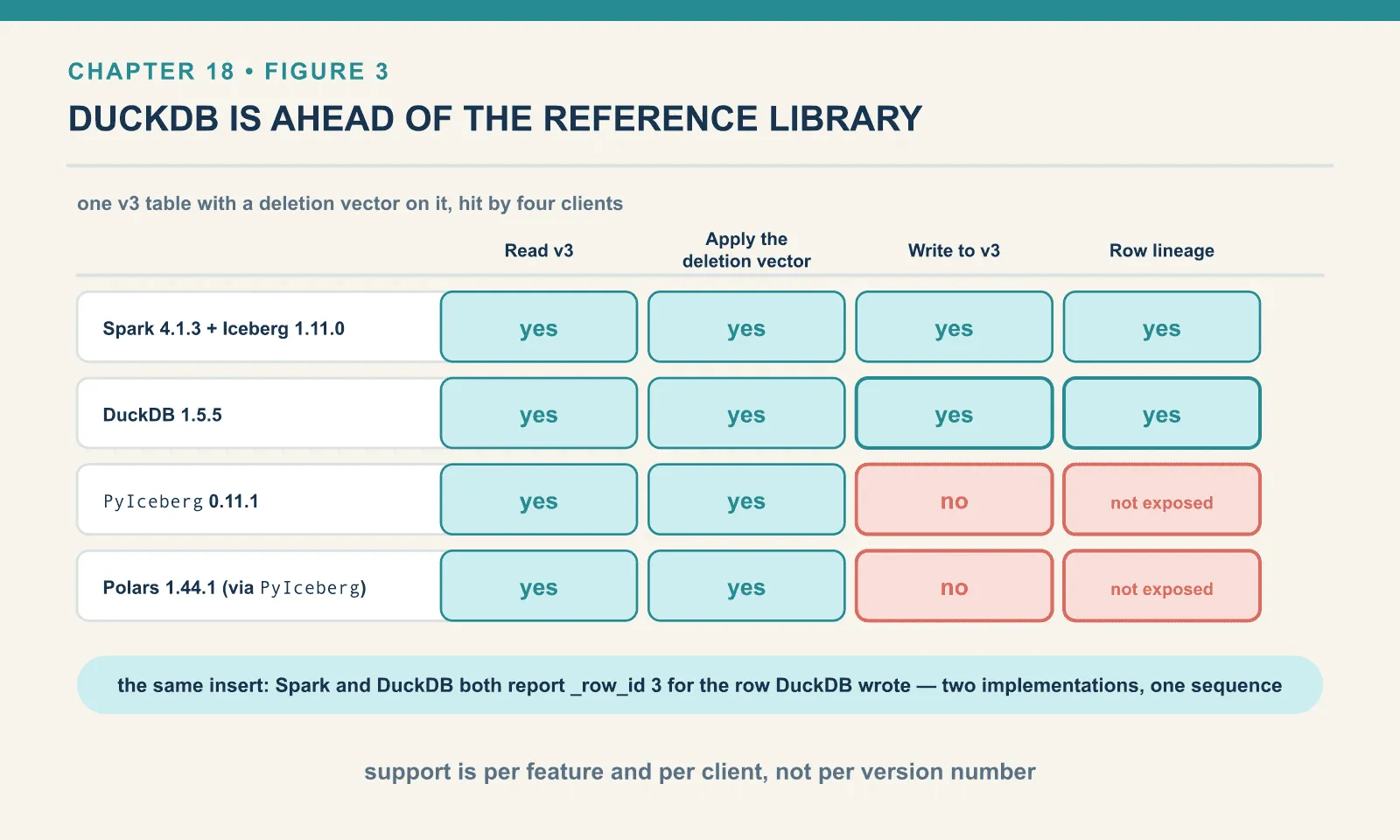
The most useful correction in this chapter is that “supports Iceberg v3” is not a property any tool has. Support is a matrix of features against clients, and the ordering is not what you would predict.
Here is one v3 table with a deletion vector on it, hit by four clients:
| Read v3 | Apply the deletion vector | Write to v3 | Row lineage | |
|---|---|---|---|---|
| Spark 4.1.3 + Iceberg 1.11.0 | yes | yes | yes | yes |
| DuckDB 1.5.5 | yes | yes | yes | yes |
| PyIceberg 0.11.1 | yes | yes | no | not exposed |
| Polars 1.44.1 (via PyIceberg) | yes | yes | no | not exposed |
DuckDB is ahead of the reference Python library on the newest version of the spec — which is not the ordering anybody would guess. Here it is running.
Reading, including the deletion vector:
READ v3 : [(1, 'ada', 'placed', Decimal('42.00')), (3, 'alan', 'shipped', Decimal('38.25'))]Writing, both directions:
INSERT into v3 -> OK, rows now [(3,)]
DELETE on v3   -> OK, rows now [(2,)]
And the DELETE did not rewrite a data file. It wrote a deletion vector, in the same encoding Spark uses. Here are both delete files on the table afterwards, one from each engine:
content record_count file
1       1            6d0ea280-7db5-4bff-a4b2-46f8138ffdb7-deletes.puffin   <- DuckDB
1       1            00000-3-60bc6e52-...-00001-deletes.puffin             <- Spark
Then the result I did not expect. Chapter 20’s subject, row lineage, is the v3 feature that gives every row a stable identity. Ask Spark and DuckDB the same question about the same rows:
Spark:                          DuckDB:
order_id _row_id _last_upd      [(3, 2, 1), (9, 3, 3)]
3        2       1
9        3       3
Identical. Order 3 kept _row_id 2 from the original Spark write. Order 9 was inserted by DuckDB, and was correctly assigned _row_id 3 by reading the table’s next-row-id and advancing it. Two independent implementations maintaining one row-identity sequence, agreeing exactly.
Two small notes on that. Neither engine lists the lineage columns in DESCRIBE; DuckDB reports ['order_id', 'customer', 'status', 'amount']. They are hidden metadata columns you have to name explicitly. And the sequence numbers differ per row (1 versus 3) because they record when each row was last written, which is the point of the field.
The cliff: one column type, and a client goes blind
A new column type can block more than the operation that uses it. Here Spark creates a v3 table with variant, the new first-class column type for semi-structured data:
CREATE TABLE ice.ch18.orders_variant (order_id BIGINT, payload VARIANT)
USING iceberg TBLPROPERTIES ('format-version'='3');
INSERT INTO ... SELECT 1, parse_json('{"channel":"web","promo":"SUMMER"}');
order_id payload
1 {"channel":"web","promo":"SUMMER"}DuckDB 1.5.5 reads it without complaint:
[(1, {'channel': 'web', 'promo': 'SUMMER'})]PyIceberg does not read it. PyIceberg cannot open it:
ValidationError | 1 validation error for TableResponse
metadata.3.schemas.0.fields.1.type
  Value error, Unsupported field type: 'variant'
That failure is at load_table — not at the scan, and not at the column. The table object never comes into existence at all. So a PyIceberg client cannot read the order_id column either. It cannot list snapshots, inspect files, or run any of the diagnostics this book has been using for eighteen chapters. One column of a type it does not know makes the whole table invisible.
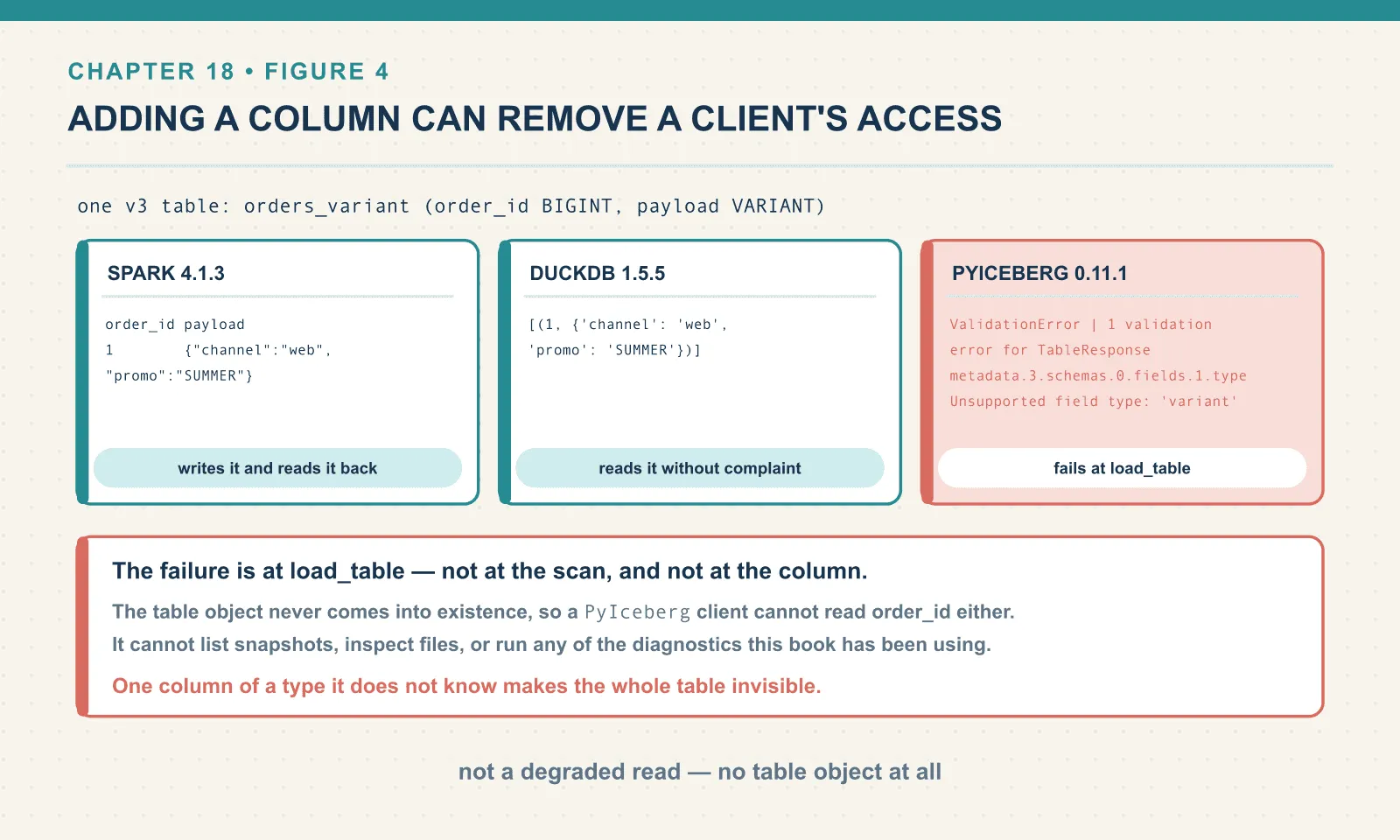
This is the sharpest version-skew failure in the book, and it generalises past this one type. Adding a column can remove a client’s access to a table. Chapter 7 taught that schema evolution as safe, and within one implementation it genuinely is. It becomes a breaking change the moment some reader in your estate does not implement the type you added.
The operational conclusion is a process one rather than a technical one. Adding a v3-only type to a shared table is a compatibility decision, not a modelling decision, and it deserves the same care as dropping a column. Before you add a variant, a geometry or a nanosecond timestamp, enumerate every client that reads the table and check each one. And if you cannot enumerate them, that is itself the finding.
Properties one engine honours and another ignores
Some mismatches leave the write successful and the rows correct. Chapter 16 showed write.delete.mode = merge-on-read changing how Spark performs a delete. The property lives on the table, so it is natural to read it as the table’s behaviour. It is not. It is a request — and each engine decides for itself what to do with it.
Here is a v2 table with that property set, deleted from through PyIceberg:
write.delete.mode = merge-on-read

UserWarning: Merge on read is not yet supported, falling back to copy-on-write

rows: 2
delete files written: 0
snapshot ops: ['append', 'overwrite']
Correct answer, entirely different mechanism: zero delete files, an overwrite snapshot, and a rewritten data file — copy-on-write, on a table explicitly configured for merge-on-read.
PyIceberg deserves credit for warning. It could have done this silently, and a table property that one client honours and another ignores without a word is a genuinely difficult thing to debug. The write succeeds, the data is right, and the only symptom is a file layout that does not match what the table asked for. If you are relying on merge-on-read for write latency, that reliance is per-writer, not per-table.
The same shape appears in the provenance finding from chapter 15. Spark records engine-name, engine-version and an exact Iceberg build hash in every snapshot summary; PyIceberg and DuckDB record neither. And in the timestamp finding from that same chapter: a naive Python datetime goes in as UTC, while a SQL engine’s identical-looking literal is converted from the session timezone. The same wall-clock string becomes different instants depending on the client. All three are the same category. The data is portable; the behaviour around it is per-implementation.
Defaults, since they are also a version
One last small thing, easy to check and easy to get wrong by assumption. What format version does each client create by default?
Spark 4.1.3 + Iceberg 1.11.0 -> 2
PyIceberg 0.11.1             -> 2
Both default to v2, three months after v3 went generally available — which is the ecosystem being sensible rather than slow. v3 is opt-in, per table, and nothing upgrades underneath you. It also means the tables in your warehouse are v2 unless somebody asked. A v3 problem is something you chose rather than something that happened.
Chapter 19 is about what you get when you do choose it — and about why the upgrade is deliberately not automatic.
What this chapter did not test
- Trino, Flink, Snowflake, Databricks or BigQuery against any of this. Chapters 15 and 17 explain why those engines are absent from the lab. Every matrix in this chapter covers four clients, and yours may differ.
- A real production catalog. Polaris, Lakekeeper, Nessie, Unity and Glue each have their own version story and their own
/v1/configanswer. The technique of reading that endpoint is what transfers; the fixture’s specific answer is not. - Downgrades. I did not take a v3 table back to v2, and there is no reason to think that is possible for a table that has used v3 features.
- A v3 table with
geometry,geographyor nanosecond timestamps. Thevariantcliff is one data point. I would expect the same shape for the others, and expecting is not testing. - Every PyIceberg operation against v3. I ran read, inspect, create, append, delete and upgrade. The boundary elsewhere may be different again.
Final thoughts
Iceberg is a specification shared by implementations written at different times. The contract is common; the implemented portions and the defaults are not.
That is the source of every finding above. The spec moved to v3 in May. Iceberg Java implemented it. DuckDB implemented most of it, including the parts that surprised me. PyIceberg implemented the reading half and is still working on the writing half. The reference REST catalog is a minor behind and does not need to care, because its job never involved reading manifests. None of those is a defect. They are four projects on four schedules, targeting one document. That arrangement is exactly what makes the format valuable in the first place.
What that means in practice is three habits, none of them expensive:
Pin everything and say the pins out loud. Not “recent Spark” but pyspark==4.1.3, and not “Iceberg 1.x” but the full jar coordinate with all three numbers in it. Half the failures in this chapter are a pin somebody left loose.
Test the matrix, not the versions. “Does DuckDB support v3” has no answer. “Can DuckDB, on this version, read and write this table” has one, and it takes a minute to obtain. Write that minute down as a test and run it after every upgrade of any of the four version numbers.
Assume the surprise is in the newest thing, then go and check the oldest client. The failures here clustered at the two ends — a spec feature three months old, and a library that has not caught up to it. The engine everyone worries about was fine, and the catalog everyone worries about did not even notice.
The next chapter goes properly into what v3 actually added. And into why, after eighteen chapters of a book written mostly on v2, the upgrade is a decision rather than a default.
Comments