A Folder Is Not a Table
Data lakes spent a decade pretending a directory of Parquet files was a table. This chapter breaks one on purpose — three different answers to the same query during a single job — and defines what a table format adds.
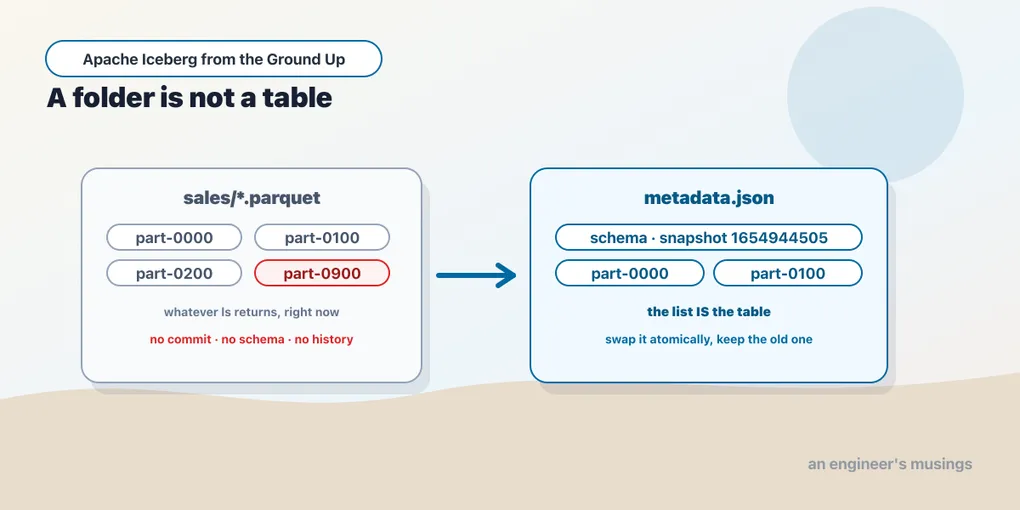
Ask an engineer where a table lives and you get one of two answers.
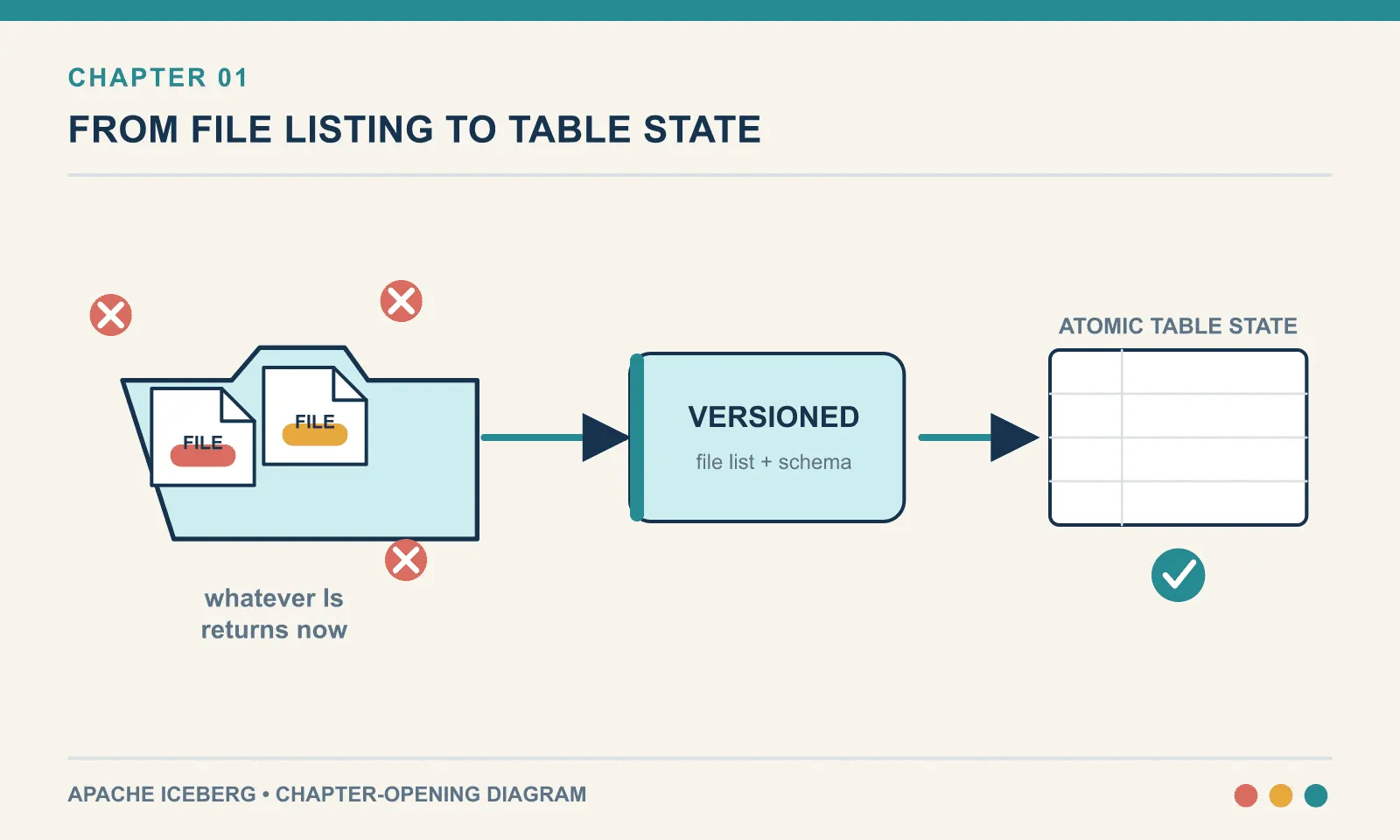
If they work on an application database, the answer is a place: a Postgres instance, a schema, a name. The database owns the bytes. You never think about the files, and if you went looking for them you would find something you could not usefully read.
If they work on a data lake, the answer is a path. s3://warehouse/sales/. Under it sit Parquet files, probably organised into subdirectories by date. That is the table. Not a handle to the table, not a cache of the table. The folder is the thing itself, and any engine that can list the folder and read Parquet can query it.
That second model won for a decade, and for good reasons. It decoupled storage from compute — point Spark, Presto, Hive and a Python script at the same bytes, no permission required. Storage got absurdly cheap. Parquet is a genuinely excellent file format.
The gap appears as soon as the files start changing. A refresh can expose a partial result, a rename can split a column, and two writers can silently destroy each other’s work. Four small failures in a directory of Parquet make the requirements concrete: what must a table guarantee that a folder cannot?
Everything here was run against DuckDB 1.5.5, PyIceberg 0.11.1 and PyArrow on Python 3.13. Nothing in this chapter needs a cluster, a cloud account, or a JVM.
The table that is just a directory
Here is a sales table. It is three Parquet files in a folder.
for i in range(3):
    write_parquet(rows=100, start=i*100)   # part-0000, part-0100, part-0200
Query it with anything that reads Parquet:
select count(*) from read_parquet('sales/*.parquet');files: 3 | count(*) -> (300,)Three hundred rows. No server was started, no data was loaded, no schema was declared anywhere. This works, it is fast, and it is how an enormous amount of production analytics genuinely runs today. Nothing so far is wrong.
The problem is not what happens when you query it. The problem is what happens when somebody writes to it.
Break one: there is no moment of commit
The most ordinary operation in a batch pipeline is a full refresh — yesterday’s numbers were wrong, or late data arrived, so the job replaces the table’s contents.
With a directory, “replace the contents” means exactly what it says. Delete the old files, write the new ones. Here is that job running, with an independent reader asking select count(*) at four points along the way:
  before      -> (300,)
  mid-job     -> IOException: IO Error: No files found that match the pattern "sales/*.parquet"
  1 of 3 done -> (100,)
  after       -> (300,)
Read those four lines slowly, because they are the entire argument for the rest of this book.
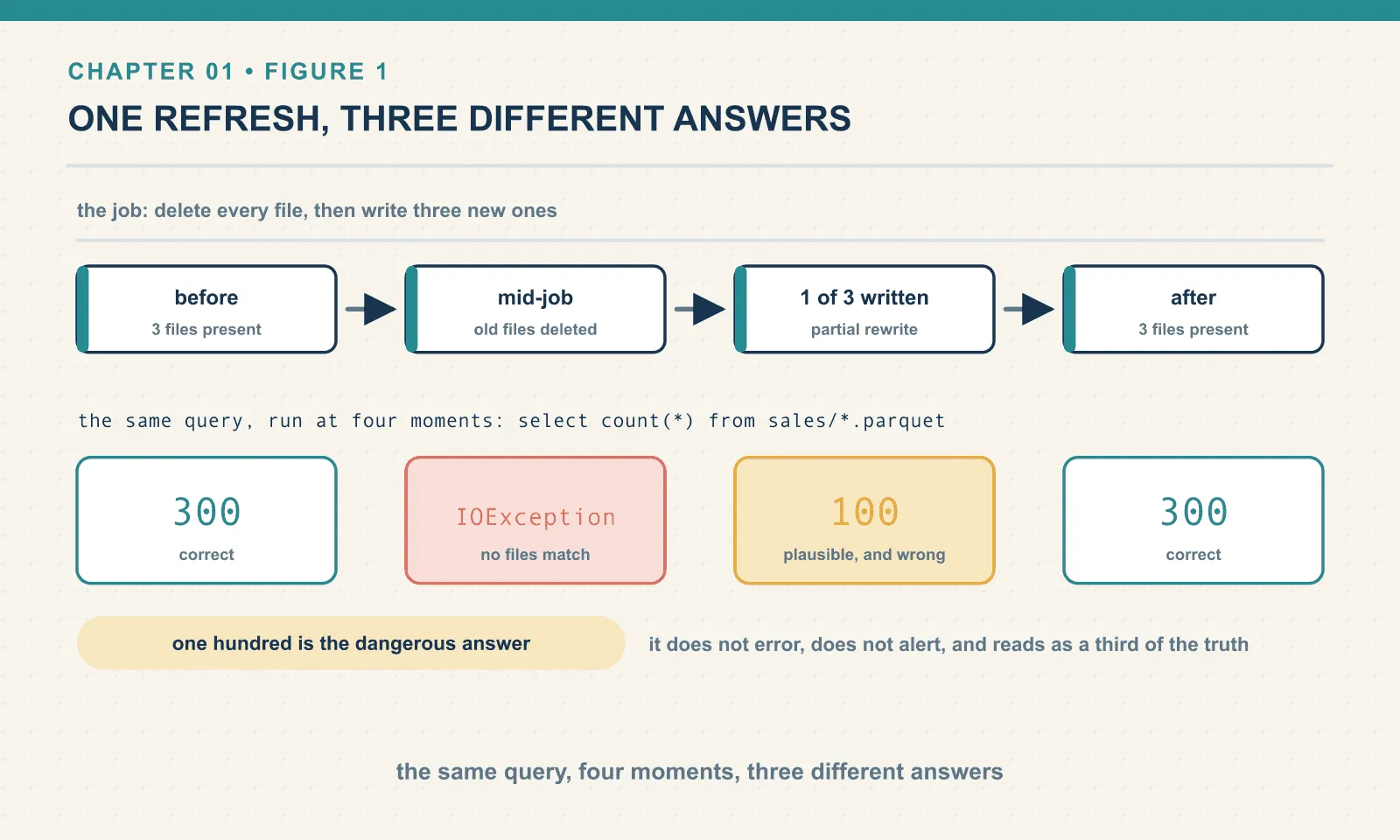
The same query, against the same table, gave three different answers and one hard error during a single job that nobody would describe as unusual. Between the delete and the first write the table did not exist — and a dashboard refreshing at that instant does not show zero rows, it shows a stack trace.
And the middle answer is worse than the error. One hundred rows is a plausible number. It is not an error, it does not alert anyone, and a downstream job that aggregates it will produce a number that is one third of the truth and looks entirely reasonable in a chart. A daily total quietly comes in low, and nobody finds out until somebody reconciles against another system three weeks later.
The reason this happens is not carelessness — it is structural. A directory has no way to express “these files, together, are the table as of now.” Every reader sees whatever ls returns at the instant it looks. There is no commit, because there is nowhere to commit to. The state of the table is an emergent property of a filesystem listing, and filesystems do not do transactions.
Teams work around this, of course — you write to a staging prefix and then swap. But rename on object storage is not atomic either. It is a copy followed by a delete: the same race, with more steps and a wider window.
Break two: there is no schema
An upstream rename can leave a folder holding two definitions of the same column. Suppose amount becomes amt. One new file lands with the new spelling — the other three still carry the old one. This is not exotic, it is a Tuesday. A query using the old name now has to reconcile them:
select sum(amount) from read_parquet('sales/*.parquet');InvalidInputException: Invalid Input Error: Failed to read file "sales/part-0900.parquet":
schema mismatch in glob: column "amount" was read from the original file ...That is the good outcome — the query fails loudly, you find the bad file, you fix the pipeline.
The bad outcome is the fix everyone reaches for next. Most engines offer a flag that reconciles differing schemas across files by taking the union of their columns. In DuckDB it is union_by_name:
select count(*), sum(amount), sum(amt)
from read_parquet('sales/*.parquet', union_by_name=true);
(350, 3000.0, 500.0)The query now succeeds — and it is wrong in a way far harder to notice than a stack trace. The table has 350 rows and one logical column split across two physical ones. Any query written against amount silently under-counts by whatever landed in amt. The flag did not fix the schema; it suppressed the only signal that the schema was broken.
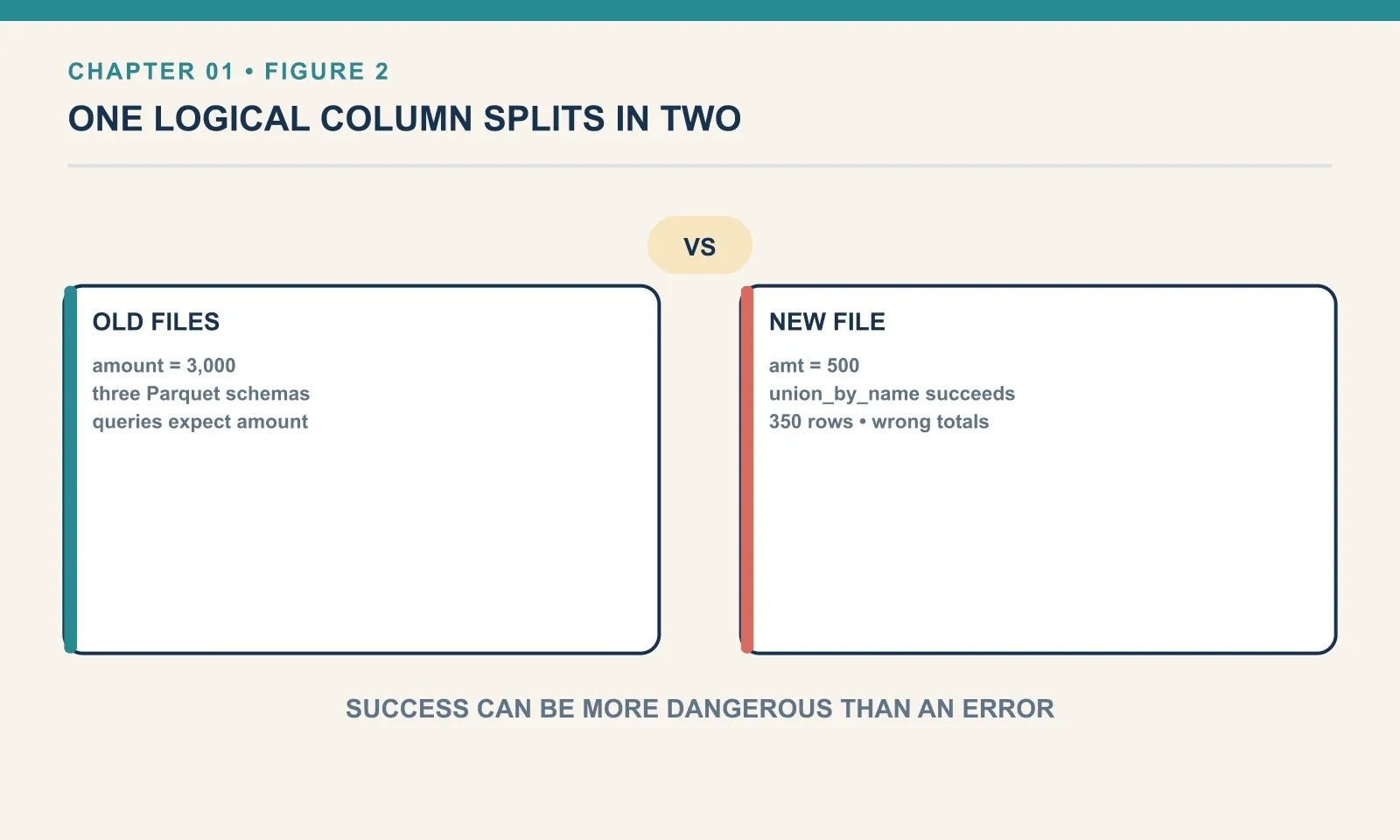
The root cause is that Parquet files carry their own schemas and nothing reconciles them. Each file is self-describing — which sounds like a feature, and is, in isolation. But a table needs one schema that all its files answer to, and a directory has no place to keep one. There is no ALTER TABLE because there is no table to alter — only files that happen to be adjacent.
Break three: there is no memory
Look at the directory after all of that:
files: ['part-0000.parquet', 'part-0100.parquet', 'part-0200.parquet', 'part-0900.parquet']What did this table look like before the refresh? Gone — the old files were deleted, and nothing recorded that they had ever been the table.
Who changed it, and when? The filesystem knows modification times — that is the whole of what it knows. There is no notion of a change to the table, only changes to files.
Can you undo it? No. Rollback means restoring a previous state, and no previous state was retained. Your recovery story is a backup of the bucket — which recovers files rather than table versions, and which nobody tests.
This is the part that surprises people coming from application databases. Atomicity, isolation and history are so fundamental to what a table is that it does not occur to you they might be optional — and on a data lake they were optional for years, where the answer was mostly “run the job again and hope.”
Break four: two writers, and one loses in silence
The last failure is the one that turns a correctness problem into a data-loss problem.
Two jobs write to the same table at once. Both follow the same sensible naming convention, so both produce a file called part-0000.parquet. Job A writes a hundred rows, job B writes fifty:
two writers, plain directory -> (50, 4950.0)Fifty rows. Job A’s hundred rows are gone — not corrupted, not quarantined, not logged. The second write landed on the same path and object storage did what it was asked. No error was raised anywhere, because from the filesystem’s point of view nothing went wrong: somebody wrote a file, and then somebody wrote that file again.
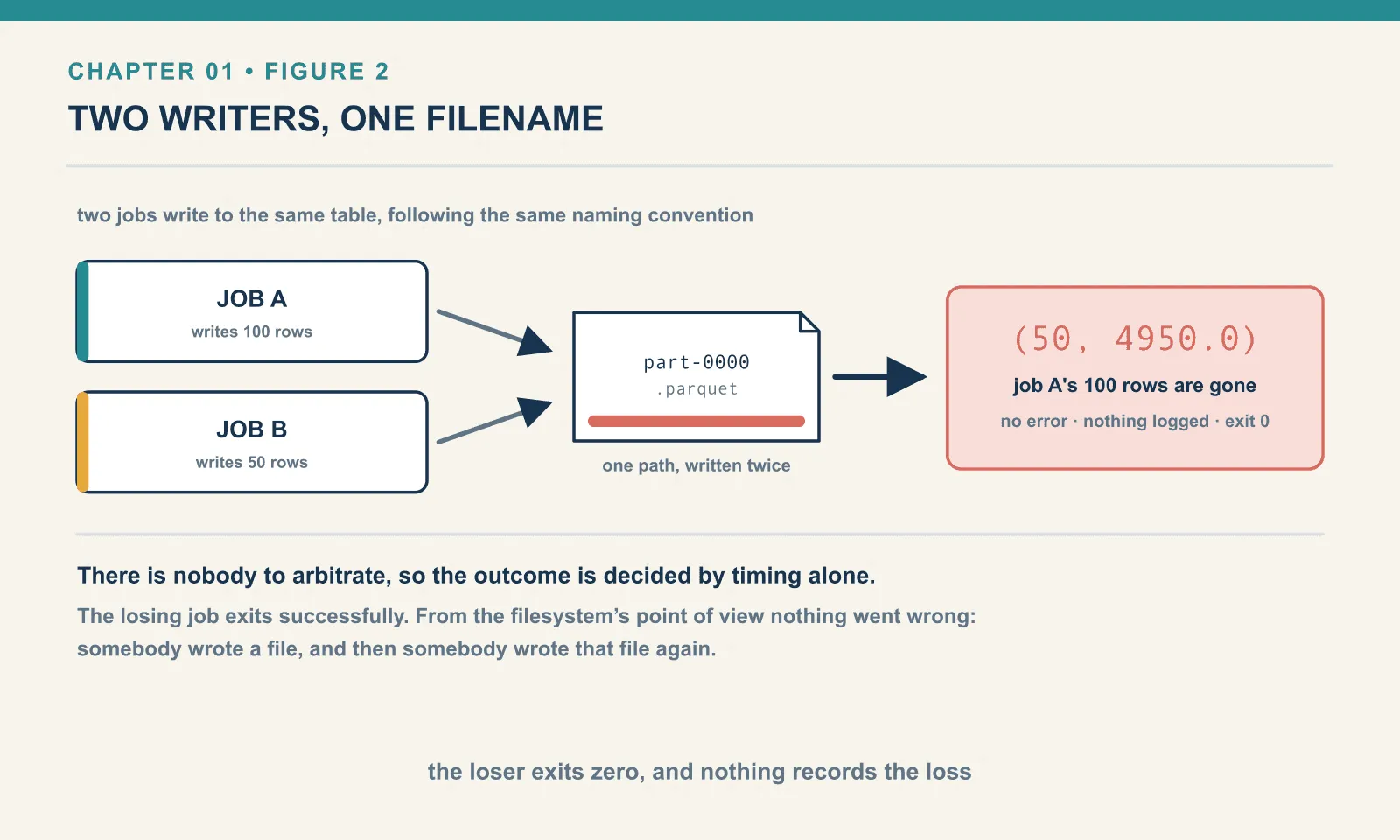
There is no arbitration because there is nobody to arbitrate. The outcome is decided entirely by timing, and the losing job exits zero.
Now the same collision against the Iceberg table, two processes running simultaneously:
writer 88.0 committed; snapshot 4043221700822231354
pyiceberg.exceptions.CommitFailedException: Table has been updated by another process: shop.sales
iceberg after two concurrent writers -> 360 rows | {88.0: 60, 10.0: 300}One writer committed and one was rejected — by name, with the reason, and with a non-zero exit. The table holds 360 rows: the original 300 plus the winner’s 60. The loser’s 40 rows are not there either.
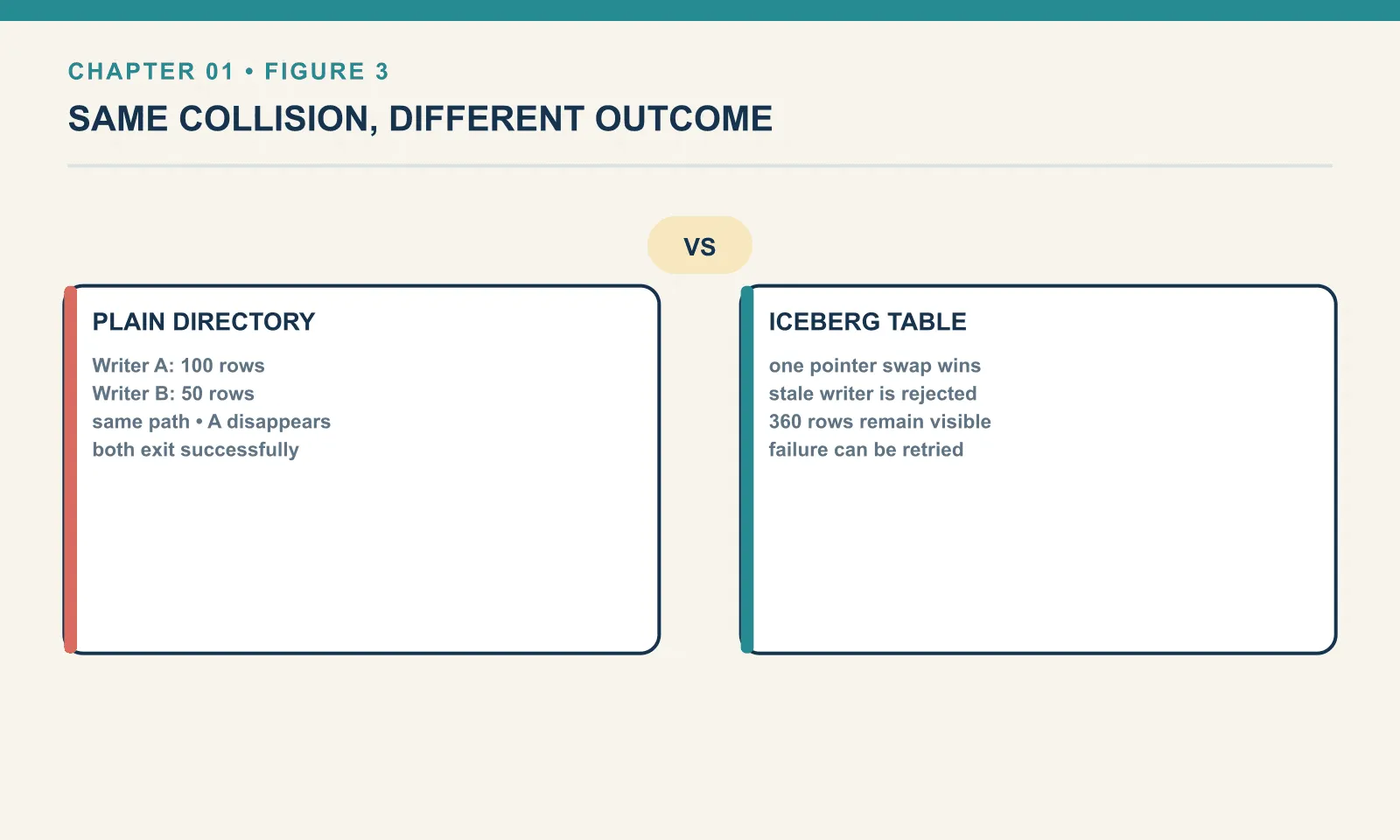
That distinction is the point, and it is worth being precise about it rather than triumphalist. Iceberg did not merge both writes. It detected that the table had moved underneath one of them and refused the commit. What you gained is not a write that always succeeds — it is a write that never half succeeds, and a failure you can see.
Whether the rejected job retries is your decision. PyIceberg surfaced the exception rather than retrying it here, which is the honest default: the library cannot know whether recomputing your write is safe. Other clients retry automatically against the new table state. Either way, the conflict was detected, which is the part a directory can never do.
What Hive did, and what it left behind
None of this was unknown. The Hive metastore was the industry’s answer for a decade, and it is worth being precise about what it solved and what it did not, because Iceberg’s design is a direct response.
Hive added a metastore — a database holding table names, schemas and, critically, the list of partitions, meaning which subdirectories exist. That gave you a schema, and a place to look up where a table’s data lived.
What it did not give you was a list of files. A Hive table’s contents were still defined by listing directories at query time — and that single decision is the source of most of the pain:
- Partitions could drift out of sync with reality. Files landed in a directory the metastore did not know about, and the fix was
MSCK REPAIR TABLE, a command whose existence tells you everything. It re-listed storage to rediscover what the table contained. - Partitions were physical, and the query had to know. If a table was laid out by
dt=2026-05-20/, then filtering on an actual timestamp column would not prune anything. You had to filter on the partition column, by name, in the shape the layout expected. Get it wrong and you scanned the whole table while the query still returned correct results, so the only symptom was cost. - Changing the layout meant rewriting the table. Partitioning is a physical directory structure, so repartitioning is a migration.
- Listing at query time is slow on object storage, where a “directory” is a prefix scan rather than a real directory, and where consistency guarantees have historically been weaker than a filesystem’s.
Hive gave the folder a schema. It did not stop the folder from being the table.
(I have not run Hive for this book. The behaviour above is the well-documented history that motivated Iceberg, not something measured here. Everything else in this chapter was executed.)
So what is a table format?
A table format is a specification for describing a table as an explicit, versioned list of files, plus an atomic way to swap one list for another.
That definition leaves Parquet in charge of storage and query engines in charge of computation. Apache Iceberg is a specification, plus client libraries that implement it — there is no Iceberg daemon to install or port to connect to. Its job is to describe the table and how its state changes.
What it adds is a layer of metadata between “the folder” and “the table”, and that layer buys four things:
- A table is a known list of files, not whatever is in a directory. Nothing is discovered by listing. A file that is not in the list is not in the table, even if it is sitting right there.
- Changing that list is one atomic operation. Readers see the old list or the new list. There is no in-between, because swapping the list is a single indivisible action rather than a sequence of file operations.
- Old lists are kept. Each version is a snapshot, so history, time travel and rollback come for free once you have decided to keep them.
- The schema lives with the table, not in each file. One schema the files answer to, with rules for how it may change.
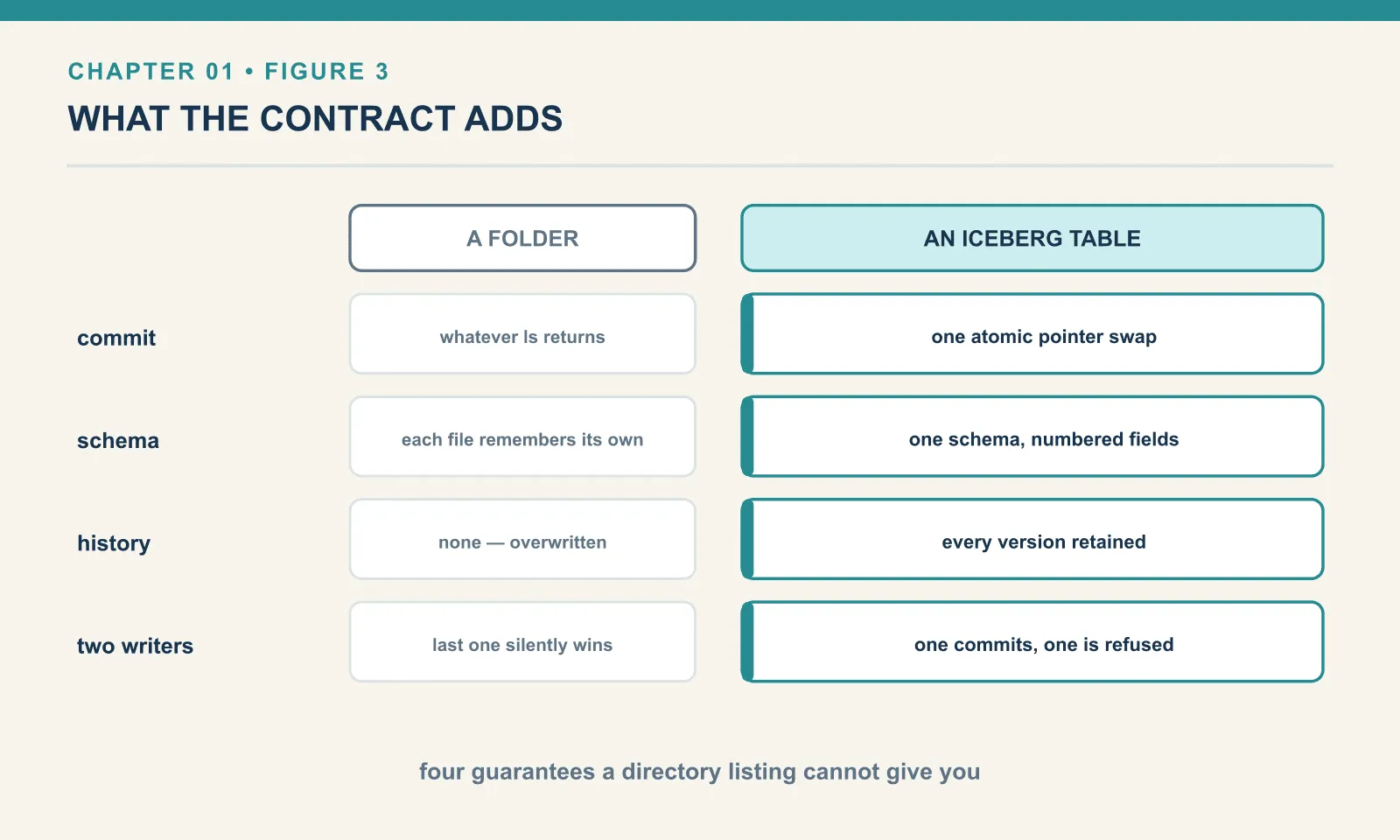
The word doing the heavy lifting in point 2 is atomic, and the natural next question is where that atomicity comes from, since object storage does not provide it. That is the catalog, and it gets two chapters of its own starting at chapter 4.
The same breakages, with a contract
Here is the identical table as an Iceberg table, using nothing but PyIceberg and a local directory. Same three hundred rows, same full refresh.
t = catalog.create_table("shop.sales", schema=...)
for i in range(3):
    t.append(batch(100, i*100, amount=10.0))
rows: 300
snapshot before overwrite: 1654944505732251786Note that a snapshot has an id. Already this table has something the directory never had: a name for the state it is currently in. Now the refresh:
t.overwrite(batch(300, start=1000, amount=25.0))rows after : 300 | amount: 25.0
reader pinned to the OLD snapshot still sees: 300 rows
snapshots recorded: 5
operations: ['append', 'append', 'append', 'delete', 'append']There is no window in which the table has no files, and none in which it has one third of them. A reader either sees the old three hundred rows or the new three hundred rows.
The last line shows the mechanism rather than the marketing. The overwrite recorded two snapshots — a delete and an append. Internally it is still two operations, exactly as the directory version was. The difference is that neither is visible until the new file list is published, so what a reader observes is a single change. This is the trick a database plays with a transaction log, applied to a folder full of Parquet.
Now the schema change that split the table in two:
with t.update_schema() as u:
    u.add_column("discount", DoubleType())
schema now: ['order_id', 'amount', 'discount']
old rows still read: 300 | discount col: {None}The column was added to the table, and the three hundred existing rows read back with discount as null. No data file was rewritten. The schema belongs to the table — so changing it is a metadata operation, and the older files are interpreted through the new schema rather than migrated to match it. Chapter 7 covers how that works, and why renaming a column here is safe when the same rename against a directory of Parquet is the trap we hit earlier.
And the thing a folder simply cannot offer:
t.manage_snapshots().rollback_to_snapshot(before).commit()rows: 300 | amount: {10.0}The refresh is undone — the amount values are back to 10.0, the pre-overwrite figure. Not restored from a backup, not recomputed by rerunning the job: the table was simply pointed at a list of files it had kept all along.
What the contract costs
Everything above is the sales pitch, so here is the invoice. Iceberg is not free, and the price is metadata.
Both tables in this chapter hold the same three hundred rows. Count what is actually on disk:
plain directory 'table' : 4 files, all parquet
iceberg table           : 21 files -> {'parquet': 4, 'avro': 10, 'metadata.json': 7}
bytes: data = 5463 | metadata = 54417
Four data files became twenty-one files, and the metadata outweighs the data by roughly ten to one.
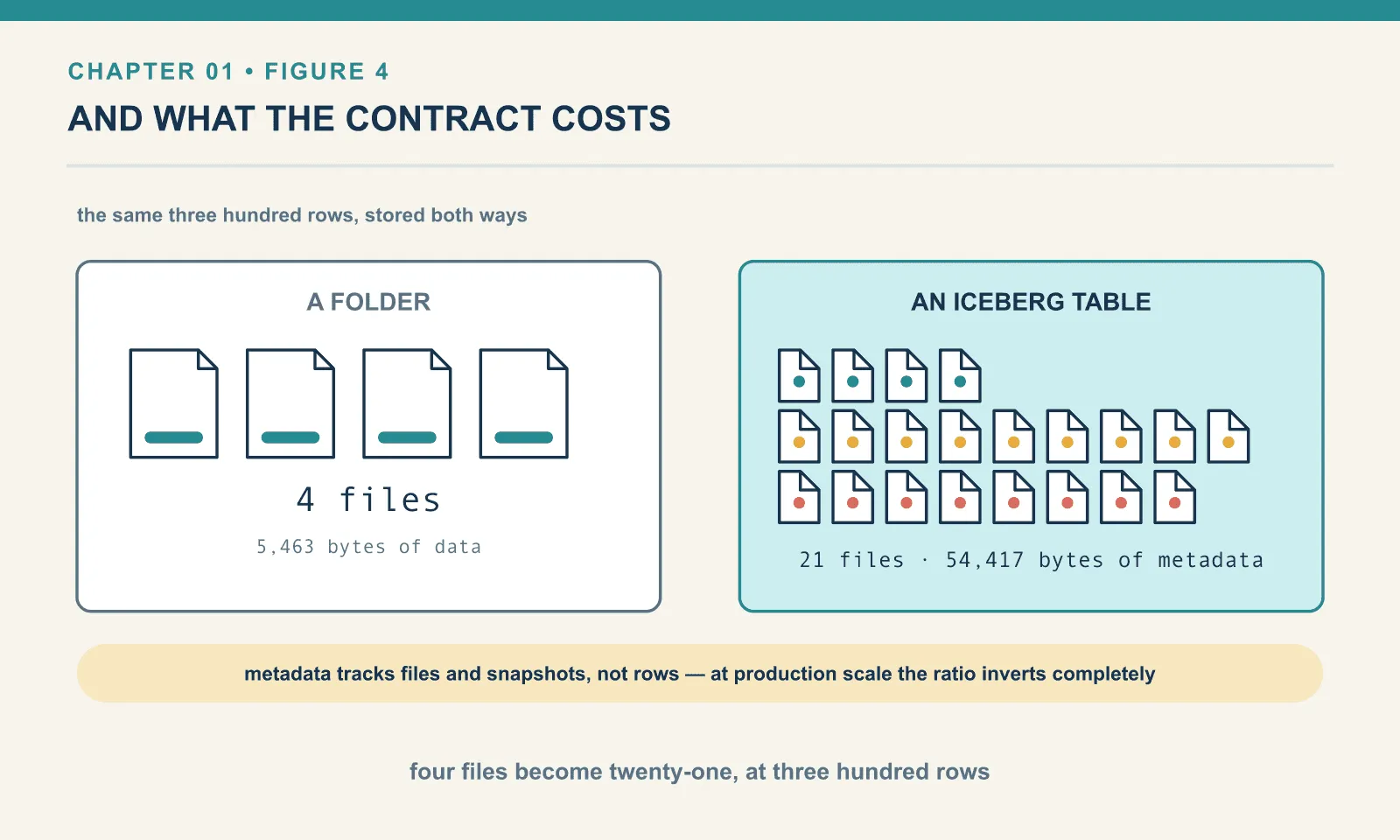
That ratio is an artefact of scale, and it is important not to over-read it — three hundred rows is a toy. Metadata size tracks the number of files and snapshots, not the number of rows, so a table holding a hundred million rows in the same four data files carries almost exactly the metadata shown here. In production the ratio inverts so completely that metadata becomes a rounding error.
What does not go away is the file count. Every commit writes a new metadata.json, a new manifest list, and at least one manifest. Commit often enough and you accumulate metadata faster than data, which is the small-files problem in a new costume. It is why chapters 11 through 13 exist, and why an Iceberg table that nobody maintains gets slower in a way a directory of Parquet never does.
Two other costs matter beyond this small example. The catalog must be running and backed up; chapters 4 and 5 explain that dependency. The spec, library and engine versions must also work together. Chapter 18 covers that coupling because it bit this book during writing.
The compensation is not only correctness. It is that the table has become a thing other tools can pick up without arrangement. Nothing has been loaded and nothing exported, yet a completely different engine reads it:
duckdb over the iceberg table: [(300, 3000.0)]Three hundred rows, three thousand in total sales, from an engine that had no part in writing any of it. That is the promise the whole format exists to make, and chapter 15 collects on it properly.
Where Iceberg sits, honestly
Iceberg is not the only table format. Delta Lake came out of Databricks and Apache Hudi out of Uber — and all three solve the same core problem with the same core idea. Anyone claiming one of them is categorically correct is selling something.
The differences that actually matter in practice are about the ecosystem rather than the specification. Iceberg’s bet was engine neutrality: it is a spec that many implementations target, with a defined REST protocol for the catalog, and it has ended up as the interoperability point that Snowflake, Databricks, AWS, Google, Trino, Spark, Flink and DuckDB all speak. That convergence, more than any technical detail, is why it is worth learning.
Be clear about when you do not want this. If your data fits comfortably in Postgres, use Postgres — you already have transactions, and you do not need a metadata layer over object storage. If you have one engine, one writer and files you rewrite wholesale, a directory of Parquet is genuinely fine and much simpler. Iceberg earns its complexity when you have concurrent writers, multiple engines, or a regulatory or debugging need for history. Adopt it because one of those is true, not because it is on a diagram.
How this book is built
Every number, error message and query result in this book was produced by running the code, on a laptop, against pinned versions. Where something could not be executed, the text says so in the place where the claim is made. That matters more than usual here: Iceberg’s specification is stable, but engine support for it moves fast enough that a book written from documentation would confidently teach behaviour that no installed version exhibits. You will see at least one case where reading the source produced a confident and completely wrong conclusion that thirty seconds of execution corrected.
Everything is also packaged, so you can run it rather than read it: the companion repository iceberg-bookshop holds the catalog, the warehouse, the seed and a verification suite pinned to the same versions. make up && make seed && make verify reproduces the load-bearing findings of this book on your own machine.
The environment grows exactly twice, and both times the chapter that needs it is the chapter that introduces it. Chapters 1 to 4 need only pip install pyiceberg and a local directory. Chapter 5 adds a catalog server, in one docker run, because that chapter is about catalogs. Chapter 10 adds Spark, because that chapter is about the first operation PyIceberg genuinely cannot perform. Nothing gets set up in advance for a payoff several chapters away.
Final thoughts
The directory-as-table model was not a mistake — it unlocked cheap storage and engine choice, and it is still the right answer for a great deal of work. What it never had was the one thing that makes a table a table: a single, authoritative, atomically-swappable answer to the question what does this table contain right now?
Keeping old answers gives you time travel. Including a schema lets the table evolve without losing track of its columns, and an atomic swap coordinates concurrent writes. Even the performance work in later chapters depends on that explicit file list: the planner can prune it instead of listing a directory.
The next chapter takes the shortest possible path to a working table, so that the third can open it up and account for every file it produced.
Next: Four Books and a Catalog
Comments