The Count Was Right and the File Was Gone
Eight lakehouse incidents produced on the lab on purpose and worked to recovery: a stray metadata file, a data file removed by a lifecycle rule, an accidental overwrite, a dropped column, a stale catalog pointer, a corrupted metadata file, an expired recovery point, and the orphan cleanup that the procedure refuses to let you get wrong.
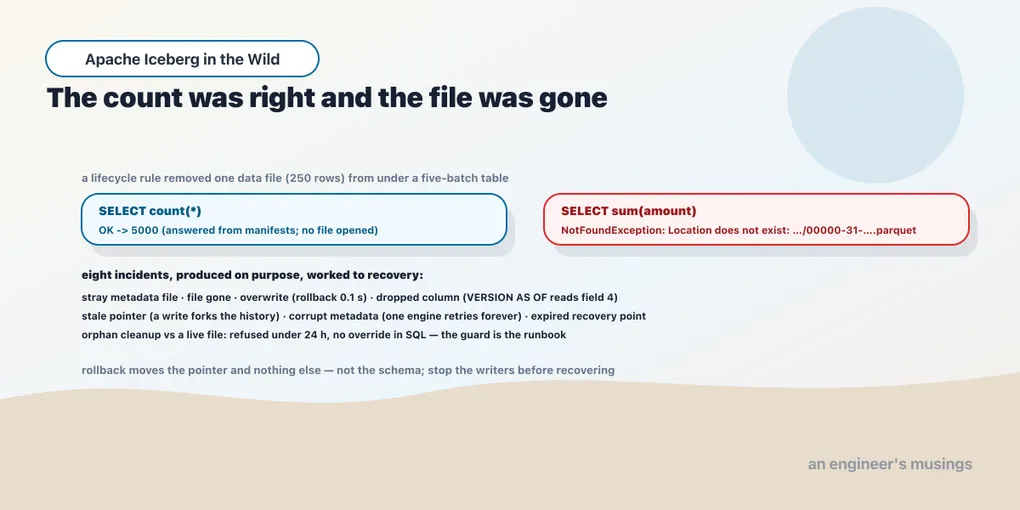
A data file deleted from under a five-batch table, the way a bucket lifecycle rule deletes things — silently, by age, without asking the catalog.
  deleted 00000-31-…-00001.parquet (250 rows); referenced by 1 snapshot
  Spark count(*):                OK -> 5000
  Spark sum(amount):             FAILED -> NotFoundException: Location does not exist: s3://warehouse/stage17/t2/data/00000-31-…
  Trino sum(amount):             Error opening Iceberg split s3://warehouse/stage17/t2/data/00000-31-… (offset=4, length=2291)
  PyIceberg scan:                does not exist 'warehouse/stage17/t2/data/00000-31-…'
The count is right. Iceberg answers count(*) from the manifests’ record counts without opening a file. The table reports five thousand rows with two hundred and fifty of them gone — and the dashboard from chapter 13 is green. The first query that reads a column is the first sign, and it fails with a path. That gap between “the metadata says” and “the store has” is the shape of most incidents on a lakehouse. The eight lab incidents below test that gap. Their error messages give you somewhere to start, and the triage queries establish which recovery is still possible.
Each incident was caused on purpose, then worked through four steps: detect it, triage it from metadata, contain it, recover. Keeping those steps separate matters. A procedure can restore a table while the writer or lifecycle rule that damaged it is still running.
1. A failed commit left a metadata file behind
A commit writes the new metadata file to the store first and then asks the catalog to swap the pointer. When the swap fails or the writer dies between the two, the file stays. Chapter 8’s unknown-state commits made nine of them.
  catalog points at 00005-….metadata.json;  7 metadata files on the store, 6 in the metadata log
  triage: files on the store not in the log: ['00006-…-stray.metadata.json']
  count(*) with the stray present: OK -> 5000
Detect by listing metadata/*.metadata.json on the store and subtracting metadata_log_entries; chapter 13’s pack has both halves. The stray in this run was one version number ahead of the pointer, which is exactly where a real one lands, because the failed commit had already claimed the next number before it died. Triage: the stray is harmless to readers, because nothing points at it, and dangerous to exactly one person, whoever registers it as the table’s state believing it to be newer. Contain: nothing. Recover: orphan cleanup removes it, on the schedule chapter 9 set, and never by hand from the store while the catalog might be about to use it.
2. A data file is gone
The missing path in the opening error gives triage a starting point: find the snapshots that reference it. That tells you whether an earlier snapshot could avoid the missing file.
SELECT snapshot_id FROM t.all_entries WHERE data_file.file_path = '<path>' AND status < 2; the file was added in snapshot 2381758306881012700; 0 snapshots precede it
rollback: none possible; rewrite_data_files as a repair: FAILED (it must read the file)
rows lost with the file: 250If the file was added recently, the snapshot before it still describes a consistent table, and chapter 10’s rollback is the recovery. The rows in that file since then are re-ingested from the source. This file was in the table’s first snapshot, so no earlier state exists. Compaction cannot rewrite around a file it cannot read. The 250 rows are gone unless a tag, a branch or chapter 16’s replica holds them. Contain by finding every other file the same rule would have removed — before the next query does. That is the store listing against data_files, per table, the same subtraction as incident 1 in the other direction. On this table it is a two-column query: every path in data_files that a HEAD on the store cannot find, and the lifecycle rule’s own age threshold tells you how many more are about to join it. The lifecycle rule is the incident; the missing file is one symptom of it.
3. An accidental overwrite
  INSERT OVERWRITE: 5,000 rows -> 1;  snapshots: [append, append, append, append, append, overwrite]
  rollback_to_snapshot(previous): OK ->  previous 2569322449750455866, current 8524797729871534864
  after rollback: 5,000 rows in 0.1s;  the overwrite snapshot is still in history
Here the previous snapshot is still available. The overwrite is a commit like any other, so restoring the earlier state takes one pointer swap — a tenth of a second in this run. The bad snapshot stays in the history until expiry, which is the evidence; the return row names both pointers, which is the audit line. Contain is the only hard step. The rollback has to happen before the retention window closes on the previous snapshot, and on a hot-class table from chapter 10 that window is two commits. A writer that keeps writing after the overwrite pushes the good state out of the window. Stop the writer first.
4. A bad schema change in production
  ALTER TABLE t4 DROP COLUMN note;  then a hundred rows written
  SELECT note:              FAILED -> column `note` cannot be resolved
  ALTER TABLE t4 ADD COLUMN note STRING;  count(note) = 0
  field ids: [(order_id, 1), (customer_id, 2), (amount, 3), (note, 5)]
  rollback_to_snapshot(before the drop): OK;  schema afterwards: [order_id, customer_id, amount, note];  count(note) = 0
  SELECT count(note) FROM t4 VERSION AS OF <pre-drop snapshot>:  5000
  INSERT OVERWRITE t4 SELECT … FROM t4 VERSION AS OF <pre-drop snapshot>:  count(*) 5000, count(note) 5000
The first attempted repair was to re-add the column by name. It did not bring the data back. The new column is field 5 and the data is under field 4, and every row reads null. A rollback does not bring it back either, because rollback moves the snapshot pointer and the schema is a table-level property that rollback leaves where it is. What does bring it back is time travel — a query VERSION AS OF the pre-drop snapshot is planned with that snapshot’s schema, and it reads field 4. Recover with an overwrite from that read into the current schema, which chapter 11’s warning about re-added names was pointing at. Contain by stopping the writers that carry the dropped column, which chapter 11 showed will keep writing it.
5. A stale catalog pointer
A table registered at an older metadata file while newer ones exist on the store. That is what a catalog restore from backup produces, and what chapter 3’s two-catalog divergence produced.
  registered t5_stale at 00002-….metadata.json;  it sees 2,000 rows, t5 sees 5,000
  triage: pointer 00002 vs newest metadata file on the store 00005;  metadata-log entries in the stale table: 3
  INSERT into the stale table:  a write from the old pointer forks the history
  metadata files on the store now: [00000, 00001, 00002, 00003-02053a, 00003-f2b549, 00004, 00005]
Detect by comparing the pointer’s version number with the newest metadata file under the table’s prefix; the pack does it. Contain before anything writes. A write from the stale pointer commits a new 00003 beside the real one, and the history forks: two files with the same version number and different content, which is the listing above. Recover by re-registering the table at the newest file, which is register_table with the current metadata location, and the stale writes, if any, are re-applied from their source. A fork that has been written to on both sides is chapter 16’s problem — not this one’s.
6. A corrupt metadata file
The current metadata file truncated to half its length.
  Spark count(*):      FAILED -> ServiceFailureException: Server error: RuntimeIOException: Failed to read file: …/00005-….metadata.json
  PyIceberg:           FAILED -> RuntimeIOException: Failed to read file: …/00005-….metadata.json
  Trino:               the query stayed in flight, retrying the catalog, for the nine minutes the client waited; it completed when the file was restored
  the metadata log's previous entry is still on the store: 00004-….metadata.json
  recover from a copy:                  OK -> 5000
  recover without one: register 00004:  OK -> 4000
The catalog reads the file on every load, so a corrupt current file is a catalog that returns 500 for that table to every engine. One engine’s response to a 500 is to retry indefinitely. Trino’s query sat in flight for the nine minutes its client waited, and the fixture logged two hundred and sixty-two failed reads of the same file in that time. The query finished the moment the object was restored, with no error ever shown to the client. An engine that retries a catalog error is kind to a flapping catalog — and blind to a corrupt file. The difference between the two is a metric chapter 13 does not have: the catalog’s own error rate per table. Recover from the object store’s own versioning or a copy if there is one, for a table at full state. Or register the previous metadata file from the log, for a table at its previous commit, with the last commit’s rows re-ingested. The previous file is always there, because the metadata log keeps it and chapter 9’s retention property deletes only what has dropped off the log. Contain by finding how the file was truncated. An object store does not truncate files by itself, and a process that did it once will do it to the next table.
7. An expired recovery point
  expire_snapshots(retain_last => 1), then rollback_to_snapshot(the first snapshot):
  FAILED -> ValidationException: Cannot roll back to unknown snapshot id: 7322528252981378268
Incident 3’s quick recovery depended on a snapshot that retention could remove. Here the rollback reaches for that earlier state and finds that it has already expired, as chapter 10 demonstrated. There is no recovery from within the table. Recover from a tag if one exists, from chapter 16’s replica if one exists, and otherwise from the source. Contain by reviewing every table’s retention against its recovery requirement, which is the exercise chapter 10 set.
8. Orphan cleanup deleted a live file
A staged file looks like an orphan until its writer commits it. The lab tried to make cleanup delete one in that interval, but the SQL procedure refused the unsafe cutoff.
  a writer has written staged-14e46fbb.parquet (250 rows) but not committed yet
  remove_orphan_files(older_than => now):
    FAILED -> Cannot remove orphan files with an interval less than 24 hours. Executing this procedure with
    a short interval may corrupt the table if other operations are happening at the same time. If you are
    absolutely confident that no concurrent operations will be affected …, you can use the Action API
  the staged file is still on the store: True
  the writer commits (PyIceberg add_files): committed;  count(*) 5250;  sum(amount) 128625.00;  Trino agrees
The procedure refuses any interval shorter than a day, and the SQL procedure has no option to override it. The message points at the Java Action API, which is a deliberate distance. A file a writer has staged but not committed survives every cleanup a scheduled SQL job can run, and the commit that follows lands cleanly on all three engines. The incident still exists in two shapes. A job written against the Action API with a short interval, which is a code review question. And a write that takes longer than a day: a multi-day backfill staging files it will commit at the end, whose oldest files are past the interval when the nightly cleanup runs. That one was not produced here, and it is flagged as the case to test before scheduling cleanup on a platform with long writes.
The runbooks
| Incident | Detect | Triage | Contain | Recover | Keep |
|---|---|---|---|---|---|
| stray metadata file | store listing minus metadata_log_entries | nothing points at it | nothing | scheduled orphan cleanup | the listing |
| data file gone | first column read fails; count(*) does not | all_entries for the path: added in which snapshot | list every file the same rule removed | rollback if a prior snapshot exists; else tag, replica or source | the error, the listing, the snapshot id |
| accidental overwrite | row count; overwrite in the snapshot log | the previous snapshot id | stop the writers before the window closes | rollback_to_snapshot, 0.1 s | the return row’s two pointers |
| dropped column | column unresolvable; a re-add reads null | field ids; the pre-drop snapshot | stop writers carrying the old field | INSERT OVERWRITE … FROM t VERSION AS OF | the field-id listing |
| stale pointer | pointer version vs newest file | metadata-log length | block writes: a write forks the history | register_table at the newest file | both 00003 files, if it forked |
| corrupt metadata | every engine fails to load; one retries forever | the previous entry in the log | find what truncated it | restore the object; else register the previous file | the corrupt object itself |
| expired recovery point | Cannot roll back to unknown snapshot id | refs: any tag or branch that held it | review retention against recovery | tag, replica, or source | the retention properties as they were |
| cleanup vs a live file | cannot happen from SQL | the interval, the longest write | code-review any Action API cleanup | add the file back with add_files if it still exists; else source | the cleanup job’s interval |
What to decide
A metadata-only answer is not a health check. count(*) was right with a file missing. The pack from chapter 13 adds one column read per table, on the file the store listing says is oldest.
Every incident starts with the store listing against the metadata, in one direction or the other. Files the metadata has that the store lacks, or files the store has that the metadata lacks. Schedule the subtraction — it is the detector for four of the eight.
Stop the writers before recovering. Every recovery here was one procedure call, and every one could have been made impossible by a writer committing past the state it needed.
Rollback moves the pointer and nothing else. Not the schema, not the properties. Time travel reads with the snapshot’s schema; use it to get data out of a dropped field.
Leave the guards on. The orphan procedure’s day-long minimum and its missing override are the platform’s best protection against its own maintenance jobs.
What was not run
A write longer than the orphan interval, which is the one shape of incident 8 the lab could not rule out. A catalog whose backing store was restored from a backup, which is incident 5 at fleet scale and chapter 16’s game day. And an object store with versioning on, which turns incident 6 into an undelete and was not available on this store.
Exercises
1. Run the subtraction both ways. For one table, list every object under its data/ prefix and compare with data_files. Then compare data_files with the listing. Do the same for metadata/ against metadata_log_entries and manifests.
Show answer
Objects on the store the metadata does not reference are orphans, from failed commits and from expired snapshots not yet cleaned. The count should be near zero after a cleanup, and it is never zero on a table with a streaming writer. Paths the metadata references that the store lacks are incident 2, and the count must be zero, always, on every table, which is why it is a scheduled check.
2. Time the window. On a hot-class table with a writer running, do an INSERT OVERWRITE of one row and then wait one commit before rolling back.
Show answer
With min-snapshots-to-keep at two, the good snapshot is expired by the next scheduled expiry after one more commit, and the rollback fails with unknown snapshot id. The runbook’s first step — stop the writer — is the whole difference between a tenth of a second and a restore from source.
Final thoughts
Eight incidents, and only one of them was a failure of Iceberg. The rest were failures of the things around it. A lifecycle rule that did not know about the catalog. A restore that did not know about the store. A schema change that did not know about the writers. An operator who did not know that rollback leaves the schema alone. Each recovery was a single call — once the triage had found the right one. The triage was in every case a query against metadata or a listing of the store, which is to say it was chapter 13’s pack run with a question in mind.
The next chapter is the incident that does not announce itself: a row readable through one engine and denied through another, and the three authorisation planes that let it happen.
Comments