One File, One Writer, No Exceptions
The database as an ordinary file — when it actually gets written, how ATTACH turns several files into one query, the lock rule that refuses even a read-only peek, and what survives when the engine version moves under it.
A Postgres database is a directory you never open, managed by a process you never inspect, reachable only through a protocol. You know it exists because the server tells you.
A DuckDB database is a file. You can ls it, copy it, put it in object storage, or delete it with rm. That sounds like a simplification, and mostly it is. But a file has properties a server hides from you, and four of them are worth understanding before you build on top.
Run against: DuckDB 1.5.5.
In memory, or on disk
Connect with no path and you get an in-memory database:
import duckdb
con = duckdb.connect()          # or duckdb.connect(':memory:')
Everything lives in your process. It is fast, it needs no cleanup, and it vanishes when the process exits. For a script that reads Parquet, computes an answer and prints it, this is usually what you want. There is no reason to persist a database you will never open again.
Give it a path and you get a file:
con = duckdb.connect('analytics.duckdb')The extension is a convention, not a requirement; .duckdb and .db are both common. The file is created immediately on connect, even before you write anything. A fresh one appears the moment you open it, so a typo’d filename leaves a stray empty database behind rather than erroring.
When the file actually grows
This is the first surprise, and it looks like a bug the first time you see it.
Create a hundred thousand rows and check the file:
con.execute("create table t as select i, i*2 as d from range(100000) t(i)")before checkpoint: 12 KB
after checkpoint: 524 KBTwelve kilobytes, for a table you just built. The data is real — query it and it is all there — but it is not in the main file yet. It is in the write-ahead log, and DuckDB moves it into the database proper at a checkpoint.
Checkpoints happen automatically: when the WAL grows past a threshold, and when the last connection to the database closes cleanly. You can also force one:
checkpoint;Two practical consequences. First, the file size on disk is not a live measure of your data. A small file may have a large WAL behind it, so comparing sizes mid-session tells you little. Second, and more important: this is why a clean disconnect matters. Close the connection and DuckDB checkpoints and tidies up. Kill the process instead and the WAL survives, and the next open replays it — which works, but means the file you copied in between was a partial picture.
If you have ever wondered why a DuckDB file sometimes seems to shrink after you close a session, that is the checkpoint reclaiming space it had been holding.
Several files, one query
A single file is the default, not the limit. ATTACH mounts another database into the current session:
attach 'reference.duckdb' as ref;After that, ref is a namespace and you query across both as if they were one database:
select t.i, ref.dim.label
from t
join ref.dim on t.i = ref.dim.i
order by 1;
(1, 'one')
(2, 'two')One query, two files on disk, an ordinary join between them. No federation layer, no foreign data wrapper, no configuration. This is the local equivalent of the cross-database references a cloud warehouse handles through a catalog.
duckdb_databases() shows what is mounted:
select database_name, path, type from duckdb_databases();('ch3', '/…/duckdb-verify/ch3.duckdb', 'duckdb')
('system', None, 'duckdb')
('temp', None, 'duckdb')Note that system and temp are always there. temp is where temporary tables live, and system holds the catalog itself. DETACH ref removes a mounted database from the session without touching the file.
The attach: block in a dbt profile, if you came here from the dbt book, is exactly this applied at connect time so every model sees the second database.
Attaching read-only is worth making a habit when you only mean to read:
attach 'reference.duckdb' as ref (read_only);The lock, which is stricter than you expect
Here is the behaviour that actually shapes how you work.
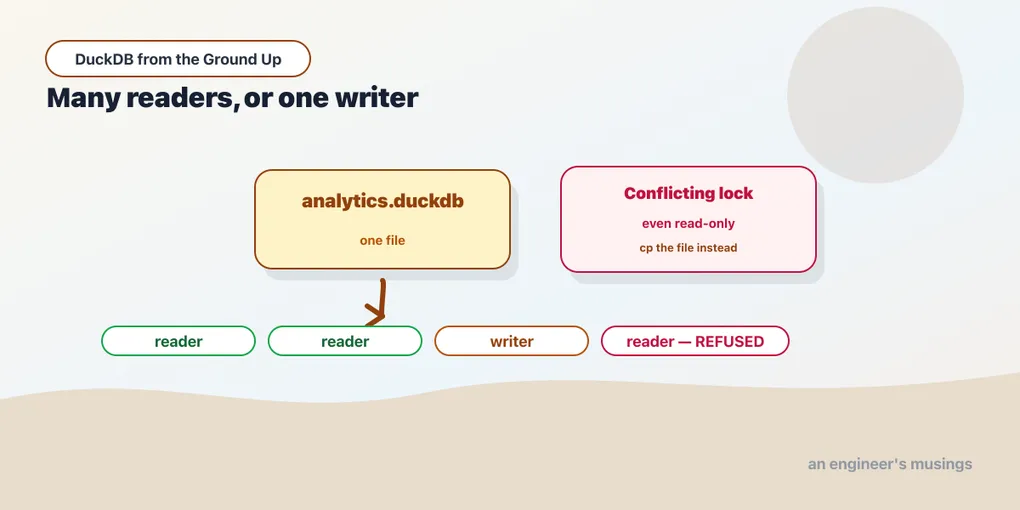
DuckDB allows many readers or one writer, on the whole file. Not per-table, not per-row — the file. That is the price of having no server: there is no coordinating process to arbitrate between clients, so the operating system’s file lock does the arbitrating, and it is blunt.
The obvious consequence is that two writers collide. The non-obvious one is that a reader cannot get in either. If a process holds the database for writing and you try to open it read-only, promising to touch nothing, you are still refused:
IO Error: Could not set lock on file "…/analytics.duckdb": Conflicting lockThis catches people constantly, and the reason is that the error is identical to the ordinary case. You read “conflicting lock”, think “something else has this open”, and go looking for the other program. The other program is your own script, still running.
There is no flag that grants a read-only peek at a locked database. What works is copying the file:
cp analytics.duckdb snapshot.duckdbThat reads cleanly while a writer holds the original, and you open the copy freely. It is a point-in-time snapshot rather than a live view, and if the writer is mid-transaction you get whatever was on disk at that instant. For inspecting yesterday’s results while today’s job runs, it is entirely adequate.
The file, across versions
An ordinary file raises a question a server never makes you ask: what happens to it when the engine moves on? DuckDB ships roughly monthly, so this is not hypothetical.
The folklore says a newer DuckDB writes files an older one cannot read. Test it. Write a database with 1.5.5, then open it with 1.1.3 — four minor releases behind:
written by 1.5.5
opened by 1.1.3: (1000,)
It opened. So did the reverse, a 1.1.3 file read by 1.5.5. The reason is a default worth knowing:
select current_setting('storage_compatibility_version');v0.10.2DuckDB writes for compatibility with v0.10.2 unless you say otherwise. New storage features exist, but by default your files do not use them. So anything from v0.10.2 onward can still read what you write. That is a deliberately conservative default, and it is why the folklore usually does not bite.
You can opt out, and then it bites exactly as advertised:
duckdb.connect('latest.duckdb', config={'storage_compatibility_version': 'latest'})Open that with 1.1.3:
IO Error: Trying to read a database file with version number 68,
but we can only read version 64.
The database file was created with an newer version of DuckDB.
There is the storage-format error, and note it names two integers rather than two release numbers. (The rest of that message, in 1.1.3, says the storage “will be stabilized when version 1.0 releases”. That advice was already out of date when the error was printed. Old errors age badly.)
Pass a version DuckDB does not know and it lists every one it does, which is the quickest way to see the valid set:
Invalid Input Error: The version string 'v9.9.9' is not a known DuckDB version,
valid options are: v0.10.0, v0.10.1, v0.10.2, … v1.5.0, v1.5.1, v1.5.2, …
So the practical rule is short. Leave storage_compatibility_version alone unless you need a new storage feature and control every reader. If you do change it, you have made your files unreadable by older engines on purpose, and that should be a decision someone wrote down.
The version-independent way out
When two engines genuinely cannot meet, there is an escape hatch that does not care about storage formats at all:
export database 'backup' (format parquet);That writes a directory:
schema.sql
load.sql
base.parquet
extra_other.parquet
schema.sql is your database as DDL and load.sql is the COPY statements to refill it. Omit (format parquet) and you get CSV instead — Parquet is the better default here for the reason chapter 4 gives, since it carries its own types and CSV does not.
The question that decides whether this is a real backup is what it captures. It captures everything:
CREATE SCHEMA extra;
CREATE SEQUENCE s INCREMENT BY 1 MINVALUE 1 MAXVALUE 9223372036854775807 START 6 NO CYCLE;
CREATE TABLE extra.other(z INTEGER);
CREATE TABLE base(k BIGINT, v BIGINT);
CREATE MACRO dbl (x) AS ((x * 2));
CREATE VIEW vw AS SELECT k FROM base WHERE (k < 10);
CREATE INDEX idx ON base(k);
Schemas, sequences, tables, macros, views and indexes, emitted in dependency order so the file replays cleanly.
Look closely at the sequence. It was created with START 1 and advanced five times before the export, and the DDL says START 6 — the current position, not the original definition. Restore it and nextval returns 6, so a table keyed off that sequence does not start handing out ids it already used. That is the kind of detail a backup gets wrong quietly, and this one gets it right.
Restoring is the mirror image:
import database 'backup';base 100 rows
vw 10 rows
nextval(s) 6
dbl(21) 42
extra.other 1 rowAnd the reason all of this is in a chapter about versions:
export from DuckDB 1.5.5 (in 'latest' storage format)
import into DuckDB 1.1.3  ->  1000 rows, sum 999000
The same database that 1.1.3 refused to open, it accepted through an export. Nothing in that directory is version-specific. It is SQL text and Parquet files, so it crosses any gap the storage format cannot.
That makes EXPORT DATABASE the tool for three jobs. Moving a database between engine versions. Keeping a backup that does not depend on a binary format. And getting your data out if you ever decide DuckDB is not the answer. For a simple point-in-time copy, cp is still faster and still fine.
What this costs you, honestly
The single-writer model is the sharpest edge in DuckDB and the clearest statement of what it is not for.
It rules out the obvious concurrent designs. You cannot have a web service with several worker processes writing to one DuckDB file. You cannot have a nightly job writing while an analyst queries. You cannot scale writes by adding processes, because the second one waits.
Reads are the exception that makes it workable. Many processes can read the same file at once, so a dashboard, a notebook and a scheduled report can all query concurrently as long as nothing is writing. That is a large fraction of analytical work.
The patterns that fall out of this are worth naming now, because they will recur:
- Write from one place. One process, one job, one writer. Everything else reads.
- Separate the write window from the read window. Build at 2 a.m., query during the day.
- Copy for isolation. A snapshot file for the reader, the live file for the writer.
- Or don’t persist at all. If your job reads Parquet, computes, and writes Parquet, an in-memory database has no lock to contend for.
That last one is more common than it sounds, and it is where the next chapters go. Once you can read files where they sit, the database file stops being the centre of gravity.
Final thoughts
The file being an ordinary file is genuinely the simplification it appears to be: no server, no backup tooling, no provisioning, and cp as a working disaster-recovery plan.
The edges are the price. The file lags your data until a checkpoint, so its size lies and a clean shutdown matters. Several files compose through ATTACH into one query, which is a real capability rather than a workaround. The lock is blunt in a way no server-based database is, refusing readers as firmly as writers. And the format outlives the engine version by default, with EXPORT DATABASE as the way across when it does not.
None of that is a defect. It is what “no server” costs, stated plainly, and it is cheap for the work DuckDB is meant for.
Next: The Sniffer Is Usually Right, and That’s the Problem — what type inference decides for you, and the ignore_errors behaviour where two queries disagree about how many rows exist.
Comments