The Database That Lives Inside Your Program
Why an in-process analytics engine exists at all — what it does that SQLite and Postgres structurally cannot, measured rather than asserted, and the honest list of jobs you should not give it.
There is a gap in the database landscape that most engineers work around without noticing.
On one side sits SQLite: a database with no server, living inside your process, opened as a file. It is the most deployed database on earth, and it is built for transactions — read a row, update a row, insert a row. On the other side sits PostgreSQL, or Snowflake, or BigQuery: real analytical power, but with strings attached. A server you connect to, an account you provision, credentials you manage, and something running whether you are using it or not.
The gap is the middle. You have a few gigabytes of Parquet on disk, or a CSV your colleague sent, or a table you pulled from an API. You want to group it, join it, window it, and get an answer. You do not want to stand up a warehouse for that. You also do not want to load it into SQLite, which is going to be miserable at the shape of query you are about to write.
That gap is what DuckDB fills. This chapter is about why the gap exists, what it takes to fill it, and the part most introductions skip: the work you should not hand it.
Run against: DuckDB 1.5.5.
The shape of the problem
Databases are built around an assumption about how rows are stored, and that assumption decides what they are good at.
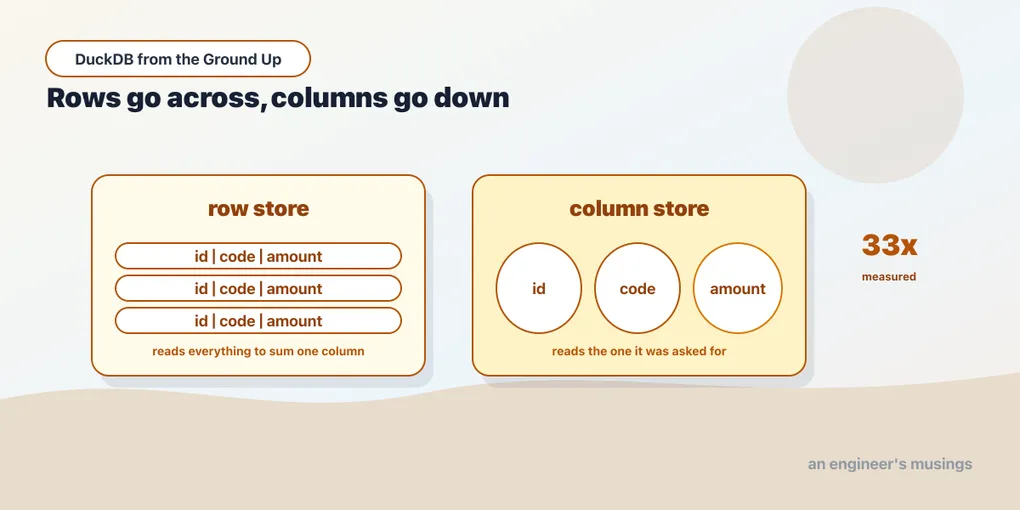
A row store keeps each record together on disk. Row 1’s id, code and amount sit adjacent, then row 2’s, and so on. That is exactly right for a transactional workload: fetch the customer with id 4821 and you touch one contiguous piece of storage. SQLite is a row store. So is Postgres, in its default heap.
A column store keeps each column together instead. Every amount in one run of bytes, every code in another. Fetching one whole row now means touching several places — worse for transactions. But ask “what is the average amount by code across two hundred thousand rows” and the engine reads only the two columns the question mentions. It reads them in tight contiguous runs, and never touches the rest.
The difference is not marginal. Here is the same data — 200,000 rows of (id, code, amount) — loaded into both SQLite and DuckDB, then the same aggregate query run against each:
select code, count(*), avg(amt) from t group by code order by code;sqlite : 82.6 ms
duckdb : 2.5 ms (33.2x)
identical results: TrueThirty-three times, on identical data with identical results. And the files:
sqlite  4,276 KB
duckdb    780 KB
A fifth of the size, because a column of four repeating codes compresses in ways a column of mixed-type row records cannot.
Both numbers come from the same script on the same laptop, and neither is a benchmark you should quote. The point is not the multiplier — it will differ on your data and your machine. The point is that this gap is structural. No amount of tuning makes a row store good at scanning two columns of two hundred thousand rows, because the layout puts the other columns in the way.
What “in-process” actually buys
Columnar storage is not unusual — every cloud warehouse is columnar. DuckDB’s second choice is the one that makes it a different kind of tool: it runs inside your process.
There is no server. No port, no daemon, no pg_ctl start, no container. The database is a library your program links against, and a file it reads and writes. When your program exits, nothing is left running.
Three things follow, and they compound:
Setup collapses to an install. No account, no provisioning, no credentials, no network path. The verification for this entire book is uv pip install duckdb.
Data does not cross a wire. With Postgres, every row your query returns is serialized, pushed through a socket, and deserialized on the other side. That cost is invisible until you pull a million rows into a DataFrame and wonder where the time went. DuckDB hands you results in the same memory your program is already using — and with Arrow, often without copying them at all.
The unit of deployment is a file. Your database is analytics.duckdb. You can copy it, email it, check it into object storage, or delete it. There is no backup procedure to design before you can experiment.
Against SQLite this is the same architectural bet — in-process, file-based, embedded — aimed at the opposite workload. It is fair to call DuckDB “SQLite for analytics”, and the DuckDB team have never resisted the comparison. What the phrase obscures is that the workloads are genuinely different, not two speeds of the same thing.
Where it sits against what you already know
If you have read the SQL track, you know PostgreSQL 18. A server, a row store, MVCC, a planner you can read with EXPLAIN, and a connection pool in front of it. That is the reference model for most engineers, and it is the right one for an application database.
DuckDB inverts three of those assumptions and keeps the fourth:
| PostgreSQL | DuckDB | |
|---|---|---|
| Deployment | server you connect to | library inside your process |
| Storage | row store | column store |
| Concurrency | many readers and writers | many readers or one writer |
| SQL | full, standard | full, standard, plus extensions |
That last row is why this book is not a SQL book. Your SELECTs, joins, CTEs and window functions transfer without modification — the SQL track teaches them once and they work here. What this book covers is everything the first three rows change.
The third row is the one that bites in practice, and it is stricter than most people expect. Chapter 3 gets to it properly, but the short version: while a writer holds the database file, a read-only connection is refused too. Not degraded — refused.
The jobs you should not give it
An introduction that only lists strengths is marketing. DuckDB is genuinely wrong for several common jobs, and the reasons are architectural rather than temporary.
It is not an application database. Your web service has many processes handling many concurrent requests, most of them small reads and writes of individual rows. That is the transactional workload a row store exists for, and the single-writer model makes it a non-starter regardless. Use Postgres.
It is not a shared warehouse. A file on your laptop is not queryable by your colleague, your BI tool, or a scheduled job at 3 a.m. There are answers to this — a later chapter covers MotherDuck and the remote protocol. But the default single-file model is genuinely local, and pretending otherwise is how teams end up emailing .duckdb files to each other.
It is not a cluster. DuckDB scales up. It will use every core you have, and it will spill to disk rather than fail when a query outgrows memory. It does not scale out. When one machine genuinely is not enough, that is a real boundary and not a configuration flag.
It is not a replacement for a warehouse you already have. Say your data is in Snowflake, your team’s SQL is in dbt, and your orchestration is in Airflow. DuckDB does not displace that. Where it fits is alongside — as the local development target that costs nothing, which is exactly the role it plays in the dbt book.
The honest summary: DuckDB is for analytical queries over data that fits on one machine, run by one process at a time. That is a narrower description than the enthusiasm around it sometimes suggests, and it is still an enormous amount of real work.
Why “fits on one machine” keeps growing
That constraint sounds more limiting than it is, and it is worth being precise about why.
A current laptop has 8 to 16 cores and 32 to 64 GB of RAM. Columnar compression routinely gets 5–10× on real analytical data — we saw 5.5× on a trivial three-column table above. A machine like that handles tens of gigabytes of Parquet comfortably, and DuckDB will spill to disk beyond that rather than fall over.
Most datasets people reach for a cluster to process are smaller than that. This is not a controversial claim any more. It is the observation behind the last several years of “your data is not big” writing, and DuckDB is the tool that made acting on it convenient.
The useful question is not “is my data big?” but “does my query need more than one machine?” The answer is no far more often than the tooling around us assumes.
What the rest of this book does
The chapters ahead follow the consequences of the two choices above.
Because DuckDB is in-process, the file becomes the unit of everything: storage, attachment, locking. Embedding it in Python or an application is a first-class story rather than an afterthought. Because it is columnar and vectorized, it can treat a Parquet file on disk as a table without loading it. It also runs a query plan that looks nothing like Postgres’s, and spills gracefully when the data outgrows memory. And because it is neither a server nor a cluster, the interesting edge is what happens when you outgrow one machine.
We start with the two things you touch first: getting it installed, and understanding the file it hands you.
Next: Two Installs and a Shell Worth Knowing — the Python package, the standalone binary, and the shell that got a rewrite in 1.5.
Comments