Grain and the Four-Step Design
Kimball's four-step design process, and the one decision inside it that governs everything else: what a single fact row means.
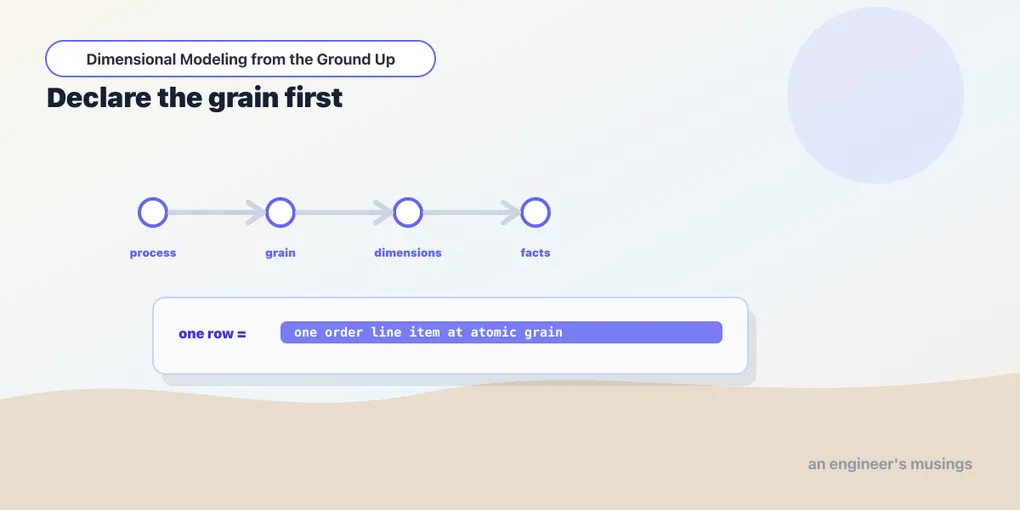
You could design a fact table by staring at the source tables and guessing. Kimball gives you something better: a four-step process that runs in a fixed order and forces the decisions in the sequence that keeps you honest.
- Select the business process. Pick the real-world activity you’re modeling. Not a department, not a report — an event the business does. For the bookshop, “a customer places an order.”
- Declare the grain. Decide what a single row in the fact table represents. This is the pivot the other three steps turn on.
- Identify the dimensions. Given that grain, what context describes each row? Who, what, when, where.
- Identify the facts. Given that grain, what do you measure on each row? The numbers.
The order matters because grain governs the two steps after it. You can’t sensibly ask “what dimensions apply?” until you know what one row is — dimensions and facts are only meaningful relative to a grain. Get step two wrong and steps three and four inherit the mistake.
Walking the four steps against the bookshop
The process is worth doing longhand once, out loud, because each step has a failure mode that only shows up if you rush it. Let’s run all four against the ordering process and come out the other side with an actual inventory of tables to build.
Step 1 — select the business process. The trap here is picking a report or a department instead of a process. “The sales team’s weekly dashboard” is not a business process; it’s a consumer of one. “Marketing wants revenue by genre” is a question, not a process either. The process is the verb the business physically performs: a customer places an order. It has a clear moment it happens, a clear actor, and it leaves a record in an operational system. If you can point at the source table where a row appears the instant the thing occurs — here, stg_order_items, one row born per line the moment the order is confirmed — you’ve found a process and not a wish. Departments reorganize and reports get renamed every quarter; the act of ordering a book does not. Modeling the process rather than the report is what lets one fact table serve the sales dashboard, the finance close, and the marketing genre analysis without a rebuild for each.
Step 2 — declare the grain. Here is where the whole design is won or lost, so it gets its own section below. The short version: one row per order line item, identified by (order_id, line_number). Say it as a sentence — “one row in this table is one book on one order” — and write that sentence into the model as a comment, because in three months it’s the only documentation anyone trusts.
Step 3 — identify the dimensions. With the grain fixed, dimensions fall out by asking who, what, when, where of a single line. Who placed it? The customer — dim_customer. What was bought? A book — dim_book. When? The order date — dim_date. Each answer is a dimension the line points at with a foreign key. Notice the discipline the grain imposes: because a row is one line, “the book” is a single, unambiguous answer. Had we chosen order grain, “what book?” would have no single answer — an order holds three — and the dimension would refuse to attach. The grain is what makes the dimensions fit. Attributes that describe the line but aren’t worth a whole table of their own — order_id itself, a line-level discount code — either ride along as a degenerate dimension (a dimension value with no dimension table, living right on the fact row) or get parked for a later junk-dimension pass. We’ll meet both properly later in the book.
Step 4 — identify the facts. Now, and only now, the numbers. Given one order line, what’s measurable? quantity (how many copies), unit_price (the price each), and amount (the extended line total). The grain disciplines this step too: every measure must be true at the line, and each of these is. A tempting measure like order_total is not true at the line — it belongs to the whole order, and stapling it onto a line row is the single most common way people poison a fact table. We’ll watch exactly how that poison spreads in a moment. If a number you want isn’t measurable at the declared grain, that’s not a reason to change the grain casually; it’s a signal you may need a second fact table at a different grain, which is a feature, not a failure.
Run those four steps and the deliverable isn’t a table — it’s a small map:
| what | table | grain |
|---|---|---|
| the ordering event | fct_order_items | one row per order line |
| who ordered | dim_customer | one row per customer |
| what was ordered | dim_book | one row per book |
| when it happened | dim_date | one row per calendar day |
Four tables, one fact and three dimensions, and every one of them traceable to a specific answer in the four-step walk. That map is the entire star schema for the ordering process, and the rest of this book is filling it in.
Grain is the whole ballgame
Grain is the answer to “what does one row in this fact table mean?” — and it’s the most important decision in the entire design. Everything downstream is a consequence of it. So get deliberately, painfully specific.
The bookshop’s tempting wrong answer is “one row per order.” It feels natural — an order is a thing, it has a total, customers place orders. But an order is a bag of line items: three books, three genres, three prices, one order. Model at the order grain and you’ve thrown away the line before you’ve stored a single row. Now “revenue by genre” is unanswerable — the genre lives on the line you didn’t keep — and you can’t recover it, because the detail was never written down.
So go to the atomic grain: one row per order line item. One customer’s single order of three books becomes three fact rows, each tied to one book, one quantity, one price. This is almost always the right call, and the reason is asymmetric. You can always roll up; you can never drill down into detail you didn’t keep. From line-item rows you can sum to order totals, to daily revenue, to genre-by-month — any grain coarser than what you stored is a group by away. But no aggregation recovers the per-book breakdown from an order total. Low grain is optionality. High grain is a door that locks behind you.
The cost of atomic grain is row count, and it’s a cost you should happily pay. More rows is exactly what warehouses like Snowflake are built to chew through, and the flexibility is worth orders of magnitude more than the storage. When you’re unsure how fine to go, go finer.
Atomic and aggregated are a deliberate pair
None of this means aggregates are forbidden — it means they’re a derived layer, never the only layer. A daily-revenue-by-genre rollup is a perfectly good table to build for a dashboard that hits it a thousand times a day; it’s cheaper to scan and it answers its one question fast. The rule is about lineage: the aggregate is built from the atomic fact, downstream of it, and the atomic fact remains the source of truth that can regenerate any aggregate you later wish you’d had. Store atomic, aggregate on purpose.
Here’s the worked counter-example, because the asymmetry only really lands when you feel the wall. Suppose a well-meaning first pass declares the grain as one row per order and stores order_total:
-- the tempting shortcut: order grain
select
    order_id,
    customer_id,
    order_date,
    sum(extended_price) as order_total   -- already collapsed the lines away
from {{ ref('stg_order_items') }}
group by order_id, customer_id, order_date
That table launches, the “revenue per day” dashboard is green, everyone’s happy. Six weeks later marketing asks the question that pays your salary: which genres are actually selling? And you are stuck — genuinely, architecturally stuck. Genre lives on the book, the book lives on the line, and the line was group by-ed out of existence before a single row was written. There is no query you can run against this table to get it back; the detail isn’t hidden, it was never stored. Your only move is to rebuild the fact at line grain and backfill it from raw sources — which is exactly the work you were trying to skip, now with a live dashboard depending on the table you have to replace. Had you stored the atomic grain from day one, the genre rollup would have been a five-line group by you wrote over lunch. That is the whole argument for atomic grain, in one avoidable afternoon of regret.
Mixed grain and the fan-out double-count
The subtler hazard isn’t choosing the wrong grain up front — it’s changing the grain by accident, mid-query, with a join. This is the bug that ships numbers that are wrong but plausible, which is the worst kind.
Picture two honest tables: fct_order_items at line grain, and an order-header source at order grain carrying one shipping_fee per order. Someone wants “total shipping revenue by customer” and reaches for the join they already know:
-- WRONG: mixes order grain into line grain, then sums
select
    oi.customer_id,
    sum(oh.shipping_fee) as shipping_revenue
from fct_order_items oi
join order_header oh on oh.order_id = oi.order_id
group by oi.customer_id;
The join looks fine and runs fine. But oh is at order grain and oi is at line grain, so the join fans out: a three-line order matches the header row three times, and shipping_fee — a per-order number — now appears three times. sum(shipping_fee) counts it triple. A one-line order counts it once. Put numbers on it: an order with three lines and a $5 shipping fee reports $15 of shipping revenue, and a single-line order with the same $5 fee reports $5. The inflation is proportional to line count, so it isn’t even a constant you could spot and divide out — customers who buy in bigger baskets look like they pay disproportionately more shipping, which is a completely fabricated pattern that someone will now try to explain. Worse, the total still looks like money — it’s in dollars, it’s positive, it’s roughly the right order of magnitude — so nothing about the output screams “wrong.” That’s the signature of a grain bug: not a crash, a plausible lie.
The tell is always the same: you summed a measure across a grain finer than the measure’s own. shipping_fee is true once per order; the moment it rides on a per-line row, summing it is summing copies. The fixes are all versions of “respect the grains”:
-- aggregate the finer table to the coarser grain first, THEN join
with order_shipping as (
    select order_id, customer_id, shipping_fee   -- already one row per order
    from order_header
)
select customer_id, sum(shipping_fee) as shipping_revenue
from order_shipping
group by customer_id;

-- or, if you must join at line grain, de-duplicate the coarse measure
select
    oi.customer_id,
    sum(oh.shipping_fee)
      / count(*) over (partition by oi.order_id)  -- undo the fan-out... fragile
      as shipping_revenue
from fct_order_items oi
join order_header oh on oh.order_id = oi.order_id
group by oi.customer_id;
The first fix is the one to internalize: never join two facts at different grains and sum across the seam. Bring each fact to a common grain first, then combine. The second fix works but is the kind of clever that breaks the day someone adds another join — reach for it only when you truly must stay at line grain. The whole family of bugs disappears if the instinct becomes reflexive: before you sum, ask what grain this number is native to, and whether the rows you’re summing over are copies.
The fact table, grain first
Here’s where the process pays off in code. The fct_order_items model is built so its grain is impossible to misread — one row per (order_id, line_number), stated in the SQL itself.
-- models/marts/fct_order_items.sql
{{ config(materialized='table') }}

select
    -- grain: one row per order line item
    oi.order_id,
    oi.line_number,

    -- foreign keys to dimensions (filled in over the next posts)
    -- b.book_sk        as book_sk,
    -- c.customer_sk    as customer_sk,
    -- d.date_sk        as date_sk,

    -- measures, at this grain
    oi.quantity,
    oi.unit_price,
    oi.extended_price
from {{ ref('stg_order_items') }} as oi
The grain lives right there in the two lead columns and the comment above them. order_id alone doesn’t identify a row — three lines share it — so line_number earns its place: together they’re unique, and a grain test on the pair is how you enforce that promise (we’ll add it at the end of this chapter). A row that duplicates (order_id, line_number) isn’t a data glitch to shrug at; it’s a grain violation, and it means a join upstream fanned out and your sum(extended_price) is now quietly wrong.
The dimension keys are commented out because they don’t exist yet — dim_book, dim_customer, and dim_date and their surrogate keys are the next few chapters. What the skeleton nails down now is the thing you can’t change cheaply later: this table counts order lines, one row each, forever. The measures hanging off that grain — quantity, unit_price, amount — are the subject of the next chapter, where facts get the attention dimensions have been hogging.
Grain for the other fact types
Everything so far has been about a transaction fact — one row per event, the workhorse you’ll build most often. But “declare the grain” is step two for every fact table, not just this kind, and the other kinds declare it differently. Naming the grain of each now makes the next chapter’s builds land faster; think of this as the grammar before the vocabulary.
- Transaction fact — one row per event.
fct_order_itemsis the model: a row appears when a thing happens and is never touched again. The grain is the event, stated as(order_id, line_number). This is the default; when you don’t know which type you need, you need this one. - Periodic snapshot — one row per entity per period.
fct_inventory_dailywill hold one row per book per day, carrying that day’s stock level — whether or not the stock moved. The grain is(book_sk, snapshot_date): the entity crossed with the period, and a row exists for the quiet days precisely because “how many were in stock on a day nothing happened” is the question this table exists to answer. An event log can’t answer that; a snapshot is built to. - Accumulating snapshot — one row per process instance.
fct_orderswill keep one row perorder_idand update it in place as the order moves from placed to shipped to delivered. The grain is the whole process instance — one order, one row, for the life of the order — which is why this fact breaks the append-only rule that transaction facts live by. The row is a scoreboard for one order’s journey, not a ledger entry. - Factless fact — one row per event or per coverage. Some things worth recording carry no number. A row per wishlist-add is an event factless fact (grain: one add — one customer, one book, one moment). A row per promoted-book is a coverage factless fact (grain: one promotion-book pairing — a state that held, not an event that fired). The measure, when you need one, is
count(*); the grain is still the first thing you declare.
Same discipline throughout: name what one row means before you name anything else. The rhythms differ — event, period, process, coverage — and picking the rhythm is picking which questions the table can answer cheaply. The next chapter builds each of these for real; here, the point is only that “declare the grain” never stops being step two.
Testing the grain
A grain you only state is a grain you’ll eventually break — a merge upstream double-fires, a join fans out, and the table quietly starts carrying two rows where it promised one. The fix is to make the promise executable. Because fct_order_items has a composite grain, the right tool is dbt_utils.unique_combination_of_columns, which asserts that a set of columns is unique together:
# models/marts/_facts.yml
models:
  - name: fct_order_items
    description: "One row per order line item. Grain: (order_id, line_number)."
    data_tests:
      - dbt_utils.unique_combination_of_columns:
          combination_of_columns:
            - order_id
            - line_number
Two things make this worth more than a passing check. First, it’s executable documentation: the YAML now literally says “these two columns are unique together,” which is the grain sentence in a form the warehouse enforces on every run. Second, it fails loudly and early — the day a build fans the table out, dbt build goes red before a dashboard serves the doubled number to someone making a decision on it.
Reading a failing grain test
Say a change to stg_order_items accidentally joins in a table that has two rows per line — a price-history table, maybe, with an old and a new price. The next dbt build prints something like:
1 of 1 FAIL 1 dbt_utils_unique_combination_o_fct_order_items_order_id__line_number ... [FAIL 1 in 0.42s]

  Failure in test dbt_utils_unique_combination_of_columns_fct_order_items_order_id__line_number
    Got 1 result, configured to fail if != 0

  compiled Code at target/compiled/bookshop/models/marts/_facts.yml/...

  select order_id, line_number, count(*) as n_records
  from analytics.marts.fct_order_items
  group by order_id, line_number
  having count(*) > 1
The message is telling you the exact shape of the problem: it found 1 result, meaning one (order_id, line_number) combination appears more than once, and it hands you the query that found it. Diagnosing is now mechanical:
- Run the compiled test query yourself — dbt saved it at that
target/compiled/...path, or you can paste thegroup by ... having count(*) > 1straight into Snowflake. It returns the offending(order_id, line_number)pairs and how many copies each has (n_records). - Pull the full rows for one offender and eyeball what differs between the duplicates:
select * from fct_order_items where order_id = <id> and line_number = <n>. If the two rows are identical except for, say,unit_price, you’ve found the fan-out — some upstream join multiplied the line by a dimension that has more than one matching row. - Walk back up the lineage from
fct_order_itemsthrough itsref()s until you find the join that isn’t one-to-one at line grain. The culprit is always a join whose right-hand side has more than one row per join key — the classic being a “current and historical” table joined without a “current only” filter. - Fix it at the grain — restore the join to one-row-per-line (add the
where is_currentfilter, or aggregate the offending table to line grain before joining), rebuild, and watch the test go green.
Keep --store-failures in your back pocket, too: run dbt build --store-failures and dbt writes the failing rows to a table in your warehouse instead of just counting them, so you can query the offenders directly without re-deriving the test query. Either way, the loop is the same — the test names the grain violation, the compiled query localizes it, and the lineage walk finds the join that broke the promise the grain made.
Final thoughts
Teams rarely regret storing too much detail; they regret the summary they can’t unwind. Grain is where that regret is decided, and it’s decided once, early, when the pressure is to just ship a table that answers today’s question. Walk the four steps in order, declare the atomic grain out loud, write it into the model, and test it — because a fact table that quietly loses its grain doesn’t error, it just returns numbers that are wrong in a way no one notices until a decision has already been made on them.
Comments