Remembering What Changed: Snapshots
Source systems overwrite the past — a customer's plan flips from free to plus and yesterday's value is gone. Snapshots capture each change as history, giving you slowly changing dimensions with almost no code.
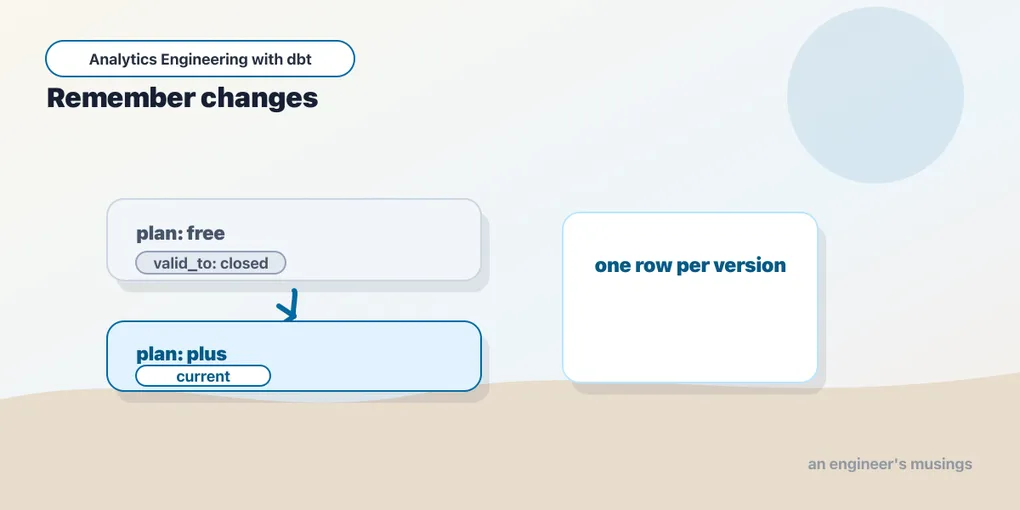
Most source systems only store the present. A customer’s plan column says plus today; when they upgraded, it changed in place, and the fact that they were free last month is simply gone. That’s fine for the app and terrible for analytics: you can’t answer “how many customers upgraded in June?” against data that forgets. Snapshots are dbt’s fix: they watch a table over time and record every change as its own row, so history accumulates instead of being overwritten.
The problem, concretely
Say customer 2, Alan, is on the free plan. Your source table has one row:
customer_id | plan
2           | free
He upgrades. The source updates in place:
customer_id | plan
2           | plus
The free era is unrecoverable. Any model that reads this table now believes Alan was always plus. Every “state at a point in time” question is unanswerable. This pattern, tracking how a dimension’s attributes change over time, is a slowly changing dimension (specifically Type 2), and it’s exactly what snapshots implement.
Defining a snapshot
A snapshot is declared in YAML under snapshots/. You tell dbt what to watch, how to identify a row, and how to detect a change:
# snapshots/customers_snapshot.yml
snapshots:
  - name: customers_snapshot
    relation: ref('stg_customers')
    config:
      unique_key: customer_id
      strategy: check
      check_cols: ['plan']
Four keys carry it:
relation— what to snapshot. Here,stg_customers, a thin staging view over the raw customer table (more on why thinness matters — and why you don’t point a snapshot at a model that does real work — below).unique_key— how to identify a row across runs (customer_id). It must be genuinely unique in the source; if two rows share a key, the snapshot will thrash, closing and reopening versions on every run.strategy— how to detect a change.checkcompares specific columns; the alternative,timestamp, trusts anupdated_atcolumn to tell it when a row changed.check_cols— with thecheckstrategy, which columns to watch. A change inplanis a change worth recording; a change in, say,last_loginmight not be.
Syntax note: dbt 1.9 moved snapshots to YAML config — a plain
snapshots/*.ymlfile with aconfig:block, as above. Older projects put a Jinja{% snapshot %} ... {% endsnapshot %}block inside a.sqlfile. That legacy form still works, but the YAML form is what to write now, and the two shouldn’t be mixed for the same snapshot.
For reference, the same snapshot in the pre-1.9 block form looked like this:
-- snapshots/customers_snapshot.sql  (legacy — for recognition only)
{% snapshot customers_snapshot %}
  {{ config(
       target_schema='snapshots',
       unique_key='customer_id',
       strategy='check',
       check_cols=['plan']
  ) }}
  select * from {{ ref('stg_customers') }}
{% endsnapshot %}
Everything the block did in Jinja, the YAML now does declaratively — and because there’s no SQL body, relation replaces the old select *. If you’re migrating, note that the YAML config: keys map one-to-one onto the old config() args, so the translation is mechanical.
The meta columns dbt adds
When it builds the snapshot table, dbt keeps your columns and bolts on four bookkeeping columns:
dbt_valid_from— when this version of the row became true.dbt_valid_to— when it stopped being true.nullmeans it’s the current version.dbt_updated_at— the timestamp dbt used to decide the change (theupdated_atvalue for thetimestampstrategy, or run time forcheck).dbt_scd_id— a hash that uniquely identifies each version row. This is your ready-made surrogate key for a Type-2 dimension; you don’t have to generate one.
Those default names occasionally collide with real source columns — a warehouse team that already ships a dbt_updated_at, or a legacy table with its own valid_from. When that happens, don’t rename the source column; rename dbt’s meta columns with snapshot_meta_column_names:
snapshots:
  - name: customers_snapshot
    relation: ref('stg_customers')
    config:
      unique_key: customer_id
      strategy: timestamp
      updated_at: updated_at
      snapshot_meta_column_names:
        dbt_valid_from: scd_valid_from
        dbt_valid_to:   scd_valid_to
        dbt_updated_at: scd_updated_at
        dbt_scd_id:     scd_id
Now the history windows live under scd_valid_from / scd_valid_to, and the source’s own columns pass through untouched. Set these names before the first run — renaming meta columns on an existing snapshot is a schema change dbt won’t reconcile for you, and you’ll be hand-migrating the table.
Running it
Snapshots have their own command, dbt snapshot (they also run as part of dbt build). The first run establishes a baseline — one row per customer, each marked as current:
$ dbt snapshot
OK snapshotted main.customers_snapshot ... [OK]
customer_id | plan | dbt_valid_from | dbt_valid_to
2 | free | 2026-06-26 22:07... | (null) ← currentNow Alan upgrades — the source shows plan = 'plus' — and you snapshot again:
$ dbt snapshot
OK snapshotted main.customers_snapshot ... [OK]
dbt notices plan changed for customer 2. It closes the old row by stamping its dbt_valid_to, and inserts a new current row:
customer_id | plan | dbt_valid_from      | dbt_valid_to
2           | free | 2026-06-26 22:07... | 2026-06-30 09:14...  ← closed: the old truth
2           | plus | 2026-06-30 09:14... | (null)               ← current: the new truth
Two rows for one customer, each with a time window, and note the seam: the old row’s dbt_valid_to is exactly the new row’s dbt_valid_from, so the windows abut without a gap and without overlap. His free period is preserved forever, and the plus period is open until the next change. You never wrote an update, never managed the timestamps; the strategy did it.
Choosing a strategy
Everything above used the check strategy, which diffs the columns you name on every run. That works anywhere, but it isn’t the only option — and it has sharp edges worth knowing before you commit a table to it.
A note on verification: the
check-strategy example is run-verified in the companion project (its seed has no reliable modified-timestamp column, socheckonplanis what it uses). Thetimestamp,check_cols: all, andhard_deletesexamples that follow are docs-verified against dbt 1.9, not run in the companion.
The timestamp strategy
When the source carries a trustworthy last-modified column, prefer it. Suppose stg_customers also exposed an updated_at — then instead of comparing a list of columns, dbt would compare that single timestamp:
snapshots:
  - name: customers_snapshot
    relation: ref('stg_customers')
    config:
      strategy: timestamp
      unique_key: customer_id
      updated_at: updated_at
Each run, dbt looks at every row’s updated_at and compares it to the version it already has on file; a newer timestamp means the row changed, so it closes the old version and inserts a new one — the same bookkeeping as before, just triggered differently. It’s both cheaper (one column to compare, not several) and more precise (it catches a change in any column, not only the ones you thought to list).
The trade-off is trust. timestamp believes the source maintains updated_at honestly — if an app updates a row but forgets to bump the timestamp, the snapshot never notices. check needs no such column, which is exactly why the bookshop uses it — the customer table has no reliable modified-timestamp — but it pays for that independence by re-comparing check_cols on every run. Reach for timestamp when the source is trustworthy, check when it isn’t.
check_cols: all, and why to think twice
You can tell the check strategy to watch every column by writing check_cols: all instead of a list:
    config:
      strategy: check
      unique_key: customer_id
      check_cols: all
It sounds like the safe choice — nothing slips through — but it has two costs. First, performance: on a wide table, dbt builds a comparison across every column on every run, and a change to a single volatile field (a last_login, a re-computed lifetime_value) opens a brand-new version even when nothing you care about moved. You get a snapshot that grows fast and records churn instead of meaning. Second, schema drift: if the source adds a column later, all silently starts tracking it, which can trigger a wave of spurious new versions the first time the new column diverges. A named check_cols: ['plan'] is almost always the better instrument — you snapshot the attributes that carry business meaning and ignore the noise.
The NULL gotcha in the check strategy
The check strategy’s comparison is careful about NULLs, but you should understand how, because it’s a classic source of “why didn’t my snapshot fire?” dbt treats a move from a value to NULL, or NULL to a value, as a change — it doesn’t collapse them the way a naive col_a != col_b would (in SQL, 'free' != NULL is NULL, i.e. not true, so a plain inequality would miss a value-to-NULL transition). dbt guards against exactly that. The residual trap is subtler: if a check_col is NULL in both the stored version and the incoming row, that’s correctly seen as no change — but if your ETL flips a genuinely-meaningful field between NULL and empty-string '', those are two distinct values and every flip opens a new version. Normalize such columns in a view before the snapshot, or use timestamp and sidestep column-by-column comparison entirely.
When a row is deleted
Both strategies share a blind spot. A snapshot detects changes to rows it sees — but if a row simply vanishes from the source (the customer is deleted, the order is purged), neither strategy fires. By default that row’s snapshot version stays open forever, dbt_valid_to still null, quietly asserting a customer who no longer exists is your current truth.
dbt 1.9’s hard_deletes config decides what to do about it:
    config:
      strategy: timestamp
      unique_key: customer_id
      updated_at: updated_at
hard_deletes: new_record # ignore | invalidate | new_recordignore(the default, and the old behavior) — deletions are invisible. The last version stays open as if nothing happened.invalidate— when a row disappears, dbt stamps itsdbt_valid_to, closing the window. You lose the fact that it was deleted specifically, but at least it’s no longer masquerading as current.new_record— dbt inserts one final row for the key, flagged withdbt_is_deleted = 'True', so the deletion itself becomes part of the history. This is the strongest choice when “when did this customer leave?” is a real question.
1.9 vs legacy:
hard_deletesreplaces the old booleaninvalidate_hard_deletes: true, which did exactly whathard_deletes: invalidatenow does. The old key still functions for backward compatibility, but you can’t set both, andnew_record— the “record the deletion as its own row” behavior — is only reachable through the newhard_deletesconfig. New snapshots should usehard_deletes.
One companion change worth knowing: dbt 1.9 also adds dbt_valid_to_current, which lets you set the current row’s dbt_valid_to to a sentinel — say to_date('9999-12-31') — instead of null. The mechanics are identical; some BI tools just deal with a far-future date more gracefully than a null in a between filter, and, as you’ll see, it makes point-in-time joins read more cleanly.
Snapshot a thin, stable layer
This snapshot points at ref('stg_customers') — but stg_customers is a thin view: it renames id to customer_id and passes plan straight through, and does nothing else. That thinness is the whole reason it’s safe to snapshot, and it’s worth being rigorous about the rule, because what you point a snapshot at is the single decision people most often get wrong.
A snapshot’s job is to be a faithful recording of what the data actually held, when it held it. The hazard is inserting logic you keep editing between the source and the historical record — and transformation logic is the one thing in your project you’re guaranteed to keep touching. If you snapshot a model that does real work — recasting types, coalescing nulls, deriving columns — then the day you refactor it, your snapshot’s check comparison sees a “change” that never happened in the real world, and you get a wall of spurious new versions. Worse, because a snapshot is stateful, that garbage is now permanent — you can’t rebuild it. A pure passthrough like stg_customers never triggers that: its output only moves when the raw plan genuinely moves.
There’s a second, concrete hazard to snapshotting a model that does real work — meta-column collisions. If a model already selects a column named dbt_updated_at or valid_from, snapshotting it clashes with dbt’s own bookkeeping columns; snapshot_meta_column_names (above) is there for that rare genuine conflict. The rule of thumb: snapshot the raw source, or a thin, deterministic view over it like stg_customers, and keep every bit of transformation logic you expect to keep editing downstream of the history, on models you’re free to rebuild. The moment a staging model starts doing real, evolving work, snapshot the raw source underneath it instead.
Reading history back
With the history captured, the questions that were impossible become plain SQL. Three patterns cover almost everything you’ll do.
A current-only view. Filtering where dbt_valid_to is null gives you just the live version of each row, so a snapshot doubles as an always-current mirror of the source. Wrap it in a model so downstream marts never touch the raw snapshot:
-- models/marts/dim_customers.sql
select
    dbt_scd_id as customer_key,   -- surrogate key, one per version
    customer_id,                  -- natural/business key
    plan,
    dbt_valid_from,
    dbt_valid_to
from {{ ref('customers_snapshot') }}
where dbt_valid_to is null
This dim_customers is illustrative — a Type-2 dimension derived from customers_snapshot, not a separate source. (The companion ships a plain current-state customers mart alongside it; the point here is that both are cheap, rebuildable models sitting on top of the one stateful snapshot.) If you’d rather build the surrogate key yourself — for stability across a strategy change, say — dbt_scd_id isn’t your only option:
{{ dbt_utils.generate_surrogate_key(['customer_id', 'dbt_valid_from']) }} as customer_key,A point-in-time query. Who was free on June 20th? Ask for the version whose window contains that date:
select customer_id
from {{ ref('customers_snapshot') }}
where plan = 'free'
  and dbt_valid_from <= '2026-06-20'
  and (dbt_valid_to > '2026-06-20' or dbt_valid_to is null)
A temporal join — the payoff for analytics. This is where snapshots earn their keep: attach to every fact the dimension value as it was when the fact occurred, not as it is now. Join each order to the customer version valid at the moment the order was placed:
-- what plan was each customer on *at the time they ordered*?
select
    o.order_id,
    o.customer_id,
    o.order_date,
    c.plan as plan_at_order_time
from {{ ref('stg_orders') }} o
left join {{ ref('customers_snapshot') }} c
    on c.customer_id = o.customer_id
   and o.order_date >= c.dbt_valid_from
   and o.order_date <  coalesce(c.dbt_valid_to, '9999-12-31')
That coalesce is why some teams set dbt_valid_to_current to a far-future sentinel — it lets the current row participate in a clean >= ... and < ... range without special-casing the null. Now “revenue from customers who were on free when they bought” is a group by, and it stays correct even after those customers upgrade. A ref('stg_customers') join — reading only the present — would silently rewrite history and answer the wrong question.
If your dim_customers needs the full Type-2 furniture that BI tools expect — an is_current flag and a per-customer version number — the snapshot has everything you need to derive them, no extra state required:
-- models/marts/dim_customers.sql
select
    dbt_scd_id as customer_key,
    customer_id,
    plan,
    dbt_valid_from,
    dbt_valid_to,
    dbt_valid_to is null as is_current,
    row_number() over (
        partition by customer_id
        order by dbt_valid_from
    ) as version
from {{ ref('customers_snapshot') }}
Every attribute here is computed from the snapshot on each build, so dim_customers stays a normal, rebuildable model — the precious, un-rebuildable state lives only in customers_snapshot underneath it.
Testing that the history is well-formed
Because the snapshot is stateful, a subtle corruption — a duplicated unique_key in the source, an overlapping window — can quietly poison every downstream join, and you want a test to catch it early rather than a wrong number in a dashboard. Two properties are worth asserting in the snapshot’s own YAML:
# snapshots/customers_snapshot.yml
snapshots:
  - name: customers_snapshot
    relation: ref('stg_customers')
    config:
      unique_key: customer_id
      strategy: check
      check_cols: ['plan']
    columns:
      - name: dbt_scd_id
        data_tests:
          - unique          # each version row is distinct
          - not_null
      - name: customer_id
        data_tests:
          - not_null
dbt_scd_id being unique confirms dbt minted one row per version and nothing double-inserted. The property you most want — “no customer has two open or overlapping windows at once” — isn’t a built-in generic, but it’s a one-off singular test:
-- tests/customers_snapshot_no_overlap.sql
-- returns rows only if two versions of a customer overlap in time
select a.customer_id
from {{ ref('customers_snapshot') }} a
join {{ ref('customers_snapshot') }} b
  on a.customer_id = b.customer_id
 and a.dbt_scd_id <> b.dbt_scd_id
 and a.dbt_valid_from < coalesce(b.dbt_valid_to, '9999-12-31')
 and coalesce(a.dbt_valid_to, '9999-12-31') > b.dbt_valid_from
A green run of that test is your assurance the point-in-time join above can never match two versions for one order — the guarantee the whole temporal model rests on.
Rules that keep snapshots honest
Snapshots are the one part of dbt that’s stateful — the table accumulates history that can’t be rebuilt from source, because the source no longer holds it. That changes how you treat them:
- Run them on a schedule, and don’t miss changes. A snapshot only captures what the source shows at run time. If
planflipsfree → plus → freebetween two runs, the snapshot sees no net change and the middle state is lost — it’s a sampler, not a change-data-capture stream. There’s no config that fixes this; the mitigations are operational. Snapshot frequently enough to catch the transitions you care about, and where every intermediate change genuinely matters (financial status, subscription state), feed the snapshot from an append-only event log or a CDC feed rather than a mutable table, so no state is ever overwritten before dbt sees it. - Snapshot a thin, stable layer — not a model that keeps changing. For every reason in the section above: keep your editable logic downstream of the history.
- Never let a full-refresh near them casually. Rebuilding a table model is free;
dbt snapshot --full-refreshwipes the snapshot and rebuilds a single baseline row per key, destroying every version you’d captured. Treat that table as precious, and keep--full-refreshaway from it in production runs.
You can’t backfill what you didn’t record
The stateful nature has a consequence people hit only once, painfully: a snapshot’s history begins the day you first run it. There is no way to reconstruct versions from before that — the source overwrote them, which is the entire reason snapshots exist. So the moment you suspect a dimension will matter historically, start snapshotting it, even if nothing downstream reads it yet. History is cheap to accumulate and impossible to invent.
For the same reason, changing a snapshot’s shape mid-life is disruptive. Editing check_cols doesn’t retroactively re-diff old versions — it only changes what future runs compare, so the boundary between “before” and “after” the change is a discontinuity you have to remember. Switching strategy (say check → timestamp) or renaming meta columns is more disruptive still: the comparison logic or the surrogate key changes, and dbt won’t reconcile old rows to the new scheme. If you must, the safe move is to stand up a new snapshot alongside the old, run both for a while, and migrate downstream models deliberately — not to mutate the config of a table whose whole value is that it never forgets.
Final thoughts
Snapshots fill the gap between what your source systems remember (only now) and what analytics needs (how things got here). For the price of a few lines of YAML, you get proper slowly-changing-dimension history — every change captured with a time window, point-in-time queries made trivial, and no hand-written update in sight. The catch is that they’re stateful in a tool that’s otherwise gloriously rebuildable, so run them on a schedule, point them at a thin and stable layer, and guard that table. History is only there if you were recording when it happened.
Comments