dbt: Your SQL, Promoted to Software
Why analysts and engineers stopped writing throwaway SQL scripts and started building data transformations the way we build code — with version control, tests, and a dependency graph.
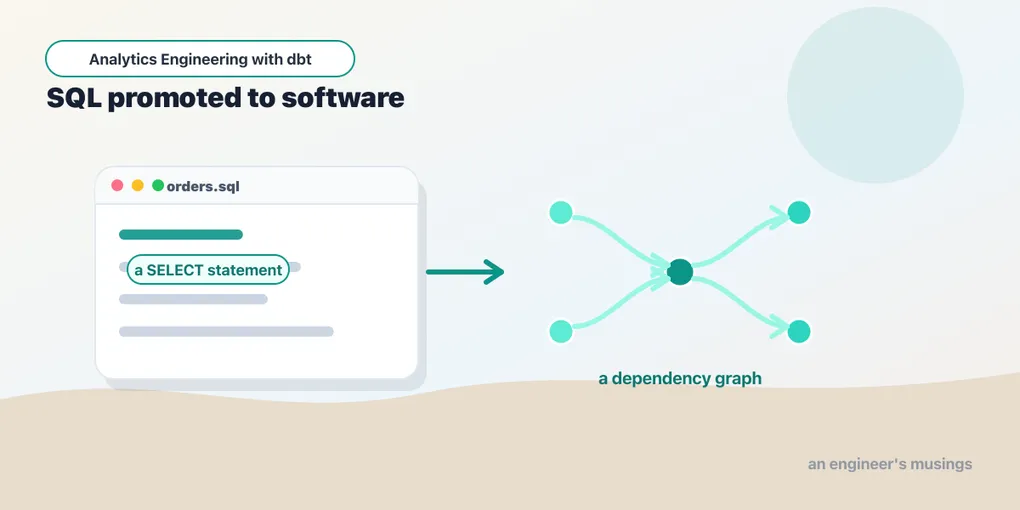
Somewhere in every data team’s history there’s a folder of SQL files named final_v2_USE_THIS.sql. One script creates a table, the next reads from it, a third reads from the second — and the only thing enforcing that order is a human running them top to bottom and remembering which is which. Change a column early in the chain and you find out what broke when a dashboard goes blank.
dbt (data build tool) is the fix. It lets you write your transformations as plain SELECT statements and then does the un-fun parts for you: works out what depends on what, runs everything in the right order, and tests the results. It’s the “T” in ELT — the transform step that turns raw loaded data into tables people can trust.
This series builds a real, working project from scratch. We’ll use dbt Core (the open-source command-line tool) against DuckDB, an embedded analytics database that runs on your laptop with nothing to install but a Python package. Every model, test, and command that runs on DuckDB was actually run — no cloud warehouse, no account, no bill. A few later chapters necessarily reach past what an embedded database can do (Snowflake’s merge, warehouse grants, the hosted Semantic Layer API); those passages say so where they appear, rather than letting you assume a green local build proves them. The finished project lives on GitHub as engineers-musings/dbt-bookshop: clone it to follow along or to check your work against a known-green build.
Before we touch a keyboard, though, it’s worth understanding why this tool exists — because dbt makes a lot more sense once you see the hole in the data stack it was built to fill.
Ten years of moving the letter T
For most of data warehousing’s history, the acronym was ETL: Extract, Transform, Load. You pulled data out of source systems, transformed it on a dedicated server — Informatica, SSIS, DataStage, or a rack of hand-rolled scripts — and only then loaded the polished result into the warehouse. The order wasn’t a style choice. Warehouse compute was the scarcest, most expensive resource in the building, so you did the heavy lifting before the data got there.
Cloud warehouses broke that constraint. Redshift, then BigQuery, then Snowflake made storage nearly free and compute elastic — you could throw a query at a billion rows and pay for the seconds it took. Suddenly the cheapest, fastest, most capable transformation engine you owned was the warehouse itself. So the letters rearranged: Extract, Load, then Transform — dump the raw data in first, reshape it in place with SQL. ELT.
Cost was the trigger, but two other things kept ELT winning. First, the raw data now lives in the warehouse. In the old model a bug in a transform meant re-extracting from the source — hitting the production Postgres again or re-pulling from a vendor API, hoping the rows hadn’t shifted underneath you. In ELT the untouched raw data is already sitting in a warehouse schema, so fixing a transform is just re-running SQL over data you already have; you can rebuild three years of history against new logic without asking the source for a thing. Second, the transform stopped being a black box. An ETL job was compiled logic on a server most of the company couldn’t see. An ELT transform is a SELECT in the same warehouse everyone else queries — readable by anyone with access, reviewable in a pull request. That transparency is the soil dbt grows in.
That flip quietly created a tooling gap. The E and L became products — Fivetran, Airbyte, Stitch, and their kin will sync your Postgres, Stripe, and Salesforce into warehouse schemas with a few clicks. The far end was covered too: BI tools like Looker, Tableau, and Metabase were happy to chart whatever tables you pointed them at. But the middle — the hundreds of SQL transformations that turn raw into reportable — had no discipline at all. It lived in scheduled stored procedures, cron’d scripts, views stacked on views, and that folder of final_v2 files. The most important logic in the company, and the least engineered.
dbt — born in 2016 at a consultancy called Fishtown Analytics, later renamed dbt Labs — claimed exactly that slice, and nothing else. It became the standard for the T so thoroughly that in late 2025 dbt Labs and Fivetran, the T company and the EL company, announced they were merging — the two halves of ELT under one roof.
What dbt is not
Because dbt sits in the middle of the stack, it’s worth being precise about the edges — half the confusion newcomers have is expecting dbt to do a neighboring tool’s job.
- dbt is not an ingestion tool. It cannot pull data from an API, tail a database’s change log, or read a Kafka topic. It starts after raw data has landed in the warehouse — someone or something else (Fivetran, Airbyte, a custom loader) got it there. dbt’s only nod to loading is seeds, for tiny CSVs that belong in git.
- dbt is not an orchestrator. It sequences its own work perfectly — the dependency graph is the heart of the tool — but it has no scheduler, no retry-across-days, no awareness of the loader upstream or the ML job downstream. Something else invokes
dbt buildon a schedule: cron, GitHub Actions, or a real orchestrator like Airflow. (This blog’s Airflow series covers that pairing in depth — including a series on orchestrating this very project.) - dbt is not a BI tool. It produces tables; it doesn’t chart them. The marts you build with dbt are what Looker or Tableau point at.
- dbt is not a database. This one matters enough to get its own section.
One row’s journey
To make those boundaries concrete, follow a single fact through the stack the way it moves in the bookshop project we build. A customer buys The Left Hand of Darkness. Stripe records the payment, and Fivetran — the EL — syncs Stripe’s tables into a raw schema in the warehouse on its own schedule; dbt has no part in this and doesn’t even know it happened. Overnight, something calls dbt build, and now dbt takes over: stg_orders cleans and renames the raw order columns, int_order_payments rolls every payment up to its order, and the orders mart joins that total on so each order carries an amount. dbt tests that every order_id is unique and no amount is null, then stops. A few minutes later Looker reads the orders table to refresh the revenue dashboard the finance team opens with their coffee — and it never touches the raw Stripe tables, only the tested mart dbt published. Three tools, three jobs: Fivetran moved it, dbt shaped it and vouched for it, Looker showed it. dbt owned exactly the middle, and the boundaries on either side are hard lines, not blurry ones.
Where the SQL actually runs
dbt is best understood as a compiler and a dispatcher. When you run it, it compiles your model files into pure SQL, opens a connection to your warehouse, and submits that SQL. The warehouse does every byte of data movement — dbt never pulls your tables over the wire, never crunches rows in Python, never holds more than metadata and query results. This is called pushdown, and it has three consequences worth internalizing now:
- The machine running dbt can be tiny. A laptop, a $5 container, a CI runner — it only needs Python and a network path to the warehouse. There’s no “dbt cluster” to size.
- Performance is warehouse performance. If a model is slow, the fix is in the SQL or the warehouse sizing, not in dbt.
- Cost lives in the warehouse. Every
dbt runspends warehouse compute. On DuckDB that’s your laptop’s CPU and free; on Snowflake it’s credits, and later chapters on materializations and incremental models are, at bottom, about spending fewer of them.
The piece that makes this work across databases is the adapter — a Python package per warehouse that dbt Core plugs into: dbt-snowflake, dbt-bigquery, dbt-redshift, dbt-databricks, dbt-postgres, dbt-duckdb, dbt-trino, and dozens more, some maintained by dbt Labs, most by vendors or the community. An adapter supplies the connection handling, the type mappings, and — most importantly — the dialect-specific implementation of dbt’s behaviors: exactly what DDL creates a view atomically on this database, how a table swap works, what a merge looks like here. You write SELECT; the adapter writes the wrapper.
There’s a visible artifact of all this you’ll come to rely on. Every dbt run writes the compiled SQL to a target/ directory. target/compiled/ holds your model with every {{ ref(...) }} resolved to a real table name and all the Jinja rendered away — pure SQL you can copy straight into a warehouse console to debug. target/run/ holds that same query wrapped in the DDL the adapter generated — the create view as ... or create table as ... that was actually submitted. And target/manifest.json is dbt’s complete description of your project: every model, test, column, and edge in the graph, serialized to disk. That file turns out to be one of the most important in the whole tool — comparing a fresh manifest against a previous one is how dbt answers “what changed since production?”, which is the entire basis of the state-aware CI we build later in the book. Compilation isn’t a hidden step; it’s an inspectable one, and reading target/ is the first thing to do when a model does something you didn’t expect.
One honest caveat: dbt does not translate SQL dialects. The SELECT you write is passed through as-is, so a model using a Snowflake-only function won’t magically run on BigQuery. What’s portable is everything around the query — the project, the graph, the tests, the workflow. That’s also why this series loses nothing by using DuckDB: it’s an in-process analytics database (think SQLite, but columnar and built for exactly this kind of query) that installs as a Python package and speaks excellent standard SQL. Every dbt concept you learn against it — and it will be every concept, this is a complete treatment — transfers verbatim to a cloud warehouse. Only the profile, the connection config, changes. You’ll see that claim made concrete in the next chapter.
The shift: SQL as software
Here’s the idea that makes dbt click. A data transformation is software. It should have the same things your application code has:
- Version control — every model is a text file in git. You review changes in pull requests and roll them back when they’re wrong.
- Modularity — one model does one thing and builds on others, instead of a 400-line query nobody dares touch.
- Tests — you assert that IDs are unique and columns aren’t null, and the build fails loudly when they aren’t. dbt goes further than most people expect here: alongside data tests there are unit tests, which check a model’s logic against fixture rows before any real data is involved.
- A dependency graph — dbt reads your models, figures out the order, and runs them as a DAG. You never hand-sequence scripts again.
- One entry point —
dbt buildruns your seeds, snapshots, models, and tests together, in dependency order, and stops a branch the moment something in it fails. It’s the closest thing analytics has tomake. - Environments and CI — the same project runs against your dev schema and production by switching a target, and dbt can compare its current state against a previous run’s manifest to build only what changed in a pull request. Deployment is a chapter of this book, not an afterthought.
None of these are exotic ideas. They’re table stakes in application engineering, and dbt’s whole contribution was insisting they apply to SQL too.
The people who work this way
The workflow even minted a job title: analytics engineer. The boundary is fuzzy in practice but the center of each role is clear. The data engineer owns the platform and the EL — pipelines, ingestion tools, the orchestrator, the warehouse itself. The analyst owns the questions — dashboards, deep dives, the “why did revenue dip in March” work. The analytics engineer owns everything in between: the transformation layer that turns what the data engineer lands into what the analyst can trust. Their deliverable is the warehouse’s public API — the tested, documented marts everyone else queries — and dbt is the tool the role is built around.
On a small team, one person wears all three hats and dbt is simply the hat-switching mechanism. On a large one, the dbt project is where the roles meet: data engineers care about its sources and its schedule, analysts contribute models by pull request, and analytics engineers review them.
Made concrete in our bookshop: the data engineer owns landing Stripe and the orders database into the raw schema and making sure dbt build fires every night; the analytics engineer owns the staging, intermediate, and mart models plus the tests that guard them; the analyst builds the churn dashboard on top of the finished customers mart and never writes a single ref(). The mart is the handoff — the line where “how the data got shaped” stops being the analyst’s problem and starts being someone’s tested, versioned deliverable.
What a model actually is
A dbt model is a .sql file containing one SELECT. That’s the whole surface area. You don’t write CREATE TABLE, you don’t write INSERT, you don’t manage schemas by hand. You write the query that produces the data you want, and dbt wraps it in the right DDL to materialize it as a view or a table.
The magic is one function, ref(). Instead of hardcoding a table name, a model refers to another model by name:
-- models/marts/orders.sql
select
    orders.order_id,
    orders.customer_id,
    orders.status,
    coalesce(order_payments.amount, 0) as amount
from {{ ref('stg_orders') }} as orders
left join {{ ref('int_order_payments') }} as order_payments
    on orders.order_id = order_payments.order_id
Those {{ ref(...) }} calls do two jobs at once. They tell dbt “orders depends on stg_orders and int_order_payments” — that’s how the DAG gets built — and at run time they expand to the real, fully-qualified table name in whatever database you’re pointed at. Move from DuckDB on your laptop to Snowflake in production and the SQL doesn’t change; only the connection does.
Core, Cloud, and the new engine
There are two products wearing the dbt name, and it pays to know exactly what separates them before someone in a meeting asks.
dbt Core is the free, open-source (Apache 2.0) command-line tool: the compiler, the graph, the runner, the whole language. dbt Cloud is dbt Labs’ paid hosted platform around Core: it runs the same engine but adds the operational conveniences you’d otherwise assemble yourself.
| dbt Core | dbt Cloud | |
|---|---|---|
| Price | Free | Free single-developer tier; paid per seat beyond that |
| Interface | Your terminal and editor | Browser IDE + a cloud CLI, plus your editor |
| Scheduler | None — bring cron, Airflow, or CI | Built-in job scheduler with logging and alerting |
| CI on pull requests | Roll your own (GitHub Actions + state comparison) | Built-in “Slim CI” that builds only changed models |
| Docs & lineage | dbt docs generate produces a site you host | Hosted docs plus Explorer, with column-level lineage |
| Semantic layer | You can define metrics (MetricFlow spec) | Hosted APIs that BI tools query against those metrics |
| Multi-project (“mesh”) | One project at a time | Cross-project ref with governance and contracts |
The pattern in that table: Cloud sells operations, not language. There is no model, test, or macro you can write in Cloud that you can’t write in Core — Cloud runs your Core project. That’s why this series teaches Core: learn the tool and the platform is a deployment decision, not a re-education. The deployment chapter near the end of this book shows how far plain Core plus a CI system gets you (far), and where paying for Cloud starts earning its keep.
If you’re weighing the two, a rough rule holds up. Reach for Cloud when you want a job scheduler you don’t have to babysit, hosted docs a non-technical stakeholder can browse without a terminal, cross-team governance — the mesh and model contracts that keep a fifty-person data org from stepping on itself — or the hosted Semantic Layer, which serves one consistent definition of “revenue” to every BI tool instead of letting each dashboard reinvent it. Stay on Core when a CI system like GitHub Actions already runs your jobs, your team lives in git anyway, and one project fits comfortably in one repository. Plenty of serious companies run entirely on Core; plenty of others decide the operational glue isn’t worth building and maintaining themselves. Neither answer is wrong — and because it’s the same engine underneath, it’s a decision you can defer and revisit, not a fork that locks you in.
One more name you’ll hear: the dbt Fusion engine. In 2025 dbt Labs acquired SDF and began rewriting dbt’s engine in Rust around it. Fusion’s headline trick is that it understands SQL itself, not just the Jinja templating around it — so it can catch a typo’d column name or a type mismatch at compile time, before the warehouse ever sees the query, and it parses large projects orders of magnitude faster. It’s rolling out gradually, adapter by adapter, alongside a VS Code extension built on it. What matters for you: Fusion runs the same projects — same models, same YAML, same commands. Everything in this book is engine-agnostic; when Fusion reaches your adapter you swap the engine, not your knowledge.
The command surface
You’ll meet each of these properly in its own chapter, but seeing the whole surface at once is useful — dbt is a small tool, and this table is most of it. Consider it the map of the book:
| Command | What it does |
|---|---|
dbt run | Build models (compile the SQL, execute it in DAG order) |
dbt test | Run data and unit tests |
dbt build | Seeds + snapshots + models + tests, interleaved in DAG order — the production workhorse |
dbt seed | Load CSV files from the project into the warehouse |
dbt snapshot | Capture slowly-changing history of a table |
dbt source freshness | Check whether raw data is arriving on schedule |
dbt docs generate | Build the documentation site and lineage graph |
dbt deps | Install packages (community macro/test libraries) |
dbt compile | Render Jinja to pure SQL without running it |
dbt show | Preview a model’s results in the terminal |
dbt ls | List project resources, with the full selection syntax |
dbt debug | Check config and connectivity |
dbt retry | Re-run only what failed last time |
dbt run-operation | Invoke a macro directly — the escape hatch for admin tasks |
If that list looks short for a whole book — the depth is in the flags, the config, and the failure modes, and that’s exactly the territory ahead.
What we’ll build
Across this series we grow one project, a small online bookshop, from three raw CSV files into a tested, documented set of analytics tables:
- your first project, profile, and
dbt run - models,
ref(), and reading the dependency graph - project structure — staging, intermediate, and marts as a discipline
- sources and seeds — where raw data comes from
- materializations: views, tables, and incremental models that only process new rows
- incremental strategies in depth —
merge,delete+insert, and microbatch - data tests, the package catalog, then unit tests for your SQL logic
- Jinja and macros — SQL that writes SQL
dbt_project.yml, hooks, and operations — the control panel and the maintenance jobs- packages, and the selector algebra that decides what actually runs
- snapshots that remember how a row changed over time
- contracts, versions, and governance — changing a mart without breaking the dashboard
- environments, targets, and secrets — dev, CI, and prod from one project
- docs, lineage, deployment, CI, and the semantic layer that stops metrics from wandering
By the end you’ll be able to stand up a dbt project, model a real dataset, and trust the output enough to build on it.
Final thoughts
dbt didn’t invent any new SQL. Its whole contribution is insisting that the SQL you already write deserves to be treated like real software — kept in git, split into pieces, wired into a graph, and tested. That sounds modest. In practice it’s the difference between a data pipeline you’re afraid of and one you can change on a Friday.
Comments