Every Format Is a Costume the Data Model Wears
How DataWeave's reader/writer model turns JSON, Java, and everything else into the same shape — and how reader/writer properties tune both sides.
Series A treated DataWeave as a language: expressions, types, functions, the map/filter/reduce core. That’s the part that stops fighting you once you learn it. This series is about the other half — the messy, real-world edge where the language meets actual bytes. JSON with duplicate keys. XML with namespaces. A fixed-width file some mainframe emitted in 1998. Dates in four formats in the same feed.
One idea makes all of that tractable, and it comes before any of the formats do.
The reader/writer model
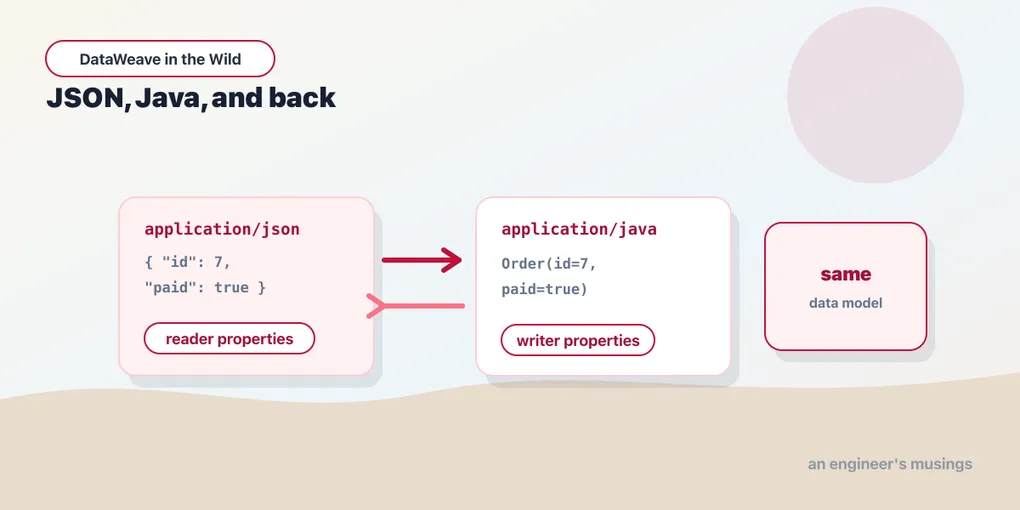
DataWeave never operates on JSON. It never operates on XML. It operates on a single in-memory data model — the three worlds you already know from Series A: arrays, objects, and simple values (String, Number, Boolean, Null, the date types). Every format is just a way of getting into that model or out of it.
Two components do that work. A reader parses incoming bytes in some format and produces the data model. A writer takes the data model and serializes it back out. Your script — the body between --- and the end — only ever sees the model in the middle. It has no idea whether the bytes came from JSON or XML, and it doesn’t care.
  JSON bytes ──reader──▶  data model  ──writer──▶  XML bytes
  XML bytes  ──reader──▶  (arrays,     ──writer──▶  JSON bytes
  CSV bytes  ──reader──▶   objects,    ──writer──▶  Java objects
  Java objs  ──reader──▶   values)     ──writer──▶  CSV bytes
Which reader runs is decided by the input format; which writer runs is decided by your output directive. Change output application/json to output application/xml and the same script emits XML — you didn’t touch the transform, you swapped the costume.
%dw 2.0
output application/xml
---
{
  order: {
    id: payload.id,
    total: payload.total
  }
}
Feed that a JSON payload and it reads JSON, holds an object in the model, and writes XML. The body says nothing about either format. That’s the whole trick, and it’s why “how do I convert X to Y in DataWeave” is almost never an interesting question — you don’t convert, you read into the model and write back out.
Reader and writer properties
The model is lossy on purpose — it’s a lowest-common-denominator shape. XML has attributes; JSON doesn’t. CSV has a header row; the model doesn’t. So each format exposes knobs, called reader properties and writer properties, that control the translation at each edge.
Writer properties ride along on the output directive. Reader properties attach to the input — in the Playground you set them on the input’s format, and in a script you can name them explicitly when you construct a reader with read:
%dw 2.0
output application/json indent=false, skipNullOn="everywhere"
---
payload
Everything after the media type is a comma-separated list of writer properties. Above, we’ve asked the JSON writer to emit compact output and to drop nulls anywhere they appear. Different formats expose different properties — the header shape is the same, the vocabulary changes per writer. Keep this model in your head for the rest of the series: every format post is really “here’s the reader/writer for this format, and here are the properties worth knowing.”
JSON, up close
JSON is the format you’ll write most, so it’s worth knowing what its writer will and won’t do for you.
Indentation. By default the JSON writer pretty-prints. Set indent=false for compact output — the right choice for anything crossing a wire rather than a human’s eyes.
Null handling. By default, keys with null values are emitted. Often you’d rather they vanish. skipNullOn controls that, and it takes "objects", "arrays", or "everywhere":
%dw 2.0
output application/json skipNullOn="everywhere"
---
{
  id: 4021,
  coupon: null,
  note: null
}
{
"id": 4021
}Both null-valued keys are gone. Without the property you’d get all three keys, two of them null. This is the clean way to express “only include this key when it has a value” for whole-object hygiene — though when the condition is more specific than “is it null”, the conditional key operator from Series A ((condition)? key: value) is the sharper tool.
Duplicate keys. The data model allows an object to hold the same key more than once — DataWeave objects are ordered lists of key/value pairs, not hash maps. So this is legal and preserved through a JSON round-trip:
%dw 2.0
output application/json
---
{
  item: "SKU-100",
  item: "SKU-200"
}
{
"item": "SKU-100",
"item": "SKU-200"
}Most JSON consumers treat that as pathological — a downstream parser will typically keep the last one and silently drop the first. If you’re producing JSON for someone else, collapse duplicates yourself (a distinctBy on the key, or a reshape) rather than trusting their parser. But know that the model can hold them, because when you read XML with repeated elements — the next post — that’s exactly what you get.
Key order. The writer preserves the order in which your script produces keys. There’s no alphabetization, no normalization. If a consumer’s snapshot test is order-sensitive, the order is entirely in your hands, which is usually what you want.
application/java — when the model meets the JVM
DataWeave runs on the JVM, and inside a Mule app the data flowing between steps is frequently plain Java objects, not serialized bytes. The application/java format is the reader/writer for that boundary: it maps the data model onto Java objects and back.
The mapping is the obvious one. A DataWeave object becomes a java.util.Map. A DataWeave array becomes a java.util.List. Simple values become their Java counterparts — String, Boolean, and DataWeave’s single Number type lands on an appropriate Java numeric type (Integer, BigDecimal, and so on) depending on the value.
%dw 2.0
output application/java
---
{
  id: payload.orderId,
  items: payload.lines map {
    sku: $.sku,
    qty: $.qty as Number
  }
}
Nothing about the body is Java-specific — it’s the same reshaping you’d write for JSON output. Only the output directive changed. The writer hands the next step in the flow a Map containing a List of Maps, ready for Java code to consume without any parsing.
Reading Java is the mirror image. When a connector or a Java component upstream produces a POJO, the application/java reader exposes its properties as object keys, so payload.customerName reaches a getCustomerName() accessor. A List reads as an array; a Map reads as an object. You navigate a POJO with the exact same selectors you’d use on parsed JSON — which is the point.
Two nuances are worth flagging. First, numbers: DataWeave has one Number type, but Java has many. When you write to Java, a value that looks like an integer tends to become an Integer or Long and a fractional one a BigDecimal — if a downstream method signature demands a specific type, coerce deliberately (x as Number keeps you in the model; the Java writer picks the concrete class). Second, null: a DataWeave null writes as a Java null, which for primitive-typed POJO fields can surface as trouble on the Java side rather than in your transform. When you’re feeding a strict POJO, prune nulls with skipNullOn thinking, or supply defaults with the default operator, before they cross the boundary.
Final thoughts
Once the reader/writer model clicks, the rest of this series is mostly vocabulary. You’re not learning “the JSON API” and “the XML API” as separate skills — you’re learning one data model and a set of small dials at each edge. The script in the middle stays honest functional DataWeave, exactly what Series A taught, and the format is a decision you make in one line at the top and one line where the bytes come in.
XML is where that abstraction earns its keep, because XML carries things the model has to work to represent — attributes, namespaces, repeated elements that either are or aren’t an array. That’s next, and it’s where most people get burned.
Comments