Snowflake: A Warehouse That Splits Storage From Compute
The one architectural idea behind Snowflake — and why pulling storage apart from compute changes how you think about a data warehouse.
Somewhere in most data teams there’s a database server that everyone is a little afraid of. It holds the reporting tables, and it’s sized for the worst Monday morning of the quarter — because the moment it can’t keep up, the dashboards go grey and someone’s Slack lights up. So it’s a big box. It’s a big box that sits at maybe fifteen percent utilization most of the week, and you pay for the whole thing the entire time, including the hours nobody is awake to run a query.
The reason it’s a big box is that in a traditional warehouse, storage and compute are welded together. The disks that hold your data and the CPUs that scan it live in the same machine, scale together, and get billed together. That coupling is the source of a specific, familiar pain: the nightly ETL job and the analytics team are pointed at the same hardware, so they contend for it. The batch load slows down the ad-hoc query; the heavy dashboard slows down the load. You can buy a bigger box, but you’re buying it for peak, and peak is rare.
This book is written against Snowflake as it exists in 2026. Where something is a number you can look up — an edition boundary, a credit rate — I’ll say so; where it’s a mental model, I’ll build it carefully, because the model is the part that outlasts any one release.
The idea: pull the two apart
Snowflake’s whole design turns on separating storage from compute. Instead of one machine that both holds and processes your data, there are two independent things.
Storage is cloud object storage — the same class of durable, effectively bottomless storage that backs S3 and its equivalents — and Snowflake manages it for you. You load data in; you don’t provision disks, you don’t think about files, you just have tables. It sits there whether or not anything is running against it, and you pay for what it occupies.
Compute is a virtual warehouse: a cluster you spin up on demand, size to the job, and suspend when you’re done. It reads from that shared storage, does the work, and hands you a result. Here’s the part that dissolves the old pain — you can point several warehouses at the same data at once, and they don’t fight. The ETL load runs on one warehouse. The analytics team runs on another. Neither slows the other down, because they aren’t sharing CPUs; they’re only sharing bytes that no one is contending to write. And a suspended warehouse costs you nothing for compute — you pay for the seconds it actually runs, not for the privilege of it existing.
Concreteness helps here. Imagine your nightly job is bulk-loading the LINEITEM table — the big one, six million rows in the sample dataset — while at the same time an analyst runs a heavy aggregation across ORDERS and CUSTOMER for a report. In the old welded world those two workloads share a machine and slow each other down. In Snowflake you give the load its own warehouse and the analyst theirs; both read from the one shared copy of the data, and because neither is contending for the other’s CPUs, the load runs at full speed and the report runs at full speed. Add a second analyst, a dashboard, a data scientist — each gets a warehouse sized to its need, and none of them queues behind the others. That’s what “zero-contention concurrency” means in practice: concurrency stops being a fight over a fixed box and becomes a matter of how many warehouses you’re willing to turn on.
That single decoupling is the thing to hold onto. Almost everything else about Snowflake is a consequence of it.
Three layers, one mental model
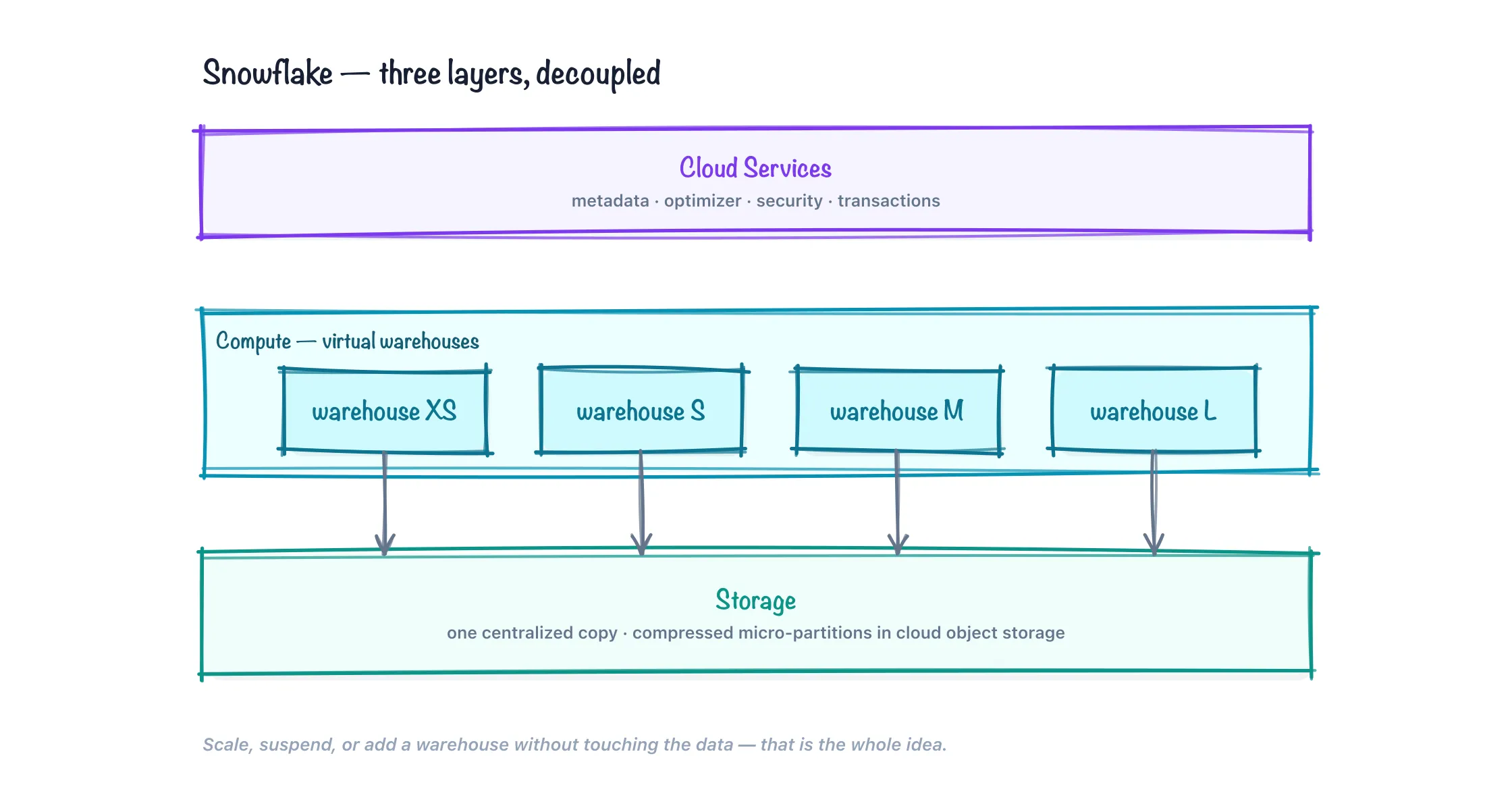
Picture Snowflake as three layers stacked on top of each other: storage at the bottom, compute in the middle, cloud services on top. Storage holds your data, compute processes it, cloud services coordinates the whole thing. If you keep those three straight, the rest of the product stops being surprising — so it’s worth looking at each one a little more closely than the slogan version, because the details of how they work are the details that come back in every later chapter.
Storage: immutable micro-partitions
When you load a table into Snowflake, it doesn’t sit as one big file or as rows you can reach in place. Snowflake slices the table into micro-partitions — contiguous chunks each holding on the order of 50 to 500 MB of uncompressed data (much smaller once compressed on disk). Within each micro-partition the data is stored columnar: all the values of one column together, then all the values of the next. That layout is what makes an analytical query fast, because a query that touches three columns of a fifty-column table reads only those three columns’ worth of bytes and skips the rest entirely.
Three properties of micro-partitions are worth committing to memory now, because they underpin features that show up much later in this book:
- They’re compressed. Snowflake picks a compression scheme per column automatically. Columnar data compresses well — a column of country codes or order statuses has few distinct values and packs down hard — which is why your storage bill is usually a fraction of the raw data size.
- They’re immutable. A micro-partition, once written, is never edited in place. “Updating” a row means writing a new micro-partition with the changed data and marking the old one as no longer current. Nothing is overwritten; old versions are simply retired.
- They carry metadata. For every micro-partition, Snowflake records the range of values in each column, the count of distinct values, and more. That per-partition metadata lets the engine prune — skip whole micro-partitions that can’t possibly contain rows matching your
WHEREclause — without reading them at all.
To make pruning concrete: the sample ORDERS table you’ll query in a couple of chapters holds 1.5 million rows across many micro-partitions. Ask for a single order date range, and the optimizer consults the per-partition min/max metadata for the order-date column, discovers that most partitions fall entirely outside your range, and reads only the handful that overlap. You wrote ordinary SQL; the storage format did the skipping for you, and it did it from metadata alone without touching the data. That’s why a well-shaped query over a huge table can come back in a moment on the smallest warehouse — most of the table was never read.
Immutability is the quiet hero here. Because old micro-partitions are retired rather than destroyed, Snowflake can hand you the table as it was an hour ago simply by pointing at the versions that were current then — that’s Time Travel, and it’s why it costs almost nothing to offer. For the same reason, a zero-copy clone of a huge table is instant: the clone just references the same immutable micro-partitions, and only diverges — writing new ones — when you actually change something. We’ll spend a whole later chapter on each of these; for now, notice that they aren’t bolted-on features. They fall out of the storage format.
Compute: virtual warehouses
A virtual warehouse is the compute you rent to run a query. Nothing runs without one — a SELECT needs a warehouse the way an engine needs to be turned on. Warehouses come in T-shirt sizes: X-Small, Small, Medium, Large, X-Large, and then 2X-Large through 6X-Large. Each step up doubles the compute — and doubles the cost. An X-Small burns 1 credit per hour of running time; Small is 2, Medium 4, Large 8, and so on, doubling all the way up to 512 credits per hour at 6X-Large. (What a credit costs in dollars depends on your edition and cloud, which we’ll get to.)
The billing is per second, with a 60-second minimum each time a warehouse starts or resumes. That minimum is the one bit of nuance: firing a warehouse up for a five-second query still bills a full minute, so it’s cheaper to run a batch of related queries in one warm session than to resume the thing repeatedly for one statement each.
Two independent knobs control a warehouse, and it’s worth keeping them separate in your head:
- Size (scale up) makes a single query faster by throwing more compute at it. A Large scans and joins the same data roughly twice as fast as a Small.
- Multi-cluster (scale out) makes a warehouse handle more concurrent queries by adding whole extra clusters behind the same warehouse name when the queue grows, then removing them when it shrinks. This is how you serve a crowd of dashboard users without any of them waiting. Multi-cluster warehouses are an Enterprise-edition-and-up feature — a boundary we’ll return to below.
Then there’s what happens when a warehouse is idle. Snowflake will auto-suspend it after a short, configurable stretch of inactivity, and auto-resume it on the next query. Resuming is fast — on the order of a second or two to go from cold to serving — which is the whole reason disposable compute is practical: you’re not waiting minutes for a cluster to boot. A running warehouse also keeps a local cache of the micro-partition data it has recently read, on fast storage attached to the cluster. Re-run a similar query on the same warm warehouse and it may skip fetching from remote storage entirely. But that cache is warehouse-local and volatile — suspend the warehouse and the cache is gone, so the first query after a resume runs a touch cooler than the ones that follow.
Cloud services: the brain, and yes, it’s billed
The top layer is the one newcomers overlook, partly because you never provision it. Cloud services is a fleet Snowflake runs on your behalf that does everything around the query: it holds the metadata about what tables and micro-partitions exist, it runs the query optimizer that plans your SELECT and decides which partitions to prune, it manages transactions and consistency, it enforces security and access control, and it maintains the result cache.
That result cache is worth calling out. When a query runs, its result is retained for 24 hours, and if anyone runs a byte-for-byte identical query against unchanged data within that window, Snowflake returns the stored result without starting a warehouse at all. Zero compute, near-instant answer. It’s a genuine “free” fast path, and it lives entirely in this top layer.
Here’s the part people miss: cloud services is metered and billable like everything else — it consumes credits for the metadata lookups, optimization, and coordination it does. The catch that keeps it from mattering for most accounts is the 10% rule: cloud-services usage is only charged to the extent it exceeds 10% of your daily virtual-warehouse compute. If your warehouses burned 100 credits today, the first 10 credits of cloud-services work are on the house. Ordinary query workloads stay comfortably under that line, so most accounts pay nothing for cloud services. You can blow past it, though, with pathological patterns — thousands of tiny metadata-heavy statements, or floods of INFORMATION_SCHEMA queries and object-creation churn — which is exactly the kind of surprise this chapter exists to pre-empt.
Storage holds it, compute processes it, cloud services coordinates it — and each of the three is billed on its own axis. That independence is the point.
Where Snowflake physically runs
Snowflake isn’t a place you install software; it’s a managed service running on top of one of the big public clouds. You choose which one — Snowflake runs on AWS, Microsoft Azure, and Google Cloud — and within it a region, a geographic location like a US-East or an EU-West. That choice sets where your storage physically lives and which region’s object storage and compute your account draws on.
The unit that matters is the account, and an account lives in exactly one region of one cloud. Everything in it — your databases, warehouses, users, roles — sits in that region. This is why the signup flow (the subject of the next chapter) asks for a cloud and region before it does anything else: it’s provisioning your account somewhere specific, and that somewhere is durable. For learning, the choice is cosmetic — pick a region near you for lower latency and don’t overthink it. In production it has teeth: it governs data-residency and compliance obligations, and it affects latency and egress cost when Snowflake talks to other services you run in the same cloud and region.
Because an account is region-bound, spanning regions or clouds is a deliberate, higher-tier act rather than a default. Snowflake offers replication — keeping a copy of databases (and eventually whole account state) in sync in a second region or even a second cloud — as the mechanism for that, whether for disaster recovery, for serving users on another continent with local latency, or for a business that has standardized on a different cloud than the one your account started in. You won’t set this up as a beginner, but it’s useful to know the shape of it now: your data has a home region, and reaching beyond it is replication, not magic. We’ll frame the cloud-and-region decision more concretely when you actually make it in the next chapter.
How this compares to what you might know
If you’ve used another cloud warehouse, it helps to place Snowflake among them, because they’ve converged on similar ideas from different starting points.
The sharpest contrast is with a traditional shared-nothing MPP warehouse — the classic on-premises or first-generation cloud design, where data is partitioned across a fixed cluster of nodes and each node owns its slice of disk. That design scales beautifully until you need to resize: adding nodes means physically reshuffling data across the cluster, a heavy operation you plan around, and storage and compute grow in lockstep whether or not you want both. Snowflake’s separation is precisely the escape from that. Because compute doesn’t own the data — it all lives in shared object storage — resizing a warehouse is instant and reshuffles nothing, and you can run ten differently-sized warehouses over one copy of the data.
Amazon Redshift began life as that shared-nothing design and has since grown a separated-storage option, but its heritage still shows in how you reason about nodes and clusters. Google BigQuery arrives at a similar destination from the opposite direction: it’s fully serverless, with no warehouse to size at all — you submit SQL and Google allocates ephemeral compute (slots) behind the scenes. That’s less to manage, but it also hands you less control; Snowflake’s explicit, sized, suspendable warehouses are the deliberate middle ground, giving you a dial you can turn per workload without making you administer a cluster. Databricks overlaps heavily on the analytics surface but grew out of Spark and the data-lake world, leading with notebooks, open table formats, and data-science and ML workflows, where Snowflake leads with SQL and a managed, closed-format warehouse. The lines blur more every year, but the instinct holds: reach for Snowflake when you want a SQL-first warehouse with per-workload compute you can reason about, and no cluster to babysit.
Editions and the credit model
Snowflake sells the same architecture at four editions, which gate features and set the price per credit rather than changing how the thing works:
- Standard — the full warehouse: all the SQL, storage/compute separation, and 1 day of Time Travel. Enough to learn everything in this book.
- Enterprise — adds the features larger teams lean on: multi-cluster warehouses, Time Travel extended up to 90 days, materialized views, search optimization, and column- and row-level security controls like dynamic data masking.
- Business Critical — layers on stringent security and compliance: support for regimes like HIPAA and PCI, customer-managed encryption keys, private connectivity, and database failover for disaster recovery.
- VPS (Virtual Private Snowflake) — the most isolated tier, a dedicated environment for organizations with the strictest requirements.
You don’t choose an edition to learn — the free trial gives you enough. But it pays to know the ladder exists, because more than once in this book a feature will come with the asterisk “Enterprise and up,” and now you’ll know what that asterisk means.
Underneath every edition is the same currency: the credit. Compute is priced in credits per second of warehouse runtime (recall the size table — 1 credit/hour at X-Small, doubling each size up). Storage is billed separately, by the terabyte-month of compressed data you’re holding, at a flat rate closer to raw cloud-storage cost. And cloud services is billed under the 10% rule above, which usually rounds to nothing. A credit’s dollar value depends on your edition, cloud, and region — higher editions cost more per credit — but the structure is consistent: you pay for storage while data sits, for compute while a query runs, and effectively nothing while nothing is happening. Sit with that last clause. It’s the opposite of the big idle box we started with, and it’s why “just leave a warehouse running” is the single most common way beginners run up a bill. A whole later chapter is devoted to keeping that from happening; for now, the mental model is enough — cost in Snowflake is a thing you do, not a thing you own.
Where this sits, and where we’re going
Snowflake is a cloud data warehouse — a SQL-first place to keep analytical data and run queries against it, without administering anything at the machine level. There are no instances to patch, no indexes to rebuild at 2 a.m., no storage to grow. You write SQL, you pick a warehouse to run it on, and the platform handles the rest. If you know SQL, you already know most of how to use it; what’s new is the model around the SQL, not the SQL itself.
This book builds that model from the ground up. Next we get you into the product and running your first query. From there: the object hierarchy (and the naming trap where “warehouse” means compute, not storage), querying the sample data that ships with every account, loading data of your own, and handing out access with roles so that not everyone is an account administrator. Cost, micro-partitions in performance depth, and Time Travel come later, once the shape of things is familiar — but you’ve now met all three in outline, which is the point of an opening chapter.
Final thoughts
The separation of storage and compute isn’t a feature you switch on — it’s the assumption underneath every decision you’ll make in Snowflake. Once compute is disposable and storage is shared, the old instinct to protect one precious server stops making sense. You stop sizing for peak and start sizing per job. You stop rationing access to the box and start giving each workload its own. And once you know that storage is immutable micro-partitions, that compute is warehouses you rent by the second, and that a whole billed brain-layer coordinates them, the features to come — Time Travel, cloning, multi-cluster scaling, the result cache — read less like a grab-bag and more like consequences of one decision. The hardest part of learning Snowflake isn’t the syntax; it’s unlearning the habit of treating the warehouse as a place your data lives.
Not run. The SQL and behavior described in this book are drawn from Snowflake’s documentation, not run against a live account.
Comments