Running Big Models: Memory, dtype, Placement, and 4-bit
Why a model that 'should not fit' on a free GPU often does: the arithmetic from stored dtype to gigabytes, and the four levers — the GPU you pick, the dtype you load in, device_map='auto', and 4-bit quantization — that make a 7B chat model run on a Colab T4.
Part IV is where the models get heavy. The generative models of the next four chapters are tens of times bigger than anything you have run so far, and the first one you reach for that is genuinely useful — a 7B chat model, say — will not fit on the free Colab GPU by the naive arithmetic. This chapter is the arithmetic done properly, and the handful of levers that let you run a model several times bigger than the hardware “should” allow. None of it is PyTorch-specific cleverness; all of it is knowing what a number is stored as.
▶ Open the companion notebook in Colab
Run against: transformers 4.57.6 on macOS for the dtype and size lookups, which read the Hub’s metadata rather than loading weights; the 5.x loading defaults are from its source. Nothing in this chapter was run on a GPU — see the notes on levers 3 and 4.
The memory problem
The reason you can’t just load any model you fancy is VRAM — the memory on the GPU. A model’s weights have to fit there to run fast, and big models have a lot of weights. How much memory they take is a product of two numbers: how many weights, and how many bytes each one is stored as. The card tells you both, and chapter 8 showed where to look:
| Model | Parameters | Stored as | Bytes each | Weights on disk / in VRAM |
|---|---|---|---|---|
Qwen/Qwen2.5-0.5B-Instruct | 494 million | bfloat16 | 2 | ~1 GB |
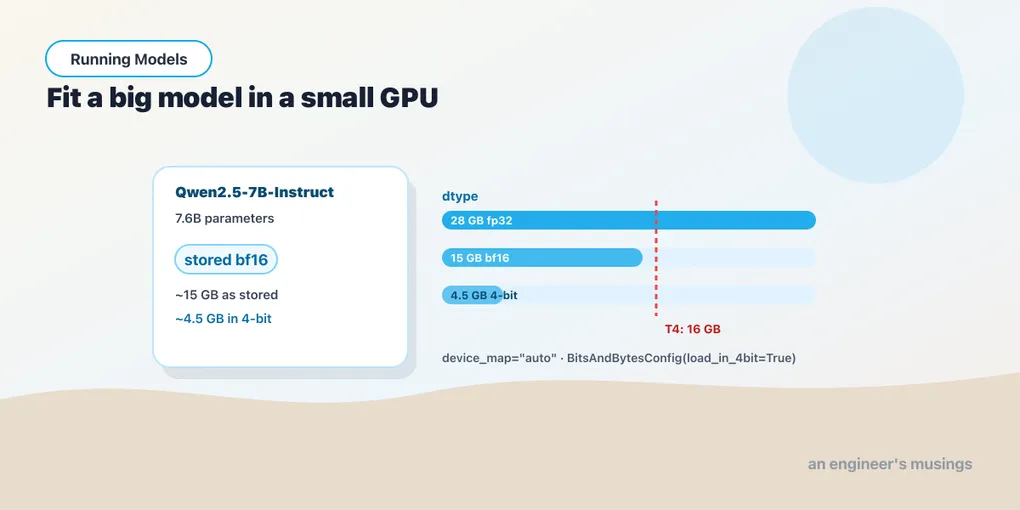
Qwen/Qwen2.5-7B-Instruct | 7.6 billion | bfloat16 | 2 | ~15 GB |
distilbert/distilgpt2 | 82 million | float32 | 4 | ~0.35 GB |
Those are the numbers the Hub reports for each model’s .safetensors files. The rule of thumb that falls out of them: parameters × bytes-per-parameter is the floor, and a running model needs a little more than that for its working state. The free Colab T4 has 16 GB of VRAM, of which about 15 are usable. So the 0.5B model is trivial, and the 7B model — fifteen gigabytes of weights alone — is a coin-flip that lands on CUDA out of memory the moment the model tries to generate.
One thing to notice in that table, because older tutorials get it wrong: modern checkpoints are not stored in 32-bit. A 7B model “in fp32” would be 28 GB, and you will see that figure quoted; but nobody ships a 7B model that way any more, and transformers 5.x loads a checkpoint in the dtype it was stored in (dtype="auto" is the default). So the half-precision lever below is already pulled for most models you meet. The levers that remain are the GPU, placement, and quantization.
Lever 1: pick the right GPU
The cheapest fix is hardware you might already have access to. In Colab, Runtime → Change runtime type lets you pick the accelerator. The free tier gives you a T4 (16 GB), which is plenty for models up to a few billion parameters as stored. Colab Pro adds beefier options (L4 with 24 GB, A100 with 40 or 80) with more VRAM. Knowing how much memory you’ve got is step one — everything else is fitting the model into it.
import torch
print("GPU available:", torch.cuda.is_available())
if torch.cuda.is_available():
    print(torch.cuda.get_device_name(0))
    print("VRAM (GB):", round(torch.cuda.get_device_properties(0).total_memory / 1e9, 1))
Lever 2: the dtype you load in
A weight is a number, and you choose how many bytes to spend on each one when you load it. float32 is 4 bytes; the two half-precision formats, float16 (fp16) and bfloat16 (bf16), are 2. For running a pretrained model the quality cost of half precision is essentially zero, which is why models are stored that way.
The thing to check is what you are actually getting. In transformers 5.x the default is dtype="auto": the model loads in its stored dtype, so a bf16 checkpoint arrives as bf16 and nothing more is needed. In 4.x the default was float32 — a bf16 checkpoint was silently doubled on load — and you had to ask for half precision explicitly. Asking is still harmless, and it is the line to add whenever a model loads bigger than its card says it is:
from transformers import pipeline
import torch

pipe = pipeline(
    "text-generation",
    model="Qwen/Qwen2.5-0.5B-Instruct",
    dtype=torch.bfloat16,     # match the stored dtype; a no-op on 5.x, a halving on 4.x
    device_map="auto",
)
print(pipe.model.dtype)       # torch.bfloat16
Between the two half formats, bf16 is the safer default on modern GPUs: it trades a little precision for a wider range and rarely produces the “everything turned to NaN” surprise fp16 occasionally does. Two hardware caveats, both met in this book’s own lab: the older PyTorch on an Intel Mac cannot hold bf16 on Apple’s MPS accelerator and fails with BFloat16 is not supported on MPS (load in float32 there, or on the CPU); and the T4 itself has no native bf16 arithmetic, so on the free tier float16 is the faster of the two. (The old argument name torch_dtype= still works and logs a deprecation warning; dtype= is the current spelling in both the pipeline and from_pretrained.)
Lever 3: device_map="auto"
Notice device_map="auto" in that snippet. That’s accelerate doing the placement for you: it looks at your hardware and decides where each piece of the model lives — the GPU if there’s room, spilling onto CPU memory if not, so that a model slightly too large for VRAM still runs, slowly, rather than not at all. Without it you’d be writing model.to("cuda") by hand and managing placement yourself; with it, you say “auto” and stop thinking about it. It needs the accelerate package installed, which is why the notebook pulls it in. For anything bigger than a toy, device_map="auto" is the line you’ll always include. One rule comes with it: once accelerate has placed a model, do not also call .to("cuda") on it; the two will fight.
Not run. The CPU-spill behaviour and the T4 figures are documented behaviour of
accelerateand Colab and were not measured here.
Lever 4: 4-bit quantization
Half precision gets you to 2 bytes. Quantization goes further — down to roughly half a byte per weight (4 bits) — and it’s how people run genuinely large models on modest GPUs.
The plain-English version: a weight is just a number, and you don’t actually need 16 bits of precision to store “approximately 0.37.” Quantization stores each weight with far fewer bits — packing the values into a smaller range and remembering a little scaling info to undo it. The model takes up much less VRAM. The cost is a small, usually-tolerable drop in quality, because you’ve rounded off some precision. For the 7B model: ~15 GB as stored → ~4–5 GB in 4-bit. That’s the difference between “won’t load” and “loads with room to spare on a free T4.”
You turn it on with BitsAndBytesConfig:
from transformers import AutoModelForCausalLM, AutoTokenizer, BitsAndBytesConfig

bnb = BitsAndBytesConfig(load_in_4bit=True)

name = "Qwen/Qwen2.5-0.5B-Instruct"   # illustrative; you'd reach for this with a 7B+ model
tokenizer = AutoTokenizer.from_pretrained(name)
model = AutoModelForCausalLM.from_pretrained(
    name,
    quantization_config=bnb,
    device_map="auto",
)
Two requirements worth burning into memory: 4-bit quantization needs the bitsandbytes package, and it needs an actual CUDA GPU. There is no CPU fallback — try this on a CPU-only runtime and you’ll get an error, not a slow result. Turn the GPU on first. And install the package before you even build the config: BitsAndBytesConfig(load_in_4bit=True) itself raises PackageNotFoundError when bitsandbytes is absent, before any model is touched.
(Quantizing a 0.5B model is overkill — it already fits in a gigabyte. It’s here so you can see the exact code that works unchanged when you swap in a model 15× the size.)
Not run. This book’s lab has no CUDA GPU; the 4-bit path is written against the documented
transformersandbitsandbytesAPIs and was not executed. ThePackageNotFoundErrorbehaviour was.
When the free GPU still isn’t enough
Honesty time: the tricks have limits. A 4-bit 13B model fits on a T4. A 70B model does not — even in 4 bits it wants ~40 GB, and the T4 has 16. When you hit that wall, your options are:
- A bigger GPU — Colab Pro (L4, A100) or a cloud instance. More VRAM, the same code.
- A smaller model — there is almost always a 7B or 8B version of the thing you want, and for most tasks it’s 90% as good. Reach for it first.
- A hosted API — for the truly huge models, let someone else own the hardware and call an endpoint. Not PyTorch anymore, but often the right call.
The skill isn’t squeezing a 70B model onto a free T4 — it’s recognizing when you can’t, and reaching for the right-sized model instead of the biggest one.
Gotchas
CUDA out of memoryis the error you’ll meet most. It means the weights don’t fit. Fix it in order: check the model loaded in its stored dtype (model.dtype), then 4-bit quantization, then a smaller model, then a bigger GPU. Restart the runtime between attempts — a failed load can leave junk in VRAM.- Read the card’s dtype, not a tutorial’s. “7B × 4 bytes = 28 GB” is true only for a model stored in fp32, which yours almost certainly is not. The
.safetensorslisting on the Hub is the authority. - 4-bit quantization needs a GPU and
bitsandbytes. No CUDA device, no quantization — full stop. Andbitsandbytesversions occasionally lag behind new GPUs, so if it errors on exotic hardware, that’s usually why. device_map="auto"needsaccelerate. Forget to install it and you’ll get an import error pointing right at it.pip install accelerateand re-run.- Quantization is for inference, not learning. Running a quantized model to get outputs is what we’re doing here; training one is a different, fussier thing that lives in the Training Models book.
What’s next
You can now read a model’s size off its card, predict whether it fits, and pull the levers that make it fit. The decoder you meet next is small enough to need none of them — which is exactly why it is the one to learn the generation loop on.
Comments