From Autocomplete to Assistant: Instruction-Tuned and Chat Models
Why GPT-2 rambles and ChatGPT answers: a beginner-friendly look at instruction-tuned and chat models — base vs instruct, chat templates with system and user roles, and running a small chat model on a free GPU.
Series: Practical PyTorch: Running Models — LLMs — Part 5 of 6
GPT-2 taught you how a model writes — but it only ever continues text. Ask it a question and it wanders. The models you actually talk to, the ones that answer instead of ramble, have one extra ingredient: they were instruction-tuned, taught on top of all that next-token prediction to be helpful. This post is the bridge from autocomplete to assistant — the last idea you need before you build the finale.
We’ll use Qwen2.5-0.5B-Instruct — tiny, ungated, and comfortable on a free Colab GPU.
Open the companion notebook in ColabBase vs instruct: same model, extra schooling
Every chat model starts as a base model — a GPT-style decoder trained to predict the next token on a mountain of text. That gives it fluency and knowledge, but no manners: it doesn’t know it’s supposed to answer you. Instruction tuning is a second round of training on examples of requests and good responses, which teaches the model to treat your input as something to act on rather than continue.
You can spot the difference in the model’s name: a ...-Instruct or ...-Chat suffix means it went through that second round. Qwen2.5-0.5B is the base; Qwen2.5-0.5B-Instruct is the one that answers. Reach for the instruct version any time you want it to do what you say.
Talking to it with roles
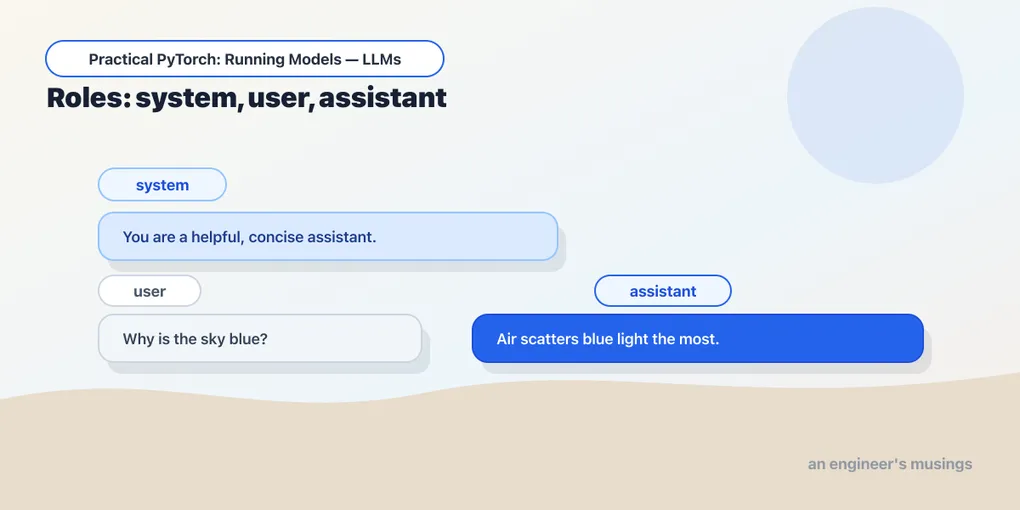
There’s a second shift from GPT-2: chat models don’t take a plain string, they take a conversation — a list of messages, each tagged with a role:
system— standing instructions for how to behave (“You are a terse, friendly assistant.”).user— what the person said.assistant— what the model said (the model fills these in; you include past ones for multi-turn memory).
The modern pipeline understands this format directly — hand it messages instead of a string:
from transformers import pipeline

chat = pipeline("text-generation", model="Qwen/Qwen2.5-0.5B-Instruct", device_map="auto")

messages = [
    {"role": "system", "content": "You are a helpful assistant who answers in one sentence."},
    {"role": "user", "content": "Why is the sky blue?"},
]

out = chat(messages, max_new_tokens=80)
print(out[0]["generated_text"][-1]["content"])
That last line looks fiddly, so read it slowly: the pipeline returns the full conversation with the model’s reply appended as a new assistant message, so [-1]["content"] is just “the text of the last message” — the answer. Ask it a question and, unlike GPT-2, it actually answers.
What the chat template does
Under the hood the model still only sees one long string of tokens — so how do roles survive? Each chat model ships a chat template that formats your messages into the exact special tokens it was trained on (markers like <|im_start|>user). The pipeline applies it for you, but you can see it:
from transformers import AutoTokenizer

tok = AutoTokenizer.from_pretrained("Qwen/Qwen2.5-0.5B-Instruct")
print(tok.apply_chat_template(messages, tokenize=False, add_generation_prompt=True))
That prints the roles flattened into the model’s special formatting. The lesson: use the model’s own template (which apply_chat_template and the pipeline do automatically) — hand-formatting a prompt and getting those markers wrong is a top reason a chat model gives mediocre answers. Let the tokenizer do it.
Sampling still applies
Everything from Part 4 carries straight over — a chat model generates with the same knobs:
chat(messages, max_new_tokens=120, do_sample=True, temperature=0.7, top_p=0.9)Lower temperature for factual answers, higher for brainstorming. The decoding skills you learned on GPT-2 are exactly the ones you’d set on any chat model or hosted API.
Gotchas
- Use the
-Instruct/-Chatvariant for tasks. The base model is for continuation; the instruction-tuned one is for answering. Picking the base model by accident is the usual reason a “chatbot” won’t chat. - Don’t hand-format prompts. Pass
messagesand letapply_chat_template(or the pipeline) insert the special tokens. Manual formatting that misses a marker quietly degrades the output. - Include history for multi-turn memory. The model is stateless — it only “remembers” what you resend. To continue a conversation, append the assistant’s reply and the next user message to the
messageslist and call again. - Small instruct models are limited. A 0.5B model is great for learning and light tasks, but it will get facts wrong and lose the thread on hard ones. It’s the right size to understand chat models, not to replace a frontier one.
- A system prompt steers a lot. Changing the
systemmessage (“answer in one sentence,” “reply as a pirate”) visibly changes behavior — it’s the cheapest, most underused knob.
What’s next
You now understand the whole chat stack: a base model for fluency, instruction tuning for helpfulness, roles and a chat template to carry a conversation, and sampling to shape the replies. Every concept the series needs is on the table.
So let’s build the thing everyone pictures when they hear “AI app” — wrap this chat model in a real conversational UI you can share.
Next: Build a Chatbot You Can Talk To, the grand finale.
Target keyword(s): instruction-tuned models, chat template transformers, qwen2.5 instruct, system user assistant roles.
Comments