Debugging PyTorch and Hugging Face Model Runs
A practical debugging playbook for beginner PyTorch and Hugging Face inference: missing packages, CUDA availability, device mismatch, shape errors, OOM, gated models, preprocessing mistakes, and slow first runs.
Series: Practical PyTorch: Running Models — LLMs — Part 2 of 6
Before we start running generative models — the most demanding stretch of the series — let’s collect the errors you are most likely to see. Not because the series has been hiding danger, but because real model work involves downloads, GPUs, package versions, model cards, long inputs, and tensors with opinions.
Debugging model code is mostly pattern recognition. Error messages look dramatic; the fixes are usually ordinary.
Open the companion notebook in ColabFirst move: print the environment
Start every notebook with a small sanity check:
import torch

print("torch:", torch.__version__)
print("cuda available:", torch.cuda.is_available())
if torch.cuda.is_available():
    print("gpu:", torch.cuda.get_device_name(0))
If you are using Hugging Face:
import transformers
print("transformers:", transformers.__version__)
This tells you whether you are debugging your code or debugging the runtime.
Read the traceback bottom-up
A Python traceback looks like a wall of text, and beginners read it top to bottom and panic. Read it the other way. The last line is the actual error; everything above it is just the chain of calls that led there, mostly inside libraries you didn’t write.
... 40 lines of library internals ...
RuntimeError: Expected all tensors to be on the same device, ...
Start at the bottom for the error type and message, then scan upward for the last line that names your own file — that’s usually where you can act. Error-type plus your-line gets you to the fix faster than reading the whole stack in order.
ModuleNotFoundError
Example:
ModuleNotFoundError: No module named 'transformers'Fix:
!pip install -q transformersCommon installs in this phase:
!pip install -q transformers accelerate gradio
!pip install -q sentence-transformers
!pip install -q diffusers
For 4-bit quantization:
!pip install -q bitsandbytes accelerateAfter installing a package in Colab, rerun the cell that imports it. For some low-level package changes, restarting the runtime is the cleanest reset.
CUDA is unavailable
Example:
torch.cuda.is_available() # FalseIf you expected a GPU in Colab, go to Runtime -> Change runtime type -> Hardware accelerator -> GPU, then reconnect or restart. If you are on a laptop without an NVIDIA GPU, this may be normal.
Do not write code that assumes CUDA exists unless the whole notebook requires it:
device = "cuda" if torch.cuda.is_available() else "cpu"Then move both model and tensors to the same place:
model = model.to(device)
batch = batch.to(device)
Device mismatch
Example:
Expected all tensors to be on the same device, but found at least two devices, cuda:0 and cpuMeaning: the model is on the GPU and the input is on the CPU, or the other way around.
Fix:
device = "cuda" if torch.cuda.is_available() else "cpu"
model = model.to(device)
batch = batch.to(device)
For tokenizer output dictionaries:
inputs = {k: v.to(device) for k, v in inputs.items()}If you are using device_map="auto", do not also casually call .to("cuda") on the model. Let accelerate manage placement.
Shape mismatch
Examples:
expected 4D input
mat1 and mat2 shapes cannot be multiplied
size mismatch
First fix: print shapes.
print(batch.shape)
print(logits.shape)
Common causes:
- image missing a batch dimension:
[3, 224, 224]instead of[1, 3, 224, 224] - image channels in the wrong position:
[1, 224, 224, 3]instead of[1, 3, 224, 224] - text tokenizer output missing
return_tensors="pt" - wrong model head for the task
- custom
Linearlayer expecting a different feature count
The fix depends on the shape, but the process is always the same: label every dimension, then compare it to what the model expects.
dtype mismatch
Shapes are not the only thing that has to line up — the kind of number does too. These are the giveaways:
expected scalar type Long but found Float
expected scalar type Float but found Half
expected m1 and m2 to have the same dtype
The fix is a one-word cast, not a reshape:
- A model wants float inputs but got integers?
x = x.float(). - A loss or embedding lookup wants integer labels/IDs but got floats?
y = y.long(). - Mixing a half-precision (
float16) model with full-precision inputs? Cast the input to match:x = x.half().
The rule of thumb: model weights and image inputs are floats; token IDs, class indices, and labels are longs (int64).
CUDA out of memory
Example:
CUDA out of memoryFix in this order:
- Restart the runtime to clear leaked VRAM.
- Use a smaller model.
- Use half precision:
dtype=torch.float16ordtype=torch.bfloat16. - Use 4-bit quantization if you have CUDA and
bitsandbytes. - Reduce batch size.
- Use a bigger GPU or hosted inference.
Out-of-memory errors can leave partial allocations behind. Restarting the runtime is not defeat; it is cleanup.
Gated model 401 or 403
Example:
401 Client Error
403 Forbidden
For gated Hugging Face models, you need two things:
- accept the model’s terms on its Hub page
- authenticate your notebook with a read token
In Colab, prefer the secrets panel: add HF_TOKEN and keep it out of notebook cells. Or log in interactively:
from huggingface_hub import login
login()
If login worked but the model still fails, go back to the model page and check whether you actually accepted the gate.
Wrong preprocessing, confident nonsense
This is the bug that does not crash.
The model runs, returns a label, and the label is nonsense because the input was resized, normalized, tokenized, or sampled differently from what the model expects.
Fix:
- For
torchvision, useweights.transforms(). - For Hugging Face vision models, use
AutoImageProcessor. - For text models, use the tokenizer from the same model name.
- For multimodal models, use
AutoProcessor.
One cousin in the same family of silent bugs: forgetting model.eval(). Left in training mode, layers like dropout and batch-norm keep behaving as if they’re learning, so the model returns slightly different — and slightly worse — answers on each run. Call model.eval() once after loading, and wrap inference in torch.no_grad() to save memory while you’re at it.
The correct preprocessing is a property of the model. Do not guess it unless the model card tells you to.
Slow first run
The first call often downloads weights. That can be hundreds of megabytes or several gigabytes.
Symptoms:
- progress bars before anything happens
- a cell that seems slow only the first time
- Colab reconnects or times out on very large models
Fix:
- wait for the first download
- pick a smaller model while learning
- check model size before loading
- avoid repeatedly restarting the runtime unless you need to
The practical debugging checklist
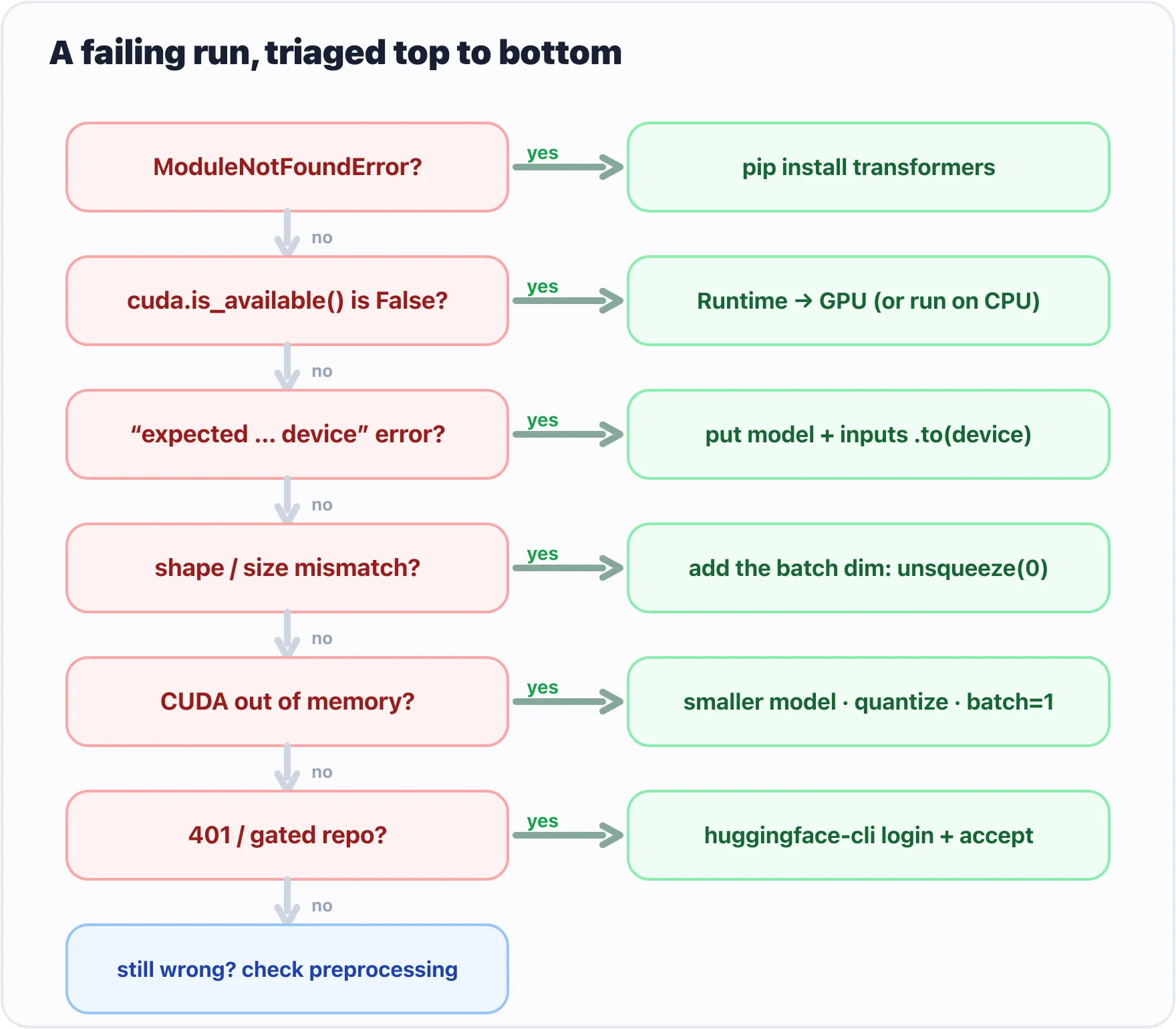
Work down the list: the first matching symptom points to its fix.
When something breaks, ask in order:
- Is the package installed?
- Is the runtime what I think it is?
- Is CUDA available if I need it?
- Are model and inputs on the same device?
- Do the tensor shapes match what the model expects?
- Did I use the model’s own tokenizer, processor, or transforms?
- Is the model gated or license-restricted?
- Is the model too large for this GPU?
Most errors land in one of those eight buckets.
What’s next
Now you have the whole operating manual: tensors, shapes, models, inputs, outputs, pipelines, Auto classes, embeddings, the Hub, memory limits, and the debugging map. The tooling is sharp — time for the most exciting arc, where models stop reading and start to write.
Next: Meet the Decoder: GPT-2 Writes One Token at a Time, where a model produces words of its own.
Target keyword(s): debug pytorch model, hugging face cuda out of memory, device mismatch pytorch, transformers troubleshooting.
Comments