Triage the Inbox: Build a Feedback Sorter with DistilBERT
The text-classification capstone: turn pipeline('sentiment-analysis') into a real tool. Batch a pile of feedback through DistilBERT, route low-confidence cases to a human, and wrap it in a Gradio app with a sortable table and a live distribution.
Series: Practical PyTorch: Running Models — Language — Part 6 of 9
Three lines gave you a verdict (Part 5): hand pipeline("sentiment-analysis") a sentence, get back POSITIVE and a score. That’s a neat demo. It is not yet a tool. A tool takes a hundred messy reviews at once, sorts them into piles, flags the ones a human should actually look at, and does it behind a UI someone non-technical can use. This post builds that — the text-world counterpart to the image classifier you put online in the vision arc. Same move: a model is a function; an app is that function with a UI.
The model under the hood is the sentiment-tuned DistilBERT you’ve been circling all arc — read in Part 3, run in Part 5. Now it does a day’s work.
One call, a whole batch
The single-sentence call from Part 5 has a trick you haven’t used yet: hand it a list and it classifies every item in one pass.
from transformers import pipeline

clf = pipeline("sentiment-analysis")   # the DistilBERT SST-2 model from Part 3

feedback = [
    "Absolutely loved it — would buy again.",
    "The app crashed twice and ate my order.",
    "It arrived. It works. That's about it.",
]
for text, r in zip(feedback, clf(feedback)):
    print(f"{r['label']:>8}  {r['score']:.2f}  {text}")
POSITIVE 1.00 Absolutely loved it — would buy again.
NEGATIVE 1.00 The app crashed twice and ate my order.
POSITIVE 0.98 It arrived. It works. That's about it.List in, list of {label, score} dicts out, same order. That batching is the whole engine of the tool: a pile of feedback goes in, a verdict per item comes out.
Look at that third line, though. “It arrived. It works. That’s about it.” is lukewarm at best, and the model still calls it POSITIVE at 0.98. That’s not a bug — it’s the model’s nature, and it’s exactly why the next step exists.
A verdict, plus a way to say “not sure”
A binary sentiment model has two boxes, so it will shove every input into one of them — neutral, sarcastic, or off-topic as it may be — and it often sounds confident doing it. The fix isn’t a fancier model; it’s a threshold. You decide how sure the model has to be before you trust its call, and anything below the line gets routed to a human instead of silently mislabeled.
def triage(text, threshold):
    items = [line.strip() for line in text.splitlines() if line.strip()]
    rows, counts = [], {"POSITIVE": 0, "NEGATIVE": 0, "needs a human": 0}
    for item, r in zip(items, clf(items)):
        verdict = r["label"] if r["score"] >= threshold else "needs a human"
        counts[verdict] += 1
        rows.append([item, verdict, round(r["score"], 3)])
    return rows, counts
Two outputs: a row per item (text, verdict, confidence) and a tally of the three buckets. The needs a human bucket is the honest part — it’s where the tool admits its limits instead of guessing.
Wrap it in a UI
You know the move from the image-classifier capstone: gr.Interface takes a function plus a description of its inputs and outputs, and turns them into a web app. The only new wrinkle is that we have two inputs and two outputs, so each becomes a list.
import gradio as gr

demo = gr.Interface(
    fn=triage,
    inputs=[
        gr.Textbox(lines=10, label="Paste feedback — one item per line"),
        gr.Slider(0.5, 1.0, value=0.95, step=0.01, label="Confidence threshold"),
    ],
    outputs=[
        gr.Dataframe(headers=["feedback", "verdict", "confidence"], label="Triaged"),
        gr.Label(label="Distribution"),
    ],
    title="Feedback Triage",
    description="Sort a pile of feedback into positive, negative, and needs-a-human.",
)
demo.launch()
Run that cell and a working tool appears: paste a block of feedback, drag the threshold, and watch the table fill and the bars shift. gr.Dataframe renders the rows as a sortable table; gr.Label turns the counts into a little bar chart. Raise the threshold and more rows slide into needs a human — you’re tuning, live, how cautious the tool is.
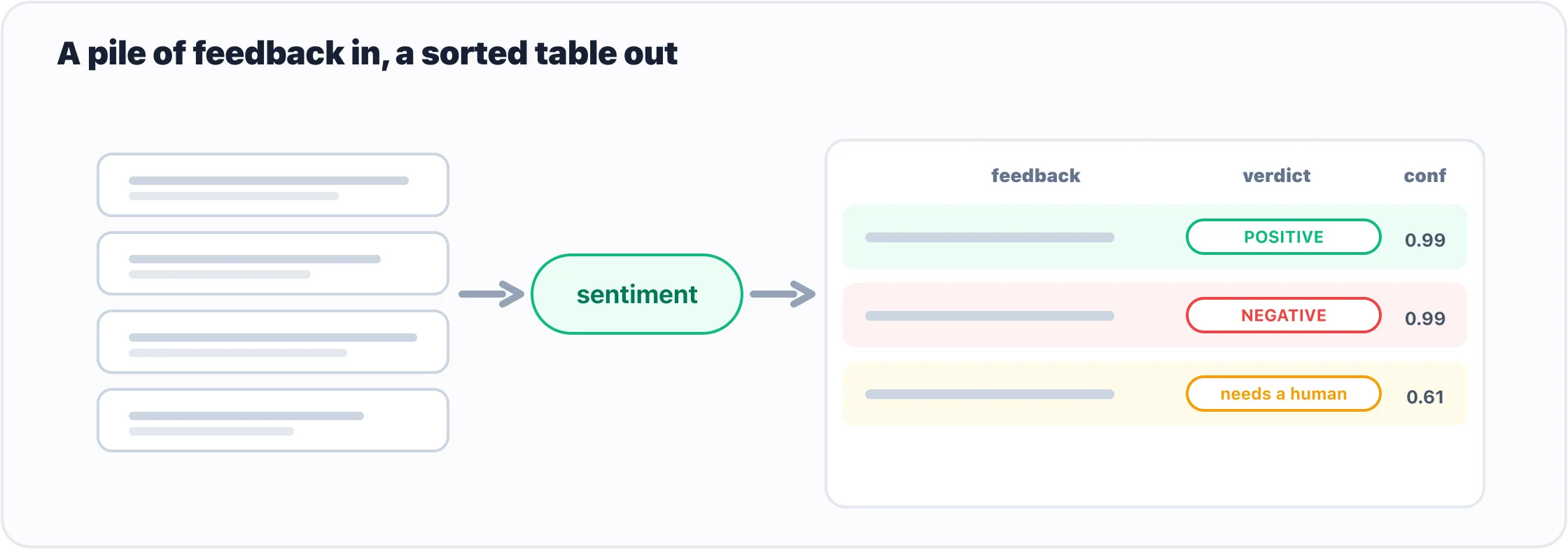
The whole tool: a batch of feedback in, a sorted table and a distribution out, with the unsure cases set aside for a person.
That’s genuinely useful: point it at a week of support emails, app-store reviews, or survey free-text and it does the first pass of sorting in seconds.
What it gets wrong
Shipping a model means being honest about where it fails, so before you hand this to anyone, know its limits:
- It’s binary.
POSITIVE/NEGATIVEonly — there’s no real “neutral,” which is why the threshold and theneeds a humanbucket are doing real work, not decoration. - It’s overconfident. A
0.98on lukewarm text (you saw it) means the score gauges certainty roughly, not as a calibrated probability. Trust the ordering more than the exact number. - It learned movie reviews. This model was trained on SST-2, film snippets. On medical notes, legal text, or code-review comments it’ll be weaker — a general model on a specific domain. If the domain matters, a model fine-tuned on your kind of text will beat it.
- Sentiment is a blunt question. “Is this positive?” is the wrong tool for “what is this about?” or “is this urgent?” Those want a classification or routing model, not a sentiment head.
None of these sink the tool. They just decide where you draw the human-review line.
Make it yours
A few one-line upgrades, now that the skeleton runs:
- Take a file. Swap the textbox for
gr.Fileand read a CSV of reviews — sametriagelogic, a real spreadsheet in. - Swap the model. Pass
model="..."topipelineto drop in a stronger or domain-tuned classifier from the Hub (finding one is where the LLMs series begins). - Ask a different question. For “what is this about?” instead of “is it positive?”, reach for
pipeline("zero-shot-classification")and pass your own candidate labels — same wrapper, a different brain.
What’s next
You’ve now shipped two apps from one pattern — an image classifier and a text triage tool — and both leaned entirely on pipeline to do the running. That’s the right default. But sometimes the easy button doesn’t reach: you want the raw scores to set a threshold inside the model, the embeddings instead of a label, or a model pipeline doesn’t wrap. Time to open the box.
Next: Beyond pipeline(): Taking the Wheel with from_pretrained, where we drop one level down to the model and tokenizer directly, while keeping everything pipeline taught us.
Target keyword(s): hugging face sentiment analysis app, gradio text classification, pipeline batch classification, distilbert sentiment app, build an nlp app.
Comments