How Audio Becomes Tokens: Neural Codecs and Encodec
A beginner-friendly look at neural audio codecs in PyTorch — use Encodec to turn a waveform into discrete tokens and back, the trick that lets a transformer generate sound.
Series: Practical PyTorch: Running Models — Audio — Part 5 of 8
For four posts you’ve made models talk. Now we point the series at the other half — making models play — and there’s one idea standing in the doorway between the two. A language model writes by predicting the next word-token. So how on earth do you get a model to predict the next bit of music? The honest answer is the whole subject of this post, and once it clicks, the next three posts stop being magic and become an obvious extension of something you already understand.
Open the companion notebook in ColabThe problem with predicting a waveform
Back in the Language series’ tokenization posts, you watched a sentence become a list of integers. “The cat sat” doesn’t go into a transformer as letters — it goes in as token IDs, a few small numbers pulled from a fixed vocabulary, and the model’s entire job is to predict the next ID in the sequence. Text generation is next-token prediction over a vocabulary of maybe fifty thousand tokens. That’s it.
Now look at a waveform. From Part 1 you know a single second of audio is sixteen thousand floating-point numbers (at 16 kHz), each a continuous amplitude somewhere in [-1, 1]. There’s no vocabulary, because the values are real numbers, not picks from a fixed list. A transformer predicts the next item out of a discrete set; a waveform offers it an infinite, continuous one, tens of thousands of values per second. You can’t do next-token prediction when there are no tokens.
So before a model can generate audio the way a language model generates text, something has to turn that continuous flood into a short sequence of integers from a fixed vocabulary. That something is a neural codec, and the one we’ll use is Encodec.
Encoder, quantizer, decoder
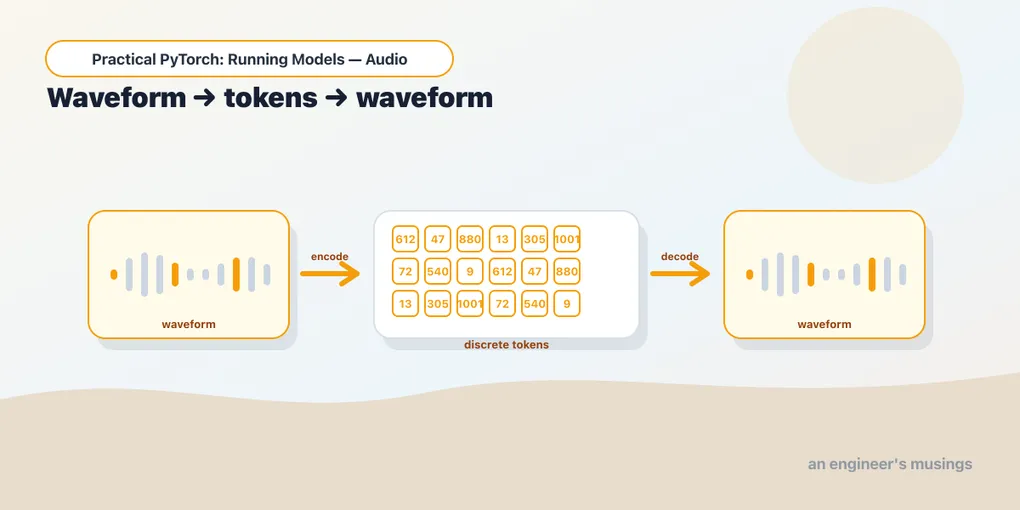
A codec is just a thing that codes and decodes; MP3 is a codec, so is the H.264 in your video files. A neural codec is one where both halves are trained networks instead of hand-written math. Encodec, from Meta, has three pieces, and the middle one is the whole story:
- the encoder takes the waveform and squeezes it down to a compact stream of feature vectors — far fewer steps than there were samples;
- the quantizer snaps each of those vectors to the nearest entry in a learned codebook, replacing a continuous vector with a single integer — its index in the book. This is the step that creates tokens;
- the decoder takes a stream of those integers, looks each one back up, and reconstructs a waveform.
Encode with the first two, get integers. Decode with the third, get sound back. The integers in the middle are the prize: they’re a vocabulary, exactly like word-tokens, and that means a transformer can model them. Let’s actually produce some.
Load Encodec and a clip
We need transformers for Encodec and torchaudio to load and resample a clip. The codec runs fine on CPU, so no GPU required for this post:
!pip install -q transformers torchaudioEncodec comes in a few flavors named by sample rate; we’ll use the 24 kHz model. As ever, the model wants its audio at exactly its own rate, so we resample the clip to match before handing it over:
from transformers import EncodecModel, AutoProcessor
import torchaudio

model = EncodecModel.from_pretrained("facebook/encodec_24khz")
processor = AutoProcessor.from_pretrained("facebook/encodec_24khz")

path = torchaudio.utils.download_asset(
    "tutorial-assets/Lab41-SRI-VOiCES-src-sp0307-ch127535-sg0042.wav"
)
waveform, sr = torchaudio.load(path)
waveform = torchaudio.functional.resample(waveform, sr, processor.sampling_rate)

inputs = processor(
    raw_audio=waveform[0].numpy(),
    sampling_rate=processor.sampling_rate,
    return_tensors="pt",
)
processor.sampling_rate is the codec’s native rate (24,000), and torchaudio.functional.resample moves the clip onto that clock — the same resample discipline from Part 1, because it bites just as hard here. The processor then packages the raw audio into the input_values and padding_mask tensors the model expects, the audio echo of the tokenizer turning a sentence into input_ids.
Encode — the payoff
Here’s the moment the whole post was built around. Push the clip through the encoder and quantizer, and read what comes out:
encoded = model.encode(inputs["input_values"], inputs["padding_mask"])
codes = encoded.audio_codes
print(codes.shape)                 # [1, 1, n_codebooks, time] -> small integers
print(int(codes.min()), int(codes.max()))   # e.g. 0 .. 1023
Two lines, and the continuous flood is gone. codes is a tensor of integers — and the min/max tell you they live in [0, 1023], meaning each one is an index into a codebook of 1,024 entries. That 1023 is the ceiling of a vocabulary, the same way a text tokenizer has a fixed vocab size.
Read the shape slowly: [batch, 1, n_codebooks, time]. The time axis is the codec’s compressed clock — Encodec runs at roughly 75 frames per second, so a 3-second clip becomes a couple hundred frames, not tens of thousands of samples. Each frame isn’t one integer, though; it’s a handful, one per codebook. That’s the extra n_codebooks axis, and it’s worth a paragraph of its own.
Why a handful of codebooks, not one
If you quantized each frame to a single codebook entry, you’d be rounding hard — 1,024 choices to describe a whole slice of sound, and the reconstruction would come back muddy. Encodec uses a trick called residual quantization: the first codebook makes a coarse guess, then a second codebook encodes what the first one missed, a third encodes what’s still left over, and so on. Stack a few and the error shrinks at each step. So a single frame is described by several integers working together, which is why codes has that n_codebooks axis instead of being flat.
This is also the quality knob. More codebooks per frame means a finer description — better audio — at the cost of a longer sequence for any downstream model to chew through. Encodec exposes it as a target bandwidth: ask for more kbps, get more codebooks. It’s the same trade you met with the spectrogram’s resolution and the sample rate itself — more detail, more numbers. Hold that thought, because steering it is the kind of dial Part 7 is all about.
The headline, though, is the count. A second of audio went from sixteen thousand floats to a few hundred frames times a few codebooks — call it a couple thousand integers, each from a fixed vocabulary. That is a sequence a transformer can model, exactly like a sentence of word-tokens. The impossible problem from the top of the post just became a familiar one.
Decode — and listen
Tokens you can’t turn back into sound aren’t worth much, so let’s close the loop. Hand the codes (and the scales Encodec computed alongside them) to the decoder, and play the result:
decoded = model.decode(encoded.audio_codes, encoded.audio_scales, inputs["padding_mask"])[0]
from IPython.display import Audio
Audio(decoded[0].detach().numpy(), rate=processor.sampling_rate)
It sounds like the clip you started with. Not bit-for-bit identical — squeeze your ear and you’ll catch a faint roughness, because a codec is compression and compression is lossy — but unmistakably the same speech, rebuilt entirely from those small integers. The codec learned to pack audio into tokens and unpack it again, and the round trip survives.
encoded.audio_scales rides along with the codes because Encodec normalizes each chunk’s loudness before quantizing and has to undo that on the way out; [0] and detach() are just the usual unwrapping — pull the waveform out of the model’s output tuple, drop the gradient bookkeeping we don’t need for playback (the same no_grad instinct from the Running Models series, applied after the fact).
The whole point: copy versus predict
Everything above was a round trip — encode then decode, which just copies the clip through the bottleneck. That’s a nice party trick, but it’s not generation. Here’s the leap.
Once audio is a sequence of integers from a fixed vocabulary, you can train a transformer to predict that sequence instead of copying it. Feed it a prompt, let it generate Encodec tokens one frame at a time — the exact next-token prediction you know from text — and then run those predicted tokens through Encodec’s decoder. Sound comes out that was never recorded. That’s not a sketch of how music generation works; that’s literally MusicGen, and it’s the next post. The encoder you used here is the same codec it leans on; the only new piece is the transformer in the middle that dreams up tokens rather than echoing them.
Gotchas
The handful of things that trip people up the first time through.
- The codes are integers, not floats. That’s the entire point — they’re a vocabulary, not a compressed signal you can do arithmetic on. If you find yourself treating
codeslike a waveform, you’ve missed the idea. - There’s an extra codebook axis.
codesis shaped[batch, 1, n_codebooks, time], not a flat list per frame, because of residual quantization. Then_codebooksdimension surprises people who expected one integer per time step. - Bandwidth is a dial. Higher target bandwidth means more codebooks, which means better reconstruction and a longer token sequence. There’s no free lunch — quality and sequence length move together.
- Reconstruction is lossy. A codec is compression; the decoded waveform is close to the original, never bit-exact. Don’t reach for Encodec when you need a faithful copy — reach for it when you need audio as tokens.
Final thoughts
The thing to carry forward isn’t “Encodec exists.” It’s the shape of the trick: any time you want a transformer to generate something that isn’t naturally discrete — audio, images, video — somebody first builds a codec that turns that thing into tokens and back, and then generation becomes next-token prediction over those tokens. You already knew how language models write. Now you know that “generate music” is the same sentence with a different tokenizer in front of it. The model in the middle is the easy part to believe; the codec was the missing piece, and you just ran it.
Next: Part 6 — Type a Vibe, Get a Track: Text-to-Music with MusicGen — the transformer that predicts Encodec tokens from a text prompt, turning a typed mood into a clip you can play.
Target keyword(s): neural audio codec, encodec pytorch, audio tokens transformer.
Comments