When One Message Won't Hold a Million Rows
How Mule's Batch Job splits a huge dataset into records, processes them in parallel steps, and commits to a target in bulk — without loading everything into memory.
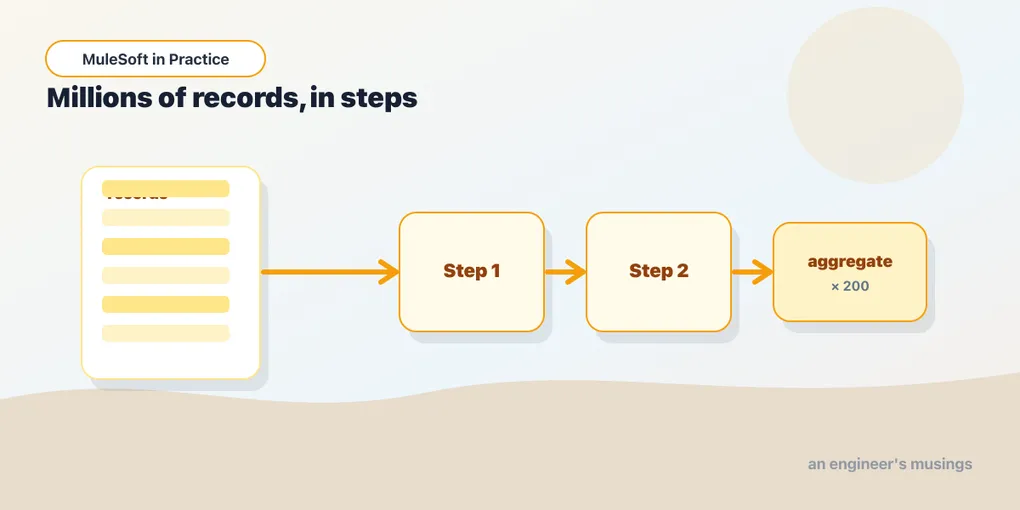
Every flow you’ve built so far treats a payload as one thing — a JSON body, a request, a single row. That model breaks the moment someone hands you a nightly extract of two million customer records and says “sync these to Salesforce.” Load that into a variable and you’ll watch the worker’s heap fill and the JVM fall over. Iterate it one record at a time with For Each and you’ll still be running when tomorrow’s extract lands.
This is the job Mule’s Batch Job was built for: take a dataset too big to hold at once, split it into individual records, push each record through a pipeline, and commit the results to a target in bulk. It’s the difference between “here’s a message” and “here’s a stream of a million small messages, keep them moving.”
The batch model
A Batch Job is a scope with its own execution model — it doesn’t behave like the rest of the flow. When a payload enters it, Mule splits that payload into records, one per element of the collection, and persists them to a disk-backed queue. From that point the job doesn’t work with your original payload at all; it works with records, and it processes them in three phases.
- Load and Dispatch — implicit. Mule splits the input and stages the records. You don’t write anything here.
- Process — one or more Batch Steps. Every record flows through each step in turn. This is where your transformation and target calls live.
- On Complete — implicit, optional. A summary phase that runs once, after every record has been through Process, with counts of successes and failures.
The key mental shift: inside Process, payload is a single record, not the whole dataset. You write your steps as if handling one row, and Mule fans that logic out across the entire input — in parallel, across threads, with backpressure handled for you.
Here’s the shape of a job that reads a big extract and upserts it downstream:
<batch:job jobName="syncCustomers" maxFailedRecords="100">
    <batch:process-records>
        <batch:step name="transformStep">
            <ee:transform doc:name="Shape record">
                <ee:message>
                    <ee:set-payload><![CDATA[%dw 2.0
output application/java
---
{
    externalId: payload.customer_id,
    name: payload.first_name ++ " " ++ payload.last_name,
    email: lower(payload.email default "")
}]]></ee:set-payload>
                </ee:message>
            </ee:transform>
        </batch:step>

        <batch:step name="upsertStep">
            <batch:aggregator size="200">
                <salesforce:upsert objectType="Contact" externalIdFieldName="externalId__c">
                    <salesforce:records>#[payload]</salesforce:records>
                </salesforce:upsert>
            </batch:aggregator>
        </batch:step>
    </batch:process-records>

    <batch:on-complete>
        <logger level="INFO" message="#['Loaded: ' ++ payload.successfulRecords ++ ', failed: ' ++ payload.failedRecords]"/>
    </batch:on-complete>
</batch:job>
Two steps, two jobs. The first reshapes each record on its own. The second collects records into blocks of 200 and hands each block to Salesforce in a single call.
Steps: filtering and record variables
A record doesn’t have to visit every step. Each Batch Step takes an acceptExpression — a DataWeave boolean evaluated per record. Return false and that record skips the step. This is how you route: validate in step one, and only records that pass flow into the step that writes.
<batch:step name="upsertStep" acceptExpression="#[vars.valid == true]">To carry that decision between steps you use record variables — setVariable inside a step attaches state to the current record, and it travels with that record through the rest of the job. It’s the batch equivalent of a flow var, scoped to one record’s journey rather than the whole execution. Set vars.valid in a validation step, read it in an acceptExpression downstream, and you’ve split good records from bad without ever collecting the dataset into one place.
The Aggregator: commit in bulk
Processing records one at a time is correct but slow when the target is a network call. Upserting to Salesforce or inserting into a database row-by-row means one round trip per record — a million round trips. The Batch Aggregator fixes this by buffering records inside a step and releasing them in blocks.
Set size="200" and the aggregator gathers 200 records, then runs its body once with payload bound to an array of those 200. Your INSERT or upsert handles the whole block in a single call. Choose the size to match what the target likes to swallow — Salesforce’s bulk limits, your database’s batch-insert sweet spot — and you turn a million calls into five thousand.
There’s also a streaming aggregator (streaming="true" with no fixed size) for when you want the entire step’s records as one stream, but for most bulk-load work a fixed block size is what you want.
When records fail
At this scale, some records will be bad — a malformed email, a foreign key that doesn’t resolve. The question isn’t whether failures happen but whether one bad record stops the other 999,999.
By default a batch job keeps going: a failing record is marked failed and the rest carry on. maxFailedRecords sets the ceiling. Leave it at 0 and the job aborts on the first failure; set it to 100 and the job tolerates up to a hundred failures before giving up; set it to -1 and it never aborts no matter how many fail. The failed records are counted in the On Complete phase, so you always get a tally.
Within a step you can also decide how a failing record behaves for the rest of its steps — whether it stops there or continues — via the step’s failure handling. The practical pattern is to let records fail soft, count them, and route the failures somewhere you can inspect them later rather than losing the whole run to one bad row.
Batch or For Each?
Both iterate a collection, so which do you reach for? For Each is right when the collection is modest and already in memory, when you need the results back in the flow to keep processing, and when strict sequential order matters. It runs in your flow’s thread, in order, and the payload after the loop is whatever you make it.
Batch is right when the dataset is large or unbounded, when you want parallelism and bulk commits, and when you can treat each record independently. It runs asynchronously on its own thread pool — the flow that triggers a batch job moves on immediately, so batch is fire-and-forget from the caller’s view. If you need to hold up a request until every record is done, batch is the wrong tool. If you’re moving a mountain of data from A to B, it’s the only tool that won’t fall over.
Final thoughts
The batch model asks you to stop thinking about “the payload” and start thinking about “a record” — write the logic for one, let Mule run it for millions. Once that clicks, the rest is tuning: aggregator block sizes to match your target, maxFailedRecords to match your tolerance for bad data, and a real destination for the records that don’t make it. It’s the least flow-like part of Mule, and for the problems it solves, that’s exactly the point.
Comments