The Modern Data Stack, Wired Together
Five books in, you have all the pieces of a data platform — this one bolts them into a single working pipeline on Snowflake.
You’ve read the dbt book and learned to treat SQL like software. You’ve read the Snowflake series and learned what a warehouse actually is. You’ve read the Airflow series and learned to schedule work without cron and a prayer. And you’ve seen Cosmos turn a dbt project into an Airflow DAG. Four sets of parts, each impressive on its own bench — and, so far, never bolted together.
That’s what this book does. One warehouse, one dbt project, one orchestrator, one graph of models running on real data. No more toy examples that stop at the interesting part.
Who does what
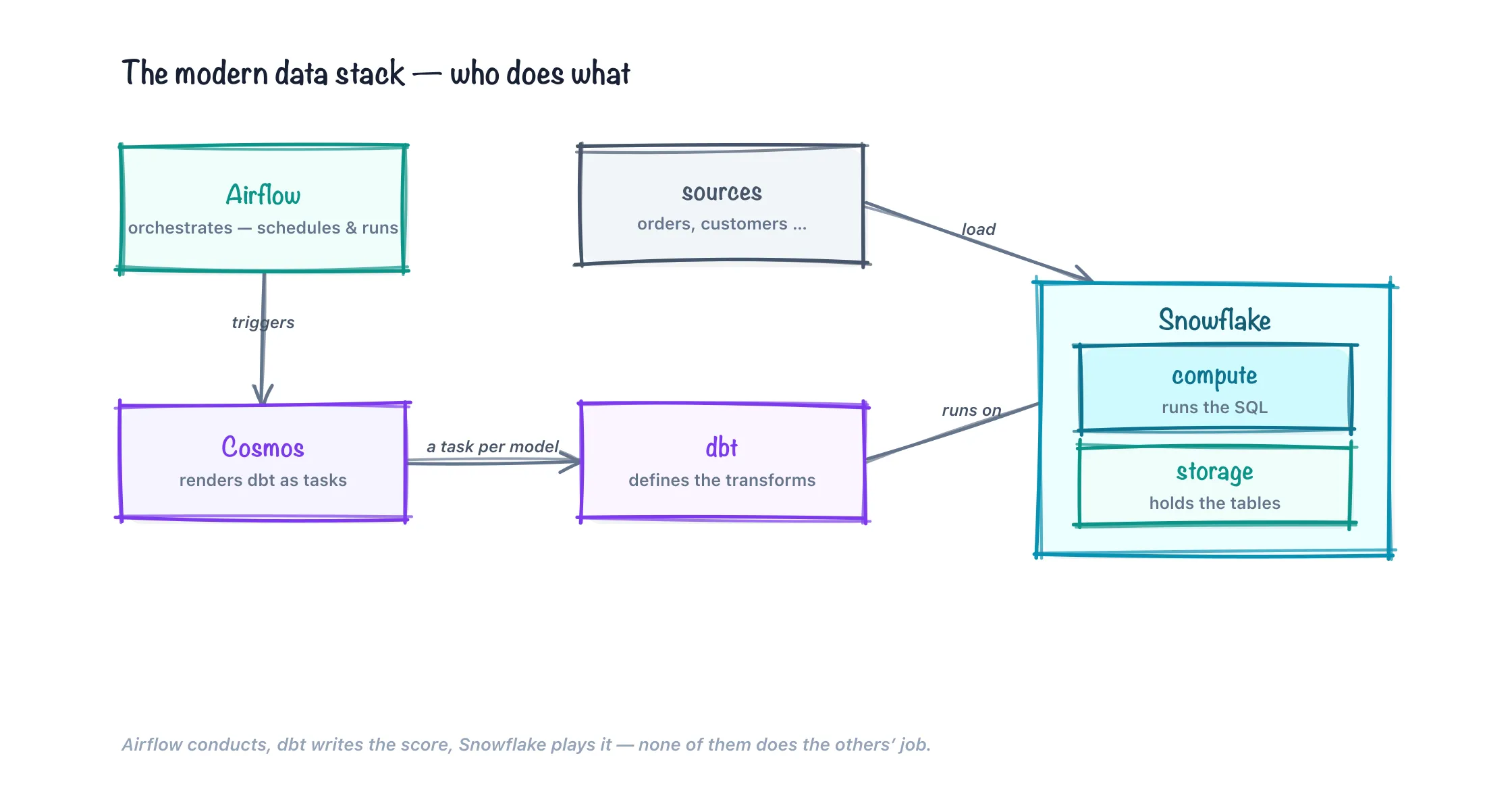
The temptation is to think of these tools as competitors for the same job. They aren’t — they occupy four different seats, and the whole point is that each does the thing it’s good at and nothing else.
Snowflake is the engine. It stores the tables and it runs the compute. Every SELECT, every CREATE TABLE AS, every join over a billion rows happens inside a Snowflake virtual warehouse, not on your laptop and not inside Airflow. If you’re fuzzy on how the account/database/schema/warehouse pieces fit, the Snowflake fundamentals chapter is the ground floor for everything here.
dbt is the score. It defines the transformations — staging models, marts, tests — as version-controlled SQL, and it compiles them into the right CREATE statements in dependency order. dbt doesn’t have a compute engine of its own; it hands SQL to Snowflake and lets Snowflake do the lifting. The dbt book is the prerequisite for the modeling in chapters 4 through 6.
Airflow is the conductor. It decides when the transformation runs, retries the parts that fail, backfills history, and gives you a place to look when something breaks at 3am. On its own Airflow knows nothing about your dbt models — it just runs tasks on a schedule. The orchestration series covers the DAG and TaskFlow basics this assumes.
Cosmos is the bridge between the last two. It reads your dbt project and renders each model as its own Airflow task, so the DAG graph is the dbt graph — every model gets its own retry, its own logs, its own green or red square. We built that warehouse-agnostic in the Cosmos book; here we point it at Snowflake specifically.
Airflow conducts, Snowflake plays, dbt is the sheet music, Cosmos hands out the parts. Keep that mapping in your head and the rest of the book is just wiring.
The end-state architecture
Here is the whole machine in one breath, left to right, so you have a mental picture to hang every later chapter on.
1 — Ingestion lands bytes in raw. Something outside dbt puts source-shaped tables into a schema called RAW. In our build that “something” is one of two things. For the hands-on chapters we take a shortcut: TPCH-shaped tables already exist in the read-only SNOWFLAKE_SAMPLE_DATA share Snowflake gives every account for free, and we clone them into RAW with a plain CREATE TABLE ... AS SELECT, so the schema looks exactly like something a loader would have produced. In a real deployment the loader is a COPY INTO statement pulling CSV or Parquet from an external stage: an S3, GCS, or Azure bucket registered in Snowflake as @ANALYTICS.RAW.TPCH_STAGE with a named FILE FORMAT. Or it’s Snowpipe, which fires that same COPY INTO automatically the moment a file lands, event-driven instead of on a poll. If you don’t want to own that pipe at all, a managed EL tool like Fivetran or Airbyte owns the connector and writes straight into RAW for you; what changes is who operates the mechanism, not the contract downstream. Either way the deal is the same: RAW holds append-mostly, source-shaped tables with a _loaded_at timestamp, and nothing in RAW is ever hand-edited. We keep the sample-share shortcut through chapter 6 so the modeling can be the star; chapter 8 replaces it with a genuine COPY INTO/Snowpipe load and spells out the raw-to-staging contract.
2 — dbt transforms raw into staging and marts. This is the code you write and the part you version-control. Staging models (STG_ORDERS, STG_CUSTOMER, STG_LINEITEM, …) rename and retype the raw columns into house style — one staging model per source table, thin and boring on purpose. Marts (FCT_ORDERS, DIM_CUSTOMER, MART_REVENUE_BY_NATION) join those clean pieces into the tables a business actually queries. dbt compiles the lot into ordered CREATE OR REPLACE TABLE/CREATE VIEW statements and ships them to Snowflake.
3 — Cosmos renders that dbt project as an Airflow DAG. At DAG-parse time Cosmos reads your project (via a dbt ls/manifest parse) and emits one Airflow task per model, wired in dbt’s dependency order. When the DAG runs, each task shells out to dbt for exactly one node — effectively dbt run --select stg_orders — inside the Airflow worker.
4 — Airflow decides when. The DAG is asset-scheduled, not clock-scheduled: it wakes when the RAW load reports fresh data (Airflow 3’s schedule=[Asset(...)]), runs the model graph, runs the tests, and stops. The warehouse it used auto-suspends. Nothing spins until the next batch lands. In skeleton, the transform DAG is barely more than a Cosmos object with an asset on its schedule:
from airflow.sdk import Asset
from cosmos import DbtDag, ProfileConfig, ExecutionConfig

raw_orders = Asset("snowflake://analytics_prod/raw/orders")

bookshop_transform = DbtDag(
    dag_id="bookshop_transform",
    schedule=[raw_orders],          # runs when the load updates the asset
    profile_config=ProfileConfig(...),      # the key-pair profile from post 2
    execution_config=ExecutionConfig(...),  # local mode; settled in post 4
)
The whole DAG body is that one object — Cosmos fills in the per-model tasks at parse time. The interesting decisions are all in the two configs, which is why chapters 2 through 4 spend their length on them.
That’s the pipeline. Five later chapters build it; four more harden it. Before any of that, though, two boring but load-bearing questions: what versions, and which databases.
Prerequisites and versions
Everything in this book was written against the versions below. This is a docs-verified book — the code is checked against each tool’s documentation for these releases, not run end-to-end against a live Snowflake account — so pin these if you want the snippets to behave.
| Component | Version | What it is |
|---|---|---|
| Apache Airflow | 3.3.0 | The orchestrator. 3.x matters: Assets replace Datasets, schedule= is unified, backfills are scheduler-managed. |
| astronomer-cosmos | 1.11.x | Renders the dbt project into Airflow tasks. Needs a version with Airflow 3 support. |
| apache-airflow-providers-snowflake | 6.x | Gives Airflow the Snowflake connection type and SQLExecuteQueryOperator wiring. |
| dbt-core | 1.11.x | The transformation framework. |
| dbt-snowflake | 1.11.x | The Snowflake adapter dbt uses to compile and run SQL. |
| snowflake-connector-python | pulled in by the above | The Python driver; both dbt-snowflake and the Airflow provider sit on it. Key-pair auth lives here. |
| Python | 3.12 | The runtime for Airflow, Cosmos, and dbt in the same image. |
| Snowflake | Standard edition | Enough for the whole build. You only need Enterprise for multi-cluster warehouses and some governance features we flag as optional. |
The version most worth internalizing is Airflow 3.3. If your Airflow reflexes are from 2.x, three things changed under you. Datasets are now Assets — from airflow.sdk import Asset, schedule=[Asset(...)]. The schedule argument is unified, with no more schedule_interval or hand-rolled timetables for the simple case. And backfills are managed by the scheduler, via airflow backfill create or the UI, rather than a CLI daemon. The orchestration in this book leans on all three.
One packaging note that shapes chapter 4: dbt and Airflow live in the same image. dbt-snowflake, astronomer-cosmos, and the Snowflake provider are all installed into the Airflow environment (a single requirements.txt under the Astro CLI project), so a worker can invoke dbt in-process. That’s Cosmos’s default local execution mode — dbt runs as a subprocess in the Airflow worker, sharing its Python. It is the simplest thing that works and it’s what we use; chapter 4 also names the alternative (an isolated virtualenv, or a separate container per task) and says when you’d reach for it. The choice of execution mode is not cosmetic — it decides where your dbt_project.yml lives, how the profile is resolved, and how the private key reaches the worker — so we settle it early and don’t revisit it.
Dev and prod, spelled out
A stack is not one environment even when the repo has one branch. We run two databases with identical shapes:
| Dev | Prod | |
|---|---|---|
| Database | ANALYTICS_DEV | ANALYTICS_PROD |
| Raw landing | ANALYTICS_DEV.RAW | ANALYTICS_PROD.RAW |
| dbt staging | ANALYTICS_DEV.STAGING | ANALYTICS_PROD.STAGING |
| dbt marts | ANALYTICS_DEV.MARTS | ANALYTICS_PROD.MARTS |
| Who runs it | a developer’s laptop, or CI | the Airflow DAG |
| Login | your Snowflake user, key-pair | a service user, key-pair |
The two databases are the same three schemas — RAW, STAGING, MARTS — so a model that compiles in dev compiles in prod with nothing changed but the target. In dbt terms that’s two targets in one profiles.yml: dev writes to ANALYTICS_DEV, prod writes to ANALYTICS_PROD, and the only difference is the database name and which credential signs in. Chapter 2 builds exactly that profile.
A raw table carries just enough metadata to make the rest of the stack honest. ANALYTICS_DEV.RAW.ORDERS is the source columns plus one thing the source didn’t have:
O_ORDERKEY  O_CUSTKEY  O_ORDERSTATUS  O_TOTALPRICE  O_ORDERDATE   _LOADED_AT
--------------------------------------------------------------------------------
1           37001      O              173665.47     1996-01-02    2026-05-14 02:03:11
2           78002      O               46929.18     1996-12-01    2026-05-14 02:03:11
That _LOADED_AT column is the seam between ingestion and dbt. It’s what a source freshness check reads to decide whether the data is stale, and what an incremental model reads to find “rows since last run.” It costs one clause in the load and it’s non-negotiable — chapter 8 makes that the heart of the raw-to-staging contract.
Compute is split by job, not by environment, and this is where a lot of first stacks go wrong. Both databases share three warehouses, each sized to its work:
LOADING_WH— the ingestion warehouse. It runsCOPY INTO/Snowpipe and nothing else, so a slow load can’t starve a dbt run, and load cost is legible on its own line. In the sample-share chapters it barely runs; chapter 8 gives it real work.TRANSFORMING_WH— the dbt warehouse. Every staging and mart model executes here. It’s the one the Airflow DAG points at, and the one you’ll watch in the cost views. Default size XS; chapter 6 explains when one heavy incremental earns a temporary size bump.REPORTING_WH— the readers’ warehouse. BI tools and analysts queryingMARTSland here, isolated from the transform job so a dashboard refresh never fights a dbt build for slots.
Every one of them is set to AUTO_SUSPEND after a minute of idle and AUTO_RESUME on the next query, so an idle stack costs nothing. That “spins down when the work is done” property is the single biggest reason the bill for a nightly pipeline is small; chapter 7 and chapter 10 make it explicit with resource monitors and statement timeouts.
Roles get the same job-shaped split rather than a per-person split: an INGEST role can write RAW, a TRANSFORM role can build STAGING and MARTS, a REPORTER role can only read MARTS. The service user Airflow logs in as is granted TRANSFORM and nothing more — it has no business writing raw or reading anything a reporter shouldn’t. We sketch this here and build the full grant tree, future grants, and per-developer sandboxes in chapter 9.
The target
The pipeline we build runs against TPCH data — the order-management benchmark Snowflake ships free in SNOWFLAKE_SAMPLE_DATA.TPCH_SF1. It has the tables you’d expect from a business that sells things: CUSTOMER, ORDERS, LINEITEM, NATION, REGION. Real enough to have interesting joins, small enough to run on the smallest warehouse. We clone those into ANALYTICS_DEV.RAW so the raw layer looks landed rather than shared, and dbt takes it from there.
Traced end to end with real object names, one row of an order’s revenue flows like this:
SNOWFLAKE_SAMPLE_DATA.TPCH_SF1.ORDERS      (the free share)
      │  CREATE TABLE ... AS SELECT   (post 5; a COPY INTO in post 8)
      ▼
ANALYTICS_DEV.RAW.ORDERS                    (source-shaped, _loaded_at stamped)
      │  dbt: models/staging/stg_orders.sql
      ▼
ANALYTICS_DEV.STAGING.STG_ORDERS            (renamed, retyped, house style)
      │  dbt: models/marts/fct_orders.sql   (joins STG_LINEITEM, STG_CUSTOMER)
      ▼
ANALYTICS_DEV.MARTS.FCT_ORDERS
      │  dbt: models/marts/mart_revenue_by_nation.sql (joins DIM_CUSTOMER, NATION)
      ▼
ANALYTICS_DEV.MARTS.MART_REVENUE_BY_NATION  (the question a business asks)
By the end you’ll have that graph running on a schedule, incrementally, with tests, on a warehouse that spins down when it’s finished — and an Airflow UI where every one of those arrows is its own retriable, log-carrying task.
Here’s what each chapter adds, in three acts.
Act one — make the parts talk (chapters 2–4).
- Chapter 2 points dbt at Snowflake with a
profiles.yml— and does it with key-pair authentication, because in 2026 that’s no longer optional. - Chapter 3 gives Airflow its own Snowflake connection and proves it with a smoke test.
- Chapter 4 brings in Cosmos so the dbt run becomes a task-per-model DAG on Snowflake, and settles the execution-mode question above.
Act two — build the pipeline (chapters 5–7).
- Chapter 5 builds the actual TPCH staging-and-marts models on real data.
- Chapter 6 makes the heavy models incremental and puts the DAG on an asset schedule.
- Chapter 7 is the first production pass: warehouse sizing, secrets, and keeping the bill sane.
Act three — make it a platform (chapters 8–12).
- Chapter 8 replaces the sample-share shortcut with a real ingestion layer —
COPY INTO, Snowpipe, EL tools, and the raw-to-staging contract. - Chapter 9 builds environments and RBAC across the whole stack: dev/CI/prod, per-developer sandboxes, and the ingest/transform/reader roles.
- Chapter 10 goes deep on warehouses and cost — per-workload sizing, query tags, resource monitors, statement timeouts.
- Chapter 11 wires CI/CD so a pull request tests dbt and deploys the DAG.
- Chapter 12 closes with lineage, contracts, and observability — proving the seams hold.
What the stack survives
A pipeline is not defined by what it does on a good day; it’s defined by what it does on a bad one. Three failures will happen to any stack that runs long enough, and the design above absorbs each one in a specific place — which is exactly why we split the tools the way we did.
A model fails. A mart references a column that ingestion quietly dropped, and the SELECT errors. Because Cosmos renders one Airflow task per model, the failure is a single red square with its own log and its own retry count. The fifteen models upstream of it that already succeeded don’t re-run, and the ones downstream are correctly held back rather than run against half-built data. You fix the model, clear the one task, and the DAG resumes from the break. Chapter 4 sets up the task-per-model granularity; chapter 6 tunes retries and the trigger rules that decide what “held back” means.
A source is late. The nightly file doesn’t land, or lands two hours after the DAG would normally have fired. A clock schedule would cheerfully run the whole graph against yesterday’s data and publish a wrong answer with full confidence. Asset scheduling won’t: the transform DAG is triggered by the RAW load asset updating, so no fresh data means no run, and a dbt source freshness check turns “the data is stale” into a loud, specific test failure rather than a silently old dashboard. Chapter 8 defines the freshness expectation and the _loaded_at semantics; chapter 6 wires the asset trigger.
A key rotates. The private key the service user authenticates with is rotated on schedule — as it should be, because that’s the whole security case for key-pair auth over passwords. Because the credential lives in exactly one place per tool (dbt’s profile, Airflow’s connection) and is pulled from a secrets backend rather than baked into an image, rotation is a swap of one secret, not a redeploy. Chapter 2 and chapter 3 set up the key on each side; chapter 7 and chapter 9 move it into a secrets backend and describe the rotation itself.
None of these are exotic. They’re the ordinary weather of running a data platform. The reason to assemble the stack this particular way — separate engine, score, conductor, and bridge — is that each failure lands on the component built to handle it, instead of taking the whole thing down.
What this book deliberately does not cover
To keep the scope honest: this is a build of the transform-and-orchestrate core, and there are two neighbors we point at but don’t enter.
- The BI and semantic layer. We publish clean marts to
ANALYTICS_PROD.MARTSand stop there. What a Looker, a Tableau, a Metabase, or dbt’s own semantic layer does with those tables — metrics definitions, dashboards, a governed metrics API — is a series of its own. We make the marts good enough to sit under one; we don’t build one. - Streaming. Everything here is batch: data lands, the DAG wakes, the graph runs, the warehouse suspends. Sub-minute freshness, Kafka, Snowpipe Streaming, and materialized-view-driven continuous transforms are a genuinely different shape of problem, and pretending a batch orchestrator is a stream processor is how stacks get sad. Snowpipe appears in chapter 8, but as event-driven file loading, not as streaming.
Naming what’s out keeps the promise of what’s in believable.
What’s genuinely new here
If you did the Cosmos book, most of the orchestration mechanics will feel familiar. What changes when the warehouse is specifically Snowflake — and where this book has to say something the agnostic version couldn’t — is authentication.
Snowflake is in the middle of retiring single-factor password sign-in for the kind of non-human accounts that dbt and Airflow use. A service user that logs in with a username and password is on a deprecation clock. The replacement is key-pair auth: you generate an RSA key pair, register the public half on the Snowflake user, and hand the private half to the tool. Both dbt and Airflow support it, and both of the next two chapters lead with it rather than treating it as an appendix.
That single decision ripples through the whole stack — the dbt profile, the Airflow connection, and where the private key is allowed to live. It’s the first thing we set up, and it’s the reason a Snowflake-specific book exists at all instead of a footnote on the generic one.
Final thoughts
The modern data stack gets sold as a shopping list — buy the warehouse, buy the transform tool, buy the orchestrator — as if the value were in owning four logos. It isn’t. The value is in the seams: dbt trusting Snowflake for compute, Cosmos trusting dbt for the graph, Airflow trusting all three to fail loudly. A stack is only “modern” when those handoffs are clean enough that you can change one part on a Friday without the other three noticing. That’s the pipeline we’re building — engine, score, conductor, and bridge, over two databases and three warehouses — and it starts with getting dbt to log in.
Comments