Exposing Your Misk Service to AI: An MCP Server with misk-mcp
Turn a Misk service into a Model Context Protocol server with misk mcp: define tools, resources, and prompts, then expose them to LLMs over StreamableHTTP or WebSocket.
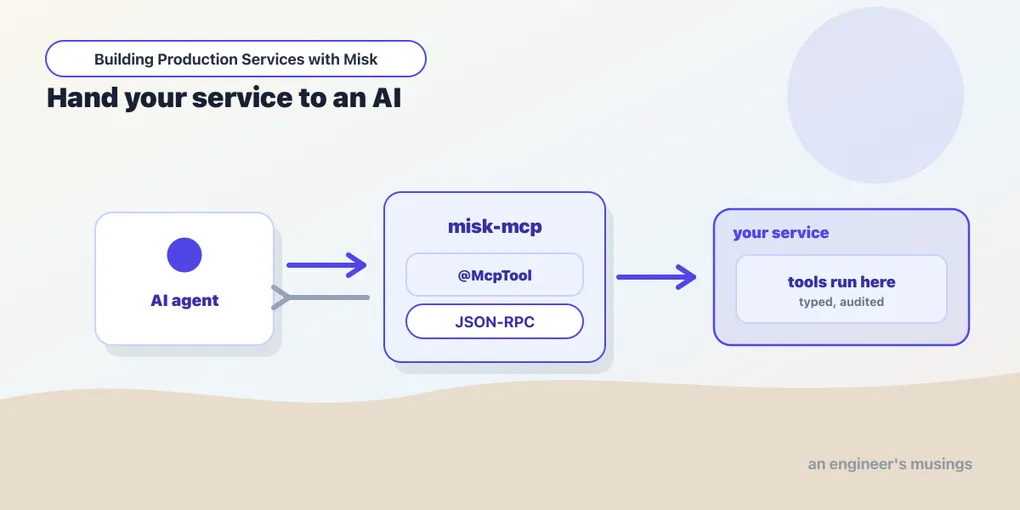
Series: Building Production Services with Misk — Bonus: Part 25
Part 24 was the finale: you can build and run a production Misk service. This is a bonus encore on the newest, most speculative corner of the framework: misk-mcp. It turns your service into a Model Context Protocol (MCP) server so AI applications can call its tools and read its data through a standardized protocol. MCP is niche but trending hard, and there’s near-zero competition for “misk mcp” today. So if you’ve shipped a Misk service and want LLMs to drive it, this is the post. Fair warning up front: the whole module is @ExperimentalMiskApi and will move.
What MCP is, and why your service should speak it
The Model Context Protocol is an open standard for connecting LLM applications to external tools and data. Instead of every AI app inventing its own plugin format, MCP defines three things a server can expose: tools (functions the model can execute), resources (contextual data the model can read), and prompts (reusable interaction templates). It adds a JSON-RPC 2.0 wire protocol over a choice of transports. Hosts (the LLM app), clients (connectors), and servers (your service) all speak the same language.
The pitch for misk-mcp is that your Misk service already has the tools and data — actions, repositories, domain logic. Rather than hand-rolling an MCP endpoint, you declare MCP components as injectable Misk classes and the module handles the protocol, the JSON schema generation, and the transport. Your service becomes something Claude or any MCP client can use directly.
Setup: the MCP server module
Install McpServerModule with a server name and config, then register your components. Everything here requires opting into the experimental API:
@ExperimentalMiskApi
class McpModule : KAbstractModule() {
  override fun configure() {
    install(McpServerModule.create("my_server", config.mcp))

    install(McpToolModule.create<CalculatorTool>())
    install(McpResourceModule.create<DatabaseSchemaResource>())
    install(McpResourceTemplateModule.create<UserProfileResource>())
    install(McpPromptModule.create<CodeReviewPrompt>())
  }
}
That’s the now-familiar Misk pattern: features are modules, components are multibound contributions (the same mechanism from Part 3). The config lives in YAML. Note the constraint: exactly one server entry is supported today:
mcp:
  my_server:
    version: "1.0.0"
    resources:
      subscribe: false       # resource update notifications
      list_changed: false
    tools:
      list_changed: false
Defining a tool
A tool is a class extending McpTool<I>, where I is a @Serializable input data class. You annotate the input fields with @Description, and the module generates the JSON schema the model sees from those. Then you implement a suspending handle:
@Serializable
data class CalculatorInput(
  @Description("The operator: add, subtract, multiply, or divide")
  val operator: String,
  @Description("The first operand")
  val a: Double,
  @Description("The second operand")
  val b: Double,
)

@ExperimentalMiskApi
@Singleton
class CalculatorTool @Inject constructor() : McpTool<CalculatorInput>() {
  override val name = "calculator"
  override val description = "Performs basic arithmetic operations"
  override val readOnlyHint = true

  override suspend fun handle(input: CalculatorInput): ToolResult {
    val result = when (input.operator) {
      "add" -> input.a + input.b
      "divide" -> if (input.b == 0.0)
        return ToolResult(TextContent("Error: division by zero"), isError = true)
      else input.a / input.b
      // ...
      else -> return ToolResult(TextContent("Unknown operator"), isError = true)
    }
    return ToolResult(TextContent("Result: $result"))
  }
}
The class is an ordinary @Inject-constructed singleton, so a tool can depend on your services, repositories, and clients like anything else in the container. ToolResult is a sealed type built from content items — TextContent, ImageContent, an isError flag, optional _meta.
When the model needs to parse the result rather than read prose, extend StructuredMcpTool<I, O> and return a typed O, which the module serializes to JSON automatically:
@ExperimentalMiskApi
@Singleton
class WeatherTool @Inject constructor(
  private val weatherService: WeatherService,
) : StructuredMcpTool<WeatherInput, WeatherOutput>() {
  override val name = "get_weather"
  override val description = "Get current weather for a city"
  override val readOnlyHint = true

  override suspend fun handle(input: WeatherInput): ToolResult {
    val w = weatherService.getCurrentWeather(input.city, input.units)
    return ToolResult(WeatherOutput(input.city, w.temp, w.humidity, w.description))
  }
}
Tool hints are the metadata that make a tool a good citizen: readOnlyHint (doesn’t modify state, so clients can cache and skip consent friction), destructiveHint and idempotentHint (only meaningful when readOnlyHint = false), and openWorldHint (touches external systems). Set them honestly; they’re how an MCP client decides whether to warn the user before invoking, and whether a retry is safe.
If a tool needs the inbound request metadata — a progressToken to stream progress back, say — extend MetaAwareMcpTool<I> or MetaAwareStructuredMcpTool<I, O>, and override the handle(input, meta) overload. It’s strictly opt-in; tools that don’t need it keep extending the plain base classes.
Resources and prompts
Tools are the headline, but resources and prompts round out what a server offers. A resource is read-only context at a fixed URI: implement McpResource with a uri, mimeType, and a handler returning a ReadResourceResult:
@Singleton
class DatabaseSchemaResource @Inject constructor(
  private val schemaService: SchemaService,
) : McpResource {
  override val uri = "schema://database/users"
  override val name = "User Database Schema"
  override val mimeType = "application/json"

  override suspend fun handler(request: ReadResourceRequest): ReadResourceResult =
    ReadResourceResult(listOf(ResourceContent(uri, mimeType, Json.encodeToString(schemaService.userSchema()))))
}
A resource template (McpResourceTemplate) is the parameterized variant — an RFC 6570 uriTemplate like users://{userId}/profile, with the extracted variables passed to the handler. And an McpPrompt is a reusable prompt template declaring typed arguments and producing PromptMessages — the “saved workflow” an AI client can offer users by name. Each registers with its matching module (McpResourceModule, McpResourceTemplateModule, McpPromptModule).
Wiring the transport
Defining components isn’t enough — MCP traffic has to reach them over HTTP, and that’s an ordinary Misk web action you write. The module supports two transports. StreamableHTTP uses HTTP POST plus Server-Sent Events, with up to three annotated methods:
@ExperimentalMiskApi
class McpSseAction @Inject constructor(
  private val mcpStreamManager: McpStreamManager,
) : WebAction {
  @McpPost
  suspend fun handle(@RequestBody message: JSONRPCMessage, sendChannel: SendChannel<ServerSentEvent>) {
    mcpStreamManager.withSseChannel(sendChannel) { handleMessage(message) }
  }

  @McpGet     // optional: server-to-client notifications
  suspend fun stream(sendChannel: SendChannel<ServerSentEvent>) {
    mcpStreamManager.withSseChannel(sendChannel) { /* server-initiated events */ }
  }
}
@McpPost is required (it handles inbound requests); @McpGet enables out-of-band server notifications; @McpDelete lets a client tear down a stateful session. The alternative is WebSocket transport, a single @McpWebSocket method for full bidirectional communication, simpler when you’re building interactive AI tooling:
@ExperimentalMiskApi
class McpWebSocketAction @Inject constructor(
  private val mcpStreamManager: McpStreamManager,
) : WebAction {
  @McpWebSocket
  fun handle(webSocket: WebSocket): WebSocketListener = mcpStreamManager.withWebSocket(webSocket)
}
Either way you must register the action with a WebActionModule.create<...>() — without it, the @Mcp* methods aren’t mounted as endpoints and nothing works. Reach for StreamableHTTP for maximum client compatibility and request/response patterns; WebSocket for real-time, bidirectional, conversational interfaces.
One scoping subtlety worth heeding: the module recommends unscoped web actions (the default, no @Singleton). That creates a fresh McpStreamManager and server per request, which lets tool descriptions vary by caller — per-user permissions, multi-tenant tool sets. If you need a @Singleton action for expensive setup, inject Provider<McpStreamManager> and call .get() per request. Injecting McpStreamManager directly into a singleton quietly pins one server instance for the app’s life and forfeits request-specific metadata.
Sessions
By default the server is stateless: each request stands alone. For context across requests, MCP uses the Mcp-Session-Id header. You opt in by implementing McpSessionHandler (initialize, isActive, terminate) and installing it with McpSessionHandlerModule.create<T>(). Back it with Redis (Part 16) or a database; the framework then mints session IDs, validates them, and stamps the response header for you. Tools that need the current session inject Provider<McpSessionId>. For most read-only tool servers, stateless is fine — add sessions only when an interaction genuinely spans calls.
Production notes & gotchas
- It’s all
@ExperimentalMiskApi. Every class here is explicitly experimental. The shapes in this post are verified against the current source, but expect them to shift between releases; pin your version and read the changelog before upgrading. - Secure MCP actions like any endpoint. MCP is “tools an AI can execute,” which is exactly as dangerous as it sounds. Put the right
@Authenticated/access annotations (Part 9) on your MCP web actions; an unauthenticateddatabase_managertool is a remote code execution invitation. - One server config, for now. The
mcpconfig block must contain exactly one server entry. Don’t design around multiple named servers yet. - Set tool hints honestly.
readOnlyHint,destructiveHint, andidempotentHintdrive client consent prompts and retry behavior. A destructive tool that claims to be read-only is a footgun pointed at your data. - Validate tool inputs and scrub errors. The
@Description-driven schema constrains shape, not semantics. Validate values, and keep sensitive detail out ofisErrorresults, since the model (and its user) sees them. - Test tools as plain objects. A tool is just a class; construct it with fakes and call
handle(...)inrunBlocking— no server required. The MCP Inspector (npx @modelcontextprotocol/inspector) drives a running server end to end when you want a live check.
That’s the series
This is where Building Production Services with Misk ends. Twenty-four core posts took you from “what is a microservice container” to a service with DI, a managed lifecycle, a web layer, auth, persistence, async and distributed coordination, observability, and a genuinely excellent testing story — plus this bonus on the frontier. Misk is opinionated, Cash-App-shaped, and thinly documented, which is exactly why reading the source has been the throughline of every post. You now have the map. Whether you wire your service up to an LLM or not, you can build and run the real thing — and that was always the point.
Target keywords: misk mcp, misk model context protocol.
Comments