MCP and the N×M Problem It Was Built to Kill
What the Model Context Protocol is, the integration problem it solves, and how its host, client, and server pieces fit together — before you write a line of code.
Series: Building MCP Servers — Part 1 of 12
A language model on its own is a brain in a jar. It can reason about your database but can’t query it, draft the email but can’t send it, summarize the ticket but can’t read it unless you paste it in. Everything useful a model does in production comes from connecting it to the world outside the prompt: tools it can call, data it can pull in. The interesting question was never whether to connect it — it’s how, without rebuilding that wiring for every app and every model that comes along.
The Model Context Protocol is the answer that stuck. This post covers three things: what MCP standardizes, the problem that makes it worth caring about, and the three pieces you’ll be thinking in for the rest of the series — host, client, server. No code yet. Next post you build a server; this post is so that server makes sense.
The N×M problem
Say you have a handful of AI applications: Claude Desktop, an AI-enabled IDE, an internal chatbot. And a handful of capabilities you want them to reach: GitHub, a Postgres database, your company’s deployment API. Before MCP, every one of those pairings was a bespoke integration. The IDE’s plugin format wasn’t the chatbot’s. A GitHub connector you wrote for one didn’t transfer to the other. With M applications and N capabilities, you were staring down an M × N matrix of one-off adapters, and every new app or tool multiplied the work.
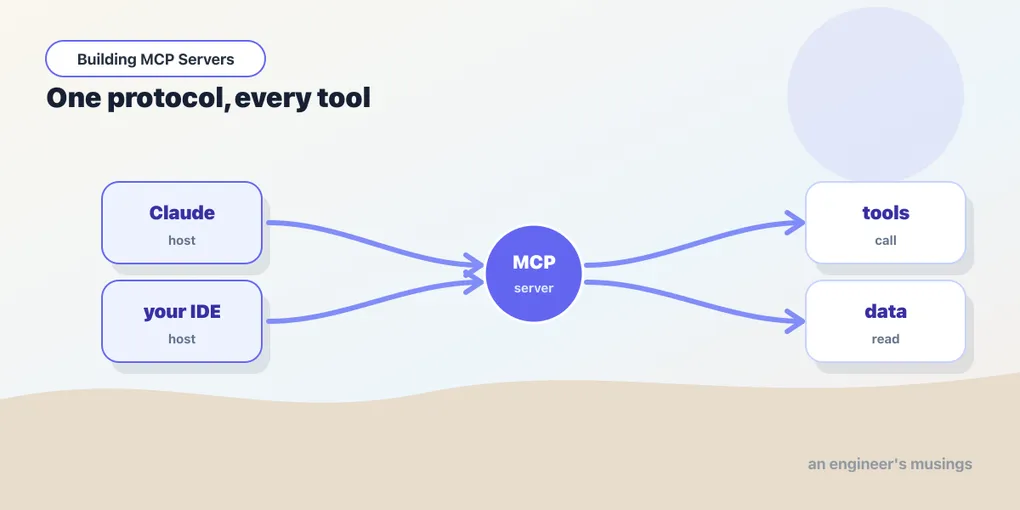
MCP collapses that matrix. You describe a capability once, as an MCP server, and any MCP-aware application can use it without knowing anything about your internals. Add a new app and it speaks to every existing server for free; add a new server and every existing app can reach it. The integration cost goes from M × N to M + N. That’s the whole pitch, and it’s the same reason USB-C won: agree on the plug, and the cable stops being the problem.
What a server exposes
An MCP server offers up to three kinds of things, and the distinction between them matters because clients treat them differently.
- Tools are functions the model can call, usually with side effects — query a database, file an issue, hit an API, run a computation. The model decides when to call them based on their descriptions.
- Resources are read-only data the application can load into context — a file’s contents, a database row, the JSON from an endpoint. They’re addressed by URI and meant to be pulled in, not executed.
- Prompts are reusable, parameterized templates a user can invoke deliberately — think “summarize this PR in our house style,” exposed as a slash command or menu item.
A rough rule: tools are model-controlled (the model chooses to call them), resources are application-controlled (the host decides what to load), and prompts are user-controlled (a person picks them). Most servers start life as a bag of tools and grow the other two as needed. We’ll spend a post on each.
Host, client, server
Three roles show up constantly, and they’re easy to conflate until you see them named.
- The host is the AI application the user actually interacts with — Claude Desktop, an IDE extension, an agent you’re building. It owns the model and the conversation.
- A client is a connector that lives inside the host, one per server, speaking MCP on the host’s behalf. You rarely build clients by hand early on; the host manages them.
- A server is your process — the thing exposing tools, resources, and prompts. This is what you’ll write for most of this series.
Between client and server sits a transport. Two matter. With stdio, the host launches your server as a local subprocess and talks to it over standard input and output. With Streamable HTTP, your server runs as a remote service the host connects to over the network. Local integrations almost always use stdio; remote, multi-user servers use HTTP. Older tutorials mention an SSE transport; that one was replaced by Streamable HTTP in the late-2025 spec. We’ll do transports properly later.
What’s actually on the wire
Underneath, MCP is JSON-RPC 2.0 — plain request/response messages. When a host lists a server’s tools and then calls one, the exchange looks like this:
// host → server
{ "jsonrpc": "2.0", "id": 1, "method": "tools/call",
  "params": { "name": "add", "arguments": { "a": 2, "b": 3 } } }

// server → host
{ "jsonrpc": "2.0", "id": 1,
  "result": { "content": [ { "type": "text", "text": "5" } ] } }
You will almost never write this by hand — the SDKs turn a decorated function into exactly these messages, and that’s the point. But it’s worth seeing once, so that “an MCP server” reads as what it is: a process that answers a small, fixed set of JSON-RPC methods.
What MCP is not
A few things it’s easy to assume and shouldn’t. MCP is not a model; it carries context to and from whatever model the host runs. It’s not an agent framework — it doesn’t decide when to call a tool; the host and its model do, and MCP just makes the tool callable. And it’s not magic discovery: a server only does what you wrote it to do. It’s an interface, not an autopilot. Keeping that straight will save you from expecting the protocol to make decisions that are really your application’s job.
Final thoughts
MCP is plumbing, and plumbing is praise here. It doesn’t make your model smarter. It makes everything your model already can’t do reachable through one consistent door, so the integration you write today still works in next year’s host against next year’s model. That durability is the reason to learn it properly rather than copy-pasting a quickstart. And properly starts with one tiny server you can run and poke yourself.
Next: Your First MCP Server: One Tool, Two Stacks, where we install the SDK, define a single tool, run it over stdio, and call it — in Python and TypeScript, side by side.
Target keyword(s): what is mcp, model context protocol.
Comments