Tools: Giving a Model Hands
A tool is a Python function a model can decide to call. The @tool decorator and why the docstring is load-bearing, bind_tools and the tool_calls a model emits, parallel calls, the request-run-return loop that is ReAct, error handling, and ToolNode — which only runs inside a graph.
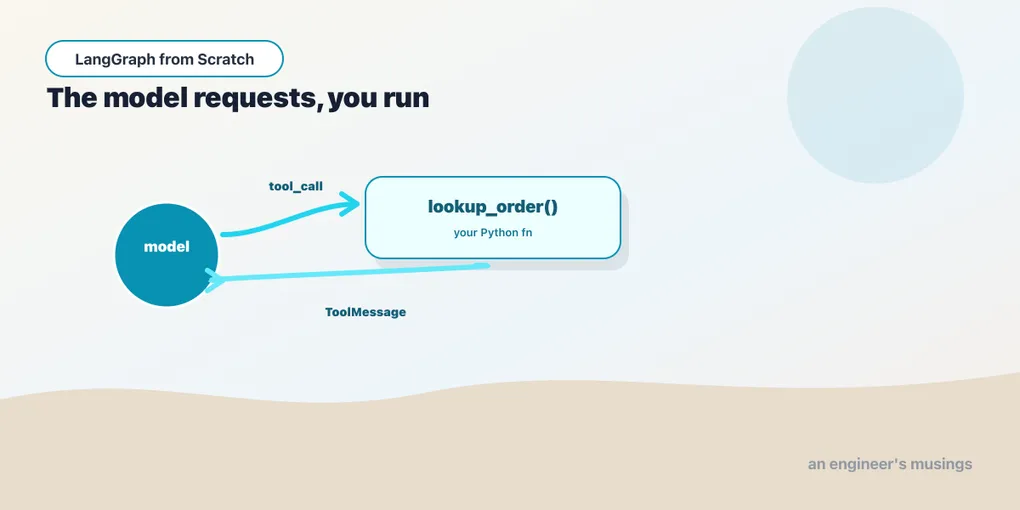
A model on its own can only produce text. It can’t check an order status, query a database, or call an API — it can only say it would like to. A tool closes that gap: it’s a plain Python function you hand the model, and the model can choose to call it. Tools are how an agent gets its ability to act, the missing capability from Chapter 1. The subtlety that trips everyone up at first is who does the calling. We’ll be precise about it, then treat the tool completely: design, invocation, parallel calls, and failure. Run against langchain-core 1.5.1 and langgraph 1.2.9.
The model requests; your code runs
Here is the mental model, stated flatly because the phrase “tool call” hides it: the model never runs your function. When you give a model tools and it decides one is needed, the model returns a request — a structured “please call lookup_order with order_id='A17'.” Your code (or LangGraph) executes the function, and you feed the result back to the model as a message. Then the model continues, now knowing the answer.
That request–run–return cycle is the entire tool mechanism, and it’s the ReAct loop from Chapter 1 seen up close. It also explains a security property worth internalizing early: because your code runs the tool, you decide what a tool is allowed to do. The model can request run_sql, but if you wrote run_sql to open the database read-only, no request it makes can write to it. The model proposes; your code disposes. Everything below is the concrete API for each step.
The @tool decorator
You turn a function into a tool with @tool. The decorator reads three things off the function, and each matters:
from langchain_core.tools import tool

@tool
def lookup_order(order_id: str) -> str:
    """Look up the status of an order by its ID."""
return f"Order {order_id}: shipped"- The name (
lookup_order) is how the model refers to it. - The type hints (
order_id: str) become the argument schema the model must fill. - The docstring becomes the tool’s description — and this is the load-bearing part. The docstring is not documentation for you; it is the instruction the model reads to decide whether and when to call this tool. A vague docstring produces a model that calls the tool at the wrong times, or not at all. Treat it as prompt engineering, because that is what it is.
You can inspect exactly what the model will see:
lookup_order.name          # 'lookup_order'
lookup_order.description   # 'Look up the status of an order by its ID.'
lookup_order.args          # {'order_id': {'title': 'Order Id', 'type': 'string'}}
lookup_order.invoke({"order_id": "A17"})   # 'Order A17: shipped'
For richer arguments — defaults, validation, per-field descriptions — supply a Pydantic args_schema, and the field descriptions join what the model reads:
from pydantic import BaseModel, Field

class SearchArgs(BaseModel):
    query: str = Field(description="what to search for")
    limit: int = Field(default=5, description="max results to return")

@tool("search", args_schema=SearchArgs)
def search(query: str, limit: int = 5) -> str:
    """Search the product catalog."""
    return f"{limit} results for {query}"
Designing tools the model can use
Tool design is half of whether an agent works, and it’s less about code than about the model’s point of view. A few principles that pay off:
- One clear job per tool. A
lookup_orderand asearch_catalogthe model can choose between beat a singledo_bookshop_thing(action, ...)it has to configure. The model picks tools by their descriptions; distinct, well-named tools are easy to pick correctly. - Few, relevant tools. A model given fifty tools chooses worse than one given five. If a request only ever touches orders, the orders specialist should carry only order tools. That’s a preview of why multi-agent systems scope tools to specialists.
- Return what the model needs to reason, as text. A tool’s return value is serialized and shown to the model. So return a concise, informative string (or structured data — below), not a giant blob it has to wade through.
These aren’t style preferences; they measurably change how often the model calls the right tool with the right arguments.
bind_tools: telling the model what it can call
A tool the model doesn’t know about is just a function. bind_tools attaches tools to a model so the model can emit calls to them:
model_with_tools = model.bind_tools([lookup_order, search])
reply = model_with_tools.invoke("What's the status of order A17?")

reply.content       # often '' — the model chose to call a tool instead of talking
reply.tool_calls
# [{'name': 'lookup_order', 'args': {'order_id': 'A17'}, 'id': 'call_abc', 'type': 'tool_call'}]
The reply is still an AIMessage, but now it may carry tool_calls. That’s a list of requests, each with the tool name, the args, and an id you’ll need to match the result back. When the model decides to call a tool, content is usually empty; the intent lives in tool_calls, not the text. So the first thing your loop checks after a model call is “did it ask for a tool?” — if reply.tool_calls:.
One wrinkle to expect from a small local model: a weak model sometimes returns arguments with the wrong Python type — {'limit': '3'} (a string) instead of {'limit': 3}. The tool’s schema coerces on execution, so it still works, but tool_calls reflects what the model produced, and a smaller model produces it less cleanly. Claude gets the types right; write your tools to tolerate the messy case anyway.
Parallel tool calls
tool_calls is a list for a reason: a model can request several tools in one turn when they’re independent. Asked “what’s the weather in Paris and Tokyo?”, a capable model emits two calls at once, and you run them together rather than in two round-trips. The mechanism supports it fully; whether the model uses it is a model-quality matter. Verified honestly: the small llama3.2:3b returned a single tool_call for that two-city question rather than two, where a stronger model would parallelize. So write your tool-running code to handle a list of calls, which ToolNode (below) does. You then get parallelism for free from whatever model is capable of it, without assuming every model will.
Closing the loop with a ToolMessage
You have a request. You run the tool. Now you feed the result back so the model can use it. It goes back as a ToolMessage, tagged with the call’s id so the model knows which request it answers:
from langchain_core.messages import ToolMessage

call = reply.tool_calls[0]
result = lookup_order.invoke(call["args"])          # your code runs it
tool_msg = ToolMessage(content=result, tool_call_id=call["id"])

final = model_with_tools.invoke([
    HumanMessage("What's the status of order A17?"),
    reply,        # the AIMessage that asked for the tool
    tool_msg,     # the result you're handing back
])
final.content     # 'Order A17 has shipped.'
Read that message list top to bottom and the loop is visible: the human asked, the AI requested a tool, the tool answered, and — given all three — the AI produced its final reply. That is a complete tool-call turn, by hand. It’s worth doing once, because it’s exactly what the graph automates. When a graph “mysteriously” loops or stops, this four-message picture is what you’ll debug against.
ToolNode: the loop as a graph node, inside a graph
Running tool calls, matching ids, appending ToolMessages, handling the parallel-call list: LangGraph packages all of it as ToolNode. It’s a prebuilt node that takes the tool calls off the latest AIMessage in state and runs them. But there’s a sharp edge only running the code reveals:
from langgraph.prebuilt import ToolNode

tools = ToolNode([lookup_order, search])
tools.invoke({"messages": [reply]})
# ValueError: Missing required config key 'N/A' for 'tools'.
Calling ToolNode.invoke standalone fails, even with an empty config. ToolNode is a graph node; it expects the runtime context a compiled graph provides, and it doesn’t run on its own. The correct usage is to put it in a graph:
from typing import Annotated, TypedDict
from langgraph.graph import StateGraph, START, END
from langgraph.graph.message import add_messages

class State(TypedDict):
    messages: Annotated[list, add_messages]

g = StateGraph(State)
g.add_node("tools", tools)
g.add_edge(START, "tools")
g.add_edge("tools", END)
app = g.compile()

app.invoke({"messages": [reply]})["messages"][-1].content   # '3 results for sci-fi'
Inside a graph it runs cleanly, and it handles the whole list of tool_calls — including parallel ones — appending a ToolMessage per call. Don’t reach for ToolNode as a standalone helper; it’s a piece of a graph, and it tells you so. (Everything else in that snippet — StateGraph, add_messages, the State schema — is the next graph chapter’s subject; here it’s just the harness that makes ToolNode legal.)
Errors are messages too
When a tool raises, you usually don’t want the graph to crash. You want the model to see the error and react: retry, apologize, try a different tool. The pattern is to catch the exception and return it as the tool result, so it flows back as a ToolMessage like any other. ToolNode does this by default: a tool that raises becomes a ToolMessage carrying the error text, and the model gets a chance to recover rather than the run dying. This is why an agent can gracefully handle a mistyped argument or a down API. The failure is just another observation in the loop, and the model treats it as one. It’s also a design lever. A well-written error message (“no order found with that ID; ask the customer to re-check it”) steers the model’s recovery, so tool errors deserve the same care as tool descriptions.
Final thoughts
A tool is a function with a good docstring, and bind_tools lets the model request it. The model’s tool_calls (a list, possibly parallel) say what to run, and a ToolMessage carries each result back so the model can continue. That request–run–return loop is the ReAct pattern, and you built one turn of it by hand. ToolNode automates the running — the ids, the list, the errors — with the caveat that it lives inside a graph and nowhere else. Two habits carry the most weight: write the docstring for the model, not for yourself, and write the tool so no request it grants can do damage you didn’t intend. Tools are the model’s hands; you decide what those hands can reach.
Next: retrieval and RAG — the other way to give a model knowledge it doesn’t have, by fetching relevant text and putting it in the prompt.
Comments