The Mesh That Changed Nothing
Pinning Istio 1.30.2, installing the ambient profile, and touring the three things it lands — none of which have touched your application yet, and one of which starts a six-month clock.
There is a number in this chapter that will date it, and rather than bury it in a footnote I am going to put it in the first paragraph:
$ curl -sL https://istio.io/downloadIstio | ISTIO_VERSION=1.30.2 TARGET_ARCH=x86_64 sh -1.30.2. That is the version this entire book is written against, it was the newest Istio release when I ran everything in it — published on 24 June 2026 — and in roughly six months it will be end-of-life, unsupported, and no longer receiving security patches.
That is not a disclaimer I am adding out of caution. It is the single most important operational fact about Istio, it is true of every Istio version anyone has ever pinned, and the number of introductions that mention it is approximately zero. So we are going to start there, before we install anything, because the install takes ninety seconds and the consequence of not knowing this lasts as long as you run the mesh.
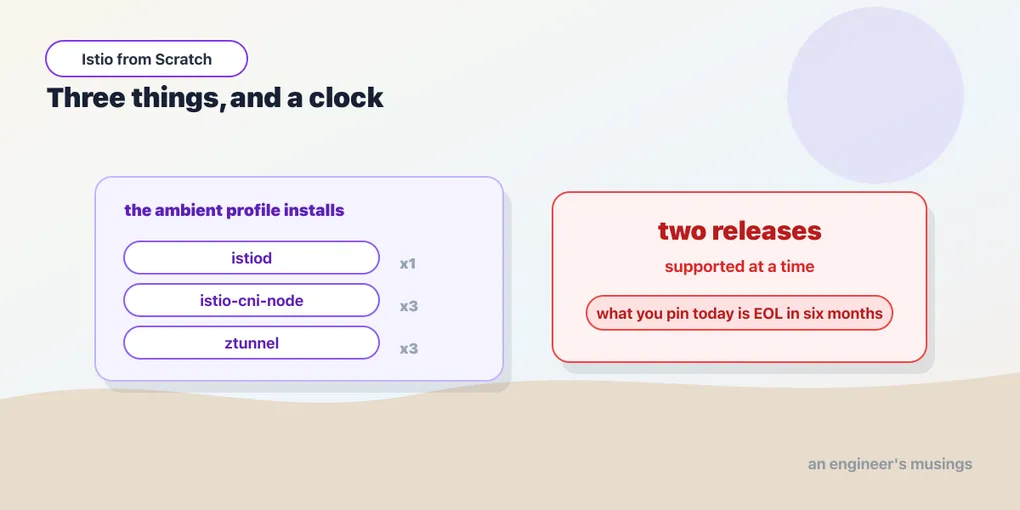
Istio supports exactly two minor releases
Not “the last few”. Not an LTS branch you can sit on for three years the way you might with a Linux distribution or a JDK. Two.
The policy, stated the way the project states it: Istio supports the current minor release and the one before it. A release goes end-of-life approximately six weeks after the release two ahead of it ships — so when 1.30 came out, 1.28’s clock started, and six weeks later it stopped being supported. Istio ships a minor roughly every quarter.
Do the arithmetic and it comes out to something like this: any given Istio minor is supported for around six to nine months, and then it is not. As I write this in July 2026, the supported minors are 1.30 and 1.29 — and that is the whole list.
There is a wrinkle in the download page that is worth understanding rather than being confused by. When I looked, patch releases existed for 1.30.2, 1.29.5 and 1.28.10 — three minors, not two. That is not the policy quietly being generous; it is 1.28 inside its six-week wind-down after 1.30 shipped, still getting patches on its way out the door. The fact that a version is downloadable tells you nothing about whether it is supported, and the release archive goes back years. (That reading of the release cadence is mine, from the policy plus the patch releases I could see; I did not go and confirm the exact EOL date of 1.28 with the project.)
Three things follow, and each one costs somebody a bad week eventually.
Your mesh is a subscription, not a purchase. For as long as this thing is in your cluster, somebody must upgrade a component that sits in the path of 100% of your production traffic — two or three times a year, on a schedule that is not yours. Budget for it explicitly, name an owner, put it on a calendar. The failure mode is not that the upgrade is hard; the failure mode is that it never gets prioritized, and eighteen months later you are running an unpatched, unsupported, cluster-wide network proxy — which is a strictly worse security position than the plaintext, mesh-less cluster you started from.
Almost everything you will read about Istio is about a dead version. The excellent conference talk from two years ago is about an EOL release. The Stack Overflow answer with 400 upvotes is about an EOL release. If you “already know Istio” from a previous job, you probably know an EOL release. This is not the usual grumble about stale documentation — the API genuinely moves, ambient mode is new, and the model most of the internet is teaching is the other data plane entirely. This track cannot be written from memory, and neither can yours. Everything in this book was run, on a real cluster, on one afternoon in July 2026, against 1.30.2 — and when you read it, check the version.
And this book will expire. Around January 2027, 1.30 goes EOL. The concepts will still be right; some of the commands and some of the YAML will not be. I would rather tell you that now than have you discover it.
Pin istioctl by hand
Which brings us to the install command, and to the one you must not run.
$ curl -sL https://istio.io/downloadIstio | ISTIO_VERSION=1.30.2 TARGET_ARCH=x86_64 sh -ISTIO_VERSION is doing the load-bearing work there. Without it, the script fetches whatever is newest today — which means the command is not reproducible. Run it in three months and you get a different mesh; run it on a colleague’s laptop and they get a different mesh; put it in a CI job and your CI upgrades a minor version of your service mesh one morning without telling anybody.
That leaves a directory named istio-1.30.2/ with the istioctl binary in bin/, plus a samples/ directory and the manifests. Put istioctl on your PATH from that directory — not from anywhere else. Then:
$ istioctl versionand confirm the number before you do anything else.
Do not brew install istioctl. Do not apt install it, do not asdf a latest, do not use any package manager that floats. Homebrew’s formula tracks the newest release, so a routine brew upgrade — run for entirely unrelated reasons, on a Tuesday, because you wanted a newer jq — will silently replace your istioctl with one from a different minor. And an istioctl from a different minor than your control plane will happily generate manifests for the version it is, which is a genuinely unpleasant way to discover version skew: you will run istioctl install to make a small change and quietly upgrade your entire mesh.
The client and the control plane are two separate things with two separate versions — and keeping them in agreement is your job, not the tool’s. Pin the binary, check it into the repo’s tooling notes, and treat istioctl version as something you read rather than something you assume.
What has to be there first
The cluster this book runs on is the one from the Kubernetes series, unchanged: kind 0.32.0, three nodes, Kubernetes 1.36.1, with the bookshop already deployed into the bookshop namespace and serving on localhost:30080. If you followed that book, you already have it. Nothing about the mesh install depends on kind specifically, but everything about this book’s output does — the pod names, the node names, the one place where kind’s lack of a load balancer produces a genuinely confusing result several chapters from now.
And one prerequisite that is not obvious, is not checked for you, and will cost you an afternoon if you skip it.
Gateway API’s CRDs are not bundled with Istio. They are not installed by istioctl install, and they are not a dependency the installer resolves. istioctl install --set profile=ambient will complete perfectly happily on a cluster with no Gateway API at all — print its success message, exit zero — and leave you with a mesh whose gateways and waypoints can never work. A Gateway is a custom resource, and a custom resource whose CRD is not installed is not a validation error you get later; it is a kind the API server has never heard of.
You find out much further down the line, in the worst possible way: you write a waypoint or an ingress gateway, kubectl apply it, and nothing happens. No pod appears. No error. This is the Gateway-with-no-controller problem from the Kubernetes book, one level lower down — there, the CRDs were installed and the controller was missing; here, the CRDs themselves are absent.
Our cluster already had them, because the traffic chapter of the Kubernetes book installed Gateway API 1.4.0, standard channel, and never removed it. That is the ideal setup and it is why nothing in this chapter’s output looks odd. If you skipped that book or started from a fresh cluster, install them first:
$ kubectl apply -f https://github.com/kubernetes-sigs/gateway-api/releases/download/v1.4.0/standard-install.yamlSix CRDs, no controller, no running process — the same six we installed there. Istio brings the controller.
The install
One command.
$ istioctl install --set profile=ambient --skip-confirmation--skip-confirmation skips the “are you sure?” prompt, which is what you want in a script and what I want in a book where the output should be reproducible. The interesting flag is --set profile=ambient.
A profile is a named bundle of components. Istio ships several — default gives you the sidecar control plane and an ingress gateway, minimal gives you just istiod, and demo turns everything on including verbose telemetry. demo is for demos, which is worth saying out loud, because a startling number of production clusters are running it. ambient gives you the ambient data plane, and it is the only one this book uses.
It runs, it prints its ticks, and it is done. Now the part that matters more than the install — look at what it actually put in your cluster, because it is a much shorter list than the size of the project would lead you to expect.
Three things. That is the whole mesh.
$ kubectl get deploy,daemonset -n istio-system -o custom-columns=\
KIND:.kind,NAME:.metadata.name,DESIRED:.status.desiredNumberScheduled,READY:.status.numberReady,REPLICAS:.status.replicas
KIND         NAME             DESIRED   READY   REPLICAS
Deployment   istiod           <none>    <none>   1
DaemonSet    istio-cni-node   3         3        <none>
DaemonSet    ztunnel          3         3        <none>
I asked for custom columns rather than the usual kubectl get all because the shape of that table is the lesson, and the <none>s are not errors. A Deployment has no desiredNumberScheduled — that is a DaemonSet field, counting nodes. A DaemonSet has no replicas — you do not choose how many; you get one per node, which on a three-node cluster is three. The two kinds of workload are answering different questions, and the table makes it obvious which of these components is “a service” and which are “an agent on every machine”.
Three components. That is the entire ambient control plane and data plane. Take them one at a time, because each one is doing something specific and the names are not self-explanatory.
istiod — the control plane. One Deployment, one pod, not on the data path. It does two jobs that are worth keeping separate in your head. First, configuration: it watches the Kubernetes API — Services, EndpointSlices, pods, ServiceAccounts, and its own custom resources — computes what every proxy in the mesh ought to be doing, and pushes that down to them. Second, and this is the one people forget, it is the certificate authority. It signs the workload certificates that give every pod its cryptographic identity, and it rotates them on a schedule you never think about. When we look at a real certificate in the mTLS chapter, istiod is what issued it and the identity in it comes straight from the pod’s ServiceAccount.
istio-cni-node — the reason there are no restarts. A DaemonSet, one pod per node, and the most misunderstood component in ambient mode. Despite the name it is not a CNI plugin in the sense that kindnet or Calico is — it does not replace your cluster’s networking, it does not assign pod IPs, and it will happily coexist with whatever CNI you already run. What it does is program the node’s networking so that traffic to and from enrolled pods is redirected into that node’s ztunnel.
That sentence is doing more work than it looks like. In the sidecar world, the equivalent job — writing the traffic-capture rules — was done by a privileged init container injected into every one of your pods, which needed NET_ADMIN, which your security team asked pointed questions about, and which by definition only ran when a pod was created. Moving that work to a node-level agent is what makes it possible to enroll a pod that is already running, without touching its spec, without a new container, and without a restart. The privilege is concentrated in one DaemonSet you can audit instead of scattered across every workload you own.
ztunnel — the node proxy. A DaemonSet, one pod per node, and the thing that is actually in your traffic’s path. It does Layer 4 and only Layer 4 — it terminates and originates mutual TLS, presents and verifies workload identity, and can enforce authorization at the level of “may this identity open a connection to that workload’s port”. Every pod in an enrolled namespace gets it, and no pod pays for it out of its own resource budget, because it does not live in your pod.
And now the interesting part, which is what is not in that list.
There is no sidecar injector. No mutating admission webhook sitting there waiting to rewrite your pod specs — because in ambient there is nothing to inject.
There is no Envoy anywhere in the cluster. Not one. istiod is a Go program, ztunnel is a Rust program, and the first Envoy that will ever appear in this cluster is the waypoint we deploy on purpose in chapter 7 — or the ingress gateway in chapter 8. Until then, an ambient mesh contains no Envoy at all, which is a sentence that would have been incoherent about Istio three years ago.
There is no ingress gateway. The default profile installs one; ambient does not. Getting outside traffic in is a thing you ask for explicitly, with a Gateway resource, and that is chapter 8’s problem.
Three GatewayClasses, and a callback
Something else happened during that install, and it is the piece that ties this whole track back to the Kubernetes book:
$ kubectl get gatewayclass
NAME             CONTROLLER                    ACCEPTED   AGE
istio            istio.io/gateway-controller   True       4m37s
istio-remote     istio.io/unmanaged-gateway    True       4m37s
istio-waypoint   istio.io/mesh-controller      True       4m37s
Istio registered three GatewayClasses, and you have seen this table before — it is exactly the shape of the one NGINX Gateway Fabric produced when we installed it in the traffic chapter. A GatewayClass is the infrastructure provider’s object; its CONTROLLER field is a string that means I answer to this name; and ACCEPTED=True is a controller writing to a status field to tell you it is watching. Nothing here is new. Only the strings changed.
istio—istio.io/gateway-controller. This is the one you name in aGatewaywhen you want an ingress: an Envoy that outside traffic arrives at. Chapter 8.istio-waypoint—istio.io/mesh-controller. The L7 proxy inside the mesh. A waypoint is not a special new kind of object — it is aGateway, withgatewayClassName: istio-waypoint, andistioctl waypoint applyis a convenience that writes one for you. Chapter 7.istio-remote—istio.io/unmanaged-gateway. For gateways Istio does not run itself, which is multicluster territory and out of scope for this book. I did not exercise it.
Stop and appreciate what that table means, because it is the answer to a question people find genuinely mystifying: how does Istio do all this without being part of Kubernetes?
It does not need to be. Istio is CRDs plus a controller — the exact mechanism we built from scratch, with fifteen lines of shell, in the Kubernetes book. It taught the API server some new nouns, registered itself as the implementation for a few Gateway API classes that already existed, and it runs a control loop. That is all of it. Istio did not fork Kubernetes — it registered some nouns and ran a controller. And the reason your waypoint and your ingress gateway are both Gateway objects, with parentRefs and HTTPRoutes attached exactly as before, is that Istio is a user of Gateway API rather than an alternative to it. You are not learning a new routing API in this book; you are pointing the one you already know at a different gatewayClassName.
istioctl analyze, and the problem in our own manifests
Before you go any further, run the analyzer. It is the cheapest check you have, it runs against the live cluster, and it is the first thing I would ask for if you brought me a broken mesh.
$ istioctl analyze -n bookshopIt found something. Not in Istio’s config — in ours, in manifests that have been running perfectly since the Kubernetes book:
Warning [IST0118] (Service bookshop/postgres) Port name pg doesn't follow the naming convention of Istio port.Here is what that is about, and it is a real thing to know rather than a nag.
Istio needs to know what protocol is spoken on a port, because the answer determines what it can do with the traffic — HTTP can be routed on paths and retried on methods, raw TCP cannot. And the way Istio has always inferred protocol from a Kubernetes Service is by reading the name of the port. A port named http, http-web, grpc-api, or tcp-postgres declares its protocol in its own name, with an optional suffix after a dash. Our Postgres Service names its port pg — which declares nothing at all — so Istio cannot infer the protocol from the name and falls back to its own detection.
The fix is a one-word rename to tcp-postgres (or an explicit appProtocol field, which is the modern and more explicit spelling of the same intent). I am flagging the limit of what I actually verified here: I saw the warning, and I know what the naming convention is for. I did not run the bookshop with a misnamed port and a correctly-named one side by side and measure a behavioural difference — so treat “rename it” as removing a genuine ambiguity you have handed the mesh, not as a fix for a bug I reproduced.
What I like about this finding is what it says about the analyzer. It is not a linter for Istio’s YAML — it reads your whole cluster, and it tells you where your existing, working, entirely valid Kubernetes manifests are ambiguous to the mesh you have just installed. That is exactly the class of problem that otherwise surfaces months later as “traffic behaves strangely and no rule explains it”. Run it after every change in this book; it will catch a real mistake in chapter 11, and that one is not cosmetic.
One more thing worth knowing about the tarball you downloaded, because a widely-repeated claim about it is wrong. You will read that samples/sleep was removed and renamed to samples/curl, and that every older tutorial’s path now 404s. On 1.30.2, both directories ship, and both use the same curlimages/curl image. samples/sleep/sleep.yaml still exists and still works. It is a small thing, but it is the kind of small thing that makes you distrust a tutorial for no reason, and I checked.
Nothing has changed
Now the closing move, and it is the point of the whole chapter.
Go and look at the bookshop.
$ curl -s -o /dev/null -w '%{http_code}\n' localhost:30080
200
Six pods. Same names they had this morning. Same startTime. Zero restarts. Still exactly one container each — no proxy was injected into anything, because there is nothing to inject. The storefront serves 200s, orders still calls catalog, catalog still reads Postgres, and every one of those calls is still plaintext, still anonymous, still unmeasured. Every one of the five uncomfortable answers from chapter 1 is still exactly as uncomfortable as it was.
You have installed a service mesh and your application does not know. There is a control plane running, three DaemonSet pods sitting on your nodes waiting, three GatewayClasses registered, and a certificate authority with nobody to issue certificates to. The mesh is present and completely inert.
That is not an anticlimax — it is a property, and one of the strongest arguments for ambient there is. Installing the mesh and enrolling a workload into the mesh are two separate acts, with two separate blast radii, performed at two separate times. You can put Istio into a production cluster on a Tuesday afternoon, break precisely nothing, watch it for a week, and enroll your first namespace when you feel like it. In the sidecar world those two steps are separable in principle too — but the second one requires restarting every pod in the namespace, which makes it a deploy, which makes it a meeting.
Here it is a label. That is the next chapter.
Final thoughts
The install was one command and I have spent four thousand words on it, which tells you where the actual difficulty in this technology lives. It is not in getting Istio running — a profile and a flag and you are done, and honestly that is a remarkable piece of packaging for a system with this much surface area.
The difficulty is in the two things either side of that command. Behind it: knowing that you are pinning a version with a six-month shelf life, that the tutorial you are reading is probably about a dead one, and that you have just signed a maintenance contract with yourself. Ahead of it: knowing what those three pods actually do — so that when traffic behaves strangely, you know whether to look at the control plane, the node agent, the node proxy, or (most likely of all) your own manifests, which the analyzer has already told you are ambiguous and which you have not yet fixed.
The version treadmill is the part I would most like you to take seriously, because it is the one that is easy to nod along to and then ignore. A service mesh is a piece of privileged network infrastructure in the path of everything you serve, and it has a support window shorter than most companies’ planning cycles. If you install this and nobody owns the upgrade, you have not made your cluster more secure. You have added an unpatched proxy in front of every service you own, and given it a name that sounds like it makes things safer.
Own the upgrade, or do not install the mesh. Everything else in this book assumes you have made that choice honestly.
Comments