Two Clusters, One Root CA, and Nowhere to Put the Gateway
A second cluster fits on the laptop. A shared root CA works, and it is the thing multicluster is actually made of. The east-west gateway is where the lab ran out of node — and that failure is the most honest thing in this chapter.
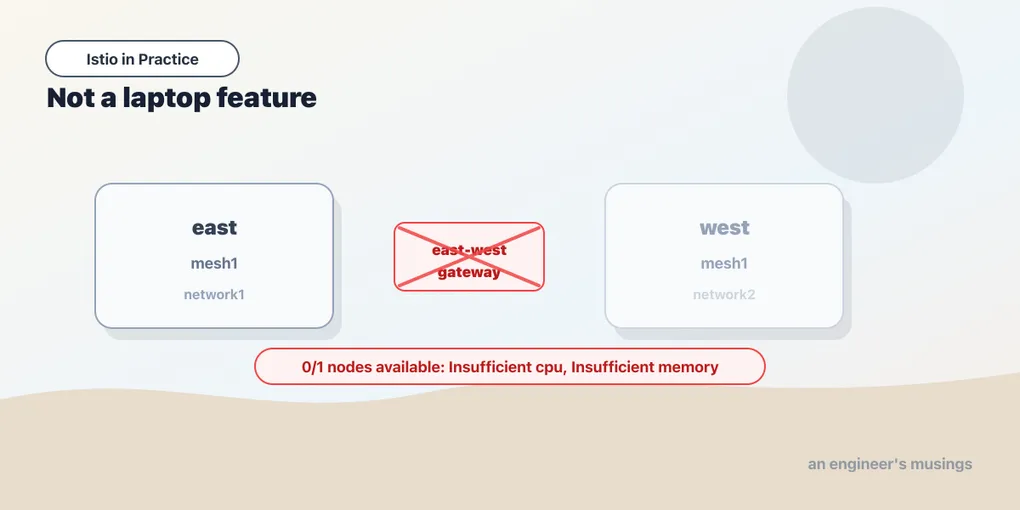
Here is where this chapter stopped:
0/1 nodes are available: 1 Insufficient cpu, 1 Insufficient memory.
no new claims to deallocate, preemption: 0/1 nodes are available:
1 No preemption victims found for incoming pod.
That is the Kubernetes scheduler, on the second cluster, declining to place a pod. The pod it is declining to place is istiod — the control plane of a mesh I had just spent an afternoon carefully building across two clusters, and which was working right up until the moment I added the one component that makes cross-cluster traffic possible at all. The node it is declining to place it on:
Allocated resources:
  cpu     1850m (92%)
  memory  3078Mi (78%)
Ninety-two percent of the node’s CPU is already spoken for. There is no room — and there was never going to be room. The interesting part is not that a laptop ran out of laptop; it is what it ran out of laptop on, and how far it got first.
So let me be straight about the shape of this chapter before you read another paragraph, because you have every right to know which parts I watched happen and which parts I am relaying.
I stood up two clusters. I built a shared root of trust between them and it worked. I ran Istio ambient on both of them, in one mesh, with the three settings that place a cluster in a mesh, and both control planes came up healthy. Then I tried to install the east-west gateway, and the lab fell over. Everything from that point on — endpoint discovery, remote secrets, cross-cluster failover, locality-aware routing — is architecture I am describing, not architecture I stood up. I will flag each piece as it arrives. Nothing in this chapter is dressed up as a demo it wasn’t.
And I am not treating that as an embarrassment to be apologised for, because the failure is load-bearing. It teaches the single most useful thing anybody can tell you about multicluster before you propose it at work, which is that multicluster is not a laptop feature. It wants real nodes and a real network, and if your four-gigabyte Docker VM cannot schedule it, that is not a quirk of your Docker VM. That is the technology telling you the truth about what it costs to operate.
First, the question you are meant to answer before you build any of this
Multicluster is what you reach for when one Kubernetes cluster is not enough. The reasons that hold up are: you need workloads in more than one region and you want a service in one region to fail over to another; you have a hard isolation or blast-radius boundary that a namespace cannot give you; you are running in more than one cloud — or one cloud and one datacentre — and you want the applications not to care; or you have simply outgrown what one control plane can carry.
The reasons that do not hold up — and I have watched every one of these get proposed — are: teams want their own cluster and this is the polite way to give it to them; someone read that multicluster is the mature deployment model; or a single service needs to be reachable from a second environment, and multicluster is the biggest hammer within reach.
Hold that distinction as you read, because the honest summary of this chapter is that multicluster mesh is a large, ongoing, permanent operational commitment that solves problems one bigger cluster does not solve, and does not solve any problem that one bigger cluster does. A second cluster is a second control plane, a second CNI, a second set of node agents, a second certificate chain, a second thing to upgrade twice a year, and a network path between them that is now inside your request latency budget. If you can get where you are going by adding nodes to the cluster you have, add nodes to the cluster you have.
Right. If you still need it, here is what it is actually made of.
A second cluster fits. That part is real.
The lab in this book is a three-node kind cluster called k8s-lab, with the bookshop on it and Istio ambient installed. I brought up a second, single-node kind cluster beside it — k8s-lab-remote — and it came up, and it stayed up:
- the remote cluster idles at roughly 510 MiB
- the original three-node cluster stayed healthy throughout — the bookshop kept serving 200s,
istiodstayed1/1,ztunnelstayed3/3on its three nodes
That is worth saying plainly, because it is a real and slightly surprising result — you can do meaningful two-cluster work on a laptop. The container runtime is not the wall. The wall is further in, it has a specific name, and we will get to it.
Multicluster is, first and last, a PKI problem
Now the part that matters more than the topology diagrams, and the part almost every explanation buries under the topology diagrams.
Go back to the mTLS chapter in the foundations book. Every workload in an Istio mesh gets a SPIFFE identity, delivered as a short-lived X.509 leaf certificate, signed by the mesh’s certificate authority. And where does that certificate authority live? Inside istiod. The control plane is the CA. That is the whole trick: istiod knows what a workload is because it can read the Kubernetes API, and it turns that knowledge into a signed certificate that other workloads will believe.
Now stand up a second cluster with a second istiod. It has its own CA — and it is signing its own certificates, for its own workloads, from its own self-generated root. The workloads in cluster A have absolutely no reason to believe anything a certificate from cluster B says, because the root that signed it is a root they have never heard of.
This is not a configuration problem you can label your way out of — it is the definition of a trust boundary. Two independently-rooted CAs are two separate worlds by construction, and mutual TLS between them fails at the first handshake — not with a policy error, not with a routing error, but with the most fundamental refusal in the protocol: I do not know who signed this.
So the hard prerequisite of every multicluster mesh, before topology, before gateways, before discovery, is that both control planes must issue certificates that chain to the same root. Get that wrong and nothing else you do will ever work, and the failure will look like a network problem for about two days.
Istio ships the tooling for this, and I ran it:
$ make -f tools/certs/Makefile.selfsigned.mk root-ca east-cacerts west-cacertsThat produces one root CA and a per-cluster intermediate signed by it — one for east, one for west. Each cluster then gets its intermediate installed as a cacerts Secret in istio-system, and its istiod signs workload certificates with that intermediate rather than generating a root of its own. Both clusters took the Secret. Both control planes came up with it.
Read the shape of that, because it is the standard PKI answer and it is doing two jobs at once. A common root means a leaf from west chains up to something east already trusts — so mTLS across the boundary is possible at all. Separate intermediates mean each cluster signs with its own key — so a compromised cluster leaks the intermediate for that cluster, not the root of your entire mesh, and you can revoke one cluster without re-rooting the world.
One thing I want to be blunt about, since the Makefile makes it look like a five-second job. Makefile.selfsigned.mk generates a self-signed root and leaves the private key sitting in a directory on your machine. That is exactly right for a lab and exactly wrong for production — where the root of trust for every service identity in your entire estate should be sitting in a hardware module or a managed CA, and should not be reachable by anybody’s make command. Istio supports plugging in a real CA. Use one. This is the key that, if it walks, lets an attacker mint a certificate for any service in any of your clusters — which is the same thing as saying it lets them be any service in any of your clusters.
The three knobs that place a cluster in a mesh
With a shared root in place, I installed Istio ambient on both clusters — one mesh, two clusters — and the three settings that define a cluster’s place in it are these. This is the install I ran on east:
$ istioctl install --set profile=ambient \
    --set values.global.meshID=mesh1 \
    --set values.global.multiCluster.clusterName=east \
    --set values.global.network=network1
and the same on west, with clusterName=west and network=network2. Both istiods came up. Three settings, three different jobs, and they are constantly confused with one another:
meshID — the same on every cluster. This is the mesh’s name. Two clusters with the same meshID and a common root are one mesh; two clusters with different meshIDs are two meshes that happen to be adjacent. Nothing about the mesh federates because you wanted it to; it federates because you named it the same thing on both sides.
clusterName — different on every cluster. This is how a cluster is identified within the mesh. It shows up in telemetry, it shows up in the endpoint metadata istiod hands out, and it is the handle by which one cluster’s control plane refers to another’s — so get two clusters into a mesh under the same name and you will have a very confusing week.
network — different when the clusters are on different networks. And this one is not decoration. It is the setting that determines whether the mesh believes it can send a packet from a pod in one cluster straight to a pod IP in the other. That is the question the rest of this chapter turns on.
Why pod IPs do not cross, and why the gateway is the only door
Here is the thing that surprises people who are comfortable with single-cluster Kubernetes.
Inside one cluster, every pod can reach every other pod’s IP directly. The CNI guarantees it — that flat, routable pod network is one of Kubernetes’ foundational promises, and the mesh leans on it entirely. When ztunnel on node A tunnels a connection to a workload on node C, it is dialling that workload’s actual pod IP, because that address is meaningful and reachable from where it is standing.
Across two clusters, that promise does not exist. Cluster east has a pod CIDR. Cluster west has a pod CIDR — quite possibly the same CIDR, since nothing coordinated them. A pod IP from west is, from east’s point of view, a number that routes nowhere or — worse — routes somewhere wrong. There is no route, and there was never going to be one unless you built it at the network layer. Most people cannot: the clusters are in different VPCs, different clouds, behind different firewalls, or simply carrying overlapping address space.
So when you tell Istio that the two clusters are on different networks, you are telling it: do not attempt to dial pod IPs across this boundary, because you cannot get there. And Istio’s answer is the east-west gateway.
An east-west gateway is a gateway that faces the mesh instead of facing the internet. It sits at the edge of each cluster on an address the other cluster can reach, and it is the single door through which all cross-network mesh traffic passes. A caller in east that wants a service whose only endpoints are in west does not dial those endpoints. It dials west’s east-west gateway, over mTLS, and the gateway — which is inside west and therefore can route to west’s pod IPs — forwards the connection to a real endpoint.
Two details make it more than a proxy with a job title.
It is not a TLS termination point in the way a north-south ingress gateway is. Cross-cluster mesh traffic is already carrying workload identity — the caller’s certificate, its SPIFFE name, the whole point of the shared root. If the gateway terminated that, the destination would see a connection from the gateway rather than from the calling workload — and every identity-based authorization policy in the destination cluster would then be evaluating the wrong principal. So it passes the mTLS session through — SNI-routed, on the destination it was asked for — rather than opening it. The identity survives the hop, and that is the entire reason the shared root had to come first.
And it is needed on each side — because traffic goes both ways, and each cluster’s pods are unreachable from the other’s.
That is the component I could not schedule. Istio ships a generator for it, samples/multicluster/gen-eastwest-gateway.sh, which produces the gateway manifest for a given cluster and network. I ran it. And then the second cluster fell over.
The wall, and the arithmetic behind it
Count what a single-node cluster in a multicluster ambient mesh has to carry, all at once, on one node:
- istiod — the control plane, and the CA
- istio-cni-node — the DaemonSet that captures traffic into the mesh
- ztunnel — the node proxy, one per node
- an east-west gateway — an Envoy Deployment, with real resource requests, because it is in the path of every cross-cluster request you will ever serve
- and whatever your cluster is actually for, which on a real cluster is the entire point and on this one was very nearly nothing
Add the gateway to that list and the node’s requests went to cpu 1850m (92%), memory 3078Mi (78%) — and the scheduler, asked to find a home for istiod, said the thing at the top of this chapter. 0/1 nodes are available. No preemption victims. Nothing to evict, nothing to shuffle, no cleverness available.
The whole lab lives in a 4 GiB Docker VM. Two Kubernetes clusters fit in that, comfortably enough that I was surprised. Two Kubernetes clusters each running a control plane, a CNI, a node proxy and an east-west gateway do not. Note the shape of the failure, too: it is not memory alone, it is CPU requests at 92%. These components ask for CPU up front — a control plane and an Envoy both do, and rightly, because both are latency-critical. Requests are a promise the scheduler has to be able to keep, and by then it could not keep another one.
I could have kept going. I could have shaved every request in every chart until it fit, run everything CPU-starved, and produced a demo — a multicluster mesh that worked in a way no multicluster mesh works in production, teaching you nothing except how to lie to a scheduler. The honest result was more useful, and it is this: the resource floor of a multicluster mesh is real, it is per-cluster, and it is not small.
What I did not run, stated plainly
Everything below this line is described from the architecture and from Istio’s documentation. I did not run any of it. Where I am reasoning rather than reporting, I will say so — and you should hold it to a lower standard of belief than the rest of this book, which was run.
Endpoint discovery, and the remote secret
A cluster’s istiod knows about the workloads in its cluster because it watches its own Kubernetes API server. For it to route to a service in another cluster, it must know what endpoints that service has over there — which means it must be able to watch the other cluster’s API server too.
That is what a remote secret is — a kubeconfig, packaged as a Kubernetes Secret in istio-system, giving one cluster’s istiod read credentials against another cluster’s API. Istio generates it with istioctl create-remote-secret, and you apply the output to the other cluster. Not run.
Stop and look at the security weight of that object for a moment, because it is easy to type and it is a very large thing to have typed. You have just given the control plane in cluster A a standing credential to read the Kubernetes API of cluster B. If those two clusters were in different trust domains for a reason — different teams, different tenants, different compliance boundaries — that reason has just been crossed by a Secret in istio-system. Multicluster federates trust in both directions, and the credential is real. Treat it exactly as seriously as you would treat handing someone a service account token in your production cluster — because that is what it is.
The two topologies, and what each one costs
Multi-primary. Every cluster runs its own istiod. Each control plane watches its own API server and, via remote secrets, the others’. Each cluster is fully independent — it can serve, sign certificates, and program its own data plane with no dependency on any other cluster being up.
That independence is the whole argument for it. If cluster A’s control plane dies, cluster B does not notice — its workloads keep getting config from its own istiod, because its own istiod is right there. This is the topology you want if the point of running two clusters is availability, because a shared control plane would reintroduce the exact single point of failure you built the second cluster to escape.
The cost is that you now operate N control planes — N istiods to upgrade on the two-release clock, N CAs to keep chained to the same root, N sets of config to keep in agreement. And “in agreement” is doing a lot of work in that sentence: a VirtualService that exists in one cluster and not the other is a routing rule that applies to some of your traffic and not the rest, depending on where the caller happened to be standing. Configuration drift in a multi-primary mesh is not a tidiness problem — it is a correctness problem.
Primary-remote. One cluster runs istiod. The other clusters run no control plane at all — their data planes connect across the network to the primary’s istiod for configuration and certificates.
The saving is obvious — one control plane, one upgrade, one place to apply config, and a much smaller resource footprint in the remote clusters. (My single-node remote could plausibly have carried the gateway if it had not also been carrying an istiod. That is exactly the trade primary-remote makes.)
And the cost is equally obvious once you say it out loud: the remote cluster’s mesh now depends on a control plane in another cluster, reachable over a network you do not fully control. If the link goes down, the remote’s data plane keeps forwarding traffic with the config and certificates it already has — proxies do not fall over the instant they lose their control plane — but it cannot get new config, and, more pointedly, it cannot get new certificates. Recall from the foundations book that workload certificates are 24-hour leaves. A partition that outlives your certificate lifetime is not a degraded mesh; it is an expired one. You have made the network between your clusters a hard dependency of your ability to serve traffic in one of them.
Which is exactly why the region-availability argument usually lands on multi-primary, and the cost argument usually lands on primary-remote, and the two arguments belong to different companies.
Locality-aware routing and failover
Once a service has endpoints in two clusters, the mesh has to decide which ones to send a request to — and “round-robin across both” is almost never what you want, because one of those sets of endpoints is across a WAN link and behind a gateway hop.
Istio’s answer is locality-aware load balancing — endpoints carry region and zone metadata, the mesh prefers the closest ones, and it spills over to a further locality only when the local endpoints are unhealthy or gone. That is the mechanism that makes cross-cluster failover automatic, and it is the reason most people wanted multicluster in the first place. It is configured through DestinationRule, using the outlier detection we met in the resilience chapter as its definition of “unhealthy” — the failover only fires because outlier detection ejected the local endpoints first.
Not run. Not the locality config, not the failover, not a single cross-cluster request. I am telling you it exists and roughly how it hangs together, and I would want to see it work on my own topology before I put a business on it — and so should you, because the interesting question in a failover is never whether it fails over. It is what happens to the requests that were in flight when it did, and that is not a question a documentation page can answer for your application.
Final thoughts
There is a version of this chapter where the lab had eight gigabytes instead of four, everything scheduled, and I showed you a green curl from a pod in east reaching a service in west. It would have been more satisfying to write — I am much less sure it would have been more useful to read. That green curl would have taught you that multicluster works, which you already assumed, and hidden the thing you actually needed to know, which is what it takes to hold it up.
What it takes is this. Every cluster in the mesh carries a full control plane — or a hard network dependency on someone else’s. Every cluster carries a gateway that is now in the path of your cross-cluster traffic, and is a new thing to size, to monitor, and to have fail. Every cluster’s certificates have to chain to a root that somebody protects properly, forever. Every cluster’s control plane holds credentials to read another cluster’s API server. Every cluster is on the two-release upgrade clock — and now they are on it together, because a mesh spanning clusters at different Istio versions is a compatibility matrix you get to own. And the network between them, which was previously somebody else’s problem, is now inside your request path and inside your certificate renewal path.
None of that is an argument against multicluster. It is an argument for being sure — because everything on that list is permanent.
So here is the question I would ask before any of it, and it is the question the scheduler asked me in three lines of text. Would one bigger cluster solve this? If the answer is yes — if the real requirement is more capacity, or team isolation, or a tidier org chart — then take the nodes, take the namespaces, take the RBAC, and keep the single flat pod network that makes every hard thing in this chapter unnecessary. Multicluster earns its cost when you genuinely cannot be in one place: two regions, two clouds, a boundary you are not permitted to cross. Then it is the right tool, and it is worth the weight, and you should build it deliberately with real nodes on a real network.
But if you were about to propose it to solve something a bigger cluster solves, my four-gigabyte Docker VM would like a word. It ran out of room in exactly the place your budget will.
Comments