Nobody Sees It Until You Say So
MERGE INTO in one atomic snapshot, branches and tags that cost nothing, and write-audit-publish — plus the two Spark defaults that will delete your table or publish a batch you meant to stage.
A nightly batch can be wrong without failing: a cancelled order survives, a quantity goes negative, or half the expected rows never arrive. Spark gives the bookshop a way to make compound changes and check a batch before readers see it.
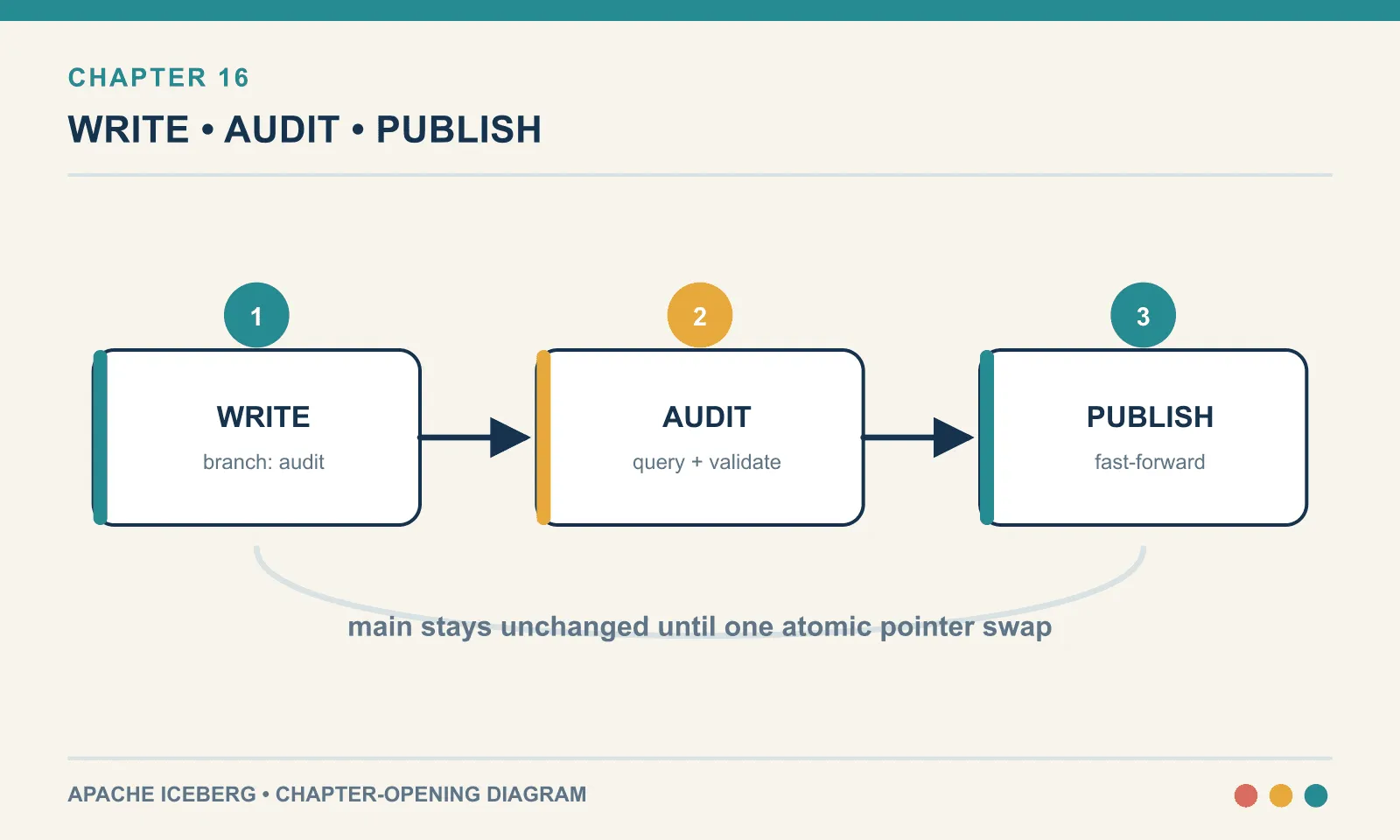
Spark arrived in chapter 10 for an operation PyIceberg genuinely could not perform. Its broader write path supports three increasingly useful ways to control what a pipeline publishes:
MERGE INTO— apply a batch of inserts, updates and deletes to a table in one statement and one snapshot.- Branches and tags — named pointers into the snapshot chain that cost nothing to create and nothing to keep.
- Write-audit-publish — load an entire batch, check it, and only then let anyone see it. This is the one that changes how you think about a nightly job.
The incremental scan promised in chapter 6 also belongs beside these writes: what it returns depends on whether the table was appended to or updated.
And there are two defaults in this chapter that will hurt you. One silently replaces your whole table when you meant to replace one partition. The other silently publishes a batch you thought you were staging. Both are shown running.
Everything here was executed against Iceberg 1.11.0, Spark 4.1.3 and the apache/iceberg-rest-fixture:1.10.1 REST catalog, on Java 21.
Why Spark, and when not
Those capabilities have a cost. Spark brings a JVM, a jar coordinate with three version numbers baked into it, a driver that wants gigabytes, and a startup cost measured in seconds rather than milliseconds. Every iteration of “did that work?” now costs you a cluster boot. Chapter 18 is largely about the ways those three version numbers fail to line up.
What you get for that is the most complete Iceberg implementation in existence. The reference implementation is Java, and the Spark runtime exposes essentially all of it. The row-level operations, the maintenance procedures, the branch and tag DDL, and the stored procedures that do compaction and expiry. As of Iceberg 1.11.0 the Spark runtime ships 20 stored procedures, which I confirmed by listing the *Procedure classes in the jar rather than reading a page:
add_files              ancestors_of            cherrypick_snapshot
compute_partition_stats compute_table_stats    create_changelog_view
expire_snapshots       fast_forward            migrate
publish_changes        register_table          remove_orphan_files
rewrite_data_files     rewrite_manifests       rewrite_position_delete_files
rewrite_table_path     rollback_to_snapshot    rollback_to_timestamp
set_current_snapshot   snapshot
If your table is small, appended to by one job, and never updated in place, you do not need any of that. PyIceberg appends, overwrites and expires snapshots, and chapters 2 through 9 got a long way on nothing else. Bring Spark in for one of three reasons: row-level updates on a table too large to rewrite, compaction and the rest of the maintenance quartet, or the publish workflow at the end of this chapter. Not because a diagram somewhere has an elephant on it.
The pattern I would recommend, and the one this book uses, is to keep both. Spark writes; PyIceberg inspects. A JVM boot between every check wrecks the iteration loop. And almost every question you have after a write is a metadata question that PyIceberg answers instantly.
MERGE INTO
Here is the shape of the problem every warehouse has. A batch of order updates arrives. Some are status changes to orders you already have. Some are cancellations that should remove the row. Some are orders you have never seen. Three different operations, interleaved in one file, with nothing marking which is which.
The bookshop’s table, four orders, all placed:
order_id customer status
1        ada      placed
2        grace    placed
3        alan     placed
4        kay      placed
And the incoming batch: order 2 shipped, order 3 cancelled, orders 5 and 6 brand new.
MERGE INTO ice.ch16.orders t
USING ice.ch16.order_updates s
ON t.order_id = s.order_id
WHEN MATCHED AND s.status = 'cancelled' THEN DELETE
WHEN MATCHED THEN UPDATE SET t.status = s.status, t.updated_at = s.updated_at
WHEN NOT MATCHED THEN INSERT *;
order_id customer status updated_at
1 ada placed 2026-07-01 09:00:00
2 grace shipped 2026-07-02 11:00:00
4 kay placed 2026-07-01 09:00:00
5 hedy placed 2026-07-02 11:10:00
6 lynn placed 2026-07-02 11:12:00Order 2 updated, order 3 gone, orders 5 and 6 inserted, order 1 and 4 untouched. The clauses are evaluated in order, which is why the cancelled case has to come before the general WHEN MATCHED. The first matching clause wins, so a bare WHEN MATCHED placed first would swallow everything behind it, cancellations included.
Now the part that matters more than the syntax. Look at what the table recorded:
operation  added  deleted  added-files  deleted-files  total
append     4      NULL     2            NULL           4
overwrite  5      4        1            2              5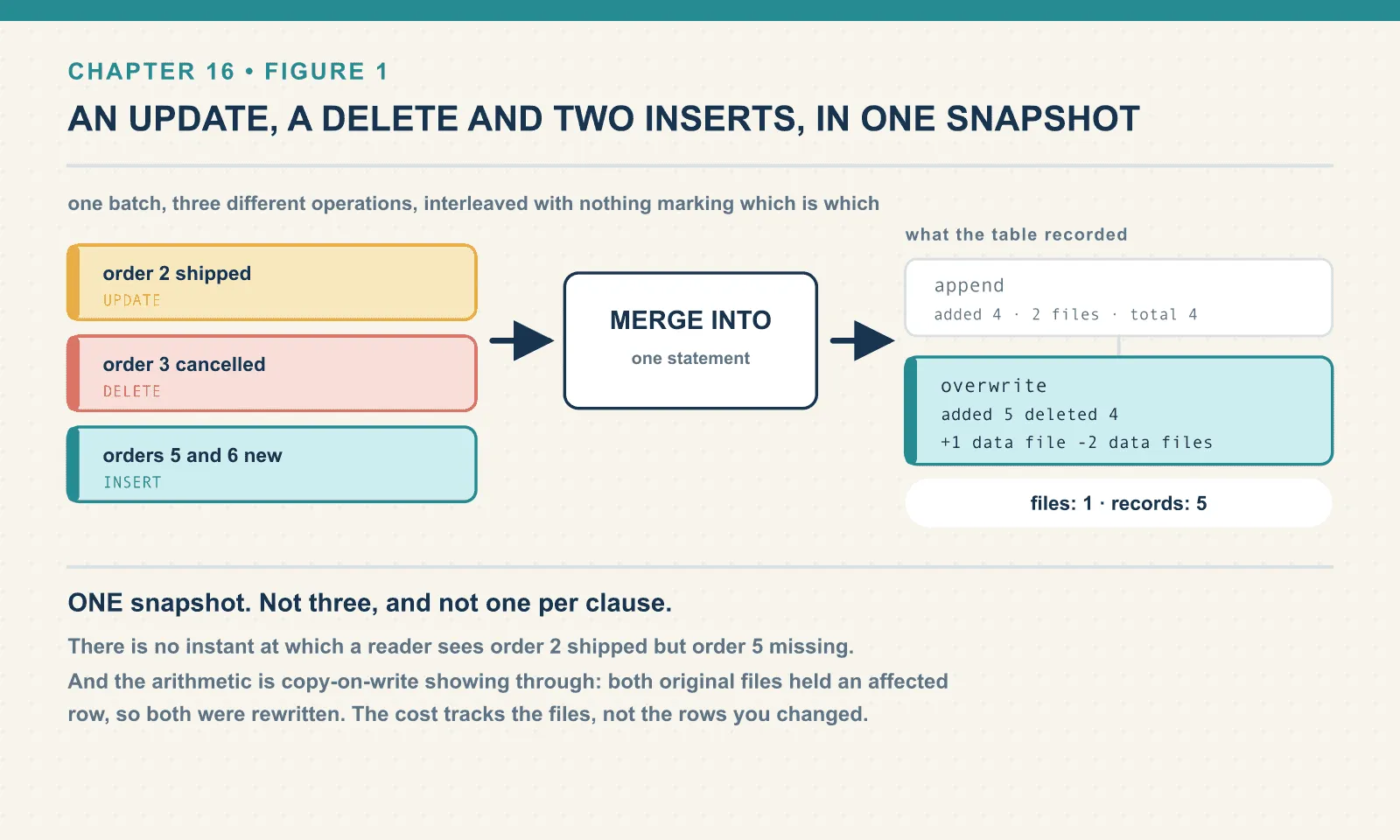
One snapshot. Not three, and not one per clause. An update, a delete and two inserts landed as a single atomic change. There is no instant at which a reader sees order 2 shipped but order 5 missing. And no instant at which the day’s revenue is short by two orders because a dashboard refreshed between statements.
That is the whole reason MERGE INTO exists as a statement rather than as three statements wrapped in a transaction. Nor can you assemble it out of PyIceberg’s append and overwrite. Those are two commits, and two commits are two moments at which the table is visible in an intermediate state.
The arithmetic of copy-on-write
The second summary row counts physical records rewritten, which is why its totals differ from the logical changes in the batch.
Three rows were affected: one updated, one deleted, two inserted. The snapshot says five records added and four deleted, and one data file added while two were deleted.
That is copy-on-write, and the numbers are the mechanism showing through. The four original rows lived in two data files. Iceberg cannot edit a Parquet file in place, because Parquet is immutable and so is every file in the table. Changing one row inside a file means rewriting the whole file. Both files contained an affected row, so both were rewritten. The three surviving rows plus the two new ones went into one new file, and the two old files were dropped from the table’s list.
files: 1 | records: 5The consequence scales badly in one specific direction. The cost of a copy-on-write update is not proportional to the rows you changed. It is proportional to the size of the files those rows live in. Updating one row in a table of ten 512 MB files, where that row happens to sit in each file, rewrites 5 GB. Chapter 10 laid out this arithmetic in the abstract. This is the first time you can read it off a real statement’s own snapshot summary.
Note also what the table properties say:
write.merge.mode = Table ice.ch16.orders does not have property: write.merge.modeThere is no property at all. Copy-on-write is what you get when nobody chose, on a v2 table written by Spark 4.1.3 against Iceberg 1.11.0. Worth knowing, because a great deal of writing on this subject describes merge-on-read as though it were the normal case.
Ask any freshly created Spark table what properties it holds, and the answer is four lines. One of them is a default nobody chose either.
current-snapshot-id              5236086033490015033
format                           iceberg/parquet
format-version                   2
write.parquet.compression-codec  zstd
That is the entire configuration of a Spark-created Iceberg table. Everything else in the long list of write.* properties you will find in the documentation is unset. And unset means the engine’s built-in default rather than a value written into the table. Which is a small but real portability question: two engines can disagree about a default, and the table does not record which one applied.
The same merge, merge-on-read
Create the same table with three properties set, and run the identical MERGE:
TBLPROPERTIES ('write.merge.mode'='merge-on-read',
               'write.update.mode'='merge-on-read',
               'write.delete.mode'='merge-on-read')
The result set is identical, five rows, same values. The disk is not:
operation  added  added-data-files  added-position-delete-files  added-delete-files
append     4      2                 NULL                         NULL
overwrite  3      1                 2                            2
content n recs
0 3 7 <- data files
1 2 2 <- delete files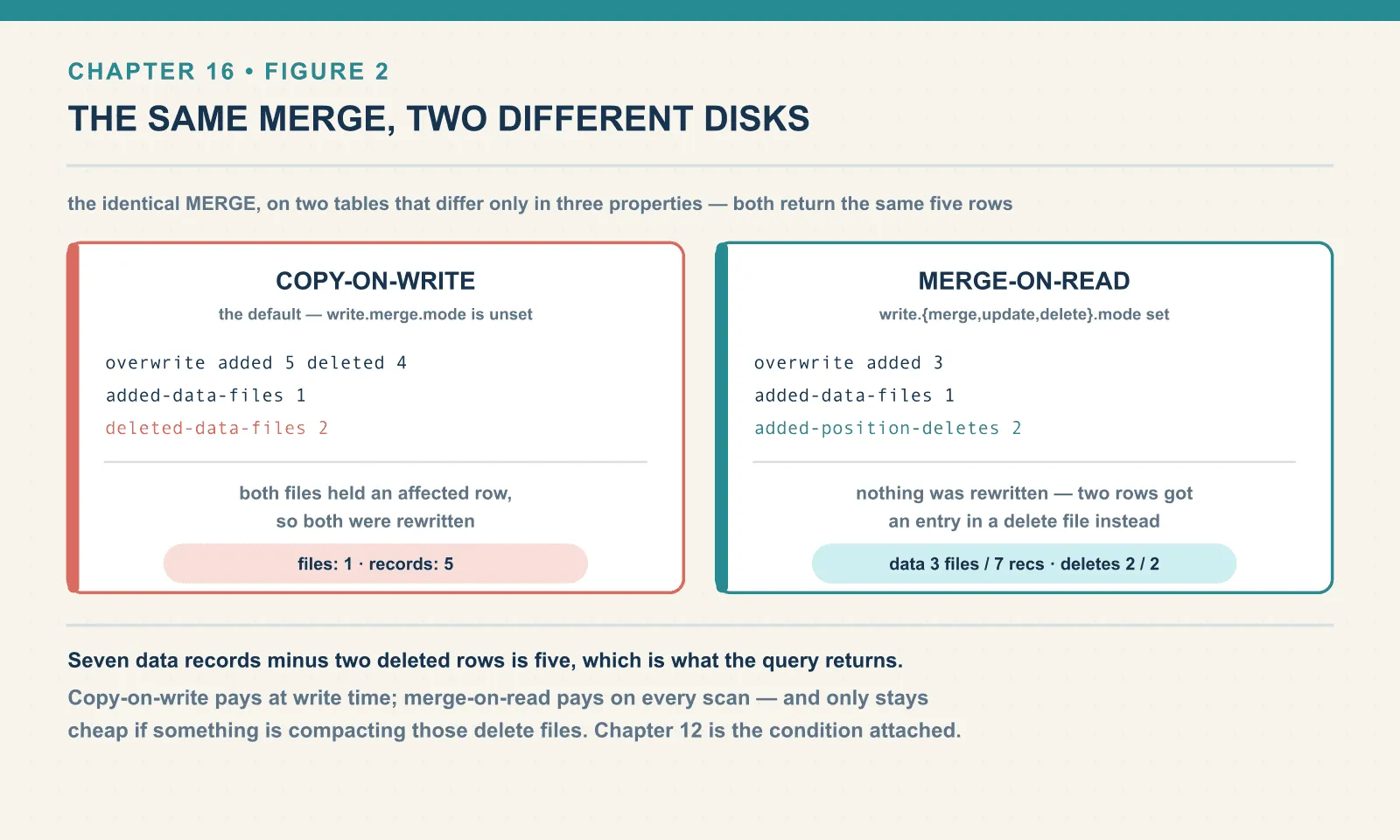
Three added records instead of five, one new data file, and two position delete files. Nothing was rewritten. The two rows that had to disappear got an entry in a delete file saying “row 3 of that file is gone”. The three genuinely new rows went into one new data file.
Seven data records minus two deleted rows is five, which is what the query returns. The delete files themselves are Parquet:
content record_count file
1       1            00000-5-0b24cd2e-...-00001-deletes.parquet
1       1            00000-5-0b24cd2e-...-00002-deletes.parquet
That .parquet suffix is a format-version fact worth holding on to. This is a v2 table, so its position deletes are Parquet files. On a v3 table the same delete becomes a .puffin deletion vector. Chapter 20 is entirely about those, and chapter 18 shows them being read correctly by three different engines.
The trade is the one you would expect. Merge-on-read makes writes cheap and reads expensive, because every scan now has to apply the delete files on the fly. Copy-on-write makes writes expensive and reads free.
Pick by which one your table does more of — and then remember the condition attached. Merge-on-read only stays cheap if something is compacting those delete files, which is chapter 12’s job. A merge-on-read table with no maintenance gets measurably slower every single day. The slope is set by your write frequency rather than by your data volume.
The default that deletes your table
Now the first of the two dangerous defaults, and it is dangerous enough that I would put it on a wall. Reloading one day can erase the other days if Spark interprets the overwrite at table scope. Here is the starting table, with four rows across three days:
2026-07-01: 2 rows
2026-07-02: 1 row
2026-07-03: 1 row
The intent is ordinary: reload the 2nd of July because the numbers were wrong. So:
INSERT OVERWRITE ice.ch16.daily VALUES (5, DATE '2026-07-02', 99.00);after: [('2026-07-02', 1)]operation added deleted total
append 4 NULL 4
overwrite 1 4 1The table now has one row. The 1st and the 3rd of July are gone. deleted: 4 says exactly what happened, in the snapshot summary, after the fact. At the time there was no error, no warning and no prompt.
The reason is a Spark setting, not an Iceberg one:
partitionOverwriteMode default: STATICIn STATIC mode, INSERT OVERWRITE with no explicit partition predicate means the whole table. It is the historical Hive behaviour and Spark keeps it as the default. Switch it:
spark.conf.set("spark.sql.sources.partitionOverwriteMode", "dynamic")Same statement, same starting table:
after: [('2026-07-01', 2), ('2026-07-02', 1), ('2026-07-03', 1)]operation added deleted total
append 4 NULL 4
overwrite 1 1 4Now deleted: 1, and only the partition the new row belongs to was replaced. Four rows in, four rows out.
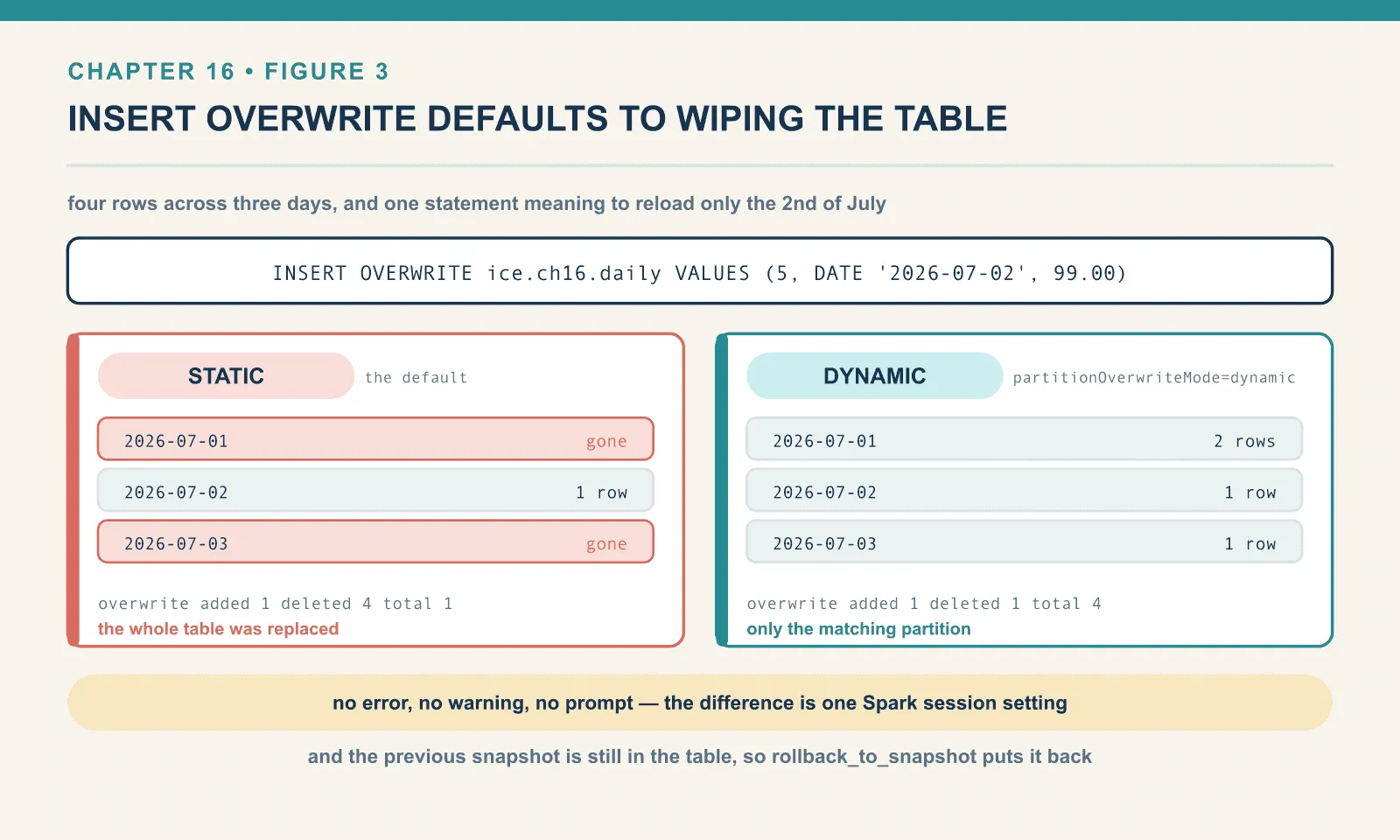
Three practical conclusions. Set partitionOverwriteMode=dynamic in your Spark defaults, so that nobody has to remember it at 2am. Prefer MERGE INTO where you can, because it has no equivalent trap: it does exactly what its clauses say and nothing else. And note what saved us here. The previous snapshot is still in the table, so chapter 6’s rollback_to_snapshot puts everything back.
That last point deserves a moment. On a directory of Parquet this mistake is a restore-from-backup incident. On an Iceberg table it is a one-line correction that takes as long as a catalog commit. The files the overwrite “deleted” were only removed from a list.
For completeness, plain UPDATE and DELETE behave as you would hope:
operation  added  deleted  total
overwrite  2      2        4     <- UPDATE ... WHERE order_id = 1
delete     NULL   1        3     <- DELETE FROM ... WHERE order_id = 4
The UPDATE rewrote a file holding two rows to change one of them, which is copy-on-write again. The DELETE produced a snapshot whose operation is literally delete. The row it removed was the only row in its file, so the file could simply be dropped from the table rather than rewritten.
Reading only what changed
Spark can read a table incrementally, returning only the rows appended between two snapshots. The distinction between appended and changed matters after a MERGE or UPDATE.
spark.read.format("iceberg") \
     .option("start-snapshot-id", first) \
     .option("end-snapshot-id", last) \
     .load("ice.ch16.incr")
Here is a table with a mixed history: two appends, an UPDATE, and one more append.
4524181100769839422 append     added= 3
4726162924971313103 append     added= 2
5291338215548768972 overwrite  added= 3
7555762521216694138 append     added= 1
table rows: 6
Read incrementally from the first snapshot to the last:
incremental read, snapshot 1 -> snapshot 4: 3
  order_ids: [4, 5, 6]
Three rows, and both surprises in that output are worth naming.
start-snapshot-id is exclusive. Orders 1, 2 and 3 arrived in the start snapshot itself, and they are not in the result. The option means “everything after this”, not “everything from this”.
The overwrite snapshot contributed nothing. The UPDATE rewrote a file containing orders 1, 2 and 3, so its added-records is 3. But an incremental append scan reads only appended files, and rewritten copies of existing rows are not new rows. Emitting them would duplicate records downstream, so Spark drops them.
That second behaviour is correct, and it is also silent, and the combination is the trap. Build a change feed on an incremental read over a table that is merged into, and the merged updates never reach the consumer. Nothing anywhere reports a problem. Chapter 17 hits the same wall from the streaming side, where Spark takes the opposite approach and refuses to run at all rather than quietly skipping. Two different answers to one question, in one engine, and the batch one is the dangerous half.
The rule is the same either way: a table you read incrementally should be append-only. If it is also updated in place, incremental reads are not a change feed. They are a partial one.
Branches and tags
A snapshot is already a complete, immutable version of the table — that has been true since chapter 6. A tag is a name for one of them. A branch is a name that moves.
Neither copies anything. Creating either is a metadata write: one commit, whether the table holds five rows or five billion. That is what makes the workflow at the end of this chapter affordable in the first place.
ALTER TABLE ice.ch16.orders CREATE TAG july_close RETAIN 90 DAYS;
ALTER TABLE ice.ch16.orders CREATE BRANCH audit;
name type snapshot_id max_reference_age_in_ms
main BRANCH 7584038833222273539 NULL
audit BRANCH 7584038833222273539 NULL
july_close TAG 7584038833222273539 7776000000Three names, one snapshot id. main is itself a branch, and always was — you have simply never had to look at it before. RETAIN 90 DAYS became 7,776,000,000 milliseconds. That is a real instruction to the expiry machinery from chapter 13: a snapshot that a tag still references will not be expired out from under it.
That last point is the practical reason tags exist. Time travel by snapshot id is fine right up until snapshot expiry runs. Then the eighteen-digit number somebody pasted into a runbook is a dangling reference to files that were deleted last Tuesday. A tag makes the version durable and gives it a name a human can actually use:
SELECT count(*) FROM ice.ch16.orders VERSION AS OF 'july_close';Branches are for work in progress. Write to one with the branch_ suffix:
INSERT INTO ice.ch16.orders.branch_audit VALUES (7, ...), (8, ...);main : 5
audit : 7
tag july_close: 5Two rows landed on audit and nowhere else. Anyone querying the table sees five rows and has no way to notice a branch exists. That is exactly the property we are about to build a workflow on.
Publishing is a pointer move:
CALL ice.system.fast_forward(table => 'ch16.orders', branch => 'main', to => 'audit');{'branch_updated': 'main',
'previous_ref': 7584038833222273539,
'updated_ref': 382221884412235329}main after fast-forward: 7
tag july_close still: 5main jumped from one snapshot to the other in a single catalog commit. No data moved. The tag still points where it always did, so the pre-publish state remains addressable by name.
fast_forward is the right primitive, and it has the constraint its name implies. It only works when the target branch is a descendant of the branch being moved. If main has advanced since the branch was cut, the fast-forward is refused, exactly as git push --ff-only is refused. That refusal is a feature, not an inconvenience. It means your publish cannot silently discard commits that arrived while you were auditing — precisely the failure the staging-table-and-swap pattern has always had.
Write-audit-publish
A nightly load can finish successfully and still be wrong. Not crashed, which would be easy. Wrong — negative amounts, a null customer, a row count that is half of yesterday’s. Nothing in the job’s own output distinguishes that from a good night. By the time anyone notices, the table has been serving bad rows to dashboards for six hours. The fix is a rollback, plus a very awkward message to people who already acted on the numbers.
Write-audit-publish inverts the order. Write into a branch that nobody reads, audit the branch, and publish only if the audit passes. Here it is running end to end, on a table with write.wap.enabled set.
main before load: 3Load 1, and the batch is bad:
spark.sql("ALTER TABLE ... CREATE BRANCH etl_20260704")
spark.conf.set("spark.wap.branch", "etl_20260704")
spark.sql("INSERT INTO ice.ch16.wapflow VALUES (4,'kay',-24.99),(5,'hedy',29.95)")
spark.conf.unset("spark.wap.branch")
Notice the INSERT statement. It does not mention the branch. That is the point of spark.wap.branch. The ETL code is unchanged, and where the write lands is a deployment setting rather than a code change. The same job runs against main in one environment and against a staging branch in another.
Audit:
audit on the branch  : [(4, -24.99)]
main during the audit: 3
branch during audit  : 5
The bad row is on the branch. Main is still at three rows and has never seen it. So:
ALTER TABLE ice.ch16.wapflow DROP BRANCH etl_20260704;after discarding, main: 3 | refs: ['main']The bad load is gone. Not rolled back and not compensated. It was never published, so there is nothing to undo. No dashboard rendered it, no downstream job consumed it, and the incident that would have followed simply did not happen. The branch and its data files are orphaned metadata now, which chapter 13’s cleanup will collect.
Load 2, with the batch fixed:
audit on the branch  : 0 failing rows
main before publish  : 3
fast_forward -> {'branch_updated': 'main',
                 'previous_ref': 7381607318104169566,
                 'updated_ref': 3818942292679211720}
main after publish   : 5
Five rows, published in one pointer move, after a check that ran against the real data in its real location.
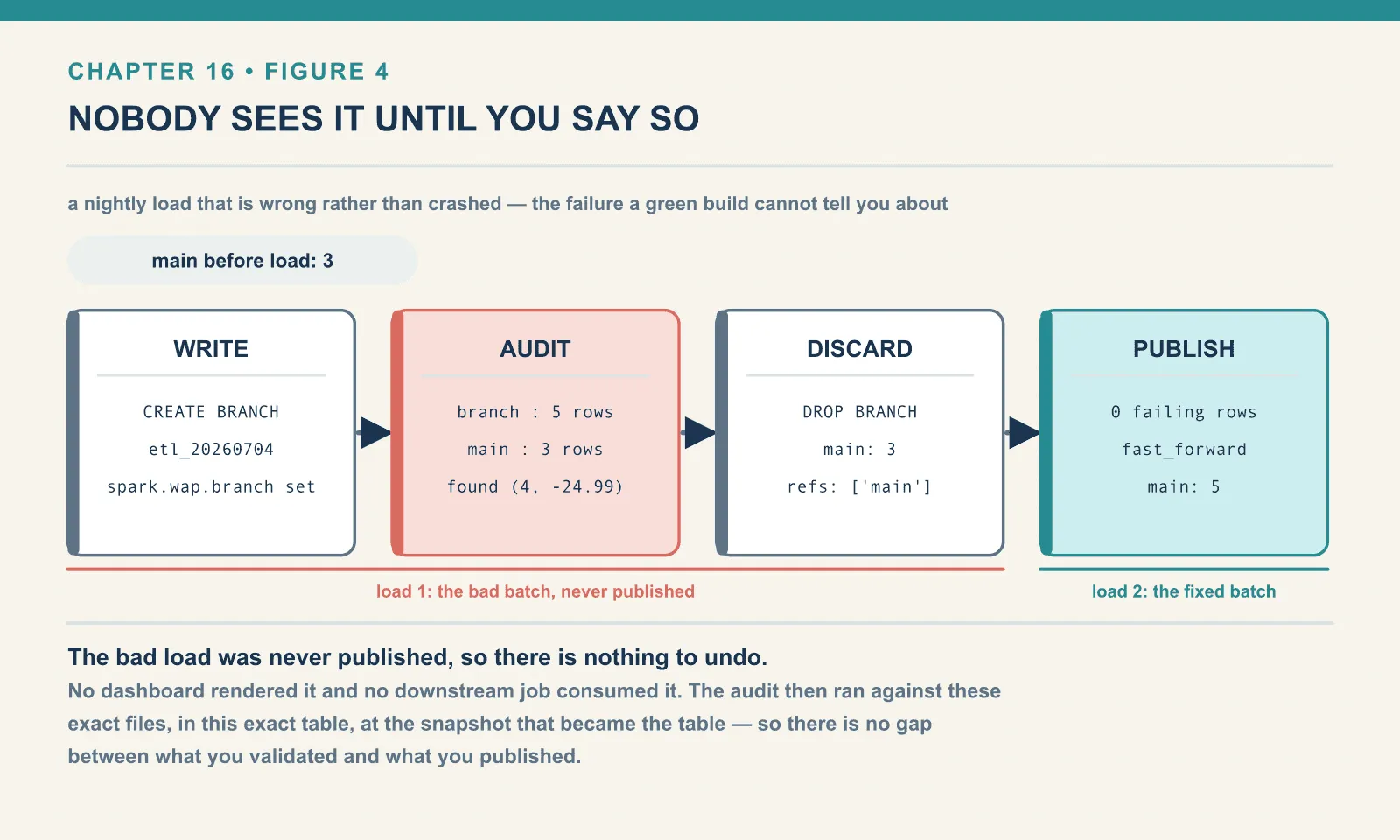
That last clause is what makes this better than the staging-table version of the same idea. The audit did not run against a temporary table that might differ from the real one in some detail. It ran against these exact files, through this exact schema, in this exact table. And at a snapshot that then became the table. There is no gap between what you validated and what you published.
The two ways WAP goes wrong
Both were run, and both fail silently, which is the worst possible way to fail.
One: spark.wap.branch redirects reads as well as writes.
A clean experiment, on a table with two rows:
spark.conf.set("spark.wap.branch", "nightly")
spark.sql("INSERT INTO ... VALUES (3, 30.00)")
count() with spark.wap.branch still set : 3
count() with spark.wap.branch unset : 2
count() of branch nightly : 3While the setting is on, SELECT count(*) on the plain table name returns the branch’s three rows. Unset it and the same query returns main’s two.
This is coherent behaviour. The session is scoped to the branch, so of course reads follow it. But it means a validation query that checks “main is unchanged” inside the same session is checking nothing at all. Your audit code has to unset spark.wap.branch before it looks at main, or address main explicitly with VERSION AS OF.
I got this wrong on the first pass of this chapter. The query returned a number that agreed with what I expected to see, and I only caught it because the number was suspiciously round. That is the whole hazard in one sentence: a redirected read does not look like an error, it looks like agreement.
Incidentally, the same experiment answers a question you might have: the branch did not exist beforehand, and the INSERT did not fail. Iceberg created nightly on the write. Convenient, and one fewer error to handle — at the price of a typo silently becoming a branch that your publish step will then never find.
Two: write.wap.enabled is the gate, and without it your staged write is a live write.
The same setup on a table that does not have the property:
INSERT -> OK (no gate)
main count: 3
refs: ['main']
No error. No branch. The three rows went straight into main. The spark.wap.branch setting was accepted and honoured by nothing. It produced a production write from a job whose entire purpose was to avoid one.
The spark.wap.id path fails the same way. With the property enabled, a write with spark.wap.id set is staged rather than published:
main count after staged write: 2

snapshot_id          operation  wap.id
3137741805341602400  append     NULL
4344080846427332844  append     batch-2026-07-04
The snapshot exists, tagged with its wap.id, and is not the current snapshot. You publish it by id:
CALL ice.system.cherrypick_snapshot(table => 'ch16.wapid',
                                    snapshot_id => 4344080846427332844);
{'source_snapshot_id': 4344080846427332844, 'current_snapshot_id': 4344080846427332844}
main count after cherrypick: 3Without the property, the identical staged write went straight to main, count 3, no snapshot held back.
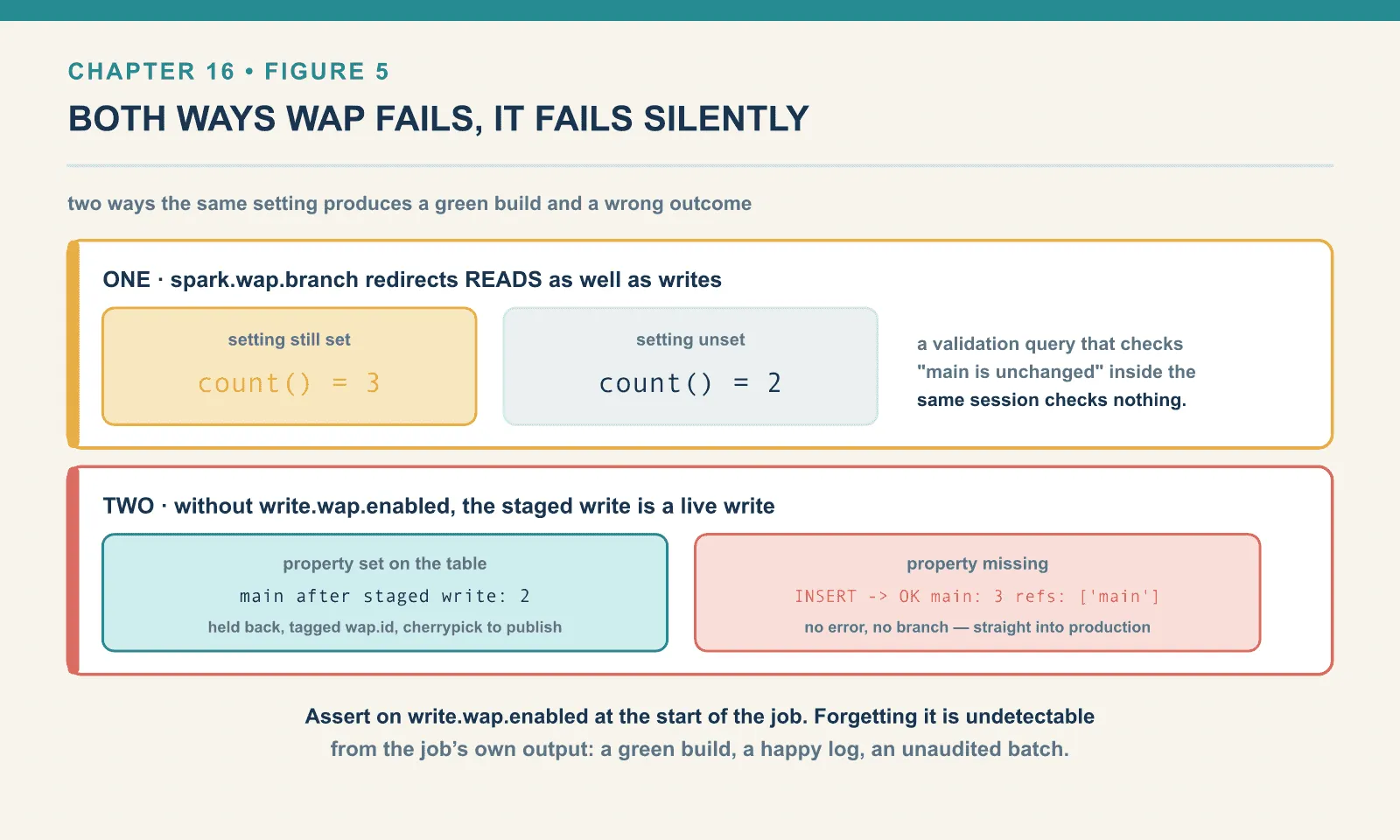
So: write.wap.enabled=true on the table is not optional, and forgetting it is undetectable from the job’s own output. Assert on it. One line at the start of the job that reads the table property and fails loudly is the cheapest insurance in this chapter. The failure mode it prevents produces a green build, a happy log, and a published batch that nobody audited.
Choosing between the two WAP styles
The choice depends on whether the unit you want to audit is several writes or a single snapshot.
The branch style (spark.wap.branch plus fast_forward) gives the staged data a name. Multiple writes can accumulate on it before publishing, and you can query it with ordinary SQL through VERSION AS OF. It suits a nightly pipeline with several stages and an audit that inspects the whole result.
The id style (spark.wap.id plus cherrypick_snapshot) stages exactly one snapshot and identifies it by a token you chose. It suits a single-write job, and it fits well where an external orchestrator already has a run id to use as the token.
If you have no strong reason either way, use the branch style. The git-shaped mental model transfers, and the staged state is queryable by name rather than by an eighteen-digit id. And DROP BRANCH is a far clearer way to say “discard that load” than quietly declining to cherry-pick a snapshot id. That id then sits in the table forever.
What this chapter did not run
- A commit conflict between two concurrent Spark writers. Chapter 4 covered compare-and-swap, and chapter 1 showed PyIceberg’s
CommitFailedException. I did not stage two Spark drivers racing on the same table here. So the retry behaviour ofcommit.retry.num-retries, and the difference between theserializableandsnapshotisolation levels, is described in the Iceberg documentation and not measured in this book. fast_forwardbeing refused. I ran the successful path only. The descendant constraint above is from the procedure’s contract, not from an observed rejection.- Object storage. Everything here wrote to a local warehouse through the REST catalog.
- Merge-on-read at a scale where the read cost is visible. Two delete files on a five-row table proves the mechanism and measures nothing about the penalty.
Final thoughts
The same atomic commit supports all three workflows. MERGE INTO makes a compound change atomic. A branch makes a whole sequence of changes atomic, by deferring the moment anyone can see them. And fast_forward is the same compare-and-swap on a catalog pointer that chapter 4 built everything else on. There is no new mechanism in this chapter at all. It is the atomic pointer swap, applied at three different granularities.
That is why write-audit-publish is not a framework or a tool you install. It is three SQL statements and a config setting, available on any Iceberg table, on any engine that implements branches. It feels like a bigger idea than that for one reason: on a directory of Parquet it was not possible at any price. The workaround everyone built instead — a staging table, a swap, a rename, and a prayer — was neither atomic nor a check of the thing you actually published.
The next chapter takes the writing story somewhere Spark’s batch model does not reach. Writers that never stop, commit every few seconds, and leave a table with tens of thousands of files by morning.
Comments