Composing Modules: One Big Module Is a Smell
How to organize guice modules as the graph grows — install, multiple modules, Modules.combine, and Modules.override for tests and environments — with Kotlin and Java side by side.
Series: Guice for JVM Engineers · I (Fundamentals) — Part 7 of 8
By now you can bind things, provide things, qualify things, and scope things. Drop all of that into a single AppModule and it works — right up until the day someone opens a four-hundred-line configure() and can’t tell the database wiring from the HTTP wiring from the three @Provides methods that exist purely to placate a test. One giant module isn’t wrong, exactly. It’s just where legibility goes to die, and legibility was the entire reason you picked Guice. This post is about keeping the graph organized as it grows: how modules nest, how you pass several at once, and how you swap pieces out for tests and environments without rewriting anything.
install: modules inside modules
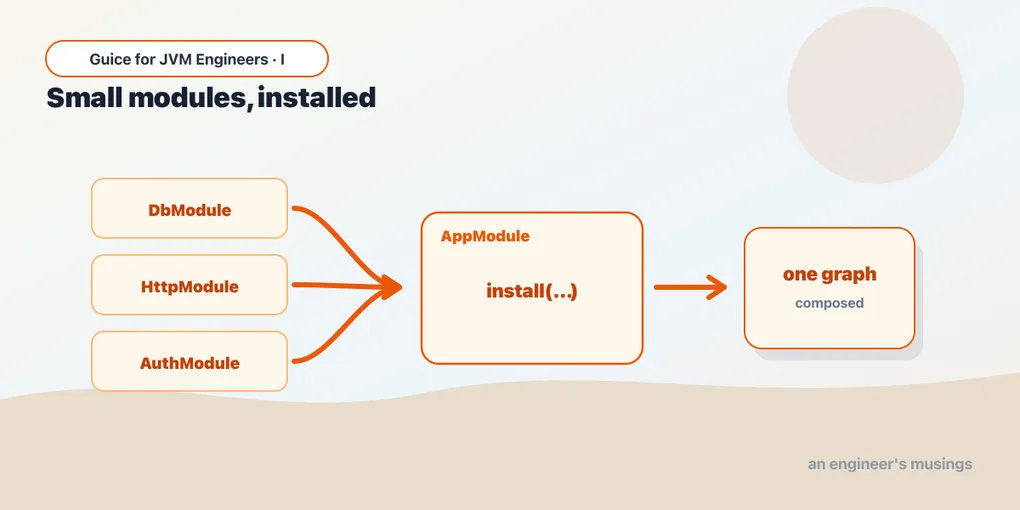
A module can pull in another module by calling install(...) from its configure(). This is the workhorse — it’s how you compose. A “top-level” module installs the feature modules; each feature module owns the bindings for its own slice of the world.
import com.google.inject.AbstractModule

class PersistenceModule : AbstractModule() {
    override fun configure() {
        bind(GreetingRepository::class.java).to(SqlGreetingRepository::class.java)
    }
}

class HttpModule : AbstractModule() {
    override fun configure() {
        bind(GreetingController::class.java).asEagerSingleton()
    }
}

// The application module is mostly a table of contents.
class AppModule : AbstractModule() {
    override fun configure() {
        install(PersistenceModule())
        install(HttpModule())
    }
}
import com.google.inject.AbstractModule;
class PersistenceModule extends AbstractModule {
@Override protected void configure() {
bind(GreetingRepository.class).to(SqlGreetingRepository.class);
}
}
class HttpModule extends AbstractModule {
@Override protected void configure() {
bind(GreetingController.class).asEagerSingleton();
}
}
// The application module is mostly a table of contents.
class AppModule extends AbstractModule {
@Override protected void configure() {
install(new PersistenceModule());
install(new HttpModule());
}
}install is just binder().install(module) under the hood — AbstractModule forwards to the binder for you. The installed module’s bindings are merged into the same injector as if you’d written them inline. There’s no namespacing or isolation here (that’s what private modules do — a Guice II topic); install flattens everything into one graph. The win is purely organizational, and that’s plenty: each module is small, focused, and lives next to the feature it wires.
Passing several modules to the injector
You don’t have to funnel everything through one top-level module. Guice.createInjector(...) is varargs — it takes as many modules as you hand it, and it also accepts an Iterable<? extends Module> if you’ve assembled a list.
import com.google.inject.Guice

fun main() {
    val injector = Guice.createInjector(
        PersistenceModule(),
        HttpModule(),
        MetricsModule(),
    )
    val controller = injector.getInstance(GreetingController::class.java)
}

// Or build the list dynamically, then pass the Iterable:
fun bootstrap(extraModules: List<com.google.inject.Module>) {
    val modules = buildList {
        add(PersistenceModule())
        add(HttpModule())
        addAll(extraModules)
    }
    val injector = Guice.createInjector(modules)
}
import com.google.inject.Guice;
import com.google.inject.Injector;
import com.google.inject.Module;
import java.util.ArrayList;
import java.util.List;
public static void main(String[] args) {
Injector injector = Guice.createInjector(
new PersistenceModule(),
new HttpModule(),
new MetricsModule());
GreetingController controller = injector.getInstance(GreetingController.class);
}
// Or build the list dynamically, then pass the Iterable:
static void bootstrap(List<Module> extraModules) {
List<Module> modules = new ArrayList<>();
modules.add(new PersistenceModule());
modules.add(new HttpModule());
modules.addAll(extraModules);
Injector injector = Guice.createInjector(modules);
}install(M()) and createInjector(M()) end up at the same place — both add M’s bindings to the one graph. The difference is where the list lives. A top-level AppModule that installs everything gives you one name to pass around and one file to read as the manifest. Passing the list straight to createInjector keeps that manifest at the entry point, which is handy when the set of modules depends on runtime conditions (a flag, an environment, a plugin list). Pick whichever puts the decision where you’d look for it; mixing both is fine.
Modules.combine: a list that pretends to be one module
Sometimes an API wants a single Module but you have several. com.google.inject.util.Modules.combine(...) bundles them into one module that simply installs them all. It takes varargs or an Iterable.
import com.google.inject.Module
import com.google.inject.util.Modules

// A reusable bundle other code can treat as one thing.
fun coreModules(): Module = Modules.combine(
    PersistenceModule(),
    HttpModule(),
    MetricsModule(),
)
import com.google.inject.Module;
import com.google.inject.util.Modules;
// A reusable bundle other code can treat as one thing.
static Module coreModules() {
return Modules.combine(
new PersistenceModule(),
new HttpModule(),
new MetricsModule());
}Be honest about when you need this. Guice’s own Javadoc on combine says it’s “rarely necessary” — most Guice APIs already take multiple modules, and install() can be called as many times as you like. The legitimate use is adapting to an external API that insists on a single Module, or naming a reusable bundle you’ll hand to several injectors. If you reach for combine just to merge two modules you control, you wanted install or varargs. The interesting cousin, though, isn’t combine at all — it’s override.
Modules.override: swap bindings for tests and environments
Here’s the one you’ll actually use. Modules.override(base).with(overrides) produces a module where, if a key is bound in both, the override wins. Everything not mentioned in the override falls through to the base. This is the canonical way to take a real production module and replace just the bits a test (or a non-prod environment) needs to fake — without touching the production module at all.
import com.google.inject.AbstractModule
import com.google.inject.Guice
import com.google.inject.util.Modules

// Production wiring — untouched, exactly as it ships.
class AppModule : AbstractModule() {
    override fun configure() {
        bind(GreetingRepository::class.java).to(SqlGreetingRepository::class.java)
        bind(Clock::class.java).toInstance(Clock.systemUTC())
    }
}

// A test module that only mentions what it wants to change.
class FakeRepositoryModule : AbstractModule() {
    override fun configure() {
        bind(GreetingRepository::class.java).to(InMemoryGreetingRepository::class.java)
        bind(Clock::class.java).toInstance(Clock.fixed(EPOCH, ZoneOffset.UTC))
    }
}

fun testInjector() = Guice.createInjector(
    Modules.override(AppModule()).with(FakeRepositoryModule()),
)
import com.google.inject.AbstractModule;
import com.google.inject.Guice;
import com.google.inject.Injector;
import com.google.inject.util.Modules;
// Production wiring — untouched, exactly as it ships.
class AppModule extends AbstractModule {
@Override protected void configure() {
bind(GreetingRepository.class).to(SqlGreetingRepository.class);
bind(Clock.class).toInstance(Clock.systemUTC());
}
}
// A test module that only mentions what it wants to change.
class FakeRepositoryModule extends AbstractModule {
@Override protected void configure() {
bind(GreetingRepository.class).to(InMemoryGreetingRepository.class);
bind(Clock.class).toInstance(Clock.fixed(EPOCH, ZoneOffset.UTC));
}
}
static Injector testInjector() {
return Guice.createInjector(
Modules.override(AppModule()).with(new FakeRepositoryModule()));
}The test injector gets the real AppModule graph — every binding it declares — except GreetingRepository and Clock, which now resolve to the fakes. You didn’t fork the production module, add a constructor flag, or sprinkle if (testing) anywhere. The same trick works for environments: a StagingOverrides module that points at the staging database and a no-op email sender, layered over the one true AppModule.
Both override(...) and .with(...) take varargs or an Iterable, so you can override several base modules and supply several overrides at once. Worth knowing: override is key-based, not module-based — it replaces individual bindings, so a fake only needs to mention the exact keys it wants to change.
Going deeper: how to slice modules — and when override turns toxic
The good carve-up is by feature or layer, and small. PersistenceModule, HttpModule, MetricsModule, SchedulingModule — each owns a coherent slice, each fits on a screen, each can be installed (and reasoned about) on its own. A module should answer one question: how is this part of the system wired? When you can name a module without the word “and,” you’ve sliced it right.
The anti-pattern is the god module — one configure() that binds the database, the HTTP layer, the metrics, and the cron jobs, because splitting felt like ceremony. It reads fine the week you write it and becomes archaeology a quarter later. Splitting costs you a few extra class declarations; the legibility you buy back is the whole point of Guice.
Now the warning the Guice maintainers put right in the Javadoc, twice: prefer to write smaller modules that can be reused and tested without overrides. Modules.override is genuinely the right tool for env- and test-specific swaps — but it’s load-bearing magic. An override silently wins over the base, so when you read the production module you can’t tell which of its bindings some test or environment has quietly replaced. A little of that is fine. A lot of it means your modules are mis-sliced: if you’re constantly overriding the same three bindings, those three belong in their own small module you simply install the right variant of, no override needed. Reach for override when you can’t change the base (it’s someone else’s, or genuinely shared); reach for better slicing when you can. Override is a smell only when it’s covering for modules that should have been split in the first place.
Gotchas
installflattens — it doesn’t isolate. Installed modules share one graph and one namespace. If two installed modules bind the same key, that’s a duplicate-bindingCreationException, not a quiet “last one wins.” (You wantModules.overridefor intentional replacement, or private modules for real isolation.)- Installing the same module instance twice is usually fine; binding the same key twice isn’t. Guice de-dupes equal module instances, so a diamond of installs (two modules each installing a shared
CommonModule()) won’t double-bind — provided the modules are equal. Give modules with no fields the default identity and you’re fine; modules carrying constructor state need sensibleequals/hashCodeor they won’t de-dupe. Modules.combineis rarely what you want. Its own Javadoc says so. Use it only to satisfy an external API that demands a singleModule, or to name a reusable bundle — not to merge modules you already control.- Override is key-based and silent. It replaces bindings whose keys match, and it does so without any announcement. An override that names a key the base never bound just adds a new binding — no error, no warning that your “override” overrode nothing. Typo a qualifier and your fake quietly doesn’t take effect.
- You can’t override a directly-bound scope that’s in use. If the base binds a scope annotation directly (
bindScope(...)) and that scope is actually used by a binding, trying to override it is an error — Guice reports “the scope … is bound directly and cannot be overridden.” Rare, but it bites when you try to swap scoping wholesale in tests. - Order of installs doesn’t imply precedence.
install(A()); install(B())does not mean B beats A on conflicts — both just get added, and a real conflict throws. Precedence is only a thing insideModules.override, where the.with(...)side wins by design.
What’s next
You can now grow the object graph without growing a single unreadable module: install feature modules, hand a list to the injector, bundle with combine when an API forces your hand, and reshape the graph for tests and environments with Modules.override — sparingly. That’s the last of the construction techniques. The remaining skill is diagnostic: what to do when the wiring doesn’t come together and Guice hands you a wall of red.
Next: Part 8 — When It Breaks, where we read CreationException like a map, untangle circular dependencies, and learn to ask the injector what it actually decided.
Target keyword(s): guice modules, guice Modules.override.
Comments