Six Megabytes and Nothing Else: Go in a Scratch Container
Containerizing a Go service with a multi-stage Dockerfile — a full builder stage, then a static CGO-free binary copied into distroless or scratch, with CA certs, a non-root user, and a .dockerignore. The static-binary proof is run; the image is actually built. Go 1.26.5.
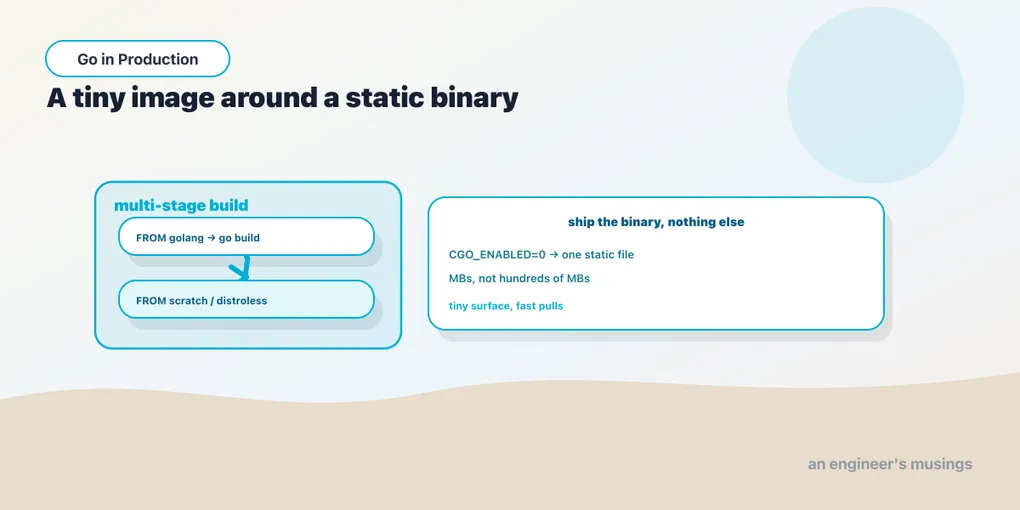
A Go program is already a single self-contained binary, which makes it the easiest thing in the world to containerize badly. Start FROM golang, copy your source in, run go build, and ship the result — it works, and the image is over 800 MB of Linux distribution, C compiler, and interactive shell wrapped around a binary that needs none of it. This chapter builds the other kind of image — the one that is just the binary on top of almost nothing, measured in single-digit megabytes with barely any attack surface.
Run against: Go 1.26.5 for the Go half. The image was really built with Docker, and the text is precise about which line ran where.
Why a static binary is the whole trick
The reason a Go service can live in an almost-empty image is that you can compile it with no external dependencies at all, not even the C library. That is not automatic. By default Go builds with cgo enabled, and a couple of standard packages will use it — the net and os/user resolvers can call into the system’s libc for DNS and user lookups. A binary built that way is dynamically linked against libc and will not run in an image that has no libc.
Set CGO_ENABLED=0 and Go uses its pure-Go implementations instead, producing a genuinely static binary that depends on nothing outside itself. Here is the proof, built for Linux from a Mac:
$ CGO_ENABLED=0 GOOS=linux GOARCH=amd64 go build -o server-static .
$ file server-static
server-static: ELF 64-bit LSB executable, x86-64, version 1 (SYSV),
statically linked, Go BuildID=..., not stripped
statically linked is the word that matters. For contrast, the same source built with cgo enabled links against the operating system’s libraries. On my Mac that build reports four dynamic dependencies, DNS resolution among them:
$ CGO_ENABLED=1 go build -o server-cgo .
$ otool -L server-cgo
	/usr/lib/libSystem.B.dylib
	/usr/lib/libresolv.9.dylib
	/System/Library/Frameworks/CoreFoundation.framework/...
	/System/Library/Frameworks/Security.framework/...
A binary with those dependencies needs those libraries present at runtime. The static one needs nothing — which is exactly why it can run in an image that contains nothing. (The classic Linux proof is ldd server-static reporting “not a dynamic executable” — macOS has no Linux dynamic loader, so file is the proof shown here. The statically linked verdict is the same fact.)
While you are passing build flags, -ldflags="-s -w" strips the symbol table and debug information. On this service the static binary went from 8.0 MB to 5.6 MB. You lose symbolized stack traces from the binary itself — a fair trade for a production image, a bad one if you plan to attach a debugger to it.
The multi-stage Dockerfile
The building requires a Go toolchain; the running requires only the binary. A multi-stage build gets you both — without shipping the first. The build stage is a full Go image, and everything in it is discarded except the one file you copy forward:
# --- build stage: the full Go toolchain, thrown away at the end ---
FROM golang:1.26 AS build
WORKDIR /src

# Copy go.mod/go.sum first so dependency download is cached
# separately from source changes.
COPY go.mod ./
RUN go mod download

# Now the source, and the build itself.
COPY . .
RUN CGO_ENABLED=0 GOOS=linux go build -ldflags="-s -w" -o /bin/server .

# --- final stage: nothing but the binary and its trust roots ---
FROM gcr.io/distroless/static:nonroot
COPY --from=build /bin/server /server
USER nonroot:nonroot
EXPOSE 8080
ENTRYPOINT ["/server"]
Every line earns its place:
FROM golang:1.26 AS buildnames a stage. This image carries the compiler, the standard library sources, git, and a shell. It is big and it is fine, because it does not ship.COPY go.mod ./thenRUN go mod download, before copying source. Docker caches each layer. Dependencies change far less often than your code, so downloading them in their own layer means an edit tomain.goreuses the cached dependency layer instead of re-downloading. (On this single-file service with no third-party imports, that step honestly reportedgo: no module dependencies to download, but the pattern is what matters the moment you add a dependency.)RUN CGO_ENABLED=0 GOOS=linux go build ...is the static build from the previous section, now producing a Linux binary at/bin/server.FROM gcr.io/distroless/static:nonrootstarts the final stage over from a base that has no shell, no package manager, and no libc. Google’sdistroless/staticis built for exactly this — a static binary, the CA certificates for TLS, timezone data, and/etc/passwd, and nothing else.COPY --from=build /bin/server /serverreaches into the discarded build stage and lifts out only the binary.USER nonroot:nonrootruns the process as an unprivileged user. The:nonrootimage variant ships that user (uid 65532) for you, so a container escape does not start as root.ENTRYPOINT ["/server"]is the exec form, which runs the binary as PID 1 directly rather than under a shell, so it receives theSIGTERMthat graceful shutdown depends on — a shell wrapper would swallow it.
The two details scratch will bite you on
If you go smaller still and use FROM scratch — the truly empty base — two things that distroless/static handed you are suddenly your problem.
The first is TLS trust. scratch has no CA certificate bundle, so the first time your service makes an outbound HTTPS call, the TLS handshake fails with an x509: certificate signed by unknown authority error. The fix is to copy the certs out of the build stage, which has them:
FROM scratch
COPY --from=build /etc/ssl/certs/ca-certificates.crt /etc/ssl/certs/
COPY --from=build /bin/server /server
EXPOSE 8080
ENTRYPOINT ["/server"]
The second is users and timezones. scratch has no /etc/passwd, so a USER name has nothing to resolve against (a numeric USER 65532 still works), and no zoneinfo, so time.LoadLocation fails unless you copy that in too or compile with the timetzdata build tag. This is the trade: scratch is the absolute minimum and you assemble what you need by hand — distroless/static is a curated minimum that has already made the sensible choices. Reach for scratch when you want to know exactly what is in the image — reach for distroless when you want the boring correct defaults.
.dockerignore: keep the context honest
Before Docker runs a single instruction it sends the build context, your directory, to the daemon. A .dockerignore keeps that context small and, more importantly, keeps things you must never bake into an image out of reach of any stray COPY .:
.git
*.md
Dockerfile
.dockerignore
/server
*.env
Excluding .git and docs shrinks the context; excluding *.env and stray binaries is a safety rail — so a secret file or a locally-built artifact cannot be copied into a layer where it would live forever, readable by anyone who pulls the image.
What actually got built
Docker was available in this environment, so the image was really built, not just written. The distroless build succeeded and the numbers are the point of the whole exercise:
$ docker build -t bookshop:distroless .
...
$ docker images
REPOSITORY   TAG          SIZE
golang       1.26         833MB      # the builder, discarded
bookshop     distroless   7.99MB     # what actually ships
bookshop     scratch      6MB        # the scratch variant
The builder image is 833 MB. The image you ship is 7.99 MB on distroless, 6 MB on scratch. That is the entire argument — the multi-stage build throws away 800-odd megabytes of toolchain and keeps a binary plus its trust roots. The running container answers, too:
$ docker run -d -p 8099:8080 bookshop:distroless
$ curl -s localhost:8099/
hello from a scratch container
$ docker logs <id>
2026/07/31 23:40:08 listening on :8080
Sharp edges
The thing that makes this image safe is the same thing that makes it awkward to debug — there is no shell. docker exec -it <container> sh fails because there is no sh, no ls, nothing to exec. When you need to get inside, the answer is either the :debug tag of the distroless image (which adds busybox) or docker debug / an ephemeral debug container that attaches a toolbox to the running process’s namespaces without changing the shipped image. Plan for it before an incident — not during one.
Two more. A non-root user cannot bind a privileged port, so listen on 8080 and map it, never bind 80 inside the container. And there is no init process reaping zombies or forwarding signals for you, which is fine for a single Go binary as PID 1 that handles its own SIGTERM, but a reason to add --init or a real init if your process spawns children.
Final thoughts
Containerizing Go well is almost entirely one idea taken seriously: compile a static binary with CGO_ENABLED=0, then put only that binary on top of the least base image that still works. The multi-stage Dockerfile is the mechanism, distroless or scratch is the base, and the CA certs, non-root user, exec-form entrypoint, and .dockerignore are the handful of details that separate a correct image from one that fails its first TLS call or runs as root. The payoff is concrete and was measured here — an 833 MB toolchain reduced to a 6 MB artifact with no shell for an attacker to land in. The image is small; next we look inside the process, at the runtime that is doing the actual work.
Not run.
ldd server-staticwas not run: macOS has no Linux dynamic loader.
Next: the runtime has knobs
Comments