Preserve Instants and Calculate Intervals
A date identifies a calendar day.
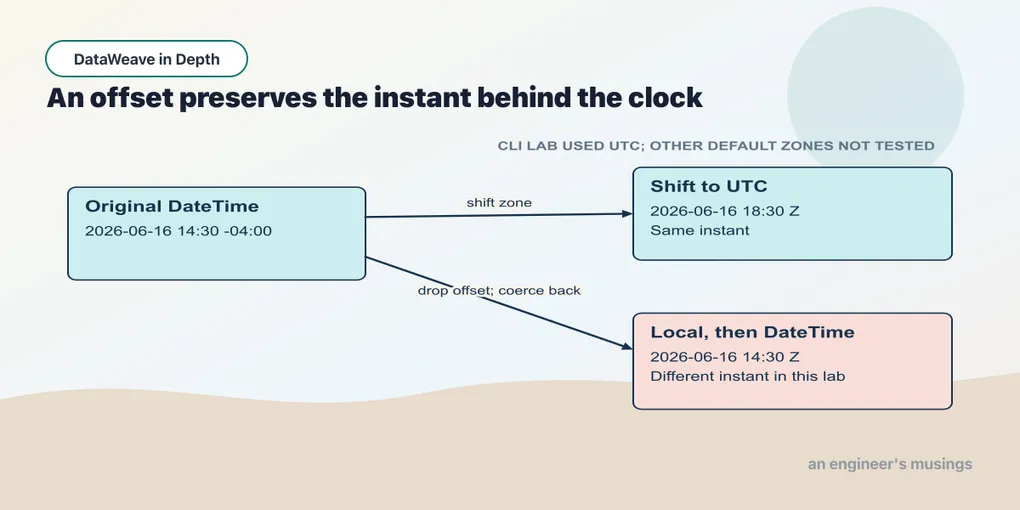
A date identifies a calendar day. An order timestamp may need to identify the exact instant it was received, while a delivery promise may use the customer’s local calendar. Those questions require different information. Keep the offset until you know which question the report is answering.
Seven types, not one
DataWeave has a family of temporal types distinguished by the information each carries: a calendar day, a wall-clock time, an instant with a zone attached. Each has a literal form between pipes:
Example 218 — Inspect the seven temporal types.
%dw 2.0
output application/json
var values = {
  date:          |2026-06-16|,
  localTime:     |14:30:00|,
  time:          |14:30:00Z|,
  localDateTime: |2026-06-16T14:30:00|,
  dateTime:      |2026-06-16T14:30:00-04:00|,
  zone:          |-04:00|,
  period:        |P1Y2M10D|
}
---
values mapObject { ($$): { value: $, kind: typeOf($) as String } }
{
"date": {
"value": "2026-06-16",
"kind": "Date"
},
"localTime": {
"value": "14:30:00",
"kind": "LocalTime"
},
"time": {
"value": "14:30:00Z",
"kind": "Time"
},
"localDateTime": {
"value": "2026-06-16T14:30:00",
"kind": "LocalDateTime"
},
"dateTime": {
"value": "2026-06-16T14:30:00-04:00",
"kind": "DateTime"
},
"zone": {
"value": "-04:00",
"kind": "TimeZone"
},
"period": {
"value": "P1Y2M10D",
"kind": "Period"
}
}The key is kind because type is a reserved word. As a bare key it fails to compile, and the error lists all twenty-eight reserved words and suggests quoting it. "type" in quotes works — useful when the JSON schema you need to produce has a type field.
DateTime carries a zone and LocalDateTime does not. A DateTime names an actual instant on the timeline. A LocalDateTime is “14:30 somewhere”. It cannot be compared to an instant or shifted into another zone, because there is nothing to shift from. Most order timestamps should be DateTime; the coercion examples below show what information a round trip through LocalDateTime loses.
Period is the odd one out. It is not a point in time but a span: |P2D| is two days, |PT6H| is six hours, |P1Y2M10D| is a year, two months and ten days. Adding or subtracting a period shifts a date or time value.
Coercing between the types
Going from more information to less is a truncation, and every one of these succeeds:
Example 219 — Convert between temporal types.
%dw 2.0
output application/json
var placedAt = |2026-06-16T14:30:00-04:00|
---
{
  toLocalDateTime: placedAt as LocalDateTime,
  toDate:          placedAt as Date,
  toLocalTime:     placedAt as LocalTime,
  toTime:          placedAt as Time,
  backAgain:       (placedAt as LocalDateTime) as DateTime,
  localToDT:       |2026-06-16T14:30:00| as DateTime,
  localToDTzone:   (|2026-06-16T14:30:00| as DateTime).timezone
}
{
"toLocalDateTime": "2026-06-16T14:30:00",
"toDate": "2026-06-16",
"toLocalTime": "14:30:00",
"toTime": "14:30:00-04:00",
"backAgain": "2026-06-16T14:30:00Z",
"localToDT": "2026-06-16T14:30:00Z",
"localToDTzone": "Z"
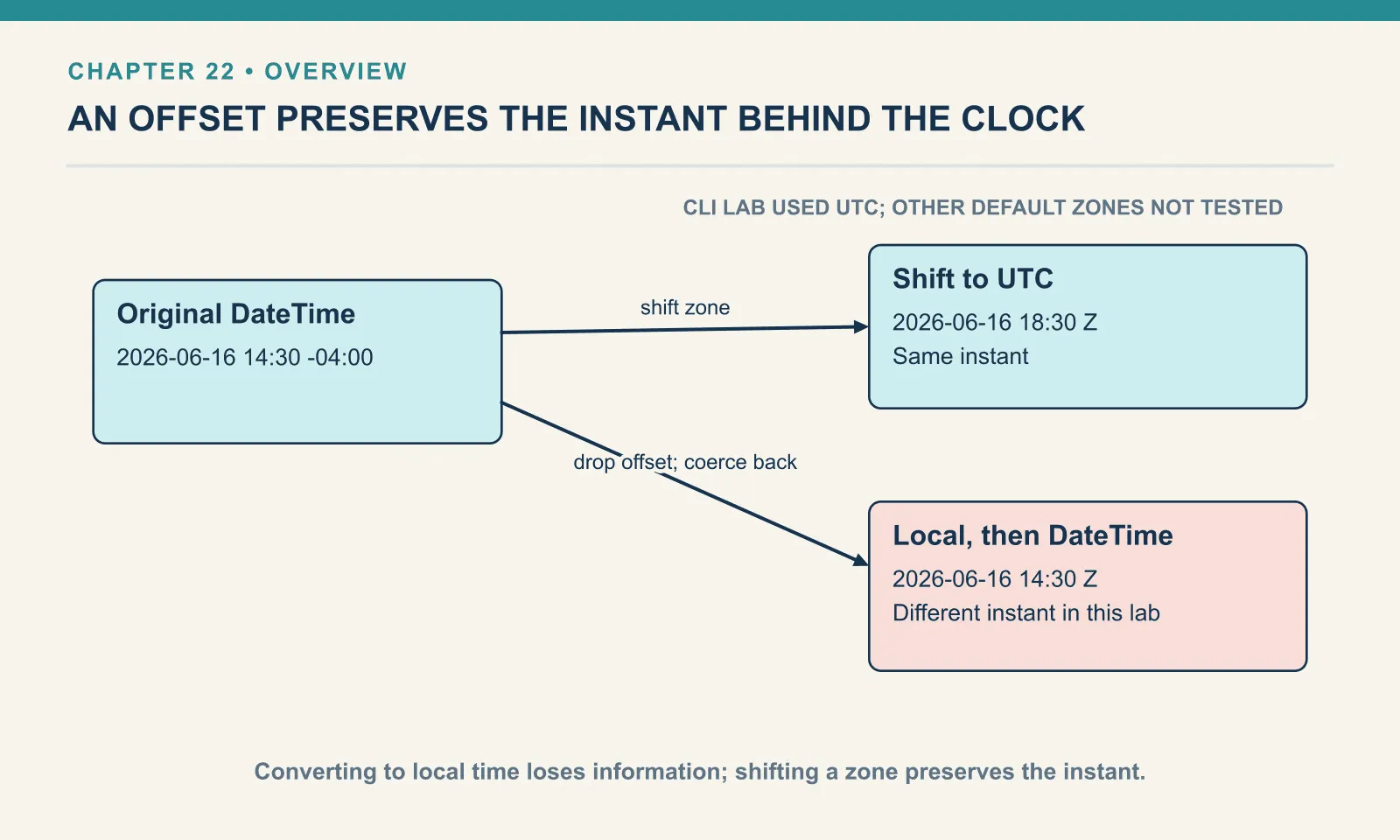
}toLocalDateTime drops -04:00, and coercing it back does not recover the offset. In this run, backAgain uses UTC. The original order was placed at 14:30 Eastern; the reconstructed value says 14:30 UTC, four hours earlier. Both are valid instants, so a successful coercion cannot tell you that information was lost. Keep the DateTime while the instant matters, and convert to LocalDateTime at the boundary where a consumer asks for wall-clock time.
Going from less information to more is refused when there is nothing to fill the gap with:
[ERROR] Cannot coerce Date (|2026-06-16|) to DateTime

4| { bad: |2026-06-16| as DateTime }
|2026-06-16| as LocalDateTime fails the same way. A Date has no time to promote, so you build midnight explicitly. The dw::core::Dates module used in the Periods section provides dateTime({…}) to assemble a value from parts. It also has atBeginningOfDay for an existing DateTime.
now() gives the current DateTime, and truncating it is how you get today:
Example 220 — Read the clock and select date components.
%dw 2.0
output application/json
---
{
  now:      now(),
  asDate:   now() as Date,
  asLocal:  now() as LocalDateTime,
  zone:     now().timezone,
  today:    now() as String {format: "yyyy-MM-dd"}
}
{
"now": "2026-09-20T04:40:35.366910685Z",
"asDate": "2026-09-20",
"asLocal": "2026-09-20T04:40:35.366983083",
"zone": "Z",
"today": "2026-09-20"
}The two printed timestamps have different nanoseconds because they came from separate now() calls; binding the result to a var lets several fields use the same instant. The zone is Z because the CLI’s container runs in UTC. A Mule runtime reports whatever zone its JVM was started in, so now() as Date can disagree with a calendar in another zone.
Shifting zones with >>
>> answers “what does this same instant read as in another zone?” It does not change the instant; it re-expresses it:
Example 221 — Shift an instant to another offset.
%dw 2.0
output application/json
var placedAt = |2026-06-16T14:30:00-04:00|
---
{
  original: placedAt,
  utc:      placedAt >> |+00:00|,
  la:       placedAt >> |-07:00|,
  laNamed:  placedAt >> "America/Los_Angeles",
  tokyo:    placedAt >> "Asia/Tokyo",
  sameInstant: (placedAt >> "Asia/Tokyo") == placedAt,
  dayInLa:  (placedAt >> "America/Los_Angeles").day
}
{
"original": "2026-06-16T14:30:00-04:00",
"utc": "2026-06-16T18:30:00Z",
"la": "2026-06-16T11:30:00-07:00",
"laNamed": "2026-06-16T11:30:00-07:00",
"tokyo": "2026-06-17T03:30:00+09:00",
"sameInstant": true,
"dayInLa": 16
}sameInstant confirms that every result names the same point on the timeline, even though Tokyo’s calendar has reached tomorrow. The right operand can be a TimeZone offset literal such as |-07:00|, or a named zone as a string, such as "America/Los_Angeles". A named zone does not use the pipe-literal syntax:
[ERROR] Invalid input 'A', expected anyDateExpression (line 5, column 20):

5| { la: placedAt >> |America/Los_Angeles| }
                      ^
The pipe literal only parses offsets. The difference between the two forms is more than syntax, and December shows it:
Example 222 — Compare a named zone with a fixed offset.
%dw 2.0
output application/json
var june     = |2026-06-16T18:30:00Z|
var december = |2026-12-16T18:30:00Z|
---
{
  juneNY:        june >> "America/New_York",
  decemberNY:    december >> "America/New_York",
  juneFixed:     june >> |-05:00|,
  decemberFixed: december >> |-05:00|,
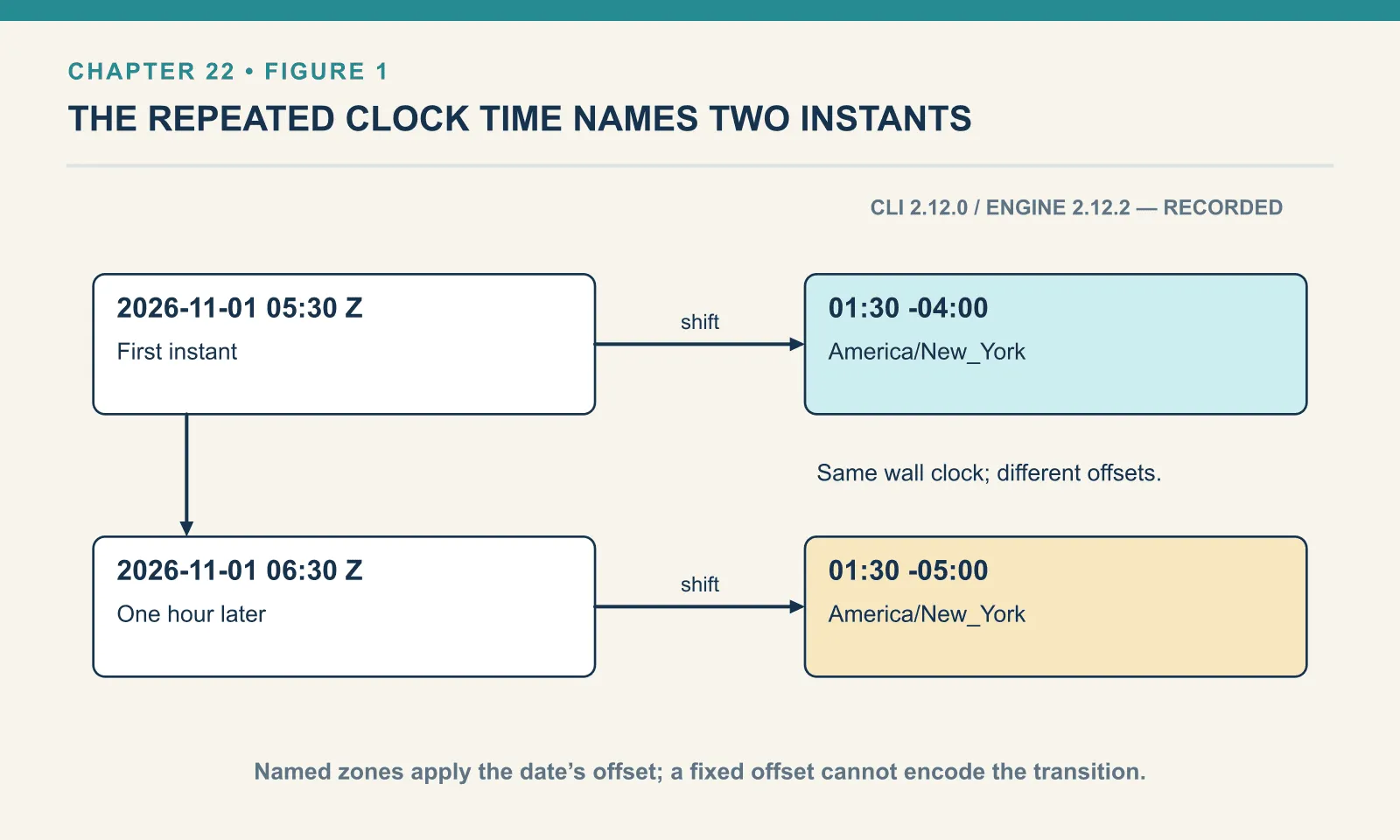
  fallBack: [|2026-11-01T05:30:00Z|, |2026-11-01T06:30:00Z|] map ($ >> "America/New_York")
}
{
"juneNY": "2026-06-16T14:30:00-04:00",
"decemberNY": "2026-12-16T13:30:00-05:00",
"juneFixed": "2026-06-16T13:30:00-05:00",
"decemberFixed": "2026-12-16T13:30:00-05:00",
"fallBack": [
"2026-11-01T01:30:00-04:00",
"2026-11-01T01:30:00-05:00"
]
}The named zone knows about daylight saving — New York is -04:00 in June and -05:00 in December. The fixed offset gets June wrong by an hour. The fallBack pair is the same wall-clock time, 01:30, one hour apart on the timeline, which is what the end of daylight saving does. So to answer “was it placed yesterday?”, shift the instant into the customer’s named zone and then derive the full local calendar date, including its year and month. Comparing raw offsets puts you off by an hour at exactly the boundary that matters.
Comparison and sorting work on the instant, not the text:
{
  "aEqualsB": true,
  "aEqualsC": true,
  "aBeforeC": false
}
Those comparisons use |2026-06-16T14:30:00-04:00|, |2026-06-16T18:30:00Z| and |2026-06-17T03:30:00+09:00|. They are three spellings of one instant, and == agrees. An orderBy on DateTime values sorts by instant too.
Display a named zone
The shifted value can print a zone identifier or its short name:
Example 223 — Format an instant and its zone.
%dw 2.0
output application/json
var placedAt = |2026-06-16T14:30:00-04:00|
---
{
  dayName:    placedAt as String {format: "EEEE, d MMMM yyyy"},
  twelveHour: placedAt as String {format: "h:mm a"},
  offset:     placedAt as String {format: "yyyy-MM-dd'T'HH:mm:ssXXX"},
  zoneId:     (placedAt >> "America/New_York") as String {format: "HH:mm VV"},
  zoneName:   (placedAt >> "America/New_York") as String {format: "HH:mm zzz"},
  epochLike:  placedAt as String {format: "yyyyMMddHHmmss"}
}
{
"dayName": "Tuesday, 16 June 2026",
"twelveHour": "2:30 PM",
"offset": "2026-06-16T14:30:00-04:00",
"zoneId": "14:30 America/New_York",
"zoneName": "14:30 EDT",
"epochLike": "20260616143000"
}Literal text inside a pattern goes in single quotes ('T'); XXX prints the offset in -04:00 form. VV is the zone id and zzz the zone’s short name. Those names exist only once the value has been shifted into a named zone.
Epoch numbers
Feeds that send seconds since 1970 coerce with no schema; milliseconds need to say so:
Example 224 — Convert epoch seconds and milliseconds.
%dw 2.0
output application/json
---
{
  fromSeconds:  1781555400 as DateTime,
  fromMillis:   1781555400000 as DateTime {unit: "milliseconds"},
  toNumber:     |2026-06-16T14:30:00-04:00| as Number,
  toMillis:     |2026-06-16T14:30:00-04:00| as Number {unit: "milliseconds"},
  millisWrong:  1781555400000 as DateTime
}
{
"fromSeconds": "2026-06-15T20:30:00Z",
"fromMillis": "2026-06-15T20:30:00Z",
"toNumber": 1781634600,
"toMillis": 1781634600000,
"millisWrong": "+58425-03-30T04:00:00Z"
}The last line reads milliseconds as seconds and produces the year 58425 without an error. A value a thousand times too big lands fifty-six millennia away instead of failing to parse. Establish the feed’s unit and sanity-check the year on the way in.
Moving values with Periods
Date arithmetic uses Periods — the runtime carries across month and year boundaries:
Example 225 — Add and subtract calendar periods.
%dw 2.0
output application/json
var placedAt = |2026-06-16T14:30:00-04:00|
---
{
  shipBy:     placedAt + |P2D|,
  returnBy:   placedAt + |P30D|,
  lastMonth:  placedAt - |P1M|,
  sixHours:   placedAt + |PT6H|,
  monthEnd:   |2026-01-31| + |P1M|,
  leapDay:    |2024-02-29| + |P1Y|,
  dateMinusDate: |2026-06-18| - |2026-06-16|,
  dtMinusDt:  |2026-06-18T15:30:00Z| - |2026-06-16T09:00:00Z|
}
{
"shipBy": "2026-06-18T14:30:00-04:00",
"returnBy": "2026-07-16T14:30:00-04:00",
"lastMonth": "2026-05-16T14:30:00-04:00",
"sixHours": "2026-06-16T20:30:00-04:00",
"monthEnd": "2026-02-28",
"leapDay": "2025-02-28",
"dateMinusDate": "PT48H",
"dtMinusDt": "PT54H30M"
}monthEnd shows the carrying rule: adding a month to 31 January lands on February’s last day. Similarly, adding a year to a leap day lands on 28 February. Sensible — and not reversible:
{
  "jan31plus1M": "2026-02-28",
  "thenMinus1M": "2026-01-28",
  "jan31plus30D": "2026-03-02",
  "roundTrip30D": "2026-01-31"
}
Add a month and subtract it and 31 January has become 28 January. Days round-trip; months and years do not — a month is not a fixed number of days. If a billing cycle is “the same day next month”, store the anchor day separately rather than recomputing it from the previous cycle’s date.
Subtraction gives a Period, expressed in hours even for dates: |2026-06-18| - |2026-06-16| is PT48H, not P2D. That does not mean a Date can take a time-based Period:
[ERROR] Invalid temporal addition. Reason: Unsupported unit: Seconds

4| { bad: |2026-06-16| + |PT6H| }
A Date has no hours to add to. Promote it first (via dateTime({…})), or add the days and keep the hours for a DateTime.
For spans you do not want to hard-code, dw::core::Periods builds them from numbers, and between measures the gap:
Example 226 — Construct periods and calculate intervals.
%dw 2.0
import * from dw::core::Periods
output application/json
var placedAt  = |2026-06-16T09:00:00Z|
var shippedAt = |2026-06-18T15:30:00Z|
---
{
  window:      days(30),
  sixHours:    hours(6),
  turnaround:  between(shippedAt, placedAt),
  reversed:    between(placedAt, shippedAt),
  built:       period({ years: 1, months: 2, days: 10 }),
  duration:    duration({ hours: 6, minutes: 30 }),
  windowType:  typeOf(days(30)) as String
}
{
"window": "P30D",
"sixHours": "PT6H",
"turnaround": "P2D",
"reversed": "P-2D",
"built": "P1Y2M10D",
"duration": "PT6H30M",
"windowType": "Period"
}between(shippedAt, placedAt) takes the later value first and returns P2D; reversing the arguments returns P-2D. It drops the six and a half hours that subtraction retained in PT54H30M. The desired measure therefore determines the operation: - for this exact span, between for whole days.
The core function daysBetween needs no import and counts calendar days. daysBetween(|2026-06-16T23:00:00Z|, |2026-06-18T01:00:00Z|) returns 2, although only twenty-six hours separate the instants. A turnaround measured in elapsed hours and a report grouped by calendar day answer different questions.
dw::core::Dates assembles values and snaps them to boundaries — the start of a day, month or week:
Example 227 — Construct dates and find calendar boundaries.
%dw 2.0
import * from dw::core::Dates
output application/json
---
{
  built:        date({ year: 2026, month: 6, day: 16 }),
  builtDT:      dateTime({ year: 2026, month: 6, day: 16, hour: 14, minutes: 30, seconds: 0, timeZone: |-04:00| }),
  namedAsZone:  "America/New_York" as TimeZone,
  namedKind:    typeOf("America/New_York" as TimeZone) as String,
  startOfDay:   atBeginningOfDay(|2026-06-16T14:30:00-04:00|),
  startOfMonth: atBeginningOfMonth(|2026-06-16|),
  startOfWeek:  atBeginningOfWeek(|2026-06-16|)
}
{
"built": "2026-06-16",
"builtDT": "2026-06-16T14:30:00-04:00",
"namedAsZone": "America/New_York",
"namedKind": "TimeZone",
"startOfDay": "2026-06-16T00:00:00-04:00",
"startOfMonth": "2026-06-01",
"startOfWeek": "2026-06-14"
}atBeginningOfWeek starts weeks on Sunday, which is not ISO. A weekly report built on it that expects ISO weeks comes out a day off.
One thing did not work. "America/New_York" as TimeZone coerces (the type says TimeZone), but passing that value as dateTime()’s timeZone failed on this runtime with Cannot coerce String (2026-06-16T14:30:00America/New_York) to DateTime. It failed because the function assembles an ISO string, and a named zone is not valid there. Build with an offset, then shift into the named zone with >>.
Worked: normalising an EU order feed
A European feed sends day-first datetimes as strings, and the output should be ISO with a computed ship-by date:
[
  { "id": "A-1001", "placed": "14/06/2026 09:15" },
  { "id": "A-1013", "placed": "15/06/2026 22:40" }
]
A do variable lets both output fields reuse one parse. Because the parsed value remembers its input format, each output format must be explicit:
Example 228 — Calculate ship dates from a European feed.
Input payload — eu-orders.json:
[
  { "id": "A-1001", "placed": "14/06/2026 09:15" },
  { "id": "A-1013", "placed": "15/06/2026 22:40" }
]
%dw 2.0
output application/json
---
payload map (order) -> do {
var placed = order.placed as LocalDateTime {format: "dd/MM/yyyy HH:mm"}
---
{
id: order.id,
placedAt: placed as String {format: "yyyy-MM-dd'T'HH:mm"},
shipBy: (placed + |P2D|) as String {format: "yyyy-MM-dd"}
}
}[
{
"id": "A-1001",
"placedAt": "2026-06-14T09:15",
"shipBy": "2026-06-16"
},
{
"id": "A-1013",
"placedAt": "2026-06-15T22:40",
"shipBy": "2026-06-17"
}
]Parsing gives the arithmetic a temporal value, and the explicit output format gives the consumer the text it needs. Because this feed carries no offset, placed is a LocalDateTime; the output also describes local time without identifying an instant. For this June fixture from a supplier known to use Berlin local time, one promotion is dateTime({…, timeZone: |+02:00|}) from the components. Another is to concatenate the offset onto the string before parsing as DateTime. Either way, document the assumption where the offset is added. The fixed +02:00 offset is specific to the example date; it is not Berlin’s year-round offset.
What was not run
Every value printed above came from the CLI, whose JVM runs in UTC; now().timezone on a Mule runtime depends on the JVM’s zone, and that line of the now() output will differ there. dateTime() from dw::core::Dates with a named TimeZone failed on this runtime as shown, and I did not find a form that accepts one; treat “build a DateTime directly in a named zone” as unverified. Nothing else in the chapter is documentation-only.
Exercises
A mixed feed. Four orders carry four date shapes: an ISO datetime with an offset, a day-first string with a time, an epoch in seconds, and a US date. Write a function that turns each into the most precise temporal type its input supports, and print the type beside the value.
Show answer
Example 229 — Normalize a mixed date feed.
Input payload — mixed-feed.json:
[
  { "id": "A-1001", "placed": "2026-06-16T14:30:00-04:00" },
  { "id": "A-1013", "placed": "16/06/2026 09:15" },
  { "id": "A-1014", "placed": 1781555400 },
  { "id": "A-1015", "placed": "06/16/2026" }
]
%dw 2.0
output application/json
fun normalise(v) = v match {
case n is Number -> n as DateTime
case s is String -> if (s matches /\d{4}-\d{2}-\d{2}T.*/) s as DateTime
else if (s matches /\d{2}\/\d{2}\/\d{4} \d{2}:\d{2}/) s as LocalDateTime {format: "dd/MM/yyyy HH:mm"}
else s as Date {format: "MM/dd/yyyy"}
}
---
payload map { id: $.id, placedAt: normalise($.placed), kind: typeOf(normalise($.placed)) as String }[
{
"id": "A-1001",
"placedAt": "2026-06-16T14:30:00-04:00",
"kind": "DateTime"
},
{
"id": "A-1013",
"placedAt": "16/06/2026 09:15",
"kind": "LocalDateTime"
},
{
"id": "A-1014",
"placedAt": "2026-06-15T20:30:00Z",
"kind": "DateTime"
},
{
"id": "A-1015",
"placedAt": "06/16/2026",
"kind": "Date"
}
]Only two of the four are instants. The output also shows the format-memory behaviour: A-1013 and A-1015 are typed values printed in their input’s shape, and an as String {format: …} on each is what a consumer would need.
Yesterday, in Los Angeles. Three orders placed at 02:30Z, 14:30Z on 16 June and 05:30Z on 17 June. Group them by calendar day in UTC and in Los Angeles. Does the group key have to be a formatted string, or can a Date serve directly?
Show answer
Example 230 — Group timestamps by local date.
%dw 2.0
output application/json
var orders = [
  { id: "A-1001", placedAt: |2026-06-16T02:30:00Z| },
  { id: "A-1013", placedAt: |2026-06-16T14:30:00Z| },
  { id: "A-1014", placedAt: |2026-06-17T05:30:00Z| }
]
fun byDay(zone) = (orders groupBy (($.placedAt >> zone) as String {format: "yyyy-MM-dd"})) mapObject { ($$): $.id }
---
{
  utc: byDay("UTC"),
  la:  byDay("America/Los_Angeles")
}
{
"utc": {
"2026-06-16": [
"A-1001",
"A-1013"
],
"2026-06-17": [
"A-1014"
]
},
"la": {
"2026-06-15": [
"A-1001"
],
"2026-06-16": [
"A-1013",
"A-1014"
]
}
}Two of the three orders change day. The formatted string gives groupBy a readable key, but a string is not required: grouping on the Date itself, groupBy (($.placedAt >> "UTC") as Date), runs and produces the same 2026-06-16 and 2026-06-17 keys. What does fail is a Date literal written as a dynamic key in an object, { (|2026-06-16|): "A-1001" }, which stops with Type 'Date' cannot be used as Key; chapter 10 showed that other values, such as numbers, can become keys.
Month-end arithmetic. Starting from 31 January 2026, add a month and subtract it; add thirty days and subtract them. Explain the two results.
Show answer
{
  "jan31plus1M": "2026-02-28",
  "thenMinus1M": "2026-01-28",
  "jan31plus30D": "2026-03-02",
  "roundTrip30D": "2026-01-31"
}
A month is a calendar unit, so adding one clamps to February’s last day. Subtracting one from that gives 28 January, three days short of where you started. Thirty days is a fixed span and round-trips exactly. Store the anchor day for anything monthly.
The feed, properly. From the string-valued feed, produce the order id, placed as an ISO date string, and the order total as a string with two decimals. Run it.
Show answer
Example 231 — Format a feed date and amount.
Input payload — order_from_feed.json:
{
  "orderId": "A-1001",
  "customer": "Dana",
  "placed": "13/09/2026",
  "items": [
    { "sku": "PEN-01", "price": "2.50", "qty": "4" },
    { "sku": "PAD-22", "price": "6.00", "qty": "2" },
    { "sku": "CLP-08", "price": "1.00", "qty": "10" }
  ]
}
%dw 2.0
output application/json
---
{
orderId: payload.orderId,
placed: (payload.placed as Date {format: "dd/MM/yyyy"}) as String {format: "yyyy-MM-dd"},
total: sum(payload.items map (($.price as Number) * ($.qty as Number))) as String {format: "0.00"}
}{
"orderId": "A-1001",
"placed": "2026-09-13",
"total": "32.00"
}Both as expressions are parenthesised, and the date goes in with one layout and out with another. Drop the two as Number coercions and total still comes out right, because * coerces; the explicit version makes the intended numeric inputs visible. A later change to the arithmetic still needs a test of its own.
The zone-conversion examples preserve instants; calendar arithmetic follows calendar rules. A month is not a fixed number of days. Keep both kinds of fixture when a requirement mixes elapsed time with local dates.
Comments