Opus, Sonnet, Haiku: Picking the Right One
The model tiers and the quality-latency-cost triangle you're really deciding, why capabilities differ across models (a rejection), the breaking changes that bite on a model upgrade, and a selection strategy that starts cheap and escalates.
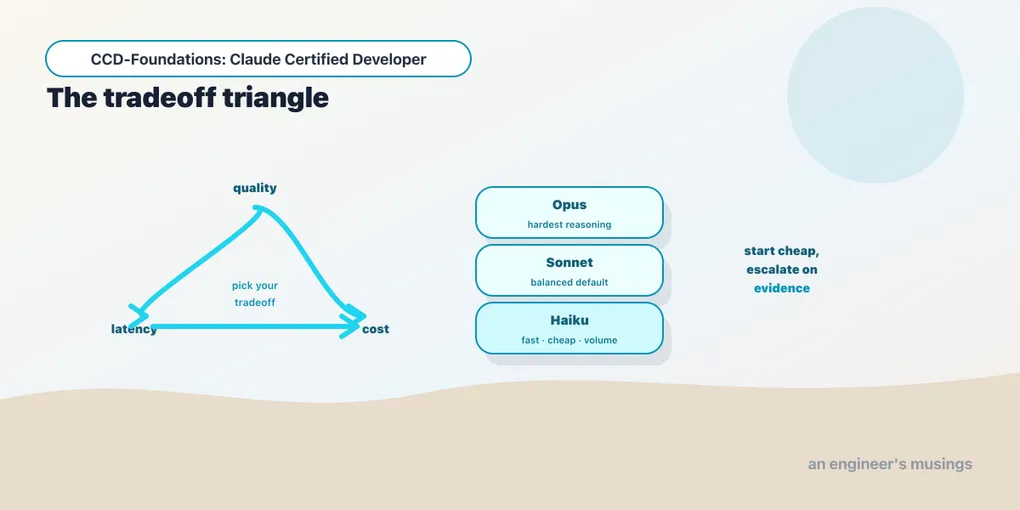
Every call you make picks a model, and that choice sets the cost, the latency, and the ceiling on quality before your prompt does any work. Claude comes in three tiers that trade the same three things against each other, so “which model” is really “which tradeoff.” Get it wrong and you either burn money on a task a cheaper model would have nailed, or ship a flagship feature on a model that isn’t up to it. This chapter builds the selection framework from the tiers up. You’ll see the triangle you’re actually deciding, the capability differences that make the choice non-obvious, and the upgrade hazards that turn a routine model bump into a breaking change.
The three tiers
Claude’s lineup is organized into three capability tiers, and the names tell you the intent:
- Opus — the most capable tier. Best reasoning, best at hard multi-step tasks, complex code, and nuanced judgment. Also the slowest and most expensive. Reach for it when the task genuinely needs the intelligence.
- Sonnet — the balanced tier. Strong capability at meaningfully lower cost and latency than Opus. The sensible default for most production work — capable enough for the majority of tasks, priced for volume.
- Haiku — the fastest and cheapest tier. Less capable on the hardest tasks, but excellent for high-volume, latency-sensitive, or straightforward work — classification, extraction, routing, simple tool use. (It’s the tier this entire series runs its verification on, precisely because the mechanics it tests don’t need Opus-level intelligence.)
Within each tier there are dated snapshots (chapter 1’s alias-vs-snapshot point), and the lineup evolves — new generations arrive, older ones retire. The tier concept is stable even as the specific models change: most-capable, balanced, fastest.
The triangle you’re actually deciding
Every model selection is a point on a quality–latency–cost triangle, and you can’t max all three. Opus buys quality at the expense of latency and cost; Haiku buys speed and cheapness at the expense of quality on hard tasks; Sonnet sits in the middle. The decision is never “which is best” in the abstract, because in the abstract Opus is “best.” It’s which tradeoff fits this task:
- A user-facing autocomplete needs latency and runs at volume → Haiku.
- A nightly report over thousands of documents needs cost and tolerates latency → Haiku, likely via batch (chapter 5).
- A complex refactoring agent or a legal-analysis step needs quality and can absorb the cost → Opus.
- Most everything else → Sonnet, until you have a reason to move.
This is a skill and not a lookup because the right answer depends on the task’s tolerances. Naming those tolerances is the actual work: how much latency, how much budget, how much quality headroom.
Capabilities differ
Models are not just faster or slower versions of each other; their capabilities differ. A feature present on one tier can be absent on another, and your code has to account for it. Requesting adaptive thinking (thinking={"type": "adaptive"}) on Haiku 4.5 returns 400 — "adaptive thinking is not supported on this model." The same parameter works on newer, larger models and is rejected outright here.
The lesson isn’t the specific feature; it’s that selecting a model can change which API features are available. Extended-thinking form, effort levels, vision resolution tiers, context-window size — these vary across models. So model selection isn’t a knob you turn at the end; it interacts with the features your application depends on. Pick a model that supports what your code needs, and test that it does rather than assuming parity.
Breaking changes across releases
The blueprint explicitly calls out “breaking behavior changes across model releases,” and this is where model selection meets configuration management (chapter 6). Upgrading a model is not a free swap:
- Tokenization can shift, changing token counts and therefore cost and context fit for the same prompt (chapter 13). Re-count against the new model.
- Behavior changes. A prompt tuned to one model’s tendencies may need adjustment on the next; output quality can move in either direction on a specific task.
- Parameters can be deprecated or newly required. A thinking form accepted on one generation may be rejected on a later one (the mirror of the adaptive rejection above). Code that hard-codes a parameter shape can break on upgrade.
The discipline: pin the dated snapshot, test before upgrading, and treat a model bump like any other dependency upgrade. Put it behind a test suite and an eval (Arc 6), not a silent change in production. A floating alias is convenient in development and a source of surprise in production, because a new snapshot can move behavior under you.
A selection strategy
Put together, a strategy that ages well:
- Start with the cheapest model that could plausibly work — usually Haiku or Sonnet. Don’t reach for Opus by default.
- Measure on your actual task with a real eval. If quality is sufficient, you’re done — you’ve saved cost and latency.
- Escalate only where quality demands it. Move the specific steps that fail up a tier, not the whole system. Many production systems route by task: Haiku for the easy 80%, Sonnet or Opus for the hard 20%.
- Pin, and re-evaluate on upgrades. Lock the snapshot; when a new one ships, run the eval before switching.
This “cheapest that works, escalate on evidence” approach is the opposite of “use the best model everywhere,” and it’s what keeps a system both good enough and affordable at scale.
Final thoughts
Model selection is choosing a point on the quality–latency–cost triangle, not finding the single best model. Opus for hard reasoning, Haiku for fast high-volume work, Sonnet as the balanced default. Escalate only where an eval shows you must, and route by task so the easy majority runs cheap. Remember that capabilities differ across tiers (adaptive thinking rejected on Haiku), so a model choice can change which features your code can use. And model upgrades are breaking changes: pin the snapshot, re-count tokens, and re-evaluate before switching. Decide the tradeoff deliberately per workload, and you get a system that’s both capable enough and cheap enough to run.
Next: cost, tokens, and caching — tracking spend, and the prompt caching that cut 15,000 tokens to a tenth of their price.
Comments