Context Management: Keeping the Critical Facts Alive
What an agent's context actually is, why it degrades over a long interaction, and the techniques that keep the facts that matter from being lost — the case-facts block, trimmed tool outputs, front-loaded findings, and the scratchpads, subagents, /compact, and crash-recovery manifests that carry a long codebase exploration.
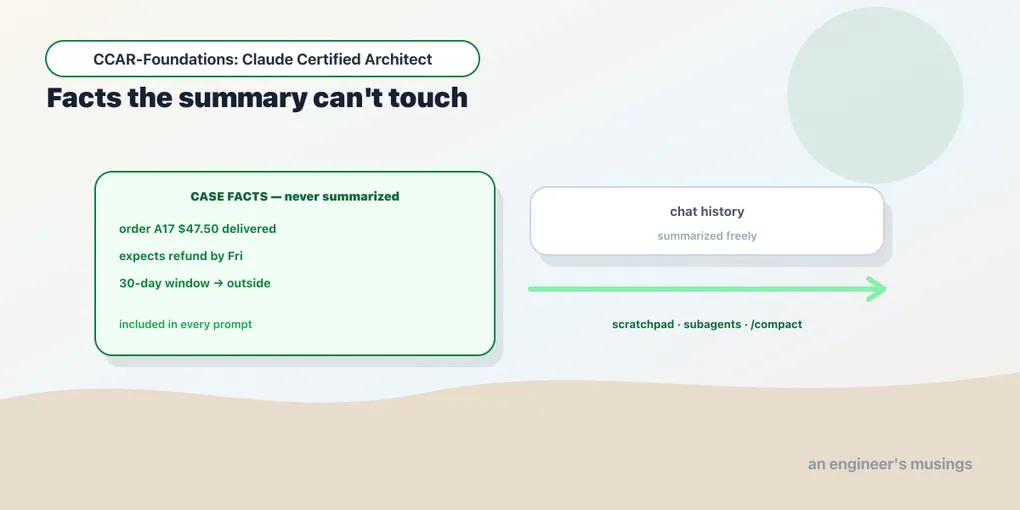
A support conversation begins with a $47.50 refund request for order A17. Twenty turns later, a summary says only that the customer has “a refund concern.” The session still runs, but it has lost the amount and deadline needed to handle the case. Context management starts by deciding which facts must survive that compression.
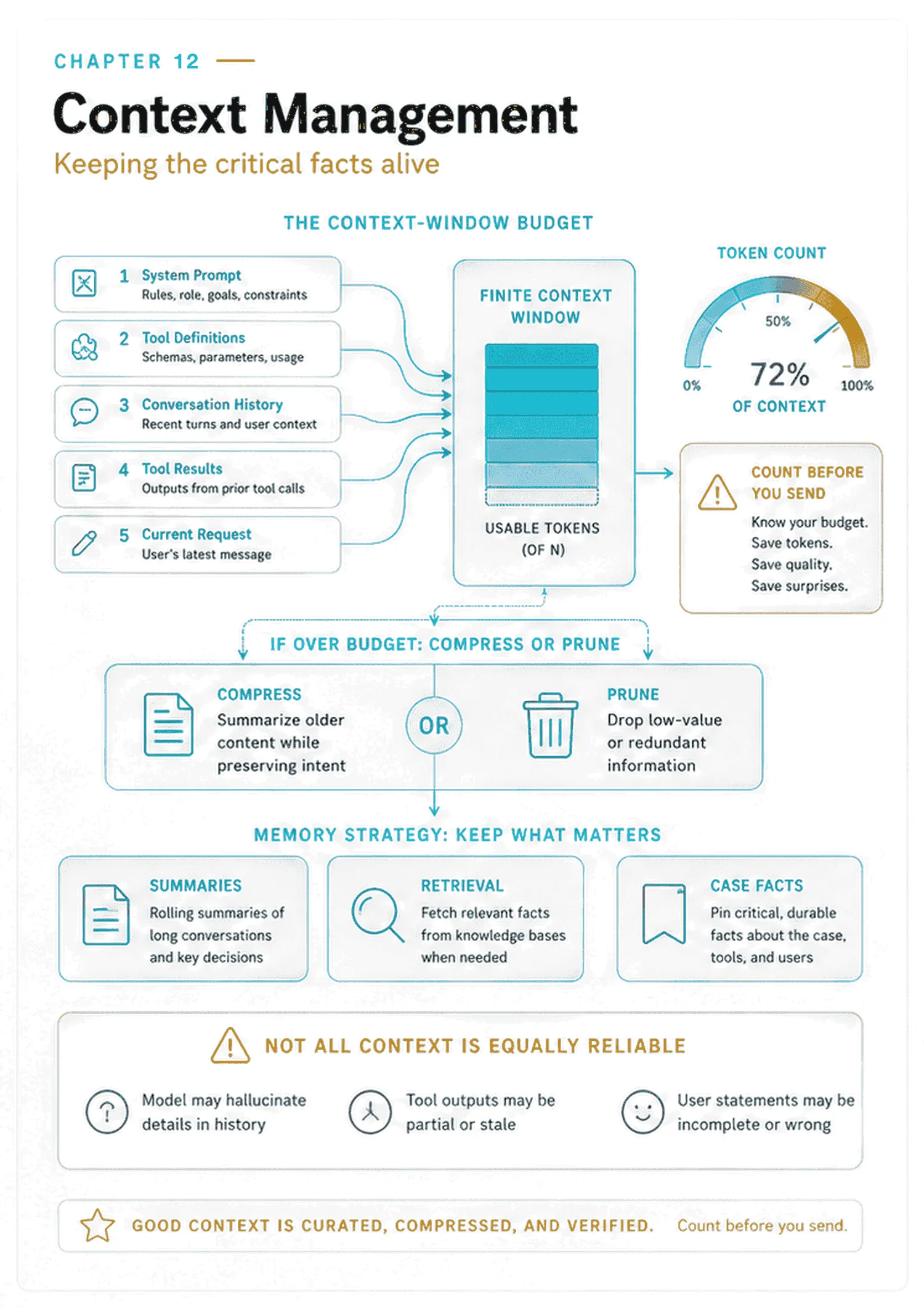
Exam objectives covered here. 5.1 Manage conversation context to preserve critical information across long interactions. 5.4 Manage context effectively in large codebase exploration. Numbering follows the Claude Certified Architect – Foundations Exam Guide, version 1.0, effective July 2026.
What an agent’s context actually is
Every turn an agent takes, the model sees exactly one thing: a block of text. It is assembled from the system prompt, the tool definitions, the conversation so far, the tool results gathered along the way, and the current request. The model has no memory between calls. The agentic loop resends the entire history every turn, because the model is stateless and that text is the only thing it knows. That block is the agent’s context, and it is the agent’s whole working memory.
Two facts about context drive this chapter. First, it is finite: the window has a fixed size, and any long task will fill it. Second, and less obvious, it is not uniformly reliable. The model does not attend to every token in a large context equally well. Context management is the discipline of deciding what goes into that limited, imperfectly-read space so the facts that matter survive the whole interaction.
Notice what is not in that list of ingredients. Inference carries no state between calls. There is no server-side session that quietly remembers order A17 and adds it back for you. If a fact is not in the block you send this turn, the model does not have it. Every technique in this chapter is a consequence of that one sentence.
Be careful what you conclude from it, because there is a second sentence people hear instead of the first. Stateless inference is a statement about what the model sees, not a promise that nothing is stored anywhere. Those are different claims. The SDK itself names several surfaces where the second one plainly does not hold. Prompt caching, which this chapter spends a section on, is server-side storage of your prefix by definition. The Batches API keeps results for you to fetch later — MessageBatch carries results_url, expires_at and archived_at, which are the fields of a thing that persists. The Files API holds an uploaded document under a file_id that outlives the request that used it. Logging, abuse monitoring and enterprise retention settings sit outside the SDK entirely. So the honest framing is short: the model does not remember; the platform may retain. When a question is about privacy or data residency rather than about what the model can recall, read the current Anthropic retention and privacy documentation for the surfaces you actually use. Treat this chapter’s statelessness as an engineering fact about context assembly, not as a compliance answer.
The two axes: capacity and attention
A larger window gives the request more capacity. Attention is the second axis, and it is the one a bigger window cannot buy: a model reads a long context unevenly, so more room is also more room to be read poorly, and every added token adds cost and latency to each call. Consider both whether the material fits and whether the model can recover the evidence the task needs.
Aggressive trimming has the opposite risk: removing information still needed for the decision. Keep essential state explicit and retrieve supporting detail when needed. Evaluate both omissions and unnecessary input.
Three ways context goes wrong
Watch for three kinds of loss during a long interaction:
- Progressive summarization loses precision. When you condense history to save tokens, the numbers go first. Amounts, percentages, dates, and customer-stated expectations get compressed into vague prose. “The customer wants a refund of $47.50 on order A17, promised by Friday” becomes “the customer has a refund concern.” Now the agent cannot act on the specifics, because they are gone. Summarization is lossy exactly where it hurts most.
- Lost in the middle. Models process the beginning and end of a long input reliably, but may omit findings buried in the middle. A critical fact in the center of a large context is the one most likely to be dropped. The name comes from Liu and colleagues’ 2023 paper “Lost in the Middle: How Language Models Use Long Contexts.” The effect is an external research finding, repeated here because the exam’s context items assume it. Chapter 11 met the same underlying limit from the review side and called it attention dilution. Two names, one problem — a single pass over a large input attends unevenly across it. This chapter uses “lost in the middle” throughout.
- Tool results accumulate disproportionately. An order lookup returns 40+ fields when 5 are relevant. Every such result piles into context, consuming tokens far out of proportion to its usefulness and crowding out what matters.
The following techniques address those risks without treating a successful request as proof that the necessary facts were retained.
Preserving what matters
The central technique against summarization loss is a case-facts block. You extract the transactional facts — amounts, dates, order numbers, statuses — into a persistent structured block that you include in every prompt, outside the summarized history. The conversation can be summarized freely, because the precise facts live in a separate layer that is never compressed:
CASE FACTS (verbatim, never summarized):
- as-of date: 2026-07-16
- order: A17    amount: $47.50    status: delivered 2026-06-01
- customer expectation: refund by Friday 2026-07-17
- policy: 30-day returns; window closed 2026-07-01; delivered 45 days ago -> outside window
The as-of date makes the relative dates checkable. Without it, “delivered 45 days ago” loses its reference point as soon as the surrounding conversation is removed.
For multi-issue sessions, keep the same idea per issue: structured issue data (order IDs, amounts, statuses) in a separate context layer, so a session juggling three tickets does not blur their facts together.
Against tool-result bloat: trim verbose tool outputs to the relevant fields before they accumulate. If a return only needs five fields from a 40-field order lookup, keep those five. The trimming happens before the result enters context, so the noise never piles up. This is the Grep-then-Read incremental discipline again: pull what the task needs, not everything available.
Trim what goes into context, not what goes into the record. Those are two different destinations, and it is easy to collapse them. The five fields you kept are what the model reasons over. The other thirty-five are what an auditor asks about six months later, when a customer disputes the refund. Write the raw response somewhere durable. Address it by a hash of its bytes, and put that reference in the projection you insert:
{"order_id": "A17", "status": "delivered", "delivered_on": "2026-06-01",
 "amount_cents": 4750, "items": 3,
 "source": {"tool": "lookup_order", "at": "2026-07-16T09:41:22Z",
            "raw_ref": "sha256:77de…", "tool_version": "orders-api-v4"}}
That costs a handful of tokens and buys the property chapter 14’s audit log depends on: every summarized fact can be traced back to the exact bytes it was summarized from, and to the version of the tool that produced them. Discarding a field from context is a display decision. Discarding it from storage is a decision you cannot revisit.
Against lost-in-the-middle: place key findings at the beginning of an aggregated input and organize the rest under explicit section headers. You position the important material where the model reads reliably, and structure the detail so nothing critical hides in an unmarked middle. And when agents feed other agents, have upstream ones return structured data, with key facts, citations and relevance scores — rather than verbose reasoning chains. The downstream agent has a limited context budget, and structured input respects it.
Call that mitigation rather than a fix, because that is what it is. Front-loading and headers move a fact toward the positions a model reads more reliably; they do not guarantee it will be used. If a fact is load-bearing enough that losing it is a real outcome, do not rely on layout to carry it. Restate the critical state near the end of the prompt, where the model reads reliably again. Ask for it back explicitly: “state the order id and amount you are acting on before you act.” Or take it out of the long context entirely, by retrieving it on demand or splitting the task into smaller calls. And measure: an eval that plants the same fact at the start, the middle and the end of inputs at several lengths tells you what your prompt actually recovers. Without that measurement, “I front-loaded it” is a hope.
Measure the budget before you manage it
Count the assembled request before choosing what to prune. In anthropic 0.120.0, client.messages.count_tokens accepts the conversation and its surrounding configuration:
import inspect, anthropic

client = anthropic.Anthropic()
print(inspect.signature(client.messages.count_tokens))
# (*, messages, model, cache_control=..., output_config=..., output_format=...,
#     system=..., thinking=..., tool_choice=..., tools=..., user_profile_id=...,
#     extra_headers=..., extra_query=..., extra_body=..., timeout=...)
#   -> MessageTokensCount
Read the parameter list carefully, because it is the point. It takes messages, but it also takes system, tools, tool_choice and thinking. It prices the whole assembled request — not just the conversation. That matters because tool definitions are context. Twelve MCP tools with the four-part descriptions chapter 4 argued for are not free; they are resent on every single turn, forever, whether the model calls them or not. An agent whose window keeps filling faster than its conversation explains is usually carrying a tool catalog it never uses.
The return type is deliberately small:
from anthropic.types import MessageTokensCount
print(list(MessageTokensCount.model_fields))   # ['input_tokens']
One number — the input token count for exactly the request you would have sent. Build the request you intend to make, count it, and decide.
The reason to reach for it is that the conversation is the part of the context you can see, and it is usually the smaller part. Three short turns of a support conversation, priced against claude-haiku-4-5:
messages only           :    40 tokens
+ system prompt         :    55  (+15)
+ 2 tools               :   759  (+704)
In this request, the visible dialogue contributes 40 of 759 tokens. The other 719 come from configuration. Counting only the conversation would miss most of the input.
The practical pattern is a pre-flight check in front of anything that assembles context programmatically:
count = client.messages.count_tokens(
    model="claude-haiku-4-5",
    system=SYSTEM_PROMPT,
    tools=TOOLS,
    messages=history + [{"role": "user", "content": question}],
)
if count.input_tokens > INPUT_BUDGET:
    history = prune(history)          # decide deliberately, before you send
When the request exceeds the input budget, select what to prune or summarize before sending it. Keep the case facts intact so compression does not decide which amount or deadline survives.
But INPUT_BUDGET cannot be the window size, and getting that wrong is how a preflight check passes on a request that then fails. count_tokens returns one number and it is input_tokens. The window has to hold the output too, and if extended thinking is on it has to hold the thinking budget as well. ThinkingConfigEnabledParam declares budget_tokens as Required[int], and max_tokens is a required parameter of messages.create in the first place. Neither is priced by the counter. So derive the input budget rather than picking one:
WINDOW      = usage.contextWindow     # from ModelUsage, not hardcoded
MAX_TOKENS  = 4096                    # what you will ask create() for
THINKING    = 8192                    # budget_tokens, or 0 when disabled
SAFETY      = 0.10                    # margin for the next loop turn

INPUT_BUDGET = int((WINDOW - MAX_TOKENS - THINKING) * (1 - SAFETY))
The safety margin is not superstition. In an agent loop the request you are about to send is not the largest one this turn will produce. The model answers with a tool_use block, your tool result comes back, and both are appended before the next call. A preflight that passes at exactly the ceiling passes for one turn and fails on the turn after. Budget for the growth, and when the number does not fit, fail deliberately — prune, summarize, or refuse — rather than sending the request and letting truncation choose for you.
How big is the window, and what happens when you exceed it
Do not hardcode the window size. The SDK reports it, per model, in the result of a run. ResultMessage.model_usage maps a model id to a ModelUsage, and its fields include the window:
from claude_agent_sdk.types import ModelUsage
import typing
print(list(typing.get_type_hints(ModelUsage)))
# ['inputTokens', 'outputTokens', 'cacheReadInputTokens', 'cacheCreationInputTokens',
#  'webSearchRequests', 'costUSD', 'contextWindow', 'maxOutputTokens',
#  'canonicalModel', 'provider']
contextWindow and maxOutputTokens come back attached to the model that actually served the request, which is what you want when a fallback model may have handled it. Anthropic’s published figure for the current Claude models is a 200,000-token window, with a larger beta window on some models. Treat that as documentation you should re-check rather than as a measurement from this book, and treat contextWindow as the value your code should branch on.
There are two distinct failures when you run out — and the exam can offer either.
The first is a stop reason. stop_reason is a closed set, and one of its members is the failure this chapter exists to prevent:
from anthropic.types import StopReason
import typing
print(typing.get_args(StopReason))
# ('end_turn', 'max_tokens', 'stop_sequence', 'tool_use',
#  'pause_turn', 'refusal', 'model_context_window_exceeded')
model_context_window_exceeded is a real member of that Literal in anthropic 0.120.0. Any loop that branches on stop_reason and handles only end_turn and tool_use will fall through on it. If your loop’s else branch is “assume we are done,” a context overflow ends the turn looking like a completion.
The second is an exception — raised before the model ever sees the request:
import anthropic
print(anthropic.RequestTooLargeError.status_code)   # 413
A 413 is the request being refused at the door for size. The next chapter builds the full taxonomy those two live in; the point here is that they are not the same event and your handling should not be either. The names, the status code and the Literal membership are introspected facts — the runtime boundary between them is not.
Layout is a lever, and caching is why
Trimming decides what is in context. Layout decides where, and it has a second consequence most people discover by accident: it decides what can be cached.
Prompt caching lets you mark a point in the request after which everything preceding it is reusable across calls. The mechanism is a cache_control field, and it hangs off the content blocks themselves:
from anthropic.types import TextBlockParam, ToolResultBlockParam, CacheControlEphemeralParam
print(list(TextBlockParam.__annotations__))
# ['text', 'type', 'cache_control', 'citations']
print(list(ToolResultBlockParam.__annotations__))
# ['tool_use_id', 'type', 'cache_control', 'content', 'is_error']
print(CacheControlEphemeralParam.__annotations__)
# {'type': "Required[Literal['ephemeral']]", 'ttl': "Literal['5m', '1h']"}
Two things to take from that. cache_control is available on ordinary text blocks and on tool-result blocks, so a large tool return can itself be a cache boundary. And the lifetime is a closed set of two: '5m' and '1h'.
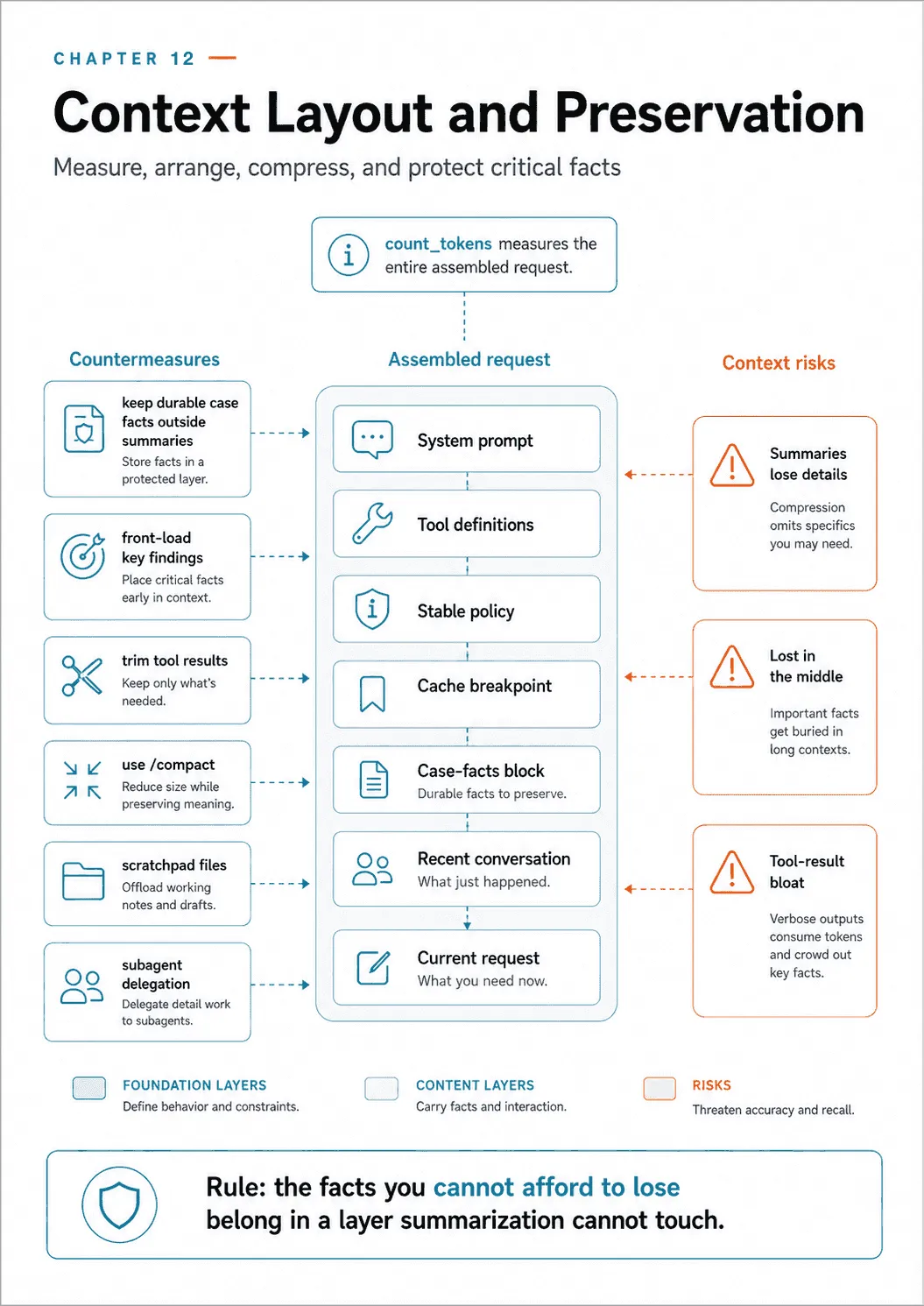
The rule that follows from the mechanism is simple and unforgiving. A cache breakpoint reuses everything before it, and only if that prefix is byte-identical to last time. So the layout you want is stable material first, volatile material last:
- System prompt and tool definitions. These change on deploy, not on turn.
- Long stable documents: the returns policy, the style guide, the schema.
- A cache breakpoint here.
- The case-facts block.
- The conversation so far, and this turn’s request.
The case-facts block changes as the investigation proceeds. Put it after the cache breakpoint so a new order status does not alter the stable policy prefix. Including facts on every turn and caching the policy are compatible when they occupy the right parts of the request. Get the order wrong and nothing errors, nothing warns, and you pay full price forever, so inspect the cache counters to check the result.
Watching the budget from the outside
You verify all of the above from Usage, which comes back on every message:
from anthropic.types import Usage
print(list(Usage.model_fields))
# ['cache_creation', 'cache_creation_input_tokens', 'cache_read_input_tokens',
#  'inference_geo', 'input_tokens', 'output_tokens', 'output_tokens_details',
#  'server_tool_use', 'service_tier']
cache_creation_input_tokens counts tokens written into the cache; cache_read_input_tokens counts tokens served from it. Both are per response, not running totals — each Message reports what that one call did, and any total is something you accumulate yourself. So the diagnostic is a shape across calls rather than a number that climbs. Lay three responses side by side and read the columns:
turn   cache_creation   cache_read   input_tokens    what happened
  1          3,900            0            280       prefix written to cache
  2              0        3,900            310       prefix served from cache
  3              0        3,900            355       prefix served from cache
That is what working looks like: one large write on the first call, then a large read and a near-zero write on every call after. The failure has an equally distinctive shape. A cache-invalidating layout writes on every turn and never reads — cache_creation_input_tokens stays large, cache_read_input_tokens stays at zero, call after call. That is the diagnostic for the mistake above, and it is two fields on one response. Under the Agent SDK the same two numbers arrive as cacheCreationInputTokens and cacheReadInputTokens on the ModelUsage shown earlier. The layout in the table above is the pattern this book expects from the mechanism; no cache-enabled request was executed for this chapter. Treat the shape as the claim and the exact token counts as illustration.
The SDK also makes the whole budget directly inspectable, which is the closest thing Domain 5 has to a dashboard. ClaudeSDKClient.get_context_usage() returns a ContextUsageResponse:
import typing
from claude_agent_sdk import ContextUsageResponse
print(list(typing.get_type_hints(ContextUsageResponse)))
# ['categories', 'totalTokens', 'maxTokens', 'rawMaxTokens', 'percentage', 'model',
#  'isAutoCompactEnabled', 'memoryFiles', 'mcpTools', 'agents', 'gridRows',
#  'autoCompactThreshold', 'deferredBuiltinTools', 'systemTools',
#  'systemPromptSections', 'slashCommands', 'skills', 'messageBreakdown', 'apiUsage']
Read that field list as a checklist of everything that is quietly consuming your window. mcpTools, skills, slashCommands, systemPromptSections and memoryFiles are all separate line items, and every one of them is context you configured rather than context the conversation produced. totalTokens against maxTokens gives you percentage; messageBreakdown attributes the rest to the conversation. When an agent starts behaving as though it forgot something, this call tells you whether it is full and, more usefully, what filled it.
Compaction, and steering what survives it
autoCompactThreshold and isAutoCompactEnabled in that response point at the other half of the story. When the window approaches full, the harness can compact the conversation on its own: summarize the history, replace it, and continue. That is the summarization failure from earlier in this chapter, happening automatically, at the worst possible moment, to the facts you most needed.
The PreCompact hook is where you get a say. Its input type has two fields that matter:
import typing
from claude_agent_sdk import PreCompactHookInput
print(list(typing.get_type_hints(PreCompactHookInput)))
# ['session_id', 'transcript_path', 'cwd', 'permission_mode',
#  'hook_event_name', 'trigger', 'custom_instructions']
In the installed package, trigger is Literal["manual", "auto"] and custom_instructions is str | None. trigger tells you why compaction is happening, so you can behave differently when the user typed /compact than when the window filled by itself. custom_instructions is the important one: compaction takes instructions about what to preserve. That is the fix for “summarization loses precision,” applied at the exact moment the loss would occur.
from claude_agent_sdk import HookMatcher

async def keep_the_facts(input_data, tool_use_id, context):
    if input_data["trigger"] == "auto":
        # Steer the summary rather than accept a generic one.
        ...
    return {}

options = ClaudeAgentOptions(hooks={"PreCompact": [HookMatcher(hooks=[keep_the_facts])]})
The hook event name, the matcher shape and the two fields are introspected. What the seam carries is the part that matters here.
Do not put it in context if you can look it up
For supporting material that is too large or rarely needed in full, use retrieval. A retrieval tool turns a 400-page manual into a few hundred tokens per question instead of a permanent tax on every turn. A support agent should carry the refund policy and retrieve the product catalog; loading the catalog is the wrong answer even if it fits.
Keep small, stable material in context when it is needed on almost every turn. Retrieve material when only a fraction is relevant or it changes frequently. For the support agent, that might mean carrying the returns policy while looking up individual products in the catalog.
Trimming after the fact
Everything so far trims before insertion. There is a second lever, and it is available precisely because the loop resends the whole history every turn: you can rewrite what you already sent.
The message array is yours. Nothing forces you to replay a 40-field tool result verbatim on turn nineteen just because you did on turn three. Two patterns:
- Retroactive pruning of tool results. Walk the history, find
tool_resultblocks older than the last few turns, and replace their content with a short digest (“order A17 lookup: delivered 2026-06-01, $47.50, 3 items”). The conversation still shows that the tool was called and what it broadly said; the 40 fields are gone. This works well because old tool output is the largest and least re-read material in a long agent session. - Sliding windows over the conversation. Keep the system prompt, the case-facts block, and the last N turns verbatim, and summarize everything between. This is manual compaction, and it is worth doing manually when the facts are ones you cannot afford a generic summarizer to touch.
Both have the same caveat, and it is the caching rule again: editing the history invalidates the cache from the edit point onward. Prune in occasional batches rather than a little every turn, so you pay the re-cache once instead of continuously.
They have a second caveat that bites harder, because it produces a 400 rather than a bill. The message array is yours, but it is not free-form. The protocol has invariants, and a naive edit breaks them:
- A
tool_useblock must be answered by atool_resultcarrying the sametool_use_id. Drop an assistant turn and leave its tool result behind, and you have sent an unpaired block. Drop the result and leave the call, and so have you. Prune pairs, never halves. - A
thinkingblock carries asignature— introspectThinkingBlockand its three fields aresignature,thinking,type, andRedactedThinkingBlockcarries opaquedata. Those exist to be passed back intact. Rewriting the text inside a thinking block, or stripping the signature to save tokens, is not a compaction; it is corruption of a block you were meant to relay unchanged. - Roles must still alternate, and the array must still start where the API expects. Deleting a run of messages can leave two assistant turns adjacent.
So compact along the protocol’s own seams. Replace the content of a tool_result with a digest and keep its tool_use_id in place; drop whole request-response pairs rather than individual blocks; leave signed blocks alone. And test it the only way that proves anything. Replay a compacted conversation through a real request for every mode you support — plain, tool-using, and extended-thinking — before it runs against a customer. Where a supported mechanism exists, prefer it: the harness’s own compaction, steered by the PreCompact hook shown earlier, already knows these rules. Hand-editing is the escape hatch, not the default.
Managing a long codebase exploration
The same problem shows up at a larger scale: exploring a big codebase over an extended session. The failure mode is context degradation. As the session runs long, the model starts giving inconsistent answers and referencing “typical patterns” instead of the specific classes it discovered earlier. It is forgetting its own findings. Four techniques counter it:
- Scratchpad files. Have the agent record key findings to a file and reference that file for later questions. A discovered fact then survives beyond the context window, external memory that context degradation cannot erase.
- Subagent delegation. Spawn a subagent to investigate a specific question (“find all test files,” “trace the refund-flow dependencies”) while the main agent keeps only the high-level coordination. The verbose exploration happens in the subagent’s isolated context; the main agent stays clean. This is the strongest of the four, because a subagent’s context is a separate budget entirely rather than a smaller share of yours.
- Summarize before spawning. Before launching subagents for the next phase, summarize the current phase’s key findings and inject that summary into their initial context. Each phase then builds on the last without carrying the raw detail forward.
/compact. Use the/compactcommand to reduce context usage during a long session, when the window fills with verbose discovery output. It is a deliberate compaction for when you have accumulated more than you need, and thePreCompacthook above is how you keep it from eating your findings.
A scratchpad or phase summary gives later work an explicit source of findings instead of relying on the surviving conversation alone. Check its contents when reloading it; moving a fact to a file does not establish that it remains current.
One warning about that place. A scratchpad file is input to a future prompt, so it inherits every property of untrusted input. That is easy to forget, because the agent wrote it itself. A file can be stale, or half-written by a process that died mid-write. It can be edited by something else on the box, left over from a different customer’s run, or full of secrets an earlier tool result happened to contain. Read it back into context and all of that goes to the model. Four cheap controls cover it:
- Own it and name it. One directory per session or tenant, never a shared
/tmppath, so a resume cannot pick up a neighbour’s findings. - Give it a header, not just a body: a schema version, the session id, and a written-at timestamp. A resume should refuse rather than reason over a version it does not recognize, or a timestamp older than the work is allowed to be.
- Write atomically. Write to a temporary file and rename it into place. A crash then leaves either the old file or the new one, never half of both. A truncated JSON scratchpad is exactly the input that makes an agent invent the missing half.
- Redact on write. The scratchpad is the wrong place for a token or a full card number. The moment to remove them is when the finding is written, not when it is read.
Treat a scratchpad as stored input to a future model call. And notice that three of the four techniques in this section are the same move as the case-facts block: they get the durable facts out of the accumulating conversation and into a place that degradation cannot reach.
Crash recovery, structurally
The reliability half of a long exploration is surviving a crash mid-way through. The pattern: each agent exports its state to a known location, and the coordinator loads a manifest on resume, injecting the recovered state into the agents’ prompts. Instead of restarting a multi-hour exploration from zero, the coordinator reads the manifest of what each agent had found and continues. Crash recovery is a design, not an accident. You get it by having agents persist structured state that a coordinator can reload, not by hoping the session survives.
Before you build that from scratch, know what the SDK already ships, because a manifest is the version you write when you are not using it. claude-agent-sdk 0.2.128 exports a SessionStore protocol with an InMemorySessionStore implementation. Its own docstring says it stores entries in a dict keyed by project_key/session_id and is “not suitable for production — data is lost when the process exits.” That is a pointed invitation: the interface is the thing you implement against Postgres or S3.
Alongside it sits a summary sidecar. SessionSummaryEntry carries session_id, mtime and an opaque data dict, and fold_session_summary(prev, key, entries) folds a batch of appended entries into the running summary. Its docstring is worth quoting for one line, because it names a mistake you would otherwise make: “Do not call this for keys with a subpath — subagent transcripts must not contribute to the main session’s summary.” Subagent context isolation is enforced right down into the persistence layer.
Use a manifest when coordinating processes the SDK does not own, or a durable session store when resuming SDK sessions, and in either case test that recovery finds the required state and accounts for work already completed.
Final thoughts
What to carry forward.
- Measure with
count_tokensbefore you send; tool definitions and the system prompt are priced too. Read the window fromcontextWindoworget_context_usage().maxTokens, and treatmodel_context_window_exceededand a 413 as distinct events. - Three losses. Summarization drops precise facts: keep a case-facts block outside the summary and give
PreCompactcustom instructions. Lost-in-the-middle: front-load key findings and use section headers. Tool-result bloat: trim to relevant fields before accumulating and prune afterwards. - Lay the context out stable-first so a cache breakpoint can work, and watch
cache_read_input_tokensto prove it did. - At codebase scale: scratchpad files, subagent delegation, phase summaries and
/compact. Crash recovery comes from durable structured state, a manifest you write or aSessionStoreyou implement.
After compacting the support conversation, inspect the request the model will actually receive. Order A17, the $47.50 amount, the customer’s deadline, and the policy dates should still be explicit and traceable to their sources.
Then check the budget and ask the model to recover those facts from the assembled request. A smaller context is useful only if it still supports the decision the agent has to make.
Not run. The lost-in-the-middle effect is an external research finding, not measured here. The behavior of a compaction run under custom instructions was not executed; it needs a live long session. Exactly which oversize conditions produce a 413 rather than the other error was not run.
Next: escalation and error propagation — when an agent should hand off to a human, and how errors should travel through a multi-agent system.
Comments