Project Memory: CLAUDE.md, the Hierarchy, and Path-Specific Rules
What CLAUDE.md is and why Claude Code layers it into a hierarchy — the managed, user, project, and local levels, why user-level config never reaches your team, bare @path imports and .claude/rules/ for modular organization, glob-scoped rules that load only for the files they apply to, and the settings.json precedence chain underneath all of it.
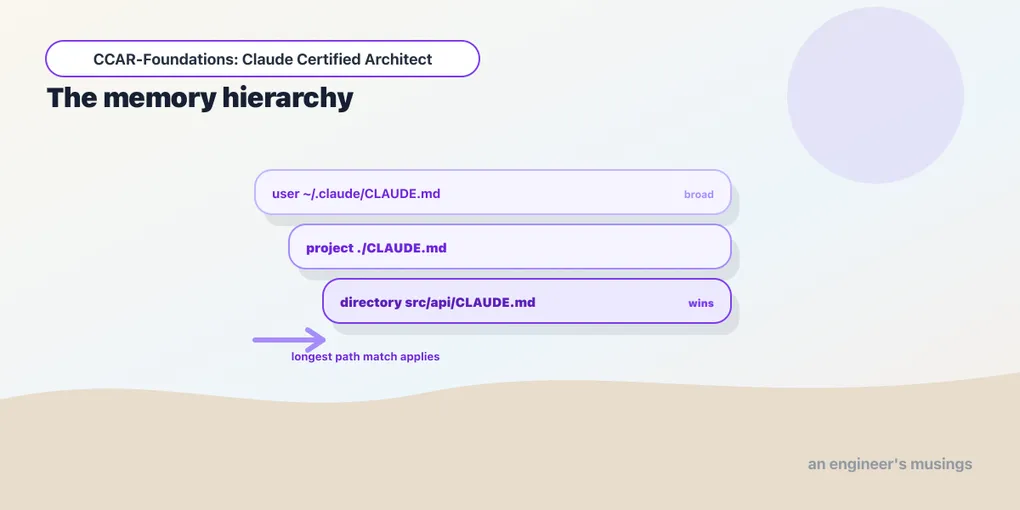
A new teammate asks Claude Code to change the API and gets code that bypasses your team’s HTTP retry wrapper. The convention exists, but only in your home-directory instructions. Shared project memory fixes the distribution problem; path-specific rules keep narrower conventions with the files they govern.
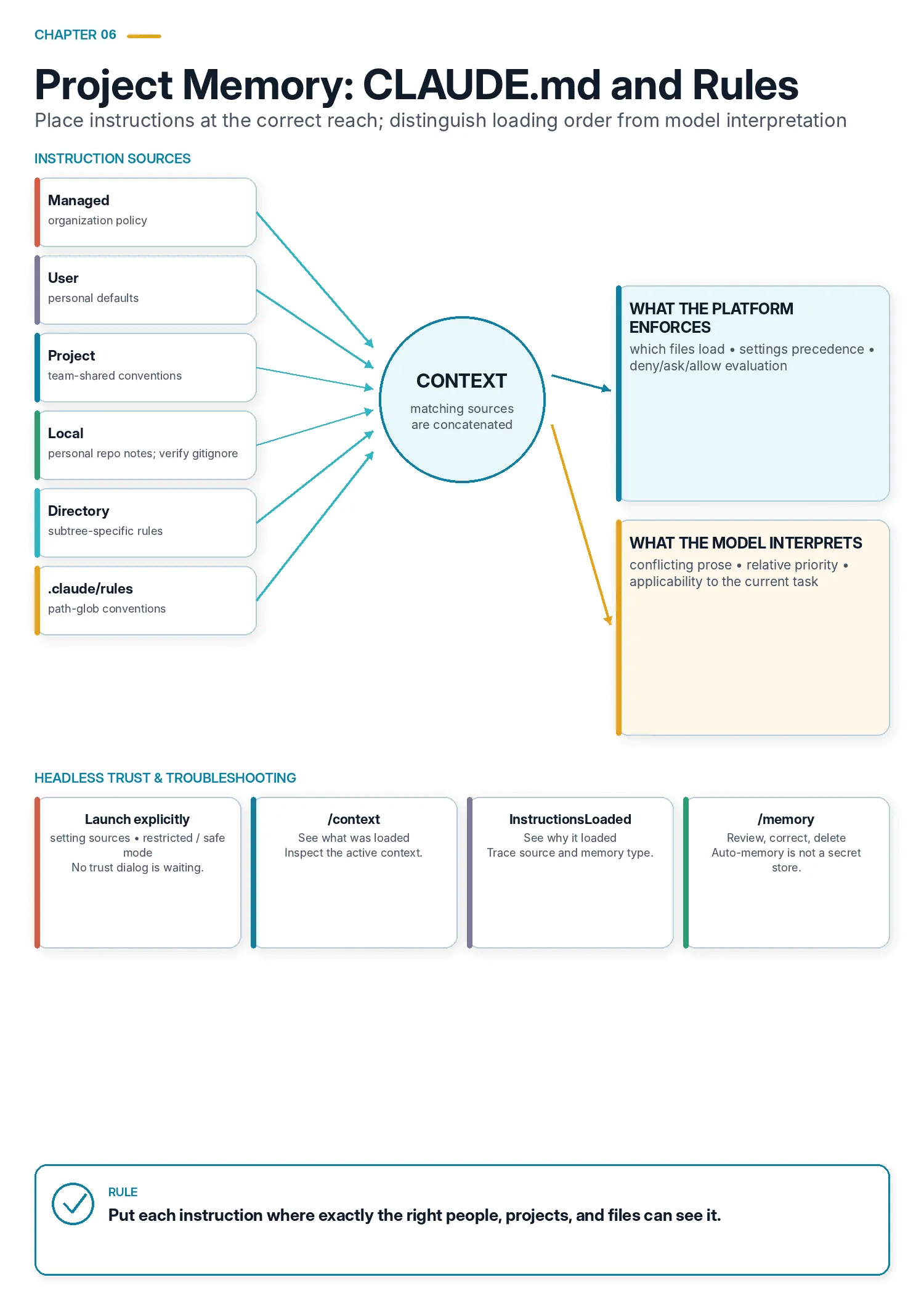
Exam objectives covered here. 3.1 Configure CLAUDE.md files with appropriate hierarchy, scoping, and modular organization. 3.3 Apply path-specific rules for conditional convention loading. Numbering follows the Claude Certified Architect – Foundations Exam Guide, version 1.0, effective July 2026.
When an instruction appears to be ignored, first check whether it reached the session. File location, import syntax, and rule matching determine what loads. Settings precedence is a separate mechanism that controls configuration values.
What CLAUDE.md is
Claude Code reads instructions from files named CLAUDE.md and folds them into its context automatically, before it does anything on your project. Think of it as project memory. These are the standing instructions that make Claude behave like someone who already works on your codebase rather than a stranger seeing it for the first time. It all goes here: your language and framework, your architecture rules, the commands to build and test, the conventions a linter would not catch. Every one of them is in scope each time Claude works in that project.
The problem CLAUDE.md solves is that a model, however capable, starts every session without your context. It does not know that you deploy with a particular script. It does not know that a certain directory is generated and should not be edited, or that your team spells configuration a specific way. Left to guess, it guesses reasonably and is reasonably often wrong. CLAUDE.md is where you write those things down once so you never have to say them again.
A single file quickly runs into a problem of its own: not every instruction has the same audience. Some conventions belong to the whole team, some to one folder, some are just your personal habits. Others are set by an administrator who does not want you overriding them. Cram all of them into one file and everyone gets everyone’s. That is the problem the hierarchy exists to solve.
Why a hierarchy — different instructions, different reach
Consider four instructions. “Never send source code to an external endpoint” is set by your security team and should not be editable by you. “This project is TypeScript with strict null checks” should apply to everyone on the project, always. “Files under services/auth/ follow the legacy error-handling pattern” should apply only in that folder. “I like my explanations terse” is a personal preference nobody else should inherit.
Those four want four different reaches: the organization, the team, one subtree, and just you. That is exactly what the hierarchy gives you. Rather than one file trying to serve every audience, memory files exist at levels, each with a natural scope, and Claude assembles the ones that apply. Get an instruction’s level right and it reaches precisely the right people and files. Get it wrong and you either leak a personal quirk to the team or strand a team convention on your own machine.
The four memory types
Claude Code classifies every memory file it loads into one of four types. This is not a documentation abstraction. It is a real enumeration inside the tool. You can see it in the payload of the InstructionsLoaded hook, which reports a memory_type field constrained to exactly these four values:
User · Project · Local · ManagedHere is what each one is and where it lives.
Managed. Organization policy, delivered by an administrator. It is not a file you place in your repo. It is a claudeMd key inside the managed settings file. The tool’s own settings schema describes it as “CLAUDE.md-style instructions injected as organization-managed memory. Only honored from managed/policy settings.” The file itself lives outside your project entirely:
macOS    /Library/Application Support/ClaudeCode/managed-settings.json
Linux    /etc/claude-code/managed-settings.json
Windows  C:\Program Files\ClaudeCode\managed-settings.json
Managed memory is the level a developer is not meant to edit or opt out of, and that is its point. Be precise about what enforces it, though. Claude Code does not defend that file. It sits on a machine-level path an administrator owns, so the thing keeping it out of a developer’s hands is filesystem permissions and whatever device management you run. On a laptop where the developer has root, they can edit it. It is also the only one of the four that the exclusion mechanism later in this chapter cannot touch.
User. ~/.claude/CLAUDE.md. Your personal instructions, applied to every project you work on. Never in version control, never shared.
Project. CLAUDE.md at the repo root, or .claude/CLAUDE.md. Committed, so it is shared with the whole team. This is the level most conventions belong at.
Local. CLAUDE.local.md, alongside the project file. Project-scoped like the project file, but gitignored, so it is your notes about this repo. Claude Code’s own /init flow describes it in those exact terms when it offers to create one: “Your private preferences for this project (gitignored, not shared) — your role, sandbox URLs, preferred test data, workflow quirks.” Contrast that with how the same flow describes the project file: “Team-shared instructions checked into source control — architecture, coding standards, common workflows.”
Take “gitignored” there as a statement of intent, not a property of the file. Claude Code chooses the name. Your repository decides whether it is tracked. Write the rule yourself and confirm it:
CLAUDE.local.md
**/CLAUDE.local.md
.claude/settings.local.json
$ git check-ignore -v CLAUDE.local.md
.gitignore:2:**/CLAUDE.local.md CLAUDE.local.mdSilence from that command means the file is not ignored, which is the answer you least want and the one you will not notice. And even with the rule in place, local memory is not a secret store. It is plaintext, and it is read into a context window and sent to a model every turn. Sandbox URLs and test-account names belong there. Credentials belong in apiKeyHelper or your secret manager, with a secret scanner in CI as the check that stops the mistake reaching a remote.
On top of those four, a CLAUDE.md (or .claude/CLAUDE.md) inside a subdirectory scopes conventions to that part of the tree. It loads as Claude works down into it. The usual shorthand for what happens next is that the longest-matching path wins: a rule in packages/api/CLAUDE.md beats the root when you are editing under packages/api/. That shorthand is useful, and it is not a mechanism. The next section is what it actually describes.
They concatenate. They do not override.
This is the single most consequential fact in the chapter, and the one people get backwards. A CLAUDE.md at a lower level does not replace the one above it. Every file that is in scope is loaded and concatenated into context. “Longest-matching path wins” is about how Claude resolves a conflict between two instructions once they are both in front of it. It is not a statement that the deeper file shadows the shallower one out of existence.
Separate file loading from interpretation of the loaded instructions:
File selection is deterministic. Which files load, and why, is decided by code. The loader walks the tree, resolves imports, matches globs, and reports every result through the InstructionsLoaded hook later in this chapter. Nothing in that step is a judgment call, and you can audit all of it.
Conflict resolution is not. No override pass removes the conflicting prose. The model interprets both instructions, with the nearer one usually providing more specific context. Write it to narrow the root guidance rather than contradict it, so the model does not have to choose which instruction to disregard.
The practical consequence runs in both directions. Nothing you write in packages/api/CLAUDE.md will make the root file’s instructions go away, so a subdirectory file cannot “turn off” a project standard. It can only argue against it. A model reading two conflicting instructions will sometimes pick the wrong one. Every level is additive, too, so the total token cost of your memory is the sum of every file in scope, not the size of the most specific one. A 400-line root CLAUDE.md plus four 200-line subdirectory files is 1,200 lines of standing instruction in every single turn.
For the new teammate, the immediate check is where the convention lives. ~/.claude/CLAUDE.md stays on your machine. Move shared instructions into the committed project file; reserve user-level memory for preferences that should follow only you.
Imports: a bare @path, and the trap that looks like one
A CLAUDE.md that grows into a monolith is hard to maintain and dilutes the instructions that matter. The first mechanism for keeping it modular is the import directive. Get it exactly right, because getting it wrong fails silently.
The syntax is a bare @ followed by a path. There is no keyword:
# Project conventions

Standards that apply across the API packages:

@./standards/api-conventions.md
@./standards/testing.md
@~/.claude/my-personal-review-checklist.md
Claude Code’s changelog states the rule in one line: “CLAUDE.md files can now import other files. Add @path/to/file.md to ./CLAUDE.md to load additional files on launch.”
@import ./standards/testing.md is not the directive. The parser treats import as a relative path. If no such file exists, nothing is imported, with no warning and no error, and the intended path remains ordinary prose. Use @./standards/testing.md, then confirm that the target loaded.
Four more properties of the parser are worth carrying:
- A path is recognized after whitespace or at the start of a line. It may begin with
./,~/, an absolute/, or a bare name starting with a letter, digit,.,_, or-. - Relative paths resolve against the importing file’s directory, not your working directory. An import inside
packages/api/CLAUDE.mdthat reads@./conventions.mdlooks inpackages/api/. - Imports nest, up to five levels deep. An imported file may itself import. The loader carries a depth counter and stops at five. It also tracks paths it has already visited, so a cycle terminates rather than hanging. That five is parser behavior rather than a documented contract, so treat it as version-specific and check the outcome rather than the limit. Register the
InstructionsLoadedhook described below and confirm the file you expected shows up withload_reason: include. An import that resolved to nothing looks exactly like one you never wrote. - Code blocks and inline code are skipped. The parser lexes the Markdown and ignores
codeandcodespantokens, so writing`@README`in backticks mentions the path without importing it. HTML comments are stripped too.
That last one has a pleasant consequence: you can document the import syntax inside a CLAUDE.md without accidentally triggering it.
.claude/rules/, and conventions that load themselves
The second modularity mechanism is a directory. .claude/rules/ holds topic-specific rule files — testing.md, api-conventions.md, deployment.md — as an alternative to a single sprawling CLAUDE.md. Splitting by topic keeps each file focused and lets you reason about one concern at a time. Rules exist at the same levels memory does: ~/.claude/rules/ for you, .claude/rules/ for the project.
The hierarchy so far scopes conventions by location: this folder, that subtree. But some conventions do not live in one place. They follow a file type scattered across the tree. Every test file, wherever it sits, wants the same testing conventions. Every Terraform file wants the same infrastructure rules. A directory-level CLAUDE.md cannot express that, because the files are not in one directory.
A rule file with a paths key in its YAML frontmatter loads only when Claude touches a matching file:
---
paths: ["**/*.test.tsx"]
---

Test conventions: use React Testing Library, one describe block per
component, no snapshot tests for interactive components. Assert on
accessible roles, never on class names.
Now those test conventions load only when Claude is editing a .test.tsx file, and it does not matter where in the codebase that file lives.
Internally, Claude Code walks the rules directory twice. The first pass collects the files that declared no globs, which load unconditionally. The second collects the files that did, which load on a match. You can watch this happen: the InstructionsLoaded hook reports a load_reason for every file it loads, drawn from a fixed set:
session_start · nested_traversal · path_glob_match · include · compactThose five reasons are the whole loading model in one enumeration. session_start is your root files. nested_traversal is a subdirectory CLAUDE.md picked up as Claude descends. path_glob_match is a paths rule firing. include is an @path import. compact is memory being re-established after the conversation is compacted.
One non-obvious detail: a paths list containing only ** is equivalent to omitting paths entirely. The loader normalizes the patterns and, if what remains is empty or matches everything, treats the rule as unconditional. A glob that matches all files does not make a rule “always eagerly loaded and also glob-scoped.” It just makes it a plain rule.
Path-specific loading has two useful effects:
- Reduced context and token usage. The rule is not in scope while editing unrelated files, so it does not consume context or distract. This is the context discipline of Domain 5 applied to configuration itself.
- It spans directories. A directory-level CLAUDE.md governs one subtree. A glob-scoped rule governs a file type wherever it lives. When your test files are spread throughout the codebase,
paths: ["**/*.test.tsx"]reaches all of them, which a per-directory CLAUDE.md never could.
Use a path-specific rule for a convention that follows a file type across the tree. Use a directory CLAUDE.md for conventions shared by everything in that subtree. A Terraform rule can reach scattered .tf files; an auth-directory file can govern all of services/auth/.
The layer underneath: settings.json
Memory files tell Claude how your project works. settings.json tells Claude Code what it is allowed to do and how it is configured. It is the other half of Domain 3, and it has its own hierarchy. That hierarchy is not the memory hierarchy, and it does not resolve the same way.
Five sources contribute settings, and the precedence is stated inside the tool’s own settings schema, in the documentation for enabledPlugins:
Settings precedence is user < project < local < flag < policy, so to disable a plugin that project settings enable, set it to false in
.claude/settings.local.json— setting false in~/.claude/settings.jsonis overridden by the project.
Read left to right, that is weakest to strongest:
| Source | File | Committed? |
|---|---|---|
| user | ~/.claude/settings.json | no |
| project | .claude/settings.json | yes |
| local | .claude/settings.local.json | no, gitignore it |
| flag | whatever --settings points at | n/a |
| policy | managed-settings.json | administrator |
Managed policy wins over everything. That is the opposite direction from what most configuration systems train you to expect, where the most local file wins. Here the most authoritative file wins, because the point of managed settings is that a developer should not be able to quietly override the organization.
Take that as the design rather than as a guarantee, and verify it on the version you run. Precedence is code, and code gets corrected. Claude Code’s changelog carries a fix for “managed policy ask rules being bypassed by user allow rules or skill allowed-tools.” The ordering held in the schema while an allow rule at a weaker level was quietly winning underneath it.
The second thing to internalize is that user settings are the weakest, not the strongest. The quoted example is the exact trap: a plugin your project enables cannot be turned off from your home directory, because project settings sit above user settings. You have to go to .claude/settings.local.json, which is above both.
Permissions
The field you will spend the most time in is permissions, which takes three rule lists and a default mode:
allow— pre-approved. These run without a prompt.deny— blocked outright, regardless of mode.ask— always prompt, even when the current mode would otherwise let it through.defaultMode— the permission mode a session starts in.additionalDirectories— directories outside the working tree that Claude may touch.
Rules are strings, and the pattern syntax is Tool on its own for the whole tool, or Tool(argument) to narrow it. This repository’s own .claude/settings.json is a working example:
{
  "permissions": {
    "allow": [
      "Bash(npm run *)",
      "Bash(git status *)",
      "Bash(git diff *)",
      "Bash(grep *)",
      "Read",
      "Edit(src/**)",
      "Write(src/**)"
    ]
  }
}
Three shapes are doing the work there. Read on its own allows the whole tool. Bash(git diff *) allows a command prefix and nothing else, so git diff is free and git push still prompts. Edit(src/**) allows edits under a path glob, so the same session that can freely rewrite src/ still has to ask before touching package.json or a CI workflow. Three more variants show up constantly. Bash(git:*) covers a whole subcommand family. WebFetch(domain:example.com) scopes network reads to one host. mcp__<server>__<tool> names a specific tool on a specific MCP server.
Write an allow rule for the repeated operation you intend to approve. Review broad patterns such as Bash(*) as grants to run arbitrary shell commands, with any remaining restrictions enforced elsewhere.
Two properties of that list carry into the next two chapters, so fix them here.
allow is auto-approval, not availability. Claude Code’s own interface says it in one line: “Claude Code won’t ask before using allowed tools.” A rule in allow removes a prompt. It does not add a tool, and leaving a tool out does not take one away — it makes that tool prompt instead. This is chapter 1’s three-lever distinction arriving in a settings file. deny is the lever that prevents. disallowedTools is the lever that removes a tool from the model’s context entirely.
That reading is not academic. It has produced a real bug in the place you would least want one. The changelog records a fix for “plan mode not blocking file writes when a matching Edit(...) allow rule exists.” An allow rule meant only to skip a prompt overrode the mode that was supposed to be holding edits back. Chapter 8 returns to it.
A Bash(...) pattern is matched by a shell analyzer, and a shell is hard to analyze. Bash(git diff *) is not a substring test against the line you typed. Claude Code parses the command and matches per subcommand. That is why “always allow” on cd src && npm test now saves one rule per subcommand rather than a single dead rule for the whole string.
Where the analyzer and bash have read the same line differently, the difference has been a bypass. The changelog carries three:
- Auto-approved “bare variable assignments to non-allowlisted environment variables.”
- “File-descriptor redirect forms that bash parses differently than the permission analyzer,” now failing closed.
- A startup warning for a wildcard placed before a subcommand, “since they also match options inserted before the subcommand.”
And an allowed command is not a bounded one. Look again at Bash(npm run *) in the block above. It matches a command whose behavior is defined by package.json — a file in the repository, which a dependency bump or an incoming pull request can change. The same holds for make, docker compose run, and every wrapper script you own. The pattern constrains the string you type. It says nothing about what the string does. A rule that reads like a narrow allowance can be a standing grant of arbitrary execution, and the narrower it looks the less anyone re-reads it.
The lever that actually bounds behavior is the sandbox, which is a separate subsystem with its own settings block: a filesystem read and write policy, a network host list, and a set of excluded commands. /sandbox configures it and prints the policy in force. Two of its modes are worth telling apart, in the tool’s own words:
- Strict sandbox mode — “All bash commands invoked by the model must run in the sandbox unless they are explicitly listed in
excludedCommands.” - Allow unsandboxed fallback — “When a command fails due to sandbox restrictions, Claude can retry with
dangerouslyDisableSandboxto run outside the sandbox (falling back to default permissions).”
The second is the more comfortable setting and the one where a determined command gets out. Choose between them knowingly rather than inheriting whichever you were on. Note also how the sandbox composes with the rules above. In auto-allow mode, “commands will try to run in the sandbox automatically, and attempts to run outside of the sandbox fallback to regular permissions. Explicit ask/deny rules are always respected.” That last sentence is the ordering worth memorizing: deny and ask survive every mode, and allow is the list that keeps needing to be right.
The working conclusion: write allow rules as a convenience you can afford to have wrong. Put what you actually need enforced into deny, a PreToolUse hook, or a sandbox.
What a headless run loads, and what it skips
Everything above assumes you are at a keyboard, where opening an unfamiliar repository puts a trust dialog in front of you before its configuration takes effect. Automation does not get that dialog. The CLI says so in its own help text for -p:
The workspace trust dialog is skipped when Claude is run in non-interactive mode (via
-p, or when stdout is not a TTY, e.g. piped or redirected output). Only use this in directories you trust. Settings files that fail validation are silently ignored in this mode (no error dialog is shown).
Read both halves. A pipe is enough to skip the dialog, so redirecting output changes the trust posture of a run without anyone deciding to. And a settings file with a typo in it is ignored, silently — meaning the allow list you were relying on may not be in effect at all while the job reports success.
The boundary has been drawn and redrawn around exactly this. The changelog carries fixes for .mcp.json servers that a repository self-approved through a committed .claude/settings.json, for agent frontmatter hooks running from untrusted folders, and for nested repositories inheriting trust from a parent. Every one of those was a repository arranging its own execution.
So make loading explicit when nobody is watching, rather than letting it be ambient. Three flags do it:
--setting-sourcesnames which of user, project and local settings to read. Leaveprojectout and a checked-out repository cannot configure the run.--restrictedignores user, project and local settings entirely, honoring only managed settings and--settings.--safe-modedisables customizations wholesale — CLAUDE.md, skills, plugins, hooks, MCP servers, custom commands and agents — while auth, model and permissions keep working. That makes it the right first move when you are trying to learn whether a repository’s configuration is what broke your job.
The CI chapter adds a fourth, --bare, which drops CLAUDE.md auto-discovery along with the rest and takes both --restricted and this whole question further.
The rest of the file
The other keys you should recognize by name:
env— environment variables set for every Claude Code session in scope.hooks— event handlers, in the same shape Domain 1’s hooks section describes. This is where aPreToolUseguard actually gets registered.model— the model for sessions in this scope.enabledPlugins— plugins to load, keyedplugin-id@marketplace-id.apiKeyHelper— a script that supplies credentials, so a key never sits in a file.statusLine,outputStyle,includeCoAuthoredBy,cleanupPeriodDays— presentation and housekeeping.claudeMdExcludes— covered next, because it is a memory control living in the settings file.
Diagnosing “why is Claude ignoring my convention?”
Three tools answer that question, and it matters which you reach for first, because only two of them are diagnostics. /memory is an editor.
/context is the diagnostic. Its own description in the tool is “Show current context usage,” rendered as a colored grid. /context all gives per-source token estimates computed with the model’s actual tokenizer. It tells you what is in the window, how much of the window each source is eating, and for plugin-provided skills, which plugin supplied them. Sometimes the answer to “why is Claude ignoring my convention” is “your convention is not loaded.” Sometimes it is “your convention is loaded, but buried under 40,000 tokens of other instruction.” /context is what shows you which.
/memory edits CLAUDE.md files and memory settings, including imported files. Use it once you know what needs changing. /context and InstructionsLoaded establish what reached the session.
The InstructionsLoaded hook is the audit trail. It fires when a CLAUDE.md or .claude/rules/*.md file is loaded into context, and its payload names the file and explains itself:
file_path         the file that loaded
memory_type       User | Project | Local | Managed
load_reason       session_start | nested_traversal | path_glob_match | include | compact
globs             the paths patterns, when the reason was a glob match
trigger_file_path the file whose path matched
parent_file_path  the importing file, when the reason was an include
Register a hook on that event and you get a complete, machine-readable record of every instruction file, why it loaded, and what pulled it in. For a paths rule that never seems to fire, or an import you are not sure resolved, this is the answer rather than a guess.
And claudeMdExcludes is the escape hatch. It is a settings key whose schema documents it as “Glob patterns or absolute paths of CLAUDE.md files to exclude from loading. Patterns are matched against absolute file paths using picomatch. Only applies to User, Project, and Local memory types (Managed/policy files cannot be excluded).” It exists for the monorepo case, where checking out the repo means inheriting six other teams’ conventions:
{
  "claudeMdExcludes": [
    "**/services/legacy-billing/CLAUDE.md",
    "**/vendor/**/.claude/rules/**"
  ]
}
Note the exemption in the schema text. You can exclude your own project’s memory. You cannot exclude your organization’s.
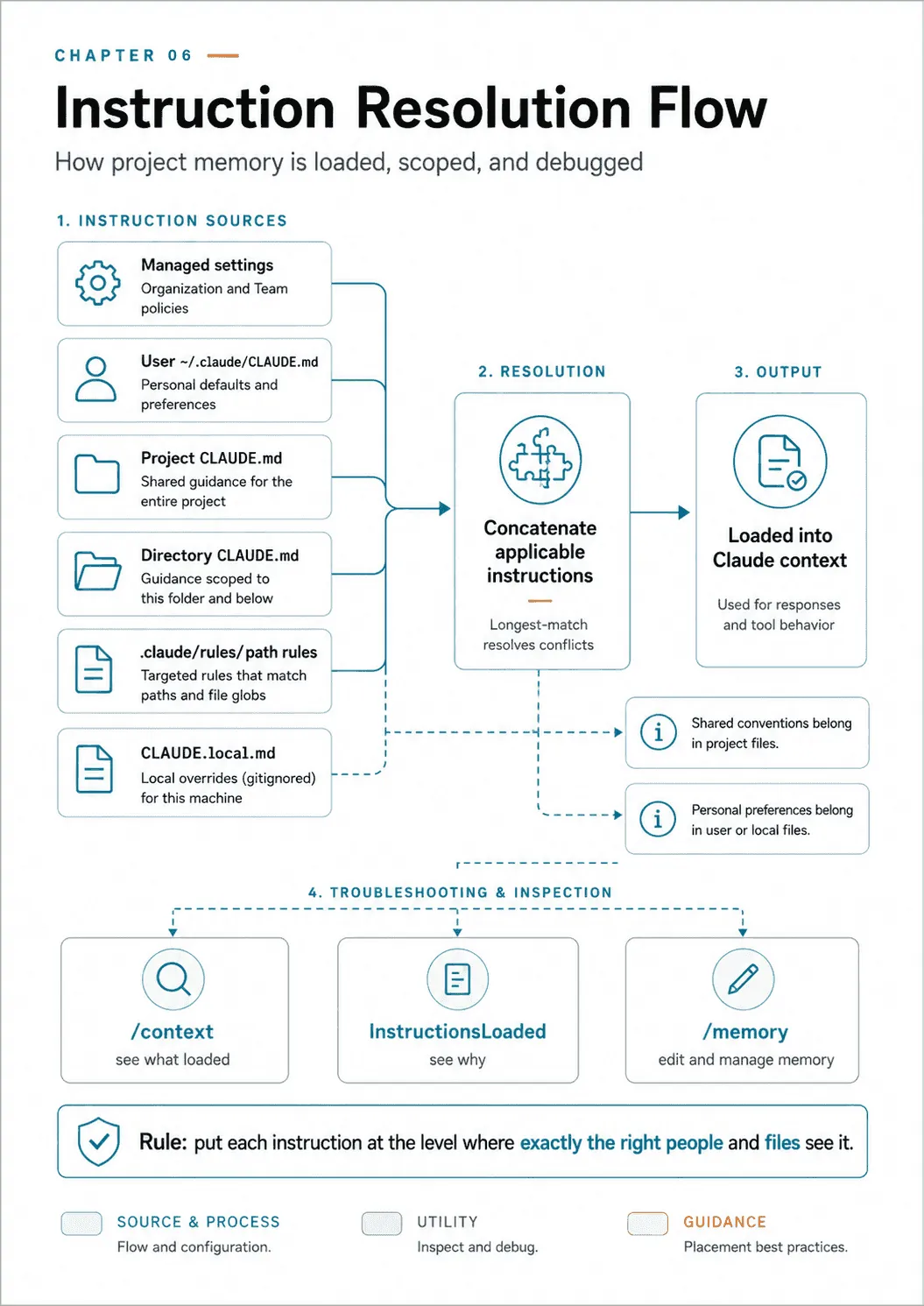
Writing one that works
Placement is most of the skill, but a well-placed file that nobody can act on is still a bad file. Four things separate a CLAUDE.md that changes behavior from one that just sits there.
Start with /init. It reads the codebase and drafts a file, and its instructions to itself are informative about what belongs there. It is told to capture “commands that will be commonly used, such as how to build, lint, and run tests,” and “high-level code architecture and structure so that future instances can be productive more quickly.” The focus it is given is “the big picture architecture that requires reading multiple files to understand.” It is also told what to leave out: “avoid listing every component or file structure that can be easily discovered,” “do not include generic development practices,” and “do not make up information.”
Check the generated file against the repository. Keep commands and conventions that help with actual work; remove generic advice and claims the project does not support.
Write what a competent new hire would ask on their first day. Not the framework, which is visible from package.json. The things that are not: which of the three test commands is the one that runs in CI. That db/generated/ is regenerated and edits there get clobbered. That the retry wrapper in lib/http.ts is mandatory for outbound calls, because the vendor rate-limits aggressively.
Budget the size, because every level adds. Memory is concatenated across levels and re-established after compaction, so it is a recurring per-turn cost, not a one-time one. If the project file is long enough that you would not read it in one sitting, split it. The always-true parts stay. The topic-specific parts move to .claude/rules/. The ones that follow a file type get a paths glob, so they cost nothing until they are relevant.
Let it accumulate honestly, and prune it deliberately. Claude Code saves useful context to auto-memory as you work, and /memory is where you manage it. Treat the resulting file the way you would treat a lab notebook: a record of what was learned. Periodically you promote the durable parts into the project file and delete the rest.
That review is not housekeeping, and it is the habit people skip. A memory file is written from whatever happened to be in the window: a customer name from a bug report, a hostname from a staging URL, an assumption that was true in June and wrong by August. All of it then loads on every turn, and nothing about it looks stale; a wrong line in a commit at least has a date on it. Read the file on a fixed cadence and delete anything you cannot source. Then keep the classes of thing that should never land there out of reach: claudeMdExcludes for files, a deny rule on the paths that hold credentials, and a secret scanner over the repository so an accident is caught at the commit.
Here is what a project-level file that earns its place looks like:
# CLAUDE.md

## Commands
- `npm run dev` — local server on :4321
- `npm run test:unit` — fast, run this before every commit
- `npm run test:e2e` — Playwright, CI only, needs Docker

## Architecture
Three packages. `packages/api` is Fastify and owns all database
access. `packages/web` never imports from `packages/db` directly —
it goes through the API client in `packages/api/client`. Breaking
that boundary is the single most common review rejection.

## Conventions
- Errors: throw `AppError` from `lib/errors.ts`. Never throw strings.
- `db/generated/` is regenerated by `npm run db:gen`. Do not edit it.
- Outbound HTTP goes through `lib/http.ts`. The vendor rate-limits
  hard and the wrapper carries the backoff.

@./standards/api-conventions.md
The example names the CI test command, the generated directory, and the required HTTP wrapper. It imports the longer API standard so that standard can be maintained in one place.
Choosing what goes where
Choose a destination by the instruction’s intended audience and files:
- An organization-wide policy nobody may override → managed settings, via
claudeMd. - A universal, always-relevant standard (the project’s language, its architecture rules) → project CLAUDE.md, so everyone gets it every time.
- A file-type convention that spans directories → a
.claude/rules/file with apathsglob, so it loads only when relevant. - A location-specific convention → a directory CLAUDE.md in that subtree.
- A personal preference across all your work → user-level
~/.claude/CLAUDE.md. - A personal note about one repo →
CLAUDE.local.md, gitignored. - A permission, environment variable, hook, or model choice →
settings.json, at the level whose reach matches.
The failure modes are all misplacements. A team convention stranded in user config, so nobody else gets it. A niche file-type rule shoved into the always-loaded project file, so every unrelated edit pays the context bloat. A plugin disabled in ~/.claude/settings.json that stays enabled because project settings outrank it. A monolith that should have been split into .claude/rules/. Placement is the skill.
Final thoughts
What to carry forward.
- The hierarchy is Managed, User, Project, Local, plus subdirectory files, concatenated rather than overridden. Which files load is decided by code and reported by
InstructionsLoaded; a conflict between loaded instructions is settled by the model. - User-level config never reaches the team. Shared conventions belong in the committed project file.
- Imports are a bare
@path, nest five deep, and@importfails silently. .claude/rules/with apathsglob loads a rule only for the files it governs, across directories.settings.jsonresolves user < project < local < flag < policy.allowonly removes a prompt;denyandaskhold in every mode. A pattern bounds the command you type, not what it does, and headless runs need--setting-sources,--restrictedor--safe-mode.
Try the new teammate’s task from a clean checkout. Check that the HTTP-wrapper convention loads from the project, and that a test-file rule appears when its path matches. If the instruction is present but conflicts with another, repair the wording at its source rather than adding a third instruction to break the tie.
The useful outcome is a project whose conventions travel with it and can be traced to a file. That makes both onboarding and the next configuration failure easier to investigate.
Next: slash commands, skills, and iterative refinement — the reusable workflows you define and the techniques for steering Claude toward the output you want.
Comments