CLAUDE.md, the Hierarchy, and Path-Specific Rules
Domain 3.1 and 3.3: the CLAUDE.md configuration hierarchy (user, project, directory), why user-level config isn't shared with your team, @import and .claude/rules/ for modular organization, and glob-scoped rules that load only for the files they apply to.
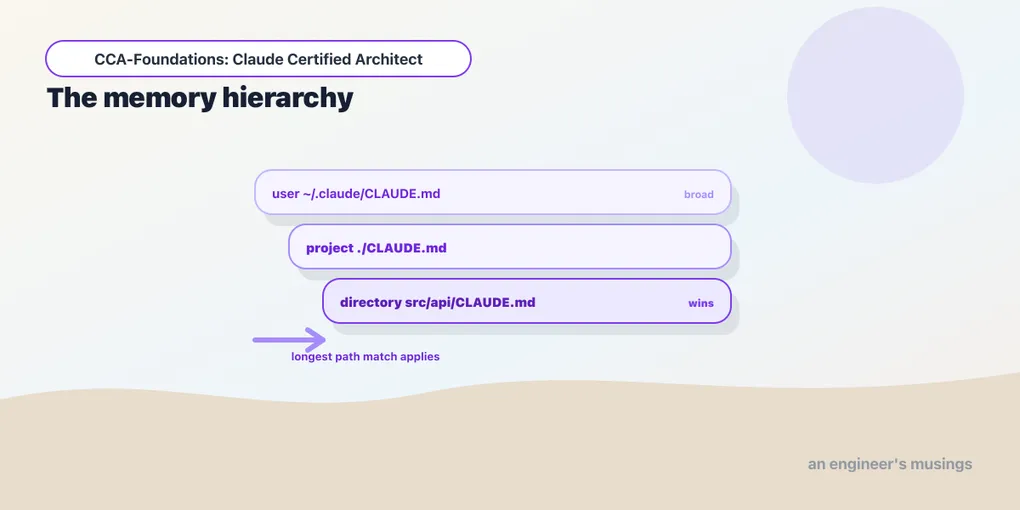
Domain 3 — Claude Code Configuration & Workflows — is 20% of the exam, and it starts with the file that tells Claude Code your project’s conventions: CLAUDE.md. The exam tests the hierarchy (which file wins, and who sees it) and path-specific rules (conventions that load only for the files they govern). This is configuration I can confirm against the live tool rather than a live model, so no ⚠️ flags here — these are checkable facts about how Claude Code loads context.
The hierarchy: user, project, directory
Claude Code assembles its instructions from CLAUDE.md files at three levels:
- User:
~/.claude/CLAUDE.md. Your personal instructions, applied to every project you work on. - Project:
CLAUDE.mdat the repo root, or.claude/CLAUDE.md. Committed to version control, so it’s shared with the whole team. - Directory: a
CLAUDE.md(or.claude/CLAUDE.md) inside a subdirectory, scoping conventions to that part of the tree. For nested files, the longest-matching path wins — a rule inpackages/api/CLAUDE.mdtakes precedence over the root when you’re editing underpackages/api/.
The single most-tested consequence is a diagnostic one: user-level config is not shared with your team. Instructions in ~/.claude/CLAUDE.md live on your machine and never travel through version control. So the classic exam scenario — “a new teammate isn’t getting the project’s conventions” — is almost always because those conventions were put in user-level config instead of the project CLAUDE.md. The fix is to move them into the committed project file. If a convention needs to reach everyone, it has to be in the repo; if it’s a personal preference, user-level is where it belongs. Getting that placement right is the whole point of the hierarchy.
Keeping CLAUDE.md modular
A CLAUDE.md that grows into a monolith is hard to maintain and dilutes the instructions that matter. Two mechanisms keep it modular:
@import references an external file, so CLAUDE.md can pull in a standards file rather than inlining it:
# Project conventions
@import ./standards/api-conventions.md
@import ./standards/testing.md
This lets each package’s CLAUDE.md selectively include the standards relevant to its domain, so a maintainer curates which standards apply where instead of maintaining one giant file.
.claude/rules/ is a directory of topic-specific rule files — testing.md, api-conventions.md, deployment.md — as an alternative to a single sprawling CLAUDE.md. Splitting by topic keeps each file focused and lets you reason about one concern at a time.
And when behavior is inconsistent across sessions, the /memory command shows which memory files are actually loaded — the diagnostic for “why is Claude ignoring my convention?” It’s usually that the file you expected isn’t in scope, and /memory is how you confirm it.
Path-specific rules: conventions that load themselves
Task 3.3 is the sharper tool, and it solves a problem directory-level CLAUDE.md can’t. Some conventions apply to files by type, scattered across the tree — every test file, every Terraform file — not to a single directory. A .claude/rules/ file with YAML frontmatter paths glob patterns loads only when you’re editing a matching file:
---
paths: ["**/*.test.tsx"]
---
Test conventions: use React Testing Library, one describe block per component,
no snapshot tests for interactive components.
Now those test conventions load only when Claude is editing a .test.tsx file — and it doesn’t matter where in the codebase that file lives. Two payoffs the exam draws on:
- Reduced context and token usage. The rule isn’t in scope while editing unrelated files, so it doesn’t consume context or distract — context discipline applied to configuration itself.
- It spans directories. A directory-level CLAUDE.md governs one subtree; a glob-scoped rule governs a file type wherever it lives. When your test files are spread throughout the codebase, a
paths: ["**/*.test.tsx"]rule reaches all of them, which a per-directory CLAUDE.md never could.
The exam-ready decision: use a path-specific rule when a convention follows a file type across the tree; use a directory CLAUDE.md when it follows a location. Terraform conventions (paths: ["terraform/**/*"]) that also need to reach a stray .tf file elsewhere are a rule’s job; conventions for everything under services/auth/ are a directory CLAUDE.md’s job.
Choosing what goes where
Pulling the levels together into the judgment the exam asks for:
- A universal, always-relevant standard (the project’s language, its architecture rules) → project CLAUDE.md, so everyone gets it every time.
- A file-type convention that spans directories → a
.claude/rules/file with apathsglob, so it loads only when relevant. - A location-specific convention → a directory CLAUDE.md in that subtree.
- A personal preference → user-level
~/.claude/CLAUDE.md, kept off the team.
The failure modes are all misplacements: a team convention stranded in user config (nobody else gets it), a niche file-type rule shoved into the always-loaded project CLAUDE.md (context bloat for every unrelated edit), or a monolith that should have been split into .claude/rules/. Placement is the skill.
Final thoughts
CLAUDE.md is a hierarchy — user, project, directory, longest-match-wins — and its most-tested trap is that user-level config never reaches your team, so shared conventions belong in the committed project file. @import and .claude/rules/ keep configuration modular, /memory tells you what’s actually loaded, and path-specific rules with paths globs load conventions only for the file types they govern, spanning directories a per-folder file can’t. The whole domain is one skill wearing different hats: put each instruction at the level where exactly the right people and files see it, and nowhere else.
Next: slash commands, skills, and iterative refinement — the reusable workflows you define and the techniques for steering Claude toward the output you want.
Comments