Airflow: When cron Stops Being Enough
How a folder of cron jobs turns into a silent failure, and what an orchestrator does about it.
The bookshop’s nightly load is three scripts and a crontab. At 2am, extract_orders.py pulls yesterday’s sales into a CSV. At 2:15, load_orders.py reads that CSV into DuckDB. At 2:30, summarize.py builds the daily revenue table the morning dashboard reads from. The fifteen-minute gaps are a guess — enough time, probably, for the previous step to finish. Nothing checks.
One night the API that feeds extract_orders.py times out. The script exits non-zero, writes nothing, and cron moves on without a word. At 2:15 the loader reads a stale CSV from the day before. At 2:30 the summary rebuilds happily from that stale data. By morning the dashboard is green, the number is wrong, and the only trace is a line in a log file nobody opens. The pipeline didn’t fail loudly — it half-ran, and half-running looks exactly like success until someone notices the revenue chart went flat on a busy Saturday.
This is the failure mode cron can’t see. Cron runs one command at a time. It has no concept that the loader depends on the extractor, no retry when a step flakes, no memory of what ran yesterday, and no place to look when something’s off. You can bolt those on — a lock file here, a || echo "failed" | mail there, a sleep 900 to pad the gap — and now you’re maintaining a fragile ad-hoc scheduler made of shell glue. That glue is the thing an orchestrator replaces.
What an orchestrator actually does
An orchestrator models your work as a graph: tasks with explicit dependencies between them. Extract, then load, then summarize — and it knows that ordering because you declared it, not because you spaced the cron entries fifteen minutes apart. If extract fails, load never starts. If a step flakes on a network blip, it retries on its own before giving up. Every run is recorded, so you can see at a glance what ran, when, how long it took, and where it broke — with the failing task’s logs one click away instead of buried on some worker.
And it handles the day you missed. When the extractor was down for a night, you don’t hand-edit dates and re-run scripts in the right order by memory. You tell the orchestrator to backfill that date and it replays the whole graph for that day, dependencies and all.
That graph has a name you’ll see everywhere from here on: a DAG, a directed acyclic graph. Directed because dependencies point one way (load reads from extract, never the reverse); acyclic because a pipeline that loops back on itself would never finish. Tasks are the nodes; dependencies are the edges. That’s the whole shape.
What Airflow is
Airflow is the open-source tool that made this pattern standard. You define DAGs in plain Python — no YAML dialect, no drag-and-drop canvas, just code you can review, test, and diff. It came out of Airbnb in 2014, became an Apache project, and is now the default answer for batch orchestration; every major cloud sells a managed version. When a data team says “we run it in Airflow,” everyone knows roughly what that means.
The reason it became the default is boring and decisive: providers. Airflow ships integrations for hundreds of external systems — every major cloud’s storage and warehouse, Postgres, MySQL, Snowflake, BigQuery, Spark, dbt, Kubernetes, Slack, HTTP APIs — as installable packages. When your pipeline needs to drop a file in S3, wait for it, then kick off a Spark job, you’re wiring together operators someone already wrote and thousands of teams already run in production. That library, accumulated over a decade, is the moat. It’s also why a newer, cleaner-designed tool can be genuinely nicer to use and still lose the bake-off: it hasn’t yet grown the connector you need at 4pm on a deadline.
Why Airflow and not something else
“Use Airflow” shouldn’t be a reflex. There’s a real field of orchestrators now, and each is good at something. Knowing the shape of the field tells you when Airflow is the right call and when you’re reaching for it out of habit.
Prefect and Dagster are the two most-cited alternatives, both younger and both born partly as reactions to early-Airflow pain. Prefect leans into “your Python functions are the workflow” — you decorate ordinary functions with @flow and @task and the dependency graph is inferred from how you call them, with a lighter operational footprint and a hybrid cloud model. Dagster puts the data assets at the center rather than the tasks: you declare the tables and files you want to exist, and it works out the runs to produce them, with strong typing and a testing story that developers who’ve been burned by untested pipelines tend to love. Both are excellent. Airflow’s answer to their headline ideas is worth noting — 3.x’s Assets (more on those below) bring asset-centric scheduling into Airflow, and the Task SDK makes plain-function authoring the default — but if your team is greenfield, small, and values developer ergonomics over connector breadth, Prefect or Dagster deserve a serious look.
Luigi is the ancestor — Spotify’s task framework, the thing Airflow partly grew up to replace. It still runs in places, but it’s target-file-based, has no built-in scheduler of its own, and isn’t where new projects start. Treat it as history.
AWS Step Functions is a different animal: a managed state machine defined in JSON/ASL, priced per state transition, deeply wired into the AWS event world. If your entire pipeline is Lambdas and AWS services and you never want to run a scheduler yourself, Step Functions is less machinery than Airflow and bills to zero when idle. What you give up is Python-native authoring, the provider ecosystem, and portability off AWS.
Managed Airflow is the option people forget is on the menu. You can run Airflow itself without operating the scheduler, database, and workers by hand: Amazon MWAA, Google’s Cloud Composer, and Astronomer (the company behind much of modern Airflow, whose Astro CLI we use in the next chapter) all sell it. Same DAGs, same providers, someone else’s pager for the control plane. For most teams adopting Airflow today, the real choice isn’t “Airflow vs. Prefect” — it’s “self-hosted Airflow vs. managed Airflow,” and managed usually wins until you have a reason it doesn’t.
ML-specific orchestrators — Kubeflow Pipelines, Metaflow, Flyte — overlap with Airflow but optimize for a different job: experiment tracking, GPU scheduling, model lineage, parameterized training sweeps. If your graph is “featurize, train, evaluate, register model” and you live in Kubernetes, one of those may fit the ML workflow better than a general batch scheduler. Plenty of shops run both: Airflow moves the data and triggers the ML tool, the ML tool owns the training loop.
So, honestly: Airflow wins when you need breadth of integrations, scheduled batch work with real dependencies, and the maturity of a decade-old, huge-community project that every data engineer you’ll hire already knows. It doesn’t win when you want the lightest possible footprint (Prefect), an asset-and-type-first developer experience on a clean slate (Dagster), a serverless AWS-native state machine (Step Functions), or a training-loop orchestrator (the ML tools). This book is about Airflow because it’s the one you’re most likely to inherit, be asked to run, or reach for when the requirement is “batch, on a schedule, with a hundred systems to talk to.” But pick it on purpose.
A short history, because the version matters
Airflow’s version number is not cosmetic — it changes which tutorial you can trust.
1.x (2015–2020) was the era that gave Airflow its reputation, good and bad. It proved DAGs-as-Python and grew the provider ecosystem, but the scheduler was slow, sometimes needed babysitting, and the mental model leaked in confusing ways (the infamous execution_date that was really “the start of the interval, not when it ran”).
2.x (Dec 2020 onward) was the rewrite that made Airflow pleasant. A high-availability scheduler you could run more than one of; the TaskFlow API (@task-decorated Python functions with automatic data passing, instead of hand-wiring operators and XComs); and Datasets, a way to schedule a DAG when data another DAG produced becomes available, rather than purely on the clock. If you learned Airflow in the last few years, this is probably the Airflow in your head.
3.x (2025) is the current major line, and it changed enough that 2.x tutorials are now quietly wrong in places. Here’s the consolidated list of what actually changed, so you’re not discovering it one surprise at a time:
- Datasets are renamed Assets. Same idea, better name — the thing your DAG produces or consumes. The imports and decorators moved with it:
from airflow.sdk import Asset,@asset, andschedule=[Asset("…")]. If a tutorial saysDataset, it’s 2.x. - The Task SDK. You now author against a stable public interface,
from airflow.sdk import dag, task, …, decoupled from Airflow’s internals. This is the import you’ll use in every chapter. - api-server + React UI. The old Flask webserver is gone. A new api-server serves a rebuilt React UI and the Task Execution API (below). One component, cleaner boundary.
- Scheduler-managed backfills. Backfilling a date range is now driven by the scheduler — via the UI or
airflow backfill create— instead of the old blockingairflow dags backfillCLI command that ran the backfill inside your terminal. - Native DAG versioning. Airflow now tracks versions of a DAG’s structure, so the UI can show you a historical run against the code as it was then, not just as it is now — the end of “why does this old run’s graph look wrong?”
- SubDAGs removed. The old
SubDagOperatorfor grouping tasks is gone; TaskGroups (a pure UI/organizational grouping, no separate scheduler overhead) fully replace it. - SLAs removed. The old per-task SLA miss feature is gone, replaced by explicit callbacks and, newer, Deadline Alerts. If you relied on SLA emails, that’s a rewrite.
- Unified
schedule=. One argument sets a DAG’s cadence, whether it’s a cron string, a timedelta, or a list of Assets. The 2.xschedule_interval=and the separatetimetable=argument are retired.
We’ll meet each of these in its own chapter. The takeaway for now: when you search for Airflow help, check the version. A 2.x answer that mentions Dataset, schedule_interval, or SubDagOperator isn’t wrong about the past — it’s wrong about your present.
Two words that get used without being defined
Before the architecture, two terms that Airflow writing tends to drop on you cold.
An executor is the part of Airflow that decides where and how a task actually runs. The scheduler figures out what is ready; the executor takes that ready task and gets it executed — in a subprocess on the same machine, on a pool of remote workers, in a fresh Kubernetes pod, and so on. It’s a strategy setting, not a server you run: the LocalExecutor runs tasks as subprocesses on one machine (this is what the Astro CLI gives you in the next chapter, and it’s plenty for learning and for plenty of production); the CeleryExecutor hands tasks to a fleet of worker machines through a queue; the KubernetesExecutor launches each task in its own pod. Same DAGs, different executor — you change how work is distributed without rewriting a line of pipeline code. Keep “executor = the task-placement strategy” in your pocket; whole later chapters turn on it.
The dag-processor is a distinct component in 3.x, and worth naming because it explains a behavior that confuses newcomers. Airflow doesn’t run your DAG file only when the DAG runs — a separate process is constantly parsing your .py files to discover DAGs and pick up changes. In 3.x this parsing is its own component, the dag-processor, split out from the scheduler for isolation and security (your DAG-file code no longer executes inside the scheduler process). The practical consequence: top-level code in a DAG file runs on every parse, every few seconds, forever — so an expensive API call or database query at the top level of your file, outside a task, is quietly hammering something all day. “Keep the top level cheap” is a rule you’ll understand the moment you know a dedicated processor is re-reading your file on a loop.
The 3.x architecture, as a mental model
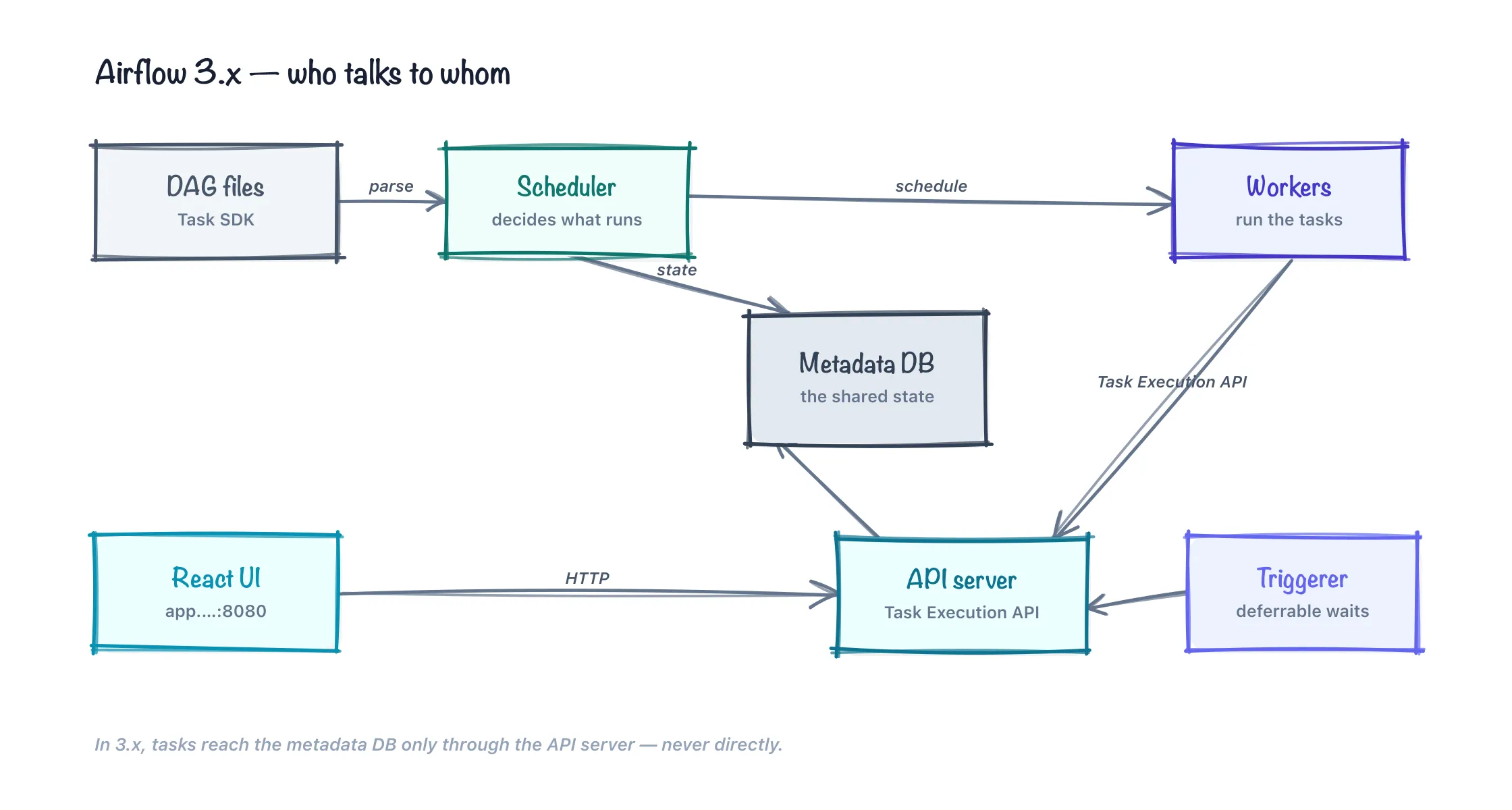
You don’t need the full topology to start, but a real map keeps the later chapters from feeling like magic. Here are the moving parts and how a run flows through them.
- The dag-processor parses your DAG files and keeps Airflow’s picture of your pipelines current.
- The scheduler reads that picture, works out which task instances are due (dependencies satisfied, schedule reached), and queues them. It’s the brain that answers “what should run now?”
- The executor (running inside or alongside the scheduler) takes queued tasks and places them onto workers to actually execute.
- The triggerer handles deferrable tasks — the ones that spend most of their life waiting on something external (“wait until this file lands,” “poll until this job finishes”). Instead of a worker sitting idle and occupied for an hour, a deferrable task hands its wait to the triggerer, which watches thousands of such waits at once on a single async event loop and wakes the task only when its condition is met. This is how Airflow waits on things without burning a worker slot per wait.
- The metadata database records every DAG, run, task instance, and state transition. It is the source of truth — if it’s not in the metadata DB, it didn’t happen. Every other component reads and writes here.
- The api-server serves the React UI and, crucially, the Task Execution API. This is the real 3.x boundary worth internalizing: in 2.x, running tasks reached straight into the metadata database to read connections and report state. In 3.x they don’t. A task talks to the api-server over the Task Execution API, and the api-server talks to the database. Your task code is held at arm’s length from the source of truth — better security (workers don’t need DB credentials), better isolation, and the door to running tasks in places that can’t reach the database directly.
You author against the Task SDK — from airflow.sdk import dag, task — and the scheduler, executor, and workers take it from there.
Anatomy of one scheduled run
Trace the bookshop’s nightly load through those components once and the whole thing clicks:
- Parse. The dag-processor reads your DAG file and registers the pipeline — three tasks,
extract → load → summarize, scheduled daily — writing that structure to the metadata DB. This happens continuously, not just at run time. - Schedule. At the appointed time, the scheduler sees a new run is due, creates a DAG run and its task instances in the metadata DB, and notices
extracthas no upstream dependencies — it’s ready. It marks it queued. - Queue. The executor picks up the queued
extracttask and places it on a worker (a local subprocess, under the LocalExecutor). - Execute. The worker runs
extract. As it runs, it reports state back through the api-server’s Task Execution API — not by writing to the database itself. It fetches the connection it needs the same way. - Update state. The api-server records
extractas success in the metadata DB. The scheduler, watching state, now seesload’s one dependency is satisfied and marks it queued. The cycle repeats throughsummarize. Ifextracthad failed instead, the scheduler would have honored its retry policy and, once retries were exhausted, marked the run failed — andloadwould never have been queued at all.
That last sentence is the entire pitch of this chapter, expressed in machinery: load never queues until extract succeeds. The fifteen-minute sleep guess is replaced by a state transition the scheduler enforces. Nothing half-runs, because the graph won’t let it.
Where Airflow fits — and doesn’t
Airflow is the conductor, not the orchestra. It doesn’t transform your data; it decides when and in what order the things that transform your data run. It kicks off a dbt run, a Spark job, a Python function, a SQL query — and makes sure each waits for what it depends on. The bookshop’s sibling dbt book does the SQL modeling; Airflow is what runs dbt build on schedule, after the fresh orders have landed. Compute lives in the tools it calls; Airflow holds the baton.
Which also tells you when to skip it, and here it’s worth being concrete rather than hand-wavy:
- One script, one timer, no dependencies. If it’s a single command with no downstream steps, no retries worth the name, and no backfills, cron (or a systemd timer) is fine. Airflow is a heavy answer to a question you don’t have — you’d be running a scheduler, a database, and an api-server to replace one crontab line.
- Sub-minute latency. Airflow’s scheduling loop, parsing cadence, and queue-then-execute handoff mean tasks start on the order of seconds, not milliseconds. If you need something to react within a second of a trigger, Airflow is the wrong shape; reach for an event-driven function (Lambda, Cloud Functions) or a message consumer.
- True streaming. If every event must be handled as it arrives, continuously, you want a stream processor — Kafka with Flink or Spark Structured Streaming, or a hosted equivalent — not a batch scheduler. Airflow orchestrates batches of work on a cadence; it is not an always-on per-event pipeline.
- A pure single-node app with a couple of steps. If the whole thing fits in one process on one machine and always will, a plain script or a lightweight library (even a Makefile, or Prefect’s local mode) may be less machinery than standing up Airflow’s components.
- A serverless AWS-only state machine. If you never want to operate a scheduler and you live entirely in AWS services, Step Functions bills to zero at idle and needs no infrastructure from you.
Airflow earns its keep the moment you have several steps that depend on each other, run on a schedule, talk to systems it already has providers for, and hurt when they silently half-run. Below that bar, use the smaller tool and don’t apologize for it.
Final thoughts
The tell that you’ve outgrown cron isn’t a big outage — it’s the padding. The sleep you added so step two wouldn’t race step one. The lock file. The email hack that pages you when a script exits non-zero. Each patch is you hand-building one feature an orchestrator gives you for free, and doing it worse. Airflow’s real pitch isn’t that it runs your scripts — cron already does — it’s that it turns “I hope they ran in the right order” into something the machine guarantees and shows you. The bookshop’s silent half-run stops being a 9am surprise and becomes a red box you can actually click.
And now you know what’s under that promise: a scheduler deciding what’s due, an executor placing it on a worker, a triggerer absorbing the waits, an api-server keeping your task code at arm’s length from the source of truth, and a metadata database that remembers everything. In the next chapter we stop describing it and start running it — the whole stack, on your laptop, in one command.
Comments